10 Best AI Email Assistants to Clear Your Inbox Faster
The 10 best AI email assistants in 2026, from free Gemini in Gmail and Copilot in Outlook to Superhuman, Fyxer, Shortwave, Spark and SaneBox, with prices and privacy tips.

On this page
- Key takeaways
- Quick picks: best AI email assistants compared
- What an AI email assistant actually does
- The 10 best AI email assistants
- How to choose the right AI email assistant
- Privacy and security checks before you connect your inbox
- Frequently asked questions
- Our verdict: the best AI email assistant for you
The best AI email assistant for most people is the one already inside their inbox: Gemini in Gmail gives every user free thread summaries, Help Me Write and suggested replies, and Microsoft 365 Personal at $9.99 a month adds Copilot to Outlook. If you want a dedicated tool, Superhuman Mail is the fastest premium inbox, Fyxer AI is the best at drafting replies for you, and SaneBox is the simplest way to filter out noise in any email account.
Below is a quick picks table, ten tool cards with prices from official pages where we could confirm them, a guide to choosing by inbox type, and the privacy checks to run before you let any AI read your email.
Key takeaways
- Gemini in Gmail is the best free AI email assistant: summaries, Help Me Write and suggested replies are free for everyone, with inbox questions and Proofread on Google AI Pro ($19.99 a month).
- Outlook users get Copilot with Microsoft 365 Personal ($9.99 a month) or Family, and businesses can add Copilot Business at $21 per user a month.
- Fyxer AI ($22.50 a month on annual billing) and Superhuman Business (reported at $33 annual) are the strongest tools for auto-drafting replies.
- Spark Mail Plus ($10 a month or $99 a year) is the best budget pick for a cross-platform app with AI built in.
- Always check what an email assistant stores and whether it trains on your data before connecting a work inbox.
Quick picks: best AI email assistants compared
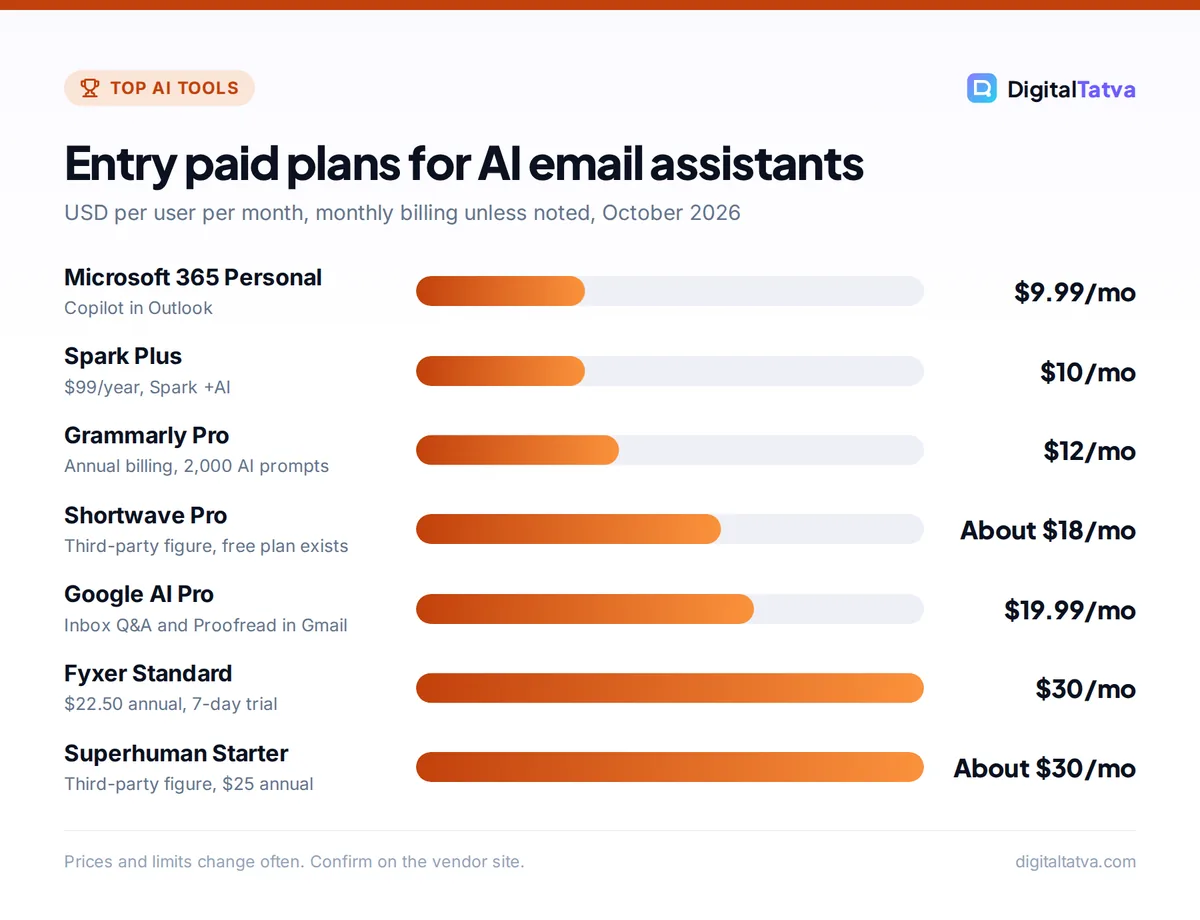
Starting prices are the cheapest paid tier in USD per user per month. Where a vendor offers annual billing, the annual rate is shown too.
| Tool | Best for | Starting price | Free plan |
|---|---|---|---|
| Gemini in Gmail | Best free option for Gmail | Free; $19.99 for Google AI Pro extras | Yes |
| Superhuman Mail | Power users who live in email | About $30, $25 annual (third-party) | No |
| Copilot in Outlook | Outlook and Microsoft 365 users | $9.99 (Microsoft 365 Personal) | No |
| Fyxer AI | Replies drafted in your voice | $30, $22.50 annual | 7-day trial |
| Shortwave | AI-first Gmail client | About $18 (third-party) | Yes |
| Spark Mail | Budget cross-platform app | $10, or $99/year | Yes, limited AI |
| SaneBox | Filtering noise in any inbox | About $4.54 annual (third-party) | 14-day trial |
| Lindy | Email agents that act for you | $29.99 | Trial only |
| Grammarly | Polished writing in any email client | $12 (Pro, annual) | Yes, 100 AI prompts |
| Claude or ChatGPT | Long, tricky drafts and research | $0 to $20 | Yes |
What an AI email assistant actually does
Email assistants handle four jobs, and most tools are strong at one or two rather than all four.
- Triage: sorting mail into important, newsletters and noise so you see what matters first.
- Summaries: turning a long thread into a few key points and action items.
- Drafting: writing replies, follow-ups and new emails, ideally in your own tone.
- Actions: scheduling meetings, updating a CRM or chasing people who have not replied.
Built-in assistants (Gemini, Copilot) are best at summaries and drafting inside the inbox you already use. Dedicated apps (Superhuman, Shortwave, Spark) replace your email client. Add-ons (Fyxer, SaneBox, Lindy) work on top of Gmail or Outlook without changing how you read mail.
The 10 best AI email assistants
1. Gemini in Gmail: Best free AI email assistant
- Starting price: Free; Google AI Pro $19.99/month (Rs 1,950 in India) for extra features
- Free plan: Yes
- Best for: Anyone on Gmail, from students to small business owners
In January 2026 Google announced that AI Overviews for thread summaries, Help Me Write and Suggested Replies are free for everyone in Gmail. That covers the two things most people want: understanding long threads quickly and getting a decent first draft. The launch started in the US in English, with more languages and regions promised.
Google AI Pro and Ultra add the ability to ask your inbox questions (for example, “when is my flight to Mumbai?”) and Proofread for grammar, tone and style. Google is also testing an AI Inbox with trusted testers. Our guide on how to use Gemini in Gmail, Docs and Sheets shows where each button lives, and Gemini pricing compares the plans.
Skip it if: you use Outlook, or need features before they reach your country.
2. Superhuman Mail: Best for power users
- Starting price: Starter about $30/month or $25/month annual (third-party figures)
- Free plan: No
- Best for: Founders, sales leaders and executives who process hundreds of emails a day
Superhuman is built for speed: keyboard shortcuts for everything, split inboxes and AI that summarizes and drafts. Superhuman is now also the parent company of Grammarly. According to a pricing comparison checked in late September 2026, Starter includes the client, Superhuman AI and team features, while Business (about $40 a month, or $33 annual) adds Auto Drafts, Ask AI, custom AI labels, Mail MCP and HubSpot and Salesforce integrations.
The same source says the wider Superhuman suite’s Pro tier includes Grammarly, Docs and the Go assistant but not Mail. We could not load Superhuman’s own pricing page, so confirm before buying.
Skip it if: you get a few dozen emails a day; the speed gains will not justify the price.
3. Copilot in Outlook: Best for Microsoft 365 users
- Starting price: $9.99/month or $99.99/year (Microsoft 365 Personal); Copilot Business add-on $21/user/month
- Free plan: No Copilot in desktop Outlook on free accounts
- Best for: Professionals and companies on Outlook and Teams
Microsoft’s support pages say Microsoft 365 Personal, Family and Premium include the Outlook desktop app “enhanced with Copilot”, which can summarize threads and draft replies. Family costs $12.99 a month, but AI features apply only to the subscription owner, so check that before sharing.
For businesses, Microsoft 365 Copilot Business is $21 per user a month on annual billing (shown at an $18 promo when we checked), and the full Microsoft 365 Copilot is $30. Copilot in Outlook works under the same security and compliance controls as the rest of Microsoft 365. Our Microsoft Copilot pricing guide breaks down every bundle.
Skip it if: your mail lives in Gmail.
4. Fyxer AI: Best for replies drafted in your voice
- Starting price: Standard $30/month, or $22.50/month billed annually
- Free plan: 7-day free trial
- Best for: Consultants, agency owners and busy professionals
Fyxer sits on top of your existing inbox, sorts incoming mail into categories and prepares draft replies so you mostly review and send. Standard includes one inbox and one calendar, AI drafts, a smart inbox and a meeting notetaker with summaries.
Pro ($50 a month, or $37.50 annual) adds multiple inboxes and calendars, advanced scheduling, attachment awareness and FyxerContext for sharing knowledge across a team. Enterprise adds SSO, SCIM and custom integrations such as HubSpot. Details are on the official Fyxer pricing article.
Skip it if: you want a new email client; Fyxer works inside the one you have.
5. Shortwave: Best AI-first Gmail client
- Starting price: Pro about $18/seat/month, billed monthly (third-party tracker)
- Free plan: Yes
- Best for: Gmail and Google Workspace users who want AI search and bundles
Shortwave rebuilds the Gmail experience around AI: an assistant that can search your whole history, summarize threads, draft replies and group similar mail into bundles. It works with Gmail and Google Workspace accounts.
A pricing tracker reports that Shortwave raised prices on 30 June 2026 and moved to monthly billing only: Pro about $18, Business about $30, Premier about $45 and Max about $120 per seat. Higher tiers mainly add more AI capacity, so pick the lowest one that covers your daily use.
Skip it if: you use Outlook or another provider.
6. Spark Mail: Best budget cross-platform email app
- Starting price: Plus $10/month or $99/year
- Free plan: Yes, with only a limited AI preview
- Best for: Freelancers and small teams on Mac, Windows, iPhone and Android
Spark by Readdle is a polished email app that works with most providers and adds Spark +AI for writing, summaries and an AI Assistant. On the official pricing page, Plus includes Spark +AI, the AI Assistant and 40 AI meeting notes a month, while Pro ($20 a month or $199 a year) adds unlimited meeting notes and full AI Assistant history.
Spark +AI is switched off by default and must be enabled in settings. Auto-Drafts and Autopilot were marked “soon” when we checked, so do not buy Spark expecting automatic replies yet. See the official Spark pricing page.
Skip it if: you only need summaries in Gmail; Gemini does that free.
7. SaneBox: Best for filtering noise in any inbox
- Starting price: Snack from about $4.54/month on annual billing (third-party figure)
- Free plan: 14-day free trial
- Best for: Anyone buried in newsletters, notifications and cold pitches
SaneBox is not a writing tool. It learns which senders matter and moves everything else into folders such as SaneLater, so your inbox shows only important mail. Because it works at the server level, it runs with Gmail, Outlook, iCloud and most IMAP accounts, on any app.
Plans are Snack (1 account), Lunch (2) and Dinner (4). A third-party tracker lists Snack at about $9.46 a month or $4.54 on annual billing, but its figures were inconsistent, so check SaneBox’s site for the current price in your region.
Skip it if: your problem is writing replies rather than sorting mail.
8. Lindy: Best for email agents that take action
- Starting price: $29.99/user/month (Plus, 3,000 credits)
- Free plan: No permanent free plan shown
- Best for: Founders and sales teams who want follow-ups and scheduling handled
Lindy goes beyond drafting. You build agents that triage your inbox, reply to routine questions, book meetings, chase people who have not replied and log details in your CRM. It is closer to hiring a virtual assistant than installing an add-on.
Pro costs $99.99 per user for 15,000 credits, and Enterprise adds HIPAA, SSO and audit logs. If you want to understand how these tools compare with ChatGPT agent and Zapier, read our roundup of the best AI agents.
Skip it if: you are not ready to let software send emails on your behalf.
9. Grammarly: Best for polished writing in any email client
- Starting price: Pro $12/member/month on annual billing ($144/year)
- Free plan: Yes, 100 AI prompts a month
- Best for: Non-native English writers and client-facing teams
Grammarly works across Gmail, Outlook, browsers, desktop apps and mobile, fixing grammar and tone and rewriting whole sentences. Pro raises the AI allowance to 2,000 prompts a month and adds tone adjustment, full-sentence rewrites and a style guide.
It will not sort your inbox or summarize threads, but it makes every email you send clearer. Our Grammarly review covers accuracy and value, and our list of the best AI writing tools has alternatives.
Skip it if: you already pay for Gemini or Copilot and their drafting is good enough for you.
10. Claude or ChatGPT: Best for long, tricky drafts
- Starting price: Free; Claude Pro or ChatGPT Plus $20/month
- Free plan: Yes (Claude Free includes app connectors)
- Best for: Sensitive replies, negotiations, proposals and research before you write
General assistants are not email clients, but they are excellent for the hardest 10 percent of emails: a delicate apology, a pricing negotiation or a proposal that needs research. Claude’s free plan includes app connections, and both assistants offer connectors to other apps (which ones depends on your plan) so they can pull context into a draft.
Paste the thread, explain the outcome you want and ask for two versions with different tones. Our comparison of ChatGPT vs Claude explains which writes better, and our AI prompts for small business owners include ready-made email prompts.
Skip it if: you want help on every email without leaving your inbox.
How to choose the right AI email assistant
Your email provider narrows the field more than anything else. Start here.
| Your situation | First choice | Runner-up |
|---|---|---|
| Personal Gmail, tight budget | Gemini in Gmail (free) | Spark Mail Free |
| Outlook at work | Copilot in Outlook | Fyxer AI |
| Hundreds of emails a day | Superhuman Mail | Shortwave |
| Want replies drafted automatically | Fyxer AI | Superhuman Business |
| Inbox full of newsletters and noise | SaneBox | Gmail’s built-in tabs |
| Need follow-ups and scheduling done for you | Lindy | Fyxer Pro |
Decide: new app or add-on?
Switching email clients (Superhuman, Shortwave, Spark) gives the deepest AI features but means learning a new app and moving your whole team. Add-ons (Fyxer, SaneBox, Grammarly) keep your current inbox and are easier to trial.
Test drafting with your real emails
Every tool demos well on sample emails. During the trial, use it on a week of your own mail and count how many drafts you send with light edits versus rewrite from scratch. That ratio tells you whether the subscription pays for itself.
Count seats and billing periods
Most tools charge per user. A five-person team on Fyxer Standard pays 5 x $22.50 = $112.50 a month on annual billing, or 5 x $30 = $150 monthly. Annual plans save a lot here; our guide to annual vs monthly AI plans explains when to commit.
Tip: Before paying for anything, turn on the free AI already in your inbox for two weeks. Many people find Gemini summaries plus a quick filter rule in Gmail solve most of the problem.
Privacy and security checks before you connect your inbox
Your inbox holds contracts, invoices, passwords and client details, so treat any AI with access as a serious decision.
- Check training policies. Look for a clear statement that your email is not used to train models, especially on free tiers.
- Prefer business plans for work mail. Business tiers usually add admin controls, SSO and data agreements.
- Limit send permissions. Let tools draft freely, but keep sending manual until you trust the output.
- Review connected apps. In your Google or Microsoft account security settings, remove access for tools you no longer use.
Our guide to AI data privacy for business goes deeper, and if you handle customer emails at scale, see our guide to AI customer support tools, which are built for shared inboxes.
Watch out: AI summaries can miss a deadline buried in a long thread or misread who promised what. Open the full email before acting on anything involving money, contracts or dates.
Frequently asked questions
What is the best free AI email assistant?
Gemini in Gmail is the best free option. Google made thread summaries, Help Me Write and suggested replies free for all Gmail users in 2026, starting in the US in English. Spark Mail also has a free plan, though its AI is only a limited preview. For writing polish, Grammarly Free gives 100 AI prompts a month across email clients.
Can AI answer my emails automatically?
Partly. Tools such as Fyxer AI and Superhuman Business prepare draft replies for you to review, and Lindy can send routine replies and follow-ups on its own if you allow it. Most people get the best results by letting AI draft and keeping the final send manual, at least until they trust the tool with their tone and facts.
Is there an AI email assistant for Outlook?
Yes. Copilot is included in Outlook with Microsoft 365 Personal ($9.99 a month), Family and Premium, and businesses can add Copilot Business at $21 per user a month on annual billing. Fyxer AI, SaneBox, Spark Mail and Grammarly also work with Outlook accounts, so you can combine them with Copilot.
Are AI email assistants safe for business email?
They can be, if you choose tools with clear data policies, admin controls and no training on your content. Use business plans for work mail, limit sending permissions, and remove old app connections in your account settings. For regulated industries, check for features such as SSO, audit logs and data processing agreements before connecting any inbox.
How much does an AI email assistant cost in India?
Gemini’s Gmail features are free, and Google AI Pro costs Rs 1,950 a month for extras such as inbox questions and Proofread. Most dedicated tools, including Superhuman, Fyxer and Spark, bill in USD, so you pay the list price plus your card’s foreign exchange markup. Annual billing usually brings the effective monthly price down significantly.
Our verdict: the best AI email assistant for you
Start with the free AI in your inbox: Gemini in Gmail or Copilot in Outlook through Microsoft 365. If email is a big part of your day, add Fyxer AI for drafted replies or switch to Superhuman Mail for speed, and use SaneBox if your real problem is noise. Pick Spark Mail if you want a budget app across devices, and Lindy when you want follow-ups and scheduling done for you. For more ways to save time with automation, see our guide to automating repetitive tasks with Zapier and AI. Prices and features in this category change often, so confirm current details on each vendor’s pricing page before you subscribe.
Pricing and features are checked at the time of writing and can change. Some links may be affiliate links, which never affect our verdicts.