10 Best AI Video Editors for YouTube and Reels
Descript, OpusClip, DaVinci Resolve, Adobe Premiere, Captions, Submagic and four more AI video editors ranked for YouTube and Reels, with 2026 prices and free plans.

On this page
The best AI video editors in 2026 are Descript for editing talking videos by editing the transcript, OpusClip for turning long YouTube videos into Shorts and Reels automatically, and DaVinci Resolve for free professional editing with strong AI audio and masking tools. Adobe Premiere is the pick for professionals who want generative AI inside the timeline, CapCut and Captions suit fast mobile editing for Reels, and Submagic is the quickest way to add viral-style captions.
This list is about editing footage you already have: cutting, captioning, cleaning audio, reframing and clipping. If you want to generate video from a text prompt, see our separate guide to the best AI video generators. Prices below were checked on 8 October 2026.
Key takeaways
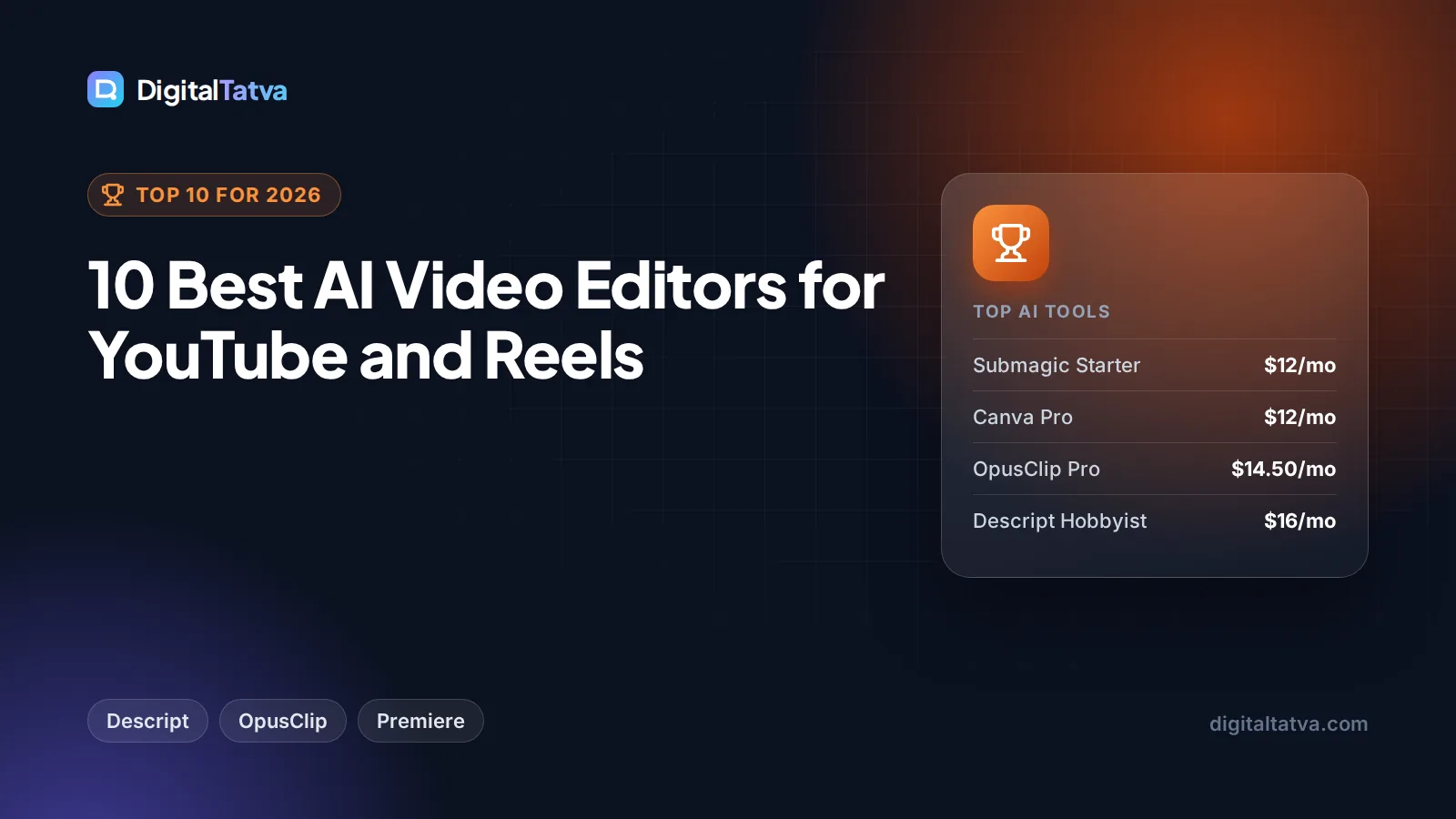
- Best overall: Descript, from $16 a month on yearly billing (Hobbyist), with transcript editing, Studio Sound and filler-word removal.
- Best for Shorts and Reels from long videos: OpusClip, with a free plan and Pro at $14.50 a month billed yearly.
- Best free editor: DaVinci Resolve; the Studio version is a one-time $295 with extra AI tools.
- Best for professionals: Adobe Premiere, which added Firefly, Veo, Kling, Runway and Luma models to the timeline in September 2026.
- CapCut remains blocked in India, so Indian creators should look at Captions, Submagic, Kapwing or the free YouTube Create app instead.
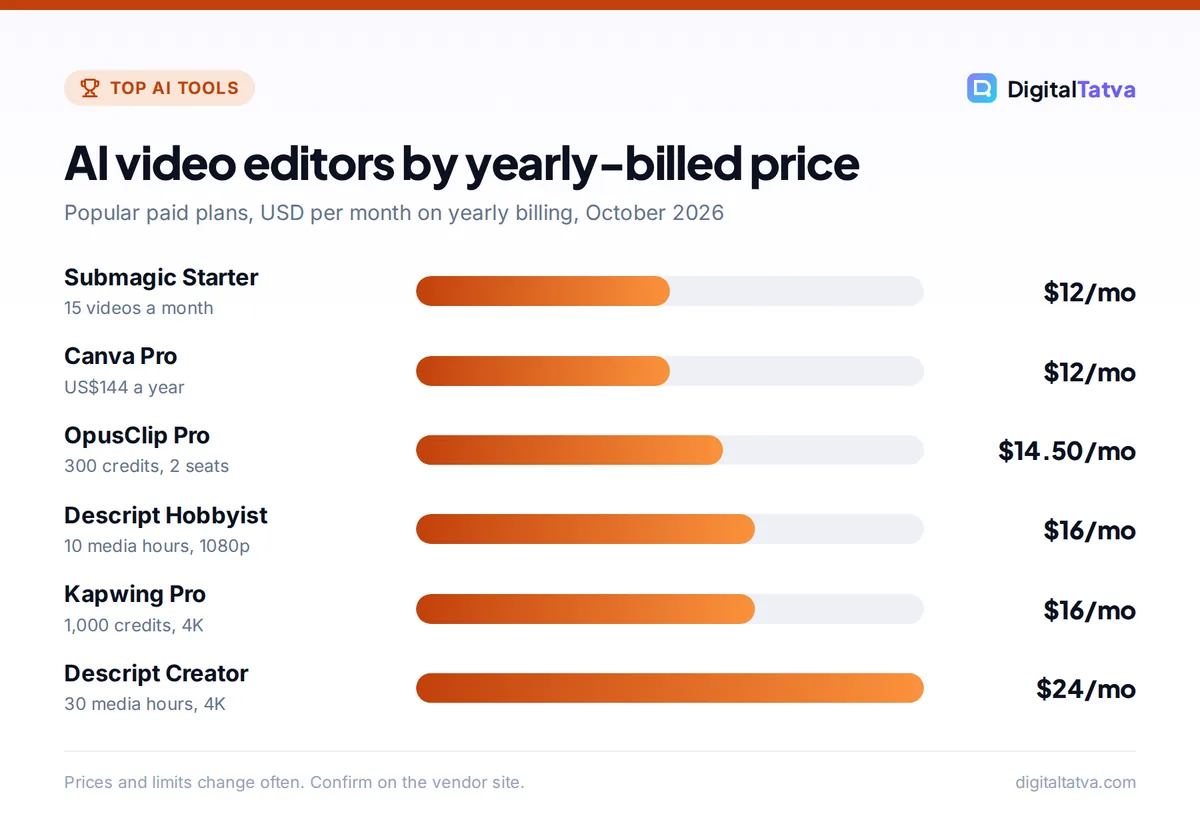
Quick picks: best AI video editors at a glance
| Tool | Best for | Starting paid price | Free plan |
|---|---|---|---|
| Descript | Editing talking videos by text | $24/mo ($16/mo yearly) | 1 media hour/mo, watermark |
| OpusClip | Auto clips from long videos | $15/mo Starter | 60 credits/mo, watermark |
| DaVinci Resolve | Free pro-grade editing | $295 one-time (Studio) | Yes, full editor |
| Adobe Premiere | Professional editing with generative AI | $22.99/mo single app (annual, billed monthly) | No |
| CapCut | Fast mobile editing (not in India) | Around $9.99/mo (unverified) | Yes |
| Captions (Mirage) | Talking-head Reels on your phone | About $24.99/mo (Max) | Limited |
| Submagic | Viral-style captions and zooms | $19/mo ($12/mo yearly) | No |
| Kapwing | Browser editing, subtitles and dubbing | $24/mo ($16/mo yearly) | Yes, watermark |
| Canva | Simple social videos with templates | US$144/yr Pro (Rs 4,000/yr India) | Yes |
| YouTube Create | Free Shorts editing with Gemini | Free | Yes |
The 10 best AI video editors reviewed
1. Descript: Best overall AI video editor
- Starting price: Hobbyist $24/mo, or $16/mo billed yearly
- Free plan: Yes, 1 media hour a month, 720p with watermark
- Best for: YouTubers, podcasters, course creators
Descript transcribes your video and lets you edit it like a document: delete a sentence in the transcript and the matching footage disappears. Its AI tools include Studio Sound (which makes a laptop mic sound closer to a studio recording), Remove Filler Words, Create Clips for short-form, AI speech with custom voice clones, and an AI agent called Underlord that can carry out multi-step edits on request. Transcription works in 25 languages.
Plans scale by media hours and AI credits: Hobbyist gives 10 hours and 400 credits with 1080p export, Creator ($35 monthly or $24 yearly) gives 30 hours, 800 credits and 4K, and Business ($65 or $50) adds translation and dubbing into 30+ languages. Descript shows two prices per plan without labels, so confirm which is monthly on the official Descript pricing page.
Skip it if: your videos are mostly music, B-roll and effects with little speech.
2. OpusClip: Best for turning long videos into Shorts
- Starting price: Starter $15/mo (monthly only); Pro $29/mo or $14.50/mo yearly
- Free plan: Yes, 60 credits a month, watermark
- Best for: podcasters and long-form YouTubers repurposing content
Upload a long video or paste a link, and OpusClip finds the most engaging moments, cuts them into vertical clips, adds animated captions and reframes the speaker to 9:16. Paid plans add a virality score to rank clips and remove the watermark. Pro adds 1:1 and 16:9 reframing, custom fonts, brand templates, social account connections and two seats.
The Free plan is fine for testing, but its exports expire after three days. If you publish clips every week, Pro on yearly billing ($174 a year) is the best value; plan details are on the official OpusClip pricing page. For scheduling those clips, see our list of the best AI tools for social media marketing.
Skip it if: you shoot short-form natively and do not have long videos to mine.
3. DaVinci Resolve: Best free AI video editor
- Starting price: Free; Studio $295 one-time
- Free plan: Yes, up to UHD at 60 fps
- Best for: serious creators who want pro tools without a subscription
Blackmagic Design’s DaVinci Resolve is a full professional editor, color grading suite and audio workstation, and the free version is remarkably complete. The paid Studio 21 version, a one-time $295, adds the Neural Engine AI tools: voice isolation, a dialogue separator, a music remixer, Magic Mask for isolating and tracking objects, facial recognition to sort clips by person, object removal, UltraNR noise reduction, SuperScale upscaling and Smart Reframe for vertical video.
The trade-off is a steep learning curve and the need for a capable computer. But no monthly fee makes it one of the best long-term deals in video.
Skip it if: you want one-click edits on your phone.
4. Adobe Premiere: Best for professionals who want generative AI
- Starting price: $22.99/mo single app (annual plan, billed monthly); also in Creative Cloud Pro
- Free plan: No (trial available)
- Best for: agencies, editors and filmmakers
Adobe now calls the app simply “Premiere”. Its September 8, 2026 update added a Generative Media Tool that generates video and sound effects directly in the timeline, using Adobe Firefly plus partner models from Google Veo, Kling, Runway and Luma. Generate Video can fill gaps using reference frames from your project, and Generate Music and Generate Soundscape are in beta. New audio tools in public beta include Enhance Audio, Separate Crosstalk for overlapping speakers, and Dynamic Auto Ducking.
Generative features use Adobe’s credit system, so heavy users may need a Firefly plan on top. Our Canva vs Adobe Firefly comparison explains Firefly credits.
Skip it if: you only make a few simple Reels a month.
5. CapCut: Best for fast mobile editing (outside India)
- Starting price: around $9.99/mo Standard per third-party sources (unverified)
- Free plan: Yes
- Best for: TikTok and Reels creators outside India
CapCut, from TikTok’s parent ByteDance, offers templates, auto captions, background removal, effects and AI tools on phone, web and desktop. It is fast and fun for trend-driven short-form content. We could not verify CapCut’s prices on an official page: third-party sources list Standard around $9.99 a month and Pro around $19.99, with prices varying by platform and region.
Important for our Indian readers: CapCut has been blocked in India since the 2020 ban on Chinese apps, and third-party reports in 2026 say it remains blocked. Do not use workarounds for client or brand accounts.
Skip it if: you are in India or need verified pricing for business budgets.
6. Captions (Mirage): Best for talking-head Reels on your phone
- Starting price: about $24.99/mo Max (iOS listing)
- Free plan: Limited, no AI credits
- Best for: founders and coaches who film to camera
The Captions app, now made by a company called Mirage, is built for people who talk to the camera. It adds styled captions in 100+ languages, AI Denoise, AI Eye Contact (so you appear to look at the lens while reading), AI Edit for command-based edits, and AI dubbing with lip sync. Max includes 500 AI credits a month, and the Frontier tiers include 1,400 to 5,600. Generating Mirage AI video costs 8 credits per second, so credit-heavy features add up fast.
Skip it if: you edit on a desktop or rarely appear on camera.
7. Submagic: Best for viral-style captions
- Starting price: Starter $19/mo, or $12/mo yearly
- Free plan: No
- Best for: Shorts and Reels creators who want polish fast
Submagic specializes in the bold, animated captions you see on viral Shorts, plus AI auto-zooms, B-roll insertion, silence and bad-take removal, audio cleanup and hook titles. Starter covers 15 videos a month up to 2 minutes each, Pro ($39 or $23 yearly) covers 40 videos up to 5 minutes and adds the AI cleanup tools, and Business ($69 or $41) handles 100 videos up to 30 minutes in 4K at 60 fps.
Skip it if: your videos are long-form or need careful manual editing.
8. Kapwing: Best browser editor for subtitles and dubbing
- Starting price: Pro $24/mo, or $16/mo yearly
- Free plan: Yes, 720p with watermark, 4-minute exports
- Best for: small teams and multilingual content
Kapwing runs in the browser, so a team can edit together without installs. Pro includes 1,000 credits, 4K export, up to 1,000 minutes of auto-subtitles a month, 50 minutes of dubbing and text to speech, a Brand Kit and a shared workspace. Business ($64 monthly or $50 yearly) adds custom voice clones and lip sync. Kapwing offers no free trial of paid plans and no refunds after upgrading, so test the free plan properly first.
Skip it if: you need advanced color grading or effects.
9. Canva: Best for simple social videos with templates
- Starting price: Pro US$144/year (Rs 4,000/year in India)
- Free plan: Yes, up to 20 AI uses
- Best for: small businesses already designing in Canva
Canva’s video editor is not the most powerful here, but it is the easiest for marketers. You get templates, Magic Resize to turn one video into several formats, background removal, a video generator, and a shared Brand Kit, all in the same app you use for posts and thumbnails. Pro gives 10 times the AI usage of Free. See our Canva pricing guide and our Canva Magic Studio review for what the AI tools can and cannot do.
Skip it if: you edit long YouTube videos with many cuts.
10. YouTube Create: Best free editor for Shorts
- Starting price: Free
- Free plan: Yes
- Best for: new creators making Shorts on a phone
YouTube’s own Create app is free and keeps getting AI features. In September 2026, YouTube announced a Gemini-powered conversational editing assistant in Shorts and Create that drafts a first cut, reorders and trims clips, and syncs music to the beat, while you can still edit on the timeline by hand. In May 2026, YouTube also added Gemini Omni remixing in Shorts and Create at no cost. Our guide to the best AI tools for YouTubers covers the rest of YouTube’s built-in AI.
Skip it if: you publish to many platforms, not just YouTube.
How to choose an AI video editor
- Match the tool to your format. Long talking videos suit Descript; long videos you want to clip suit OpusClip; native vertical content suits Captions, Submagic or YouTube Create.
- Decide where you edit. Phone-first creators should pick mobile apps. Desktop editors get more control from Resolve, Premiere or Descript.
- Count your monthly volume. Most tools limit media hours, videos or credits. Estimate how many minutes you upload each month before choosing a tier.
- Check AI credits separately. Generative features, dubbing and voice clones usually draw from a credit pool that can run out before your media hours do.
- Test export quality and watermarks. Free plans often cap at 720p and add a watermark.
Save money: Many creators pay for two editors that overlap. A common lean setup is DaVinci Resolve (free) for main edits plus one clipping tool like OpusClip for Shorts. Yearly billing on Descript, OpusClip, Submagic or Kapwing cuts the price by roughly a third to a half. Our guide to annual vs monthly AI plans explains when that commitment makes sense.
AI video editor pricing compared
| Tool | Monthly billing | Yearly billing (per month) | What limits you |
|---|---|---|---|
| Descript Hobbyist | $24 | $16 | 10 media hours, 400 AI credits |
| Descript Creator | $35 | $24 | 30 media hours, 800 AI credits |
| OpusClip Pro | $29 | $14.50 | 300 credits a month |
| Submagic Pro | $39 | $23 | 40 videos, 5 min each |
| Kapwing Pro | $24 | $16 | 1,000 credits a month |
| Captions Max | About $24.99 | Not confirmed | 500 AI credits a month |
| DaVinci Resolve Studio | $295 one-time | Your computer’s power | |
Need music for your edits? Our list of the best AI music generators explains which ones you can use in monetized videos. For voiceovers, see the best AI voice generators, and for subtitles from raw audio, our list of the best AI transcription tools.
Frequently asked questions
What is the best free AI video editor?
DaVinci Resolve is the best free editor for serious work, with professional editing, color and audio tools at no cost. For quick Shorts on a phone, YouTube Create is free and now includes a Gemini-powered editing assistant. OpusClip, Descript and Kapwing have free plans too, but they add watermarks and limit exports.
Which AI video editor is best for YouTube?
For long YouTube videos with lots of talking, Descript is the best fit because you edit the transcript and can remove filler words automatically. Pair it with OpusClip to turn each video into Shorts. Professionals who need generative fills and advanced audio cleanup should consider Adobe Premiere or DaVinci Resolve Studio.
Is CapCut available in India?
No. CapCut has been blocked in India since the 2020 ban on Chinese-linked apps, and 2026 reports say it remains blocked. Indian creators can use Captions, Submagic, Kapwing, Canva, Descript or the free YouTube Create app for similar mobile-friendly editing, captions and templates.
Can AI edit a video automatically?
Partly. Tools like OpusClip pick highlights and cut clips automatically, Descript’s Underlord agent performs multi-step edits on request, and YouTube Create’s assistant drafts a first cut. You should still review every edit, check captions for mistakes, and add your own judgment on pacing and story.
Is Descript worth paying for?
Yes, if you publish talking videos or podcasts regularly. Hobbyist at $16 a month on yearly billing gives 10 media hours, 1080p export, Studio Sound and filler-word removal, which can save hours of manual cutting each week. If you mostly edit music videos or B-roll, a timeline editor like Resolve is a better fit.
Our verdict on the best AI video editors
Descript is our top pick for most creators because transcript editing and Studio Sound save real time on every video. Add OpusClip if you repurpose long videos into Shorts and Reels, and choose DaVinci Resolve if you want professional power without a subscription. Agencies and editors already in Adobe will get the most from Premiere’s new generative tools, and Indian creators should skip CapCut in favor of Captions, Submagic or YouTube Create. Video editor plans change often, so confirm current prices and limits on each vendor’s site before you subscribe.
Related reading: how to make an AI video from text and Runway vs Kling for AI video generation.
Pricing and features are checked at the time of writing and can change. Some links may be affiliate links, which never affect our verdicts.