How to Use ChatGPT for SEO: Keywords, Briefs and Content
A step-by-step ChatGPT for SEO workflow: keyword clustering, content briefs, drafting, meta tags, schema and internal links, plus how to get cited in ChatGPT search.

On this page
- Key takeaways
- What ChatGPT can and cannot do for SEO
- What you need before you start
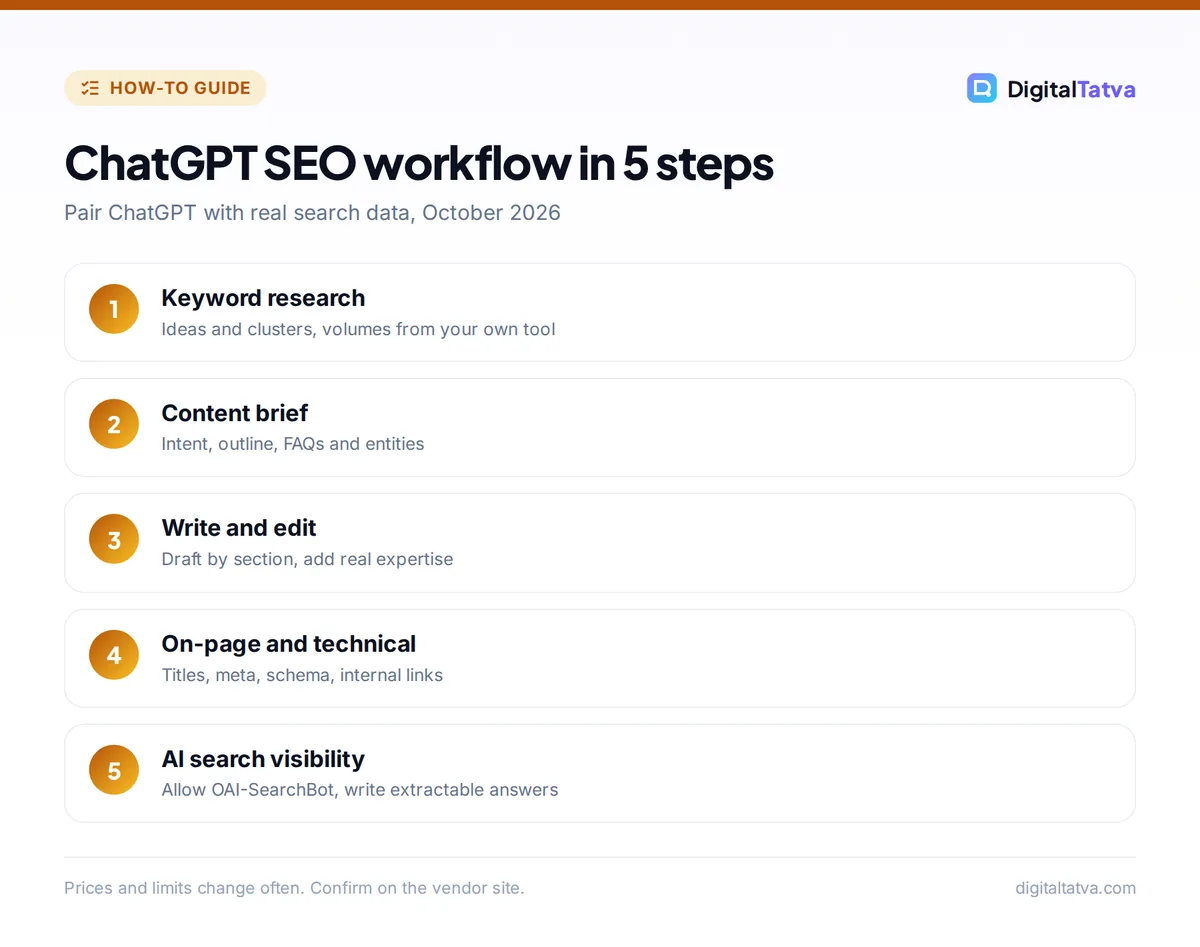
- Step 1: Keyword research with ChatGPT
- Step 2: Turn keywords into content briefs
- Step 3: Write and improve content with ChatGPT
- Step 4: On-page and technical SEO tasks
- Step 5: Optimize for ChatGPT search and AI answers
- Common mistakes when using ChatGPT for SEO
- Frequently asked questions
- Next steps: build your ChatGPT SEO workflow
To use ChatGPT for SEO, treat it as a fast strategist and drafting assistant, not a data source: use it to brainstorm and cluster keywords, map search intent, write content briefs and outlines, draft and improve on-page copy, generate schema markup and plan internal links, then verify volumes and rankings in a real SEO tool. ChatGPT does not have search volume or ranking data of its own, so the winning workflow pairs it with Google Search Console or a keyword tool and keeps a human editor in charge of facts and quality.
This guide gives you a step-by-step workflow with copy-ready prompts for keywords, briefs and content, plus what changed with GPT-6 in October 2026 and how to get your site cited in ChatGPT search itself.
Key takeaways
- ChatGPT is excellent for keyword ideas, intent grouping, briefs, outlines, titles, meta descriptions, FAQs and schema, but it cannot give reliable search volumes.
- Paste real data (Search Console exports, keyword tool CSVs, competitor headings) into ChatGPT to get grounded recommendations.
- Google warns that mass-producing pages with AI “without adding value for users” can count as scaled content abuse.
- To appear in ChatGPT search answers, allow OAI-SearchBot in robots.txt. Blocking GPTBot (training) does not remove you from search.
- Plus at $20 per month gives GPT-6 Sol with thinking levels and ChatGPT Work for bigger audits; Free (GPT-6 Luna) handles basic tasks.
What ChatGPT can and cannot do for SEO
Knowing the limits upfront saves you from the most common mistake: trusting made-up numbers. Here is where ChatGPT helps and where you need another tool.
| SEO task | ChatGPT is good at | Use a dedicated tool or human for |
|---|---|---|
| Keyword research | Seed ideas, long-tail variations, questions, clustering, intent labels | Search volume, difficulty, SERP features, trends |
| Content briefs | Outlines, angles, entities to cover, FAQs, word count targets | Checking what actually ranks today |
| Writing | First drafts, intros, rewrites, readability fixes | Original experience, expert review, fact checks |
| On-page SEO | Titles, meta descriptions, headings, alt text, schema JSON-LD | Testing markup in Google’s tools |
| Technical SEO | Regex, robots.txt drafts, hreflang, redirect maps, explaining errors | Crawling the site, Core Web Vitals data |
| Reporting | Summarizing exports, spotting patterns, charts | Pulling the data from Search Console or analytics |
For the data side, our roundup of the best AI SEO tools for Google and AI search compares Semrush, Ahrefs, Surfer and others. Entry points range from Ahrefs Starter at $29 per month to Semrush’s SEO plan at $139 per month.
What you need before you start
- A ChatGPT plan. Free now runs GPT-6 Luna and is fine for titles, meta descriptions and small briefs. Plus ($20 per month, or Rs 1,999 in India) adds GPT-6 Sol with Medium and High thinking, larger uploads and ChatGPT Work, which matters for analyzing big exports. See our ChatGPT pricing guide.
- Real data. A Google Search Console performance export, a keyword list from any SEO tool, and the URLs of top-ranking competitor pages.
- A brand and style note. Two or three paragraphs on your audience, tone, products and what you never claim. Save it in a ChatGPT project so every chat starts with it.
Tip: Pick Medium or High thinking for strategy work like clustering and briefs. On Plus, Instant no longer switches up to a thinking level automatically, so a quick Instant answer may skip the careful reasoning you wanted.
Step 1: Keyword research with ChatGPT
Use ChatGPT to widen and organize your keyword list, then validate it with real numbers.
- Generate seed keywords. Prompt: “I run [business] for [audience] in [city or country]. List 40 search queries potential customers might type at each stage: problem aware, comparing options, ready to buy. Include local and question-style queries.”
- Expand with real data. Export related keywords and volumes from your SEO tool or Search Console, then paste or upload the CSV. Prompt: “Here is my keyword export. Remove irrelevant and duplicate terms and explain why each removal was made.”
- Cluster by intent. Prompt: “Group these keywords into topic clusters where one page could rank for all of them. For each cluster give the primary keyword (highest volume in the file), search intent (informational, commercial, transactional, navigational) and a suggested page type.”
- Prioritize. Prompt: “Rank the clusters by opportunity using volume, difficulty and how closely they match our services. Show it as a table and chart.” With GPT-6, ChatGPT can return an interactive chart you can sort, thanks to Intelligent UI.
- Find gaps. Paste your sitemap URLs or page titles. Prompt: “Which clusters have no matching page on our site? Which pages target the same cluster and might compete with each other?”
Watch out: If you ask ChatGPT for search volumes without giving it data, it may produce confident-looking numbers that are wrong. Only use volumes and difficulty scores that come from your own exports.
For big spreadsheets, the official ChatGPT add-in for Excel and Google Sheets can clean and group keywords right inside the sheet. Our guide to using ChatGPT for Excel and data analysis shows how.
Step 2: Turn keywords into content briefs
A good brief is where ChatGPT saves the most time. Give it the keyword, the competitor headings and your angle, and it will produce a structured brief in minutes.
Brief prompt you can copy
“Create an SEO content brief for the primary keyword [keyword]. Audience: [who]. Our angle: [what makes us different]. Here are the H2 and H3 headings from the top 5 ranking pages: [paste]. Include: search intent, suggested title (under 60 characters), meta description (under 155 characters), H2/H3 outline, questions to answer, entities and subtopics to cover, internal links to these pages [list], data or examples we must supply ourselves, and what to avoid.”
Review the outline against what actually ranks. If every top result is a list and ChatGPT suggests an essay, follow the search results. Then add what only you can provide: real prices, case studies, screenshots or local knowledge. That is the part Google rewards and AI cannot invent.
Our step-by-step guide on how to write a blog post with AI that actually ranks goes deeper into turning briefs into finished articles.
Step 3: Write and improve content with ChatGPT
ChatGPT drafts quickly, but the best SEO results come from using it as an editor as much as a writer.
- Draft section by section. Ask for one H2 section at a time with your notes, rather than a whole 2,000-word article in one go. You keep control of facts and voice.
- Answer first. Prompt: “Rewrite this intro so the first two sentences directly answer [query].” Direct answers help both Google snippets and AI answer engines.
- Improve readability. Prompt: “Shorten paragraphs to 2 to 4 sentences, use active voice and explain jargon once in plain words.”
- Add FAQs from real questions. Paste “People also ask” questions or Search Console queries and ask for concise answers of 40 to 80 words.
- Fact-check prompts. Prompt: “List every factual claim, number and date in this draft so I can verify each one.” Then verify them yourself.
Google’s guidance is clear: using AI tools “to generate many pages without adding value for users may violate Google’s spam policy on scaled content abuse.” It asks publishers to focus on “accuracy, quality, and relevance” and to consider sharing how content was created. Read Google’s official guidance on AI-generated content before you scale up.
Save money: Our library of ChatGPT prompts for marketing includes ready-made prompts for blog intros, product descriptions and ad copy, so you spend fewer messages iterating.
Step 4: On-page and technical SEO tasks
Titles and meta descriptions in bulk
Upload a CSV of URLs, current titles and primary keywords. Prompt: “Write a new title (50 to 60 characters, keyword near the start) and meta description (120 to 155 characters, clear benefit) for each row. Keep brand name at the end of titles. Return a CSV.” Spot-check the lengths, because models still miscount characters sometimes.
Schema markup
Prompt: “Generate JSON-LD for an FAQPage using these questions and answers” or “Create LocalBusiness schema for [name, address, hours, phone].” Always test the output in Google’s Rich Results Test before publishing.
Internal linking
Paste a list of your URLs with titles and the new article. Prompt: “Suggest 5 to 8 internal links from this article to existing pages, with natural anchor text, and 3 existing pages that should link back to it.”
Technical helpers
- “Write a regex for Search Console that matches question queries starting with how, what, why or can.”
- “Create a 301 redirect map from these old URLs to the closest new URLs.”
- “Explain this Search Console error in plain English and list likely fixes.”
For larger audits, such as reviewing 200 pages of an export and producing a prioritized fix list in a spreadsheet, use ChatGPT Work, the agent that replaced agent mode. Our guide on how to use ChatGPT Work explains how to set up multi-step tasks like this.
Step 5: Optimize for ChatGPT search and AI answers
SEO now includes being cited by AI assistants. OpenAI says more than 1.2 billion people use ChatGPT every week, and ChatGPT search answers cite websites, so it is worth making sure your site can appear there.
- Allow OAI-SearchBot. OpenAI’s crawler documentation says sites that opt out of OAI-SearchBot “will not be shown in ChatGPT search answers.” Check your robots.txt and firewall rules. Changes can take about 24 hours to apply.
- Training is separate. GPTBot collects content that may be used for model training. You can block GPTBot and still allow OAI-SearchBot, so opting out of training does not have to cost you search visibility.
- Write extractable answers. Clear definitions, direct answers under question headings, comparison tables and up-to-date facts are easier for any AI system to cite.
- Track referrals. ChatGPT search referrals are commonly tagged with utm_source=chatgpt.com, so set up a segment in your analytics to watch that traffic.
- Test your brand. Ask ChatGPT, Perplexity and Gemini the questions your customers ask and note who gets cited. Our Perplexity vs ChatGPT comparison explains how each handles sources.
Note: With GPT-6’s Intelligent UI, ChatGPT can build simple calculators, converters and comparison tools inside the chat. If your traffic depends on basic tool pages, invest in original data, deeper features or expert guidance that a generated widget cannot match.
Common mistakes when using ChatGPT for SEO
- Trusting invented metrics. Volumes, difficulty and traffic estimates must come from real tools or Search Console.
- Publishing unedited drafts. Generic AI text rarely ranks and can hurt trust. Add experience, examples and verified facts.
- Scaling too fast. Hundreds of thin AI pages is exactly what Google’s scaled content policy targets.
- Ignoring the live SERP. Always check what ranks now before following an AI outline.
- Blocking the wrong bot. Blocking OAI-SearchBot removes you from ChatGPT search answers; blocking only GPTBot does not.
- Vague prompts. Give audience, angle, data and format every time. Our prompt engineering guide shows techniques that work.
Agencies running this workflow for several clients should also read our guide to AI for marketing agencies, which covers tooling and pricing models.
Frequently asked questions
Can ChatGPT do keyword research?
Partly. ChatGPT is very good at generating keyword ideas, long-tail questions, clusters and intent labels, but it does not have reliable search volume or difficulty data. Use it to expand and organize lists, then validate numbers with Google Search Console or an SEO tool like Semrush or Ahrefs, and paste that data back in for prioritization.
Is AI-written content bad for SEO?
Not by itself. Google’s guidance focuses on quality, accuracy and relevance rather than how content is made, but it warns that generating many pages without adding value can count as scaled content abuse. Use ChatGPT for drafts and structure, then add original experience, verified facts and expert review before publishing.
Which ChatGPT plan is best for SEO work?
Plus at $20 per month (Rs 1,999 in India) is the best value for most SEO professionals. It includes GPT-6 Sol with Medium and High thinking for strategy, larger uploads for keyword exports, and ChatGPT Work for multi-step audits. The free plan on GPT-6 Luna handles quick titles, meta descriptions and small briefs.
How do I get my website cited in ChatGPT search?
Make sure your robots.txt and firewall allow OAI-SearchBot, since OpenAI says opted-out sites will not appear in ChatGPT search answers. Then publish clear, well-structured pages with direct answers, tables and current facts. Blocking GPTBot only affects training and does not stop your pages appearing in search answers.
Can ChatGPT write meta descriptions and schema markup?
Yes, and it does both well. Upload a CSV of URLs and keywords to get titles and meta descriptions in bulk, and ask for JSON-LD schema for FAQs, products, articles or local businesses. Check character counts yourself and validate schema in Google’s Rich Results Test before publishing.
Next steps: build your ChatGPT SEO workflow
Start with one cluster: research and group the keywords, write a brief, draft section by section, add your own expertise, then optimize titles, schema and internal links. Once that page performs, turn your best prompts into a saved project and scale carefully. Pair ChatGPT with real search data and a human editor, and it will cut hours from every article without risking your rankings. For writing tools beyond ChatGPT, see our list of the best AI writing tools. OpenAI’s plans and features change often, so confirm current pricing on the official ChatGPT site before you subscribe.
Pricing and features are checked at the time of writing and can change. Some links may be affiliate links, which never affect our verdicts.