Claude Code vs Cursor: Terminal Agent or AI Code Editor?
Claude Code vs Cursor compared on pricing, models, usage limits and workflow, so you know whether a delegating agent or an AI code editor fits the way you work.

On this page
- Key takeaways
- Quick verdict: Claude Code or Cursor?
- Claude Code vs Cursor comparison table
- How they work: terminal agent vs AI code editor
- Pricing compared: what you will actually pay
- Models and code quality
- Features and workflow fit
- Usage limits, teams and privacy
- Can you use Claude Code and Cursor together?
- Choose Claude Code if, choose Cursor if
- Frequently asked questions
- Our verdict
Claude Code is Anthropic’s coding agent: you describe a task and it reads your project, edits files and runs commands on its own, from the terminal, the Claude desktop app, VS Code or the web. Cursor is an AI code editor built on VS Code, with fast autocomplete, inline edits and an agent that can use models from several labs. Pick Claude Code if you want to hand off whole tasks; pick Cursor if you want to stay in an editor and steer every line.
Both start at $20 a month, so price alone will not decide it. Below we compare how each works, what you actually pay as of October 2026, which models you get, how usage limits behave, and who should choose which.
Key takeaways
- Claude Code is agent first: it plans, edits many files and runs tests with little hand-holding. Cursor is editor first: autocomplete, inline edits and an agent inside a full IDE.
- Claude Code comes with Claude Pro ($20), Max ($100 or $200), Team and Enterprise, or pay-as-you-go API billing. It is not on the free Claude plan.
- Cursor has a free Hobby plan, Pro at $20, Pro Plus at $60 and Ultra at $200, plus an India-only Start plan at Rs 649 a month.
- Claude Code runs Anthropic models only (Opus 5.5 by default). Cursor offers its own Composer models plus Claude, GPT and Gemini, with non-Cursor models billed at API rates.
- The lines are blurring: Claude Code now has a desktop app and IDE extensions, and Cursor ships a terminal agent called Cursor CLI.
Quick verdict: Claude Code or Cursor?
Choose Claude Code if you think in tasks (“add a login page”, “fix the failing tests”, “migrate this folder to TypeScript”) and want an agent that works through them end to end. It suits developers who live in the terminal, people automating repetitive project work, and non-developers who use the desktop app to build small tools. If you already pay for Claude Pro, you have it at no extra cost.
Choose Cursor if you write code by hand most of the day and want AI woven into every keystroke. Tab completion, Cmd+K inline edits and a side-panel agent make it the smoother everyday editor, and the model picker lets you switch between labs.
Many professional developers end up using both: Cursor as the editor, Claude Code running in its built-in terminal for bigger jobs. We explain how that works further down.
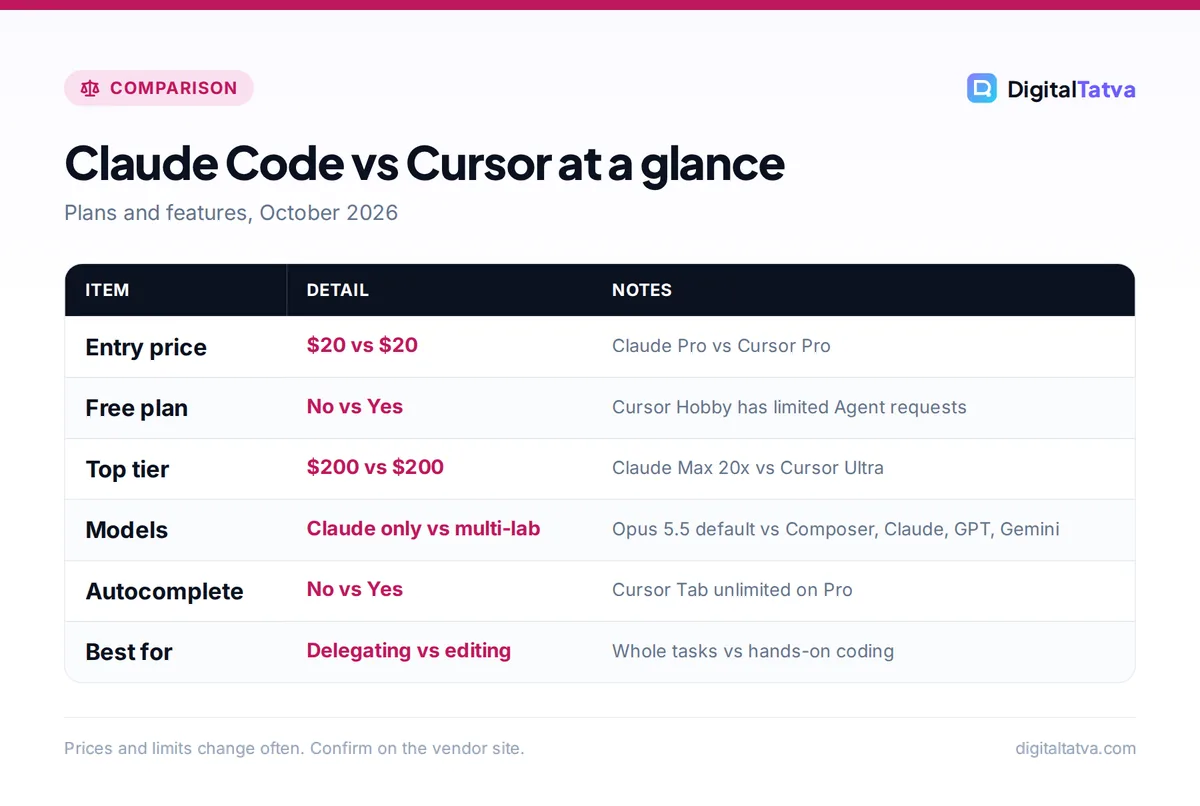
Claude Code vs Cursor comparison table
| Criterion | Claude Code | Cursor |
|---|---|---|
| What it is | Agentic coding tool from Anthropic | AI code editor built on VS Code |
| Where it runs | Terminal, desktop app, VS Code, JetBrains, web, Slack, CI | Desktop editor, cloud agents, Cursor CLI |
| Free option | No (needs Pro or higher, or API credits) | Hobby plan with limited Agent requests |
| Entry paid plan | Claude Pro $20/mo ($17 on annual billing) | Pro $20/mo |
| Heavy use plans | Max 5x $100, Max 20x $200 | Pro Plus $60, Ultra $200 |
| Team plans | Team $25 or $125 per seat ($20 or $100 annual) | Teams $40 or $120 per user |
| Models | Claude only: Opus 5.5 default, Sonnet 5.5, Haiku, Fable on credits | Composer 2.5 and Grok in the Cursor pool; Claude, GPT, Gemini at API rates |
| Autocomplete | No inline autocomplete | Unlimited Tab on Pro |
| How limits work | Five-hour and weekly windows shared with Claude chat | Included usage per pool, then on-demand at API rates |
| Project instructions | CLAUDE.md, skills, hooks, subagents | .cursor/rules, AGENTS.md, skills, hooks |
Prices come from the official Claude pricing page and the Cursor pricing page. For deeper plan detail, see our guides to Claude pricing and Cursor pricing.
How they work: terminal agent vs AI code editor
Claude Code: you delegate, it executes
Claude Code works as an agent loop. You give it a goal, it reads the files it needs, proposes a plan, edits code, runs commands such as tests or git, checks the result and repeats. You approve actions or let a permission mode such as Auto handle routine steps. It reads your project on demand, so you never paste code into a chat box.
The original home is the terminal (you type claude in a project folder), but Anthropic now ships the same agent in the Claude desktop app’s Code tab, in VS Code and JetBrains extensions, on the web at claude.ai/code and in GitHub Actions. That makes it usable by people who have never opened a terminal; our beginner guide to Claude Code walks through the desktop route.
Cursor: you drive, AI rides along
Cursor is a full editor. Its Tab model predicts your next edit as you type, Cmd+K (Ctrl+K on Windows) rewrites selected code, and the Agent panel (Cmd+I) handles multi-file tasks with modes for Agent, Plan, Debug and Design. Checkpoints let you roll back an agent run. You see every change in context, which many developers prefer for code they will maintain for years.
Cursor has also moved toward agents: cloud agents run tasks in the background, and Cursor CLI brings an agent command to the terminal with Agent, Plan and Ask modes. If you are new to the editor, start with our guide on how to use Cursor AI to code faster.
Pricing compared: what you will actually pay
Claude Code pricing
Claude Code has no separate price. It is included in Claude Pro ($20 a month, or $17 billed annually), Max 5x ($100), Max 20x ($200), Team seats and Enterprise. Claude chat and Claude Code share one usage allowance that resets every five hours, with weekly limits on top. When you run out, you wait, upgrade, or turn on usage credits billed at API rates.
You can also skip the subscription and connect a Claude Console account, paying per token. Anthropic’s cost documentation says enterprise deployments average around $13 per developer per active day and $150 to $250 per developer per month, with 90% of users under $30 per active day. That is a useful benchmark: if your API spend would land near $150 a month, Max 5x at $100 is the cheaper route.
Cursor pricing
Cursor’s Hobby plan is free with limited Agent requests. Pro is $20 a month with unlimited Tab and extended agent limits, Pro Plus is $60, Ultra is $200, and Teams costs $40 or $120 per user. In India, a Start plan costs Rs 649 a month including tax but only covers Cursor’s own models.
Usage sits in two pools. The “Cursor Models” pool (Composer 2.5 and Grok) gets significantly more included usage. The “Other Models” pool (Claude, GPT, Gemini) is charged at each model’s API price. Once included usage runs out, on-demand usage continues at API rates. Cursor’s own guidance says daily agent users typically spend $60 to $100 a month in total usage, and power users $200 or more.
A worked cost example
Say one agent task reads 300,000 fresh input tokens and writes 20,000 output tokens. At API rates:
- Claude Opus 5.5 ($4 input, $20 output per million): 0.3 x $4 = $1.20, plus 0.02 x $20 = $0.40. Total $1.60.
- Claude Sonnet 5.5 ($2 input, $10 output): 0.3 x $2 = $0.60, plus 0.02 x $10 = $0.20. Total $0.80.
The same Claude model costs the same per token in either tool when billed at API rates, so the real difference is how much each tool includes in the flat fee and how many tokens its agent burns per task. Caching cuts these numbers a lot in practice, which we cover in our guide to reducing Claude Code and Cursor costs.
Save money: Claude Code defaults to Opus 5.5 on paid plans. Switching routine work to Sonnet 5.5 with /model sonnet halves the per-token price and stretches your five-hour window further.
Models and code quality
Claude Code is a single-vendor tool. On the Anthropic API, its opus alias maps to Claude Opus 5.5 and sonnet to Sonnet 5.5, and Fable is available through usage credits. There is also an opusplan alias that uses Opus for planning and Sonnet for execution. If you like Claude’s coding style, this is the most direct way to use it, with the agent loop tuned by the same company that trains the models.
Cursor is multi-vendor. Composer 2.5, Cursor’s own model, is the cost-efficient choice for routine work, and you can switch to Claude, GPT or Gemini models for harder problems. That flexibility helps when one model gets stuck on a bug another solves quickly.
We do not publish invented benchmark scores. In everyday use, the agent design matters as much as the model: Claude Code tends to explore more of the repository before acting, which helps on unfamiliar codebases, while Cursor’s tight editor loop makes small, frequent changes faster to review. For a wider field, see our ranking of the best AI coding assistants.
Features and workflow fit
Project memory and rules
Claude Code reads a CLAUDE.md file at the start of every session; running /init creates one from your codebase. Skills load specialized instructions only when needed, hooks run your own scripts before or after tool calls, and subagents handle verbose jobs like test runs in a separate context. Cursor uses project rules in .cursor/rules (as .mdc files), supports AGENTS.md, and offers skills, hooks and MCP on paid plans.
Everyday editing
This is Cursor’s clear win. Claude Code has no inline autocomplete, so for typing code yourself you still want an editor with completion. Cursor’s Tab is unlimited on Pro and does not consume agent usage.
Long, autonomous tasks
This is Claude Code’s strength. Plan mode (Shift+Tab) proposes an approach before touching files, checkpoints let you /rewind, and the desktop app can run parallel sessions, cloud sessions that continue after you close the laptop, and scheduled tasks. Cursor’s cloud agents cover similar ground, but Claude Code’s ecosystem of skills and plugins is broader for non-coding automation too.
Claude Code pros
- Best-in-class agent loop for multi-step tasks
- Included with Claude Pro, so no extra subscription
- Runs in terminal, desktop app, IDEs, web and CI
- Detailed cost tools such as /usage and /insights
Claude Code cons
- No free plan
- Claude models only
- Shares limits with Claude chat
- No inline autocomplete
Cursor pros
- Excellent autocomplete and inline edits
- Choice of models from several labs
- Free Hobby plan and Rs 649 Start plan in India
- Familiar VS Code interface and extensions
Cursor cons
- Non-Cursor models billed at API rates once included usage runs out
- Included usage amounts are not published in dollars
- Bills can climb with heavy agent use
Usage limits, teams and privacy
Claude Code limits are time based. Pro gives a five-hour session allowance (Anthropic’s rough guide is around 45 short messages per five hours in chat, and coding turns are much heavier), and Max multiplies that by 5x or 20x with a weekly cap across all models. Our explainer on Claude usage limits covers how to make them last, and Claude Pro vs Max helps you decide when to upgrade.
Cursor limits are spend based: included usage per pool, then on-demand billing in arrears. That is more predictable for occasional use and less predictable for heavy agent use, so check your usage in the Cursor dashboard regularly.
For teams, Claude Team seats include Claude Code with admin spend controls and analytics, and Enterprise adds the Analytics API. Cursor Teams adds SSO, usage analytics, team-wide privacy mode and Bugbot code review. If you are rolling AI coding tools out to staff, read our business guide to AI data privacy first.
Can you use Claude Code and Cursor together?
Yes, and it is a popular setup. Open Cursor’s built-in terminal, run claude, and Claude Code works on the same files while Cursor shows the diffs. You get Cursor’s autocomplete for hand edits and Claude Code’s agent for larger tasks. The downside is paying for two subscriptions. If you only want one bill, GitHub Copilot is another middle ground; compare it in our Cursor vs GitHub Copilot breakdown.
Tip: Keep one source of project instructions. Claude Code reads CLAUDE.md and Cursor reads AGENTS.md and its rules folder, so put shared conventions in AGENTS.md and point CLAUDE.md to it.
Choose Claude Code if, choose Cursor if
Choose Claude Code if you
- Already pay for Claude Pro or Max and want coding included.
- Prefer delegating whole tasks over typing code yourself.
- Work in the terminal, on servers over SSH, or in CI pipelines.
- Are a non-developer who wants to build small tools in the desktop app.
Choose Cursor if you
- Write code by hand every day and want great autocomplete.
- Want to switch between Claude, GPT, Gemini and Cursor’s own models.
- Want a free plan to start, or the Rs 649 Start plan in India.
- Prefer reviewing every change inside a familiar VS Code interface.
Frequently asked questions
Is Claude Code better than Cursor?
Neither is better for everyone. Claude Code is stronger for autonomous, multi-step tasks such as refactors, migrations and fixing failing tests across many files. Cursor is better as an everyday editor thanks to Tab autocomplete, inline edits and a multi-model picker. If you mostly delegate work, pick Claude Code; if you mostly type code, pick Cursor.
Is Claude Code free?
No. The free Claude plan does not include Claude Code. You need Claude Pro at $20 a month ($17 on annual billing), Max, a Team or Enterprise seat, or a Claude Console account that pays per token. Cursor does have a free Hobby plan with limited Agent requests if you want to try AI coding at no cost.
Can I use Claude models in Cursor?
Yes. Cursor’s “Other Models” pool includes Claude, GPT and Gemini models, charged at each model’s API price against your included usage and then on demand. You get Claude’s coding ability inside Cursor’s editor, but not Claude Code’s agent features such as CLAUDE.md, subagents and Anthropic’s own permission modes.
Which is cheaper for heavy users, Claude Max or Cursor Ultra?
Both cost $200 a month at the top tier, and Max 5x at $100 sits between Cursor Pro Plus ($60) and Ultra. Max gives 20x Pro’s per-session usage in time-based windows, while Ultra gives Cursor’s maximum included usage before on-demand billing. Heavy Claude-only users usually get more from Max; multi-model users from Cursor.
Does Claude Code work on Windows?
Yes. Claude Code runs natively on Windows 10 version 1809 or later through PowerShell or CMD, and inside WSL. Git for Windows is recommended so it can use Bash. You can also skip the terminal and use the Code tab in the Claude desktop app for Windows, which includes Claude Code without extra installs.
Our verdict
Claude Code and Cursor solve the same problem from opposite ends. Claude Code is the better agent: give it a clear task and it will plan, edit, test and commit with minimal supervision, and it costs nothing extra if you already have Claude Pro. Cursor is the better editor: its autocomplete and inline edits make hands-on coding faster, and its model choice protects you from betting on a single lab. Solo developers who delegate should start with Claude Pro; developers who type all day should start with Cursor Pro; teams with budget often run both. Pricing and limits change often, so confirm current plans on the Claude and Cursor pricing pages before you subscribe.
Related reading: our full Cursor review and model routing explained.
Pricing and features are checked at the time of writing and can change. Some links may be affiliate links, which never affect our verdicts.