How to Reduce Claude Code and Cursor Costs
12 proven ways to reduce Claude Code and Cursor costs, with worked token math, cache tips, model choices and when a subscription beats pay-as-you-go billing.

On this page
- Key takeaways
- Where Claude Code and Cursor money actually goes
- Step zero: measure your baseline
- A worked example: one day of Claude Code on the API
- 8 ways to reduce Claude Code costs
- 4 ways to reduce Cursor costs
- Subscription or pay-as-you-go: which is cheaper?
- Cheaper models through other providers
- Common mistakes that waste money
- Frequently asked questions
- Next steps: build a cheaper coding routine
The fastest way to reduce Claude Code and Cursor costs is to stop sending expensive tokens you do not need: use a cheaper model for routine work, clear the conversation between unrelated tasks, keep project instruction files short, and avoid breaking the prompt cache. In Claude Code, simply switching from the default Opus 5.5 to Sonnet 5.5 for everyday tasks halves the price of fresh input and output. In Cursor, keeping routine work on Cursor’s own models instead of API-priced ones does the same.
Below are 12 practical techniques, with worked examples using real October 2026 prices, plus how to decide whether a subscription or pay-as-you-go billing is cheaper for you.
Key takeaways
- Claude Code re-sends your whole conversation every turn. Long, unfocused sessions are the biggest hidden cost.
- Sonnet 5.5 ($2 input, $10 output per million tokens) costs half of Opus 5.5 ($4, $20) and handles most coding tasks well.
- A prompt cache miss after a break can cost about 25 times more than a cache hit for the same context on Opus 5.5.
- In Cursor, Composer 2.5 sits in a pool with much more included usage; Claude, GPT and Gemini are billed at API rates.
- Anthropic says Claude Code averages around $13 per developer per active day on enterprise API billing. If you spend more than Max costs, switch to a subscription.
Where Claude Code and Cursor money actually goes
Both tools bill you for tokens, the small chunks of text that AI models read and write (see our plain English guide to tokens). Coding agents use far more tokens than chat because every step carries file contents, tool results and the full history of the session.
How that shows up depends on your plan:
- Claude subscriptions (Pro $20, Max $100 or $200, Team seats): no per-token bill, but a five-hour and weekly allowance shared with Claude chat. Wasted tokens mean hitting limits sooner. Usage credits beyond the limit are billed at API rates.
- Claude Console (API): you pay per token at list prices. Anthropic’s cost documentation puts the enterprise average at around $13 per developer per active day and $150 to $250 per month.
- Cursor (Pro $20, Pro Plus $60, Ultra $200): included usage in two pools, then on-demand billing at API rates. Cursor says daily agent users typically spend $60 to $100 a month in total usage.
Here are the Claude rates that matter for the examples below, from the official Claude API pricing page.
| Model | Input | 5-min cache write | Cache hit | Output |
|---|---|---|---|---|
| Claude Opus 5.5 | $4.00 | $5.00 | $0.20 | $20.00 |
| Claude Sonnet 5.5 | $2.00 | $2.50 | $0.20 | $10.00 |
| Claude Haiku 4.5 | $1.00 | $1.25 | $0.10 | $5.00 |
All prices are USD per million tokens. For the full rate card, read our Claude API pricing guide.
Step zero: measure your baseline
You cannot cut what you cannot see. In Claude Code, run /usage. API users see the session’s tokens and estimated cost by model, plus a prompt cache line showing what share of input came from cache. Subscribers see plan usage bars and a breakdown that attributes usage to skills, subagents, plugins and individual MCP servers, and flags behaviors such as long context or cache misses when they cause 10% or more of recent usage. /context shows what is filling the context window, and /insights writes a report on how you work.
In Cursor, check the usage page in your account dashboard and note which models drive on-demand charges, especially those billed from the API-priced Other Models pool.
A worked example: one day of Claude Code on the API
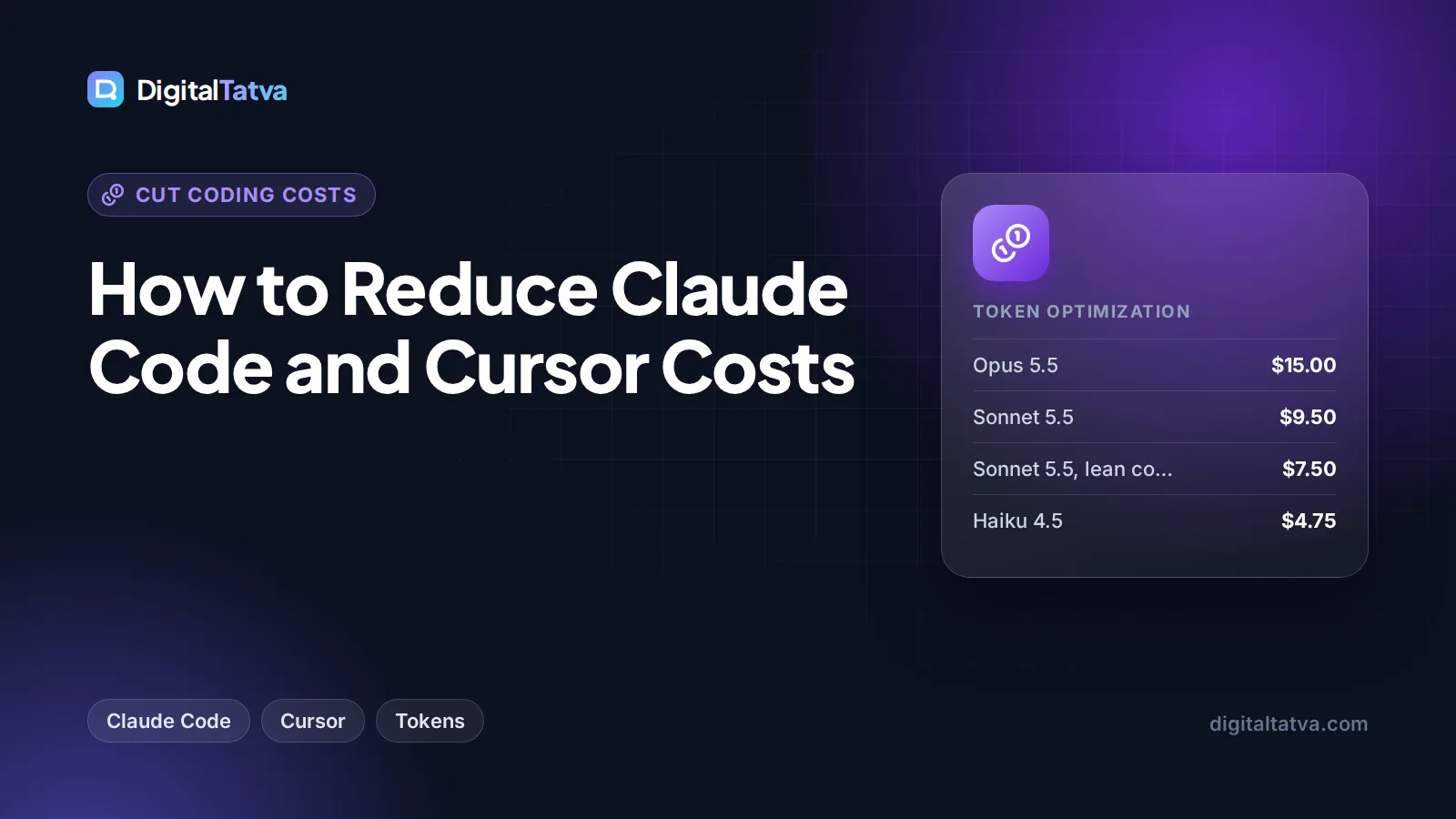
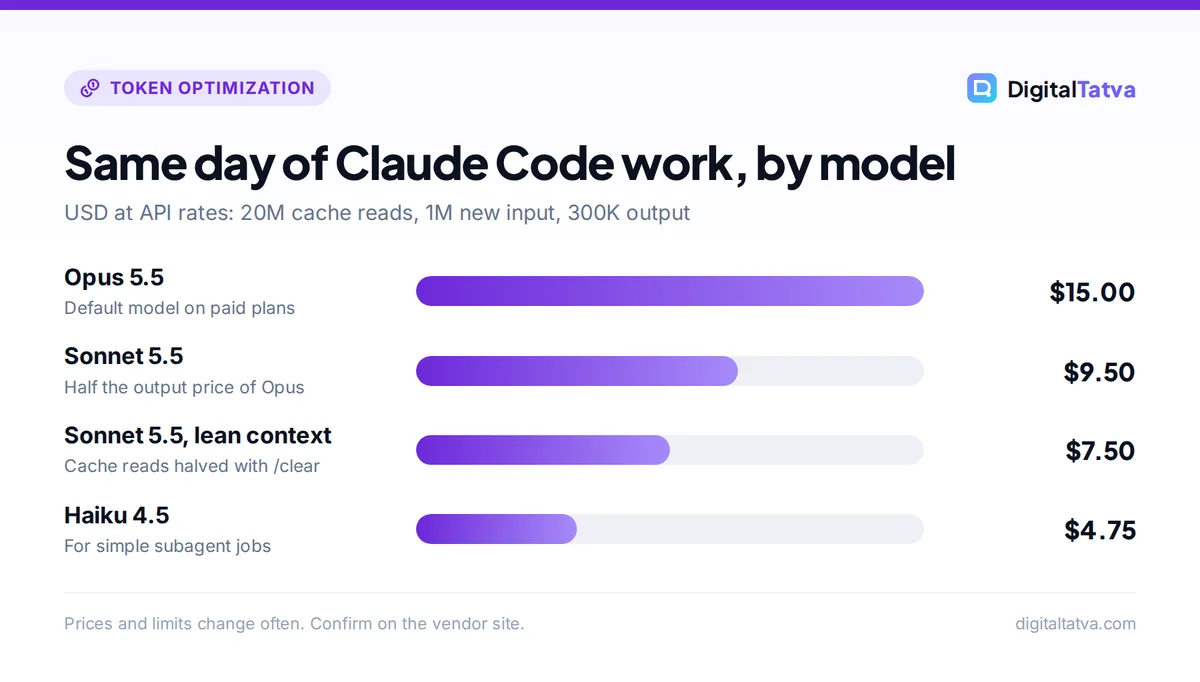
Imagine a solo developer’s day in Claude Code: 20 million tokens read from cache (the re-sent conversation and files), 1 million new input tokens written to the 5-minute cache, and 300,000 output tokens.
- Opus 5.5: (20 x $0.20) + (1 x $5.00) + (0.3 x $20) = $4.00 + $5.00 + $6.00 = $15.00
- Sonnet 5.5: (20 x $0.20) + (1 x $2.50) + (0.3 x $10) = $4.00 + $2.50 + $3.00 = $9.50
- Haiku 4.5: (20 x $0.10) + (1 x $1.25) + (0.3 x $5) = $2.00 + $1.25 + $1.50 = $4.75
- Sonnet 5.5 with lean context (cache reads halved to 10 million): $2.00 + $2.50 + $3.00 = $7.50
Over 20 working days, that is $300 on Opus versus $150 on lean Sonnet. On a subscription, the same savings mean your five-hour window lasts roughly twice as long. The techniques below are how you get from the first number to the last.
8 ways to reduce Claude Code costs
1. Make Sonnet your default, not Opus
Claude Code uses Opus 5.5 by default on Pro, Max, Team, Enterprise and API accounts. Anthropic’s own cost guide says Sonnet “handles most coding tasks well and costs less than Opus”. Switch with /model sonnet, or set "model": "sonnet" in your settings file. Keep Opus for architecture decisions and gnarly bugs.
2. Use the opusplan alias for big tasks
The opusplan model alias uses Opus in plan mode, then switches to Sonnet to carry out the plan. You pay Opus prices for the short, high-value thinking and Sonnet prices for the long, token-heavy execution. This is a simple form of model routing built into the tool.
3. Lower the effort level on simple work
Thinking tokens are billed as output, the most expensive token type. Opus 5.5 and Sonnet 5.5 support effort levels from low to max (default medium). For renaming variables, writing docstrings or small edits, run /effort low. On Opus 5.5, cutting 100,000 thinking tokens saves 0.1 x $20 = $2.00.
4. Clear between unrelated tasks
Every message re-sends the whole conversation. A session that has run all day costs usage on every one-line question. Use /clear when you switch tasks (it costs nothing), with /rename first if you want to /resume later. Use /compact with instructions such as “keep only the API changes” when you need continuity, but remember compaction is itself a large request.
5. Do not break the cache
Claude Code caches the start of your conversation. On a subscription the cache lasts an hour; on an API key, or once you draw on usage credits, it lasts five minutes by default. After a break, the first message reprocesses everything. For a 150,000-token context on Opus 5.5, a cache hit costs 0.15 x $0.20 = $0.03, while a rebuild at the 5-minute write rate costs 0.15 x $5 = $0.75, about 25 times more. Changing tool definitions or MCP servers mid-session also invalidates the cache. Group your work into focused blocks rather than returning to a stale session every hour, and see our prompt caching explainer for the mechanics.
6. Keep CLAUDE.md short and move the rest into skills
CLAUDE.md loads into every session. Anthropic suggests keeping it under 200 lines. Move workflow-specific instructions (release steps, PR review checklists) into skills, which load only when used.
7. Trim MCP servers and filter noisy output
Run /mcp and disable servers you are not using; prefer CLI tools such as gh, which add no tool listings. Add a hook that filters test output to failures only, so Claude reads a few hundred tokens instead of tens of thousands. Hand verbose jobs such as log analysis to a subagent set to model: haiku, so only a short summary returns to the main conversation.
8. Avoid agent teams unless you need them
Anthropic says agent teams use approximately 7x more tokens than standard sessions when teammates run in plan mode, because each teammate has its own context window. Our $15 Opus day would become roughly $105. Use them only for genuinely parallel work, keep teams small, run teammates on Sonnet and shut them down when done.
Tip: Write specific prompts. “Add input validation to the login function in auth.ts” lets Claude read one file; “improve this codebase” makes it scan everything. Use plan mode (Shift+Tab) for complex tasks and press Escape early if it heads the wrong way.
4 ways to reduce Cursor costs
9. Keep routine work in the Cursor Models pool
Cursor’s “Cursor Models” pool, which includes Composer 2.5 and Grok models, gets significantly more included usage than the “Other Models” pool. Claude, GPT and Gemini are charged at their API prices. Use Composer 2.5 for everyday edits and switch to a frontier model only when Composer gets stuck. Our Cursor pricing guide explains both pools in detail.
10. Lean on Tab and inline edits for small changes
Tab completion is unlimited on Pro. A one-line fix with Cmd+K or Tab costs far less than an Agent run that reads half the repository. Reserve the Agent for multi-file work.
11. Plan first, and keep rules lean
Cursor’s Plan mode “creates detailed implementation plans before writing any code”, which prevents expensive rework. Keep .cursor/rules files scoped with globs or set to “Apply Intelligently” so they load only where relevant, rather than always applying large rule sets to every request. Checkpoints let you restore instead of paying for the agent to undo its own mistakes.
12. Pick the right plan, and watch on-demand usage
Once included usage runs out, Cursor bills on-demand usage in arrears at API rates. If you regularly exceed Pro by $40 or more, Pro Plus at $60 is likely cheaper than paying overage. In India, the Start plan (Rs 649 a month, Cursor Models only) suits learners who are happy with Composer. Check the usage page weekly so the bill does not surprise you.
Subscription or pay-as-you-go: which is cheaper?
For Claude Code, compare your expected API spend with plan prices.
| Your usage | Estimated API cost | Cheapest option |
|---|---|---|
| A few light sessions a month | Under $20/month | API (Console) or Pro |
| Most days, focused sessions | $20 to $100/month | Claude Pro, then Max 5x if limits bite |
| Daily, enterprise average | $150 to $250/month | Max 5x ($100) or Max 20x ($200) |
| All-day agent use | Well over $200/month | Max 20x |
Max has weekly limits across all models, so the very heaviest users may still need usage credits. For a team, mix Team Standard seats ($25, or $20 annual) for light users with Premium seats ($125, or $100 annual) only for heavy Claude Code users. Our Claude Pro vs Max guide and AI team plans explainer cover the trade-offs. If you are unsure which tool to keep at all, see Claude Code vs Cursor.
Save money: Claude Pro on annual billing costs $17 a month ($200 up front) and includes Claude Code. If you use Claude for writing too, one subscription can replace a separate chat tool and a coding tool.
Cheaper models through other providers
DeepSeek offers an Anthropic-compatible API endpoint, and its documentation maps Claude Sonnet and Haiku model names to its deepseek-flash model and Opus names to deepseek-v4-pro. Pointing an Anthropic-format tool at it can cut token prices sharply: Flash costs $0.15 input and $0.60 output per million off-peak. The trade-offs are real, though. Several Anthropic features, including cache_control, are ignored, quality differs from Claude, and you must be comfortable with DeepSeek’s data handling before sending proprietary code. Read our DeepSeek API pricing guide before trying it, and test on a non-sensitive project first.
Watch out: Pointing Claude Code at a third-party endpoint means you lose Anthropic’s support for that setup and some features may behave differently. Treat it as an experiment, not a default.
Common mistakes that waste money
- Leaving Opus as the default for every task.
- Running one session all day across unrelated tasks.
- Letting a 600-line CLAUDE.md or always-on rule files load into every request.
- Installing many MCP servers “just in case”.
- Picking frontier models in Cursor for edits Composer handles fine.
- Paying API rates every month when a flat plan would be cheaper, or the reverse.
Many of the same habits help in the chat apps too; see how to reduce token usage in ChatGPT and Claude.
Frequently asked questions
Why is Claude Code using up my limit so fast?
Claude Code sends your full conversation, file contents and tool results with each step, and on paid plans it defaults to Opus 5.5. Long sessions, cache misses after breaks, many MCP servers and agent teams all multiply usage. Clear between tasks, switch to Sonnet 5.5 for routine work, and run /usage to see which behaviors are using the most.
Is it cheaper to use Claude Code with an API key or a subscription?
For light, occasional use, an API key can be cheaper than Pro because you pay only for tokens used. For regular use, subscriptions usually win: Anthropic’s enterprise average is $150 to $250 per developer per month on API billing, while Max 5x costs $100. Estimate a typical week with /usage, then compare.
How do I see how much Claude Code costs?
Run /usage inside Claude Code. API users see tokens and an estimated dollar cost per model for the session; subscribers see plan usage bars and an attribution breakdown. For authoritative API billing, check the usage page in the Claude Console, which also lets you set workspace spend limits.
What is the cheapest way to use Cursor?
Start on the free Hobby plan, then Pro at $20 a month for unlimited Tab. Keep routine agent work on Composer 2.5, which draws from the larger Cursor Models pool, and switch to Claude or GPT only for hard problems. In India, the Start plan at Rs 649 a month is the cheapest paid option if Cursor’s own models are enough.
Does lowering the effort level hurt code quality?
For simple tasks, usually not noticeably. Lower effort means fewer thinking tokens, which are billed as output. For complex planning, debugging or architecture work, keep the default or raise it, because deeper reasoning prevents expensive rework. A good habit is low effort for small edits and default or higher for anything multi-step.
Next steps: build a cheaper coding routine
Start with the two biggest levers this week: make Sonnet 5.5 your Claude Code default and use /clear between tasks; in Cursor, default to Composer 2.5. Next, trim CLAUDE.md and unused MCP servers, then check /usage or your Cursor dashboard after a week to see what changed. Finally, compare your real spend with plan prices and switch billing if needed. Prices, plans and limits change often, so confirm current rates on the Claude and Cursor pricing pages before you decide.
Related reading: the cheapest AI model for each task and how to use Cursor AI.
Pricing and features are checked at the time of writing and can change. Some links may be affiliate links, which never affect our verdicts.