Model Routing: Send Each Task to the Cheapest Capable AI
Model routing explained: how rules, classifiers, cascades and fallbacks send each AI request to the cheapest capable model, with worked cost examples and router tools.

On this page
- Key takeaways
- What is model routing?
- Why routing saves so much: the price ladder
- The four main routing strategies
- Worked example: routing a support assistant
- The hidden costs of routing
- Ready-made routers and built-in routing
- How to build a simple router in five steps
- When routing is not worth it
- Frequently asked questions
- Verdict: route by difficulty, measure by outcome
Model routing means sending each AI request to the cheapest model that can handle it well, instead of sending everything to one expensive model. A router looks at each request (by rules, a small classifier model, or a “try cheap first” cascade) and picks a budget, mid-tier or premium model. Done well, routing can cut an API bill by more than half without users noticing a drop in quality.
This guide explains how routing works, the four main routing strategies, worked cost examples using October 2026 prices, ready-made routers such as OpenRouter’s Auto Router, and the pitfalls that quietly erase your savings.
Key takeaways
- Routing works because prices span a huge range: GPT-6 Luna costs $0.10 input and $0.50 output per million tokens, while Claude Opus 5.5 costs $4 and $20.
- In our worked example, routing 70% of traffic to a budget model cut a $1,600 monthly bill to about $623, a 61% saving.
- The four strategies are rule-based routing, classifier routing, cascades (escalate on failure) and fallbacks (switch on errors or limits).
- Routing mid-conversation can break prompt caching, so route per conversation or per task, not per message.
- OpenRouter’s Auto Router adds no fee on top of the chosen model’s price, and Claude Code’s opusplan alias is a built-in example of routing.
What is model routing?
Most AI apps handle a mix of requests. Some are easy: classify this ticket, extract a date, answer a FAQ. Some are hard: debug this code, write a nuanced reply to an angry client, reason through a contract. Sending everything to a premium model overpays for the easy majority. Sending everything to a budget model fails on the hard minority.
A router sits between your app and the models. For each request, it decides which model should answer, sends the request, and returns the reply. Your users see one assistant; behind the scenes, three or four models share the work.
Routing differs from simply picking the cheapest model for each task once, at design time. A router makes that choice dynamically, request by request, which matters when one endpoint receives both easy and hard inputs.
Why routing saves so much: the price ladder
The savings come from the gap between tiers. Here are current standard prices per million tokens for models commonly used in routers.
| Tier | Model | Input | Output |
|---|---|---|---|
| Budget | GPT-6 Luna | $0.10 | $0.50 |
| Budget | DeepSeek Flash (off-peak, cache miss) | $0.15 | $0.60 |
| Budget | Gemini 3.1 Flash-Lite (text) | $0.25 | $1.50 |
| Fast mid | Gemini 3.8 Flash (until 31 Dec 2026) | $0.75 | $3.75 |
| Fast mid | Claude Haiku 4.5 | $1.00 | $5.00 |
| Mid | Claude Sonnet 5.5 or GPT-6.1 Sol | $2.00 | $10.00 |
| Premium | Claude Opus 5.5 | $4.00 | $20.00 |
| Flagship | GPT-6 Astra or Claude Fable 5.1 | $10.00 | $50.00 |
The flagship tier costs 100 times more per token than the budget tier. Even moving a request one rung down the ladder typically halves its cost. Full rate cards are in our guides to OpenAI API pricing, Claude API pricing and Gemini API pricing.
The four main routing strategies
1. Rule-based routing
You write simple rules: requests from the “FAQ” widget go to GPT-6 Luna, anything containing code goes to Sonnet 5.5, enterprise customers get Opus 5.5. Rules are free to run, predictable and easy to debug. They break down when the same entry point receives very different requests.
2. Classifier routing
A small, cheap model reads the request (or just its first few hundred tokens) and labels it: simple, standard or complex. The label decides the model. This adapts to messy inputs but adds a small cost and a little latency per request, and the classifier itself can misjudge.
3. Cascades: try cheap, escalate on failure
Every request goes to the budget model first. If the answer fails a check (invalid JSON, a failed test, a low confidence score, a validator model saying “not good enough”), the request is retried on a stronger model. Cascades guarantee you only pay premium prices when needed, but escalated requests are paid for twice, and you need a reliable check.
4. Fallback routing
Fallbacks switch models when something goes wrong rather than based on difficulty: an outage, a rate limit error, or a usage cap. DeepSeek, for example, returns an HTTP 429 error when you exceed its concurrency limit, so a fallback to another provider keeps your app running. ChatGPT does a consumer version of this: on the $200 Pro plan, when you hit the GPT-6 Pro weekly limit, it automatically switches to GPT-5.6 Thinking at Medium.
Note: Most production routers combine strategies: rules for obvious cases, a classifier for the rest, and fallbacks for reliability.
Worked example: routing a support assistant
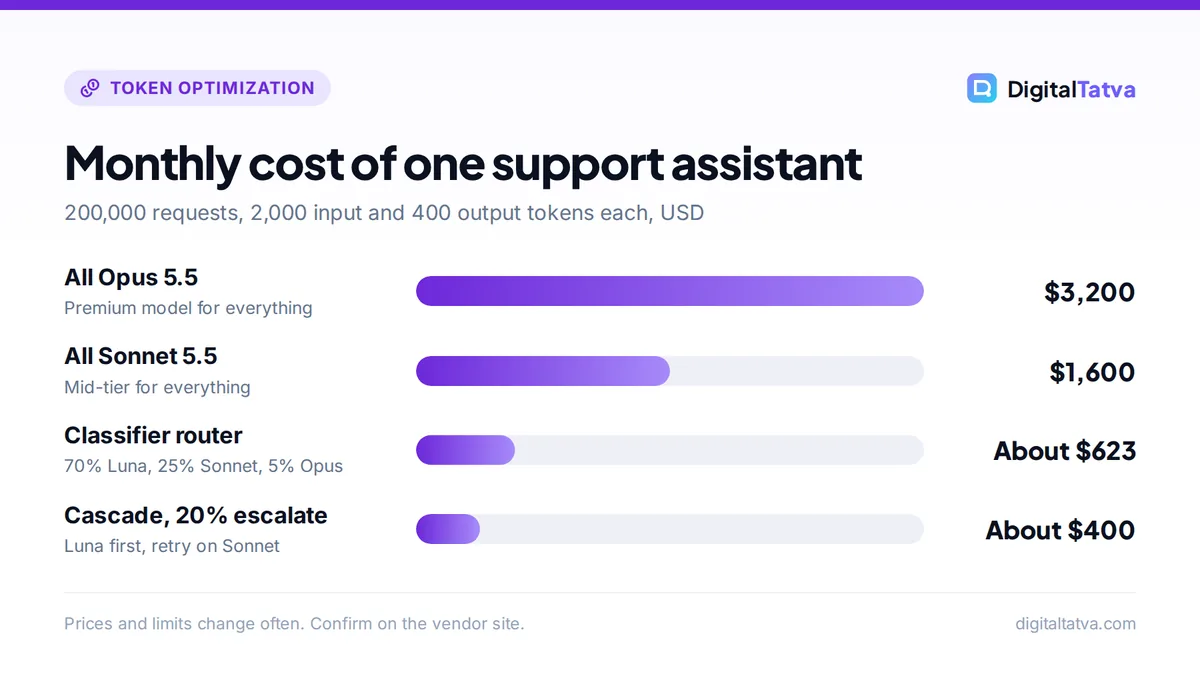
Say your support assistant handles 200,000 requests a month, each with about 2,000 input tokens (instructions, help-center snippets and the question) and 400 output tokens. That is 400 million input and 80 million output tokens a month.
Without routing
- Everything on Claude Sonnet 5.5: (400 x $2) + (80 x $10) = $800 + $800 = $1,600 a month.
- Everything on Claude Opus 5.5: (400 x $4) + (80 x $20) = $1,600 + $1,600 = $3,200 a month.
With a classifier router
A GPT-6 Luna classifier reads the first 300 tokens of each request and outputs a one-word label (about 5 tokens).
- Classifier cost. 200,000 x 300 = 60M input tokens x $0.10 = $6.00, plus 1M output tokens x $0.50 = $0.50. Total $6.50.
- 70% simple, to GPT-6 Luna. 280M input x $0.10 = $28, plus 56M output x $0.50 = $28. Total $56.
- 25% standard, to Sonnet 5.5. 100M input x $2 = $200, plus 20M output x $10 = $200. Total $400.
- 5% complex, to Opus 5.5. 20M input x $4 = $80, plus 4M output x $20 = $80. Total $160.
Total: $6.50 + $56 + $400 + $160 = about $623 a month, 61% less than all-Sonnet, while the hardest 5% of requests get a better model than before.
With a cascade instead
Send everything to GPT-6 Luna first: (400 x $0.10) + (80 x $0.50) = $40 + $40 = $80. If 20% fail the quality check and are retried on Sonnet 5.5, those 40,000 requests add (80 x $2) + (16 x $10) = $160 + $160 = $320. Total about $400 plus the cost of the check. But if 40% escalate, the retries cost $640 and the total reaches $720, more than the classifier router. Cascades win only when the budget model succeeds most of the time.
Tip: Measure cost per successful task, not cost per token. A budget model that fails often and triggers retries or human fixes can be more expensive overall. Our guide on estimating AI API costs shows how to model this before you build.
The hidden costs of routing
Broken prompt caches
Prompt caches belong to one model. If a long conversation hops between models, each switch rebuilds the cache on the new model at full input price. On Sonnet 5.5, cached input costs $0.20 per million versus $2 fresh, so losing the cache on a 100,000-token conversation costs about 0.1 x $1.80 = $0.18 extra per switch. Route once per conversation or per task, and keep shared instructions at the start of the prompt. See our prompt caching guide.
Inconsistent tone and format
Different models write differently. Users may notice a support bot that sounds different from one message to the next. Strict output formats, shared system prompts and examples reduce this.
Classifier and gateway overhead
Classifiers add a few milliseconds to seconds of latency and a small cost. Gateways may add fees; OpenRouter, for instance, charges 5.5% (minimum $0.80) when you buy credits, although it passes model prices through without markup.
Context window and long-prompt pricing
Budget models may have smaller context windows or different long-context pricing. Claude Haiku 4.5 has a 200K context window, while Sonnet 5.5 and Opus 5.5 offer 1M. OpenAI bills GPT-6 requests over 272K input tokens at higher rates. Route long documents to a model that handles them economically; our context window explainer covers the limits.
Ready-made routers and built-in routing
OpenRouter Auto Router
OpenRouter gives one API for models from many labs. Its Auto Router (model id openrouter/auto) classifies each prompt into about 30 task types and ranks models by what OpenRouter users spend on that task type over the last seven days. OpenRouter says “there is no additional fee for using the Auto Router”: you pay the selected model’s normal rate. You can restrict choices with allowed_models (for example anthropic/*), exclude models, set a cost_tier from low to max, and cap price with provider.max_price. The response’s model field tells you which model answered. Details are in the official Auto Router docs.
Self-hosted gateways
Open-source proxies such as LiteLLM put many providers behind one interface and track spend by key, and Anthropic’s Claude Code documentation notes that several large enterprises use LiteLLM for this. You write the routing logic yourself, which gives full control and no gateway fee, at the cost of running the service.
Routing inside the tools you already use
- Claude Code: the
opusplanalias uses Opus for planning and Sonnet for execution, and subagents can be set to Haiku for simple jobs. See our guide to reducing Claude Code and Cursor costs. - Cursor: its own models (Composer 2.5, Grok) sit in a pool with much more included usage, while Claude, GPT and Gemini are billed at API rates, which rewards routing routine work to Composer.
- Bolt.new: its docs say “Bolt handles model selection behind the scenes” across its Standard and Max agents.
How to build a simple router in five steps
- Collect real requests. Export 200 to 500 recent prompts and tag each as simple, standard or complex by hand.
- Define a quality bar. Decide what a good answer looks like: valid JSON, a correct label, a passing test, or a rubric score.
- Test each tier. Run the sample through a budget, mid and premium model. Record pass rate and cost per request. Use the Batch API at 50% off to make these tests cheap.
- Start with rules, then add a classifier. Route obvious cases by rules. Add a cheap classifier for the rest and check its accuracy on your tagged sample.
- Monitor and adjust. Log which model handled each request, its cost and any user complaints. Revisit monthly, since prices change; Gemini 3.8 Flash, for example, doubles in price on 1 January 2027.
When routing is not worth it
- Low volume. If your API bill is $20 a month, the engineering time costs more than the savings.
- Uniformly hard tasks. If every request needs a premium model, routing adds overhead with nothing to save.
- Strict compliance needs. Sending data to several providers multiplies the vendors you must vet. Our AI data privacy guide explains what to check.
- When batching or caching would do more. For predictable workloads, prompt caching and the Batch API may cut costs further with less complexity. Try those first.
Frequently asked questions
What is model routing in AI?
Model routing is the practice of automatically choosing which AI model answers each request. A router uses rules, a small classifier model or a cascade to send easy requests to cheap models and hard requests to stronger ones. The goal is the lowest cost per good answer, rather than using one expensive model for everything.
How much can model routing save?
It depends on your traffic mix. In our support assistant example, routing 70% of requests to GPT-6 Luna, 25% to Sonnet 5.5 and 5% to Opus 5.5 cut the monthly bill from $1,600 to about $623, a 61% saving. Workloads with more easy requests save more; uniformly hard workloads save little.
Does OpenRouter charge extra for routing?
OpenRouter says there is no additional fee for its Auto Router; you pay the chosen model’s standard rate, and it passes provider prices through without markup. It does charge a 5.5% fee (minimum $0.80) when you buy credits, and bring-your-own-key usage above a free allowance carries a 5% fee.
Is a cascade better than a classifier router?
A cascade is better when the budget model succeeds most of the time and you have a reliable automatic check, because you only pay for the strong model on failures. A classifier router is better when many requests are clearly hard, since cascades pay twice for every escalation. Many teams combine both approaches.
Can I use model routing without coding?
Partly. Tools you already use route for you: Claude Code’s opusplan alias, Cursor’s model pools and Bolt’s automatic model selection. Automation platforms also let you pick different models per step. For custom routing across providers inside your own app, you will need some code or a developer.
Verdict: route by difficulty, measure by outcome
Model routing is one of the most effective ways to cut AI API costs once you have real volume. Start simple: send obvious easy requests to a budget model such as GPT-6 Luna, keep a mid-tier model such as Sonnet 5.5 as the default, and reserve Opus 5.5 or a flagship for the hardest few percent. Route per conversation to protect your prompt cache, measure cost per successful task, and stack routing with caching and batching. Model prices change often, so confirm current rates on each provider’s pricing page before you set your rules.
Related reading: DeepSeek API pricing and GPT-6 models explained.
Pricing and features are checked at the time of writing and can change. Some links may be affiliate links, which never affect our verdicts.