10 AI Humanizer Tools Compared: Do They Really Beat AI Detectors?
Grammarly, QuillBot, Undetectable AI and seven more AI humanizers compared on price and limits, plus an honest look at why detectors and humanizers are both unreliable.

On this page
- Key takeaways
- Quick answer: do AI humanizers beat AI detectors?
- Why AI detectors are unreliable (and why that matters)
- The 10 AI humanizer tools compared
- A better workflow: edit AI drafts so they sound like you
- Is it ethical to use an AI humanizer?
- How to choose an AI humanizer and pricing notes
- Frequently asked questions
- Verdict: the best AI humanizer is a good editor
An AI humanizer rewrites AI-generated text so it reads more naturally, but no AI humanizer reliably “beats” AI detectors, and no AI detector reliably catches AI writing either. Both sides are guessing from statistical patterns, so results swing from one run, tool and document to the next. The honest use for these tools is editing a stiff AI draft into clear, natural prose for work you are allowed to use AI on, not disguising AI work where it is banned.
Below we compare 10 AI humanizer tools by price, limits and positioning as of October 2026, explain why detector scores are not proof, and show an editing workflow that beats any humanizer button.
Key takeaways
- AI detectors are unreliable: OpenAI shut down its own AI text classifier in July 2023 “due to its low rate of accuracy”, and Stanford researchers found detectors often flag non-native English writing as AI.
- Humanizers are unreliable too. Turnitin added “AI bypasser detection” in 2025 to flag text run through humanizer tools, so a “100% human” score on one checker means little.
- Grammarly and QuillBot both say their humanizers are not meant to bypass detectors and tell users to disclose AI use where rules require it.
- Prices range from free (Grammarly, QuillBot, Wordtune basic tiers) to about $30 to $50 a month for high-volume tools like StealthGPT.
- Submitting AI work where it is not allowed can mean failing grades, academic misconduct cases or lost clients. No tool removes that risk.
Quick answer: do AI humanizers beat AI detectors?
Sometimes a humanized text scores as “human” on a given detector, and sometimes the same text gets flagged on another detector or a later version of the same one. That is not a feature you can count on. Detectors and humanizers are in an arms race, and both publish confident marketing claims that independent testers have not confirmed.
| Question | Honest answer |
|---|---|
| Can a humanizer guarantee a “human” score? | No. Results vary by detector, version and text |
| Are AI detectors accurate enough to prove AI use? | No. They give probability scores and produce false positives |
| Can detectors spot humanized text? | Some now try to. Turnitin launched AI bypasser detection in 2025 |
| Is humanizing AI text cheating? | It depends on the rules. If AI use is banned or must be disclosed, hiding it is misconduct |
| What is a legitimate use? | Editing your own AI-assisted drafts for clarity, tone and flow where AI is allowed |
| What works better than a humanizer? | Adding your own facts, examples and voice, then editing by hand |
Watch out: If your school, university, publisher or client bans AI or requires disclosure, a humanizer does not make undisclosed AI use acceptable. Grammarly’s own humanizer page warns that hiding AI use in academic settings “may be considered unethical and could constitute cheating or plagiarism.” Follow the policy, and when in doubt, ask and disclose.
Why AI detectors are unreliable (and why that matters)
AI detectors look for statistical signals, such as how predictable each word is, rather than any hidden tag in the text. That approach has three well-documented problems.
- Low accuracy even from AI labs. OpenAI’s own AI classifier correctly identified only 26% of AI-written text in its challenge set and wrongly labeled human text as AI 9% of the time. OpenAI withdrew it on July 20, 2023, citing its “low rate of accuracy”. See OpenAI’s classifier notice.
- Bias against non-native writers. A 2023 Stanford study by Liang and colleagues found that widely used GPT detectors “consistently misclassify non-native English writing samples as AI-generated”, and the authors cautioned against using detectors in educational settings. That matters for the many students and professionals in India who write in English as a second language.
- Vendor claims are hard to check. Turnitin says its false positive rate is under 1%, but independent testing of that claim is limited, and a score is a probability, not evidence.
The lesson cuts both ways: if you are falsely flagged, drafts and version history are your best defense, and text a humanizer gets past a detector today can be flagged tomorrow.
The 10 AI humanizer tools compared
Here is the quick comparison. “Positioning” shows whether a tool sells itself as a writing editor or openly as a detector bypass tool, which tells you a lot about the risk you take on.
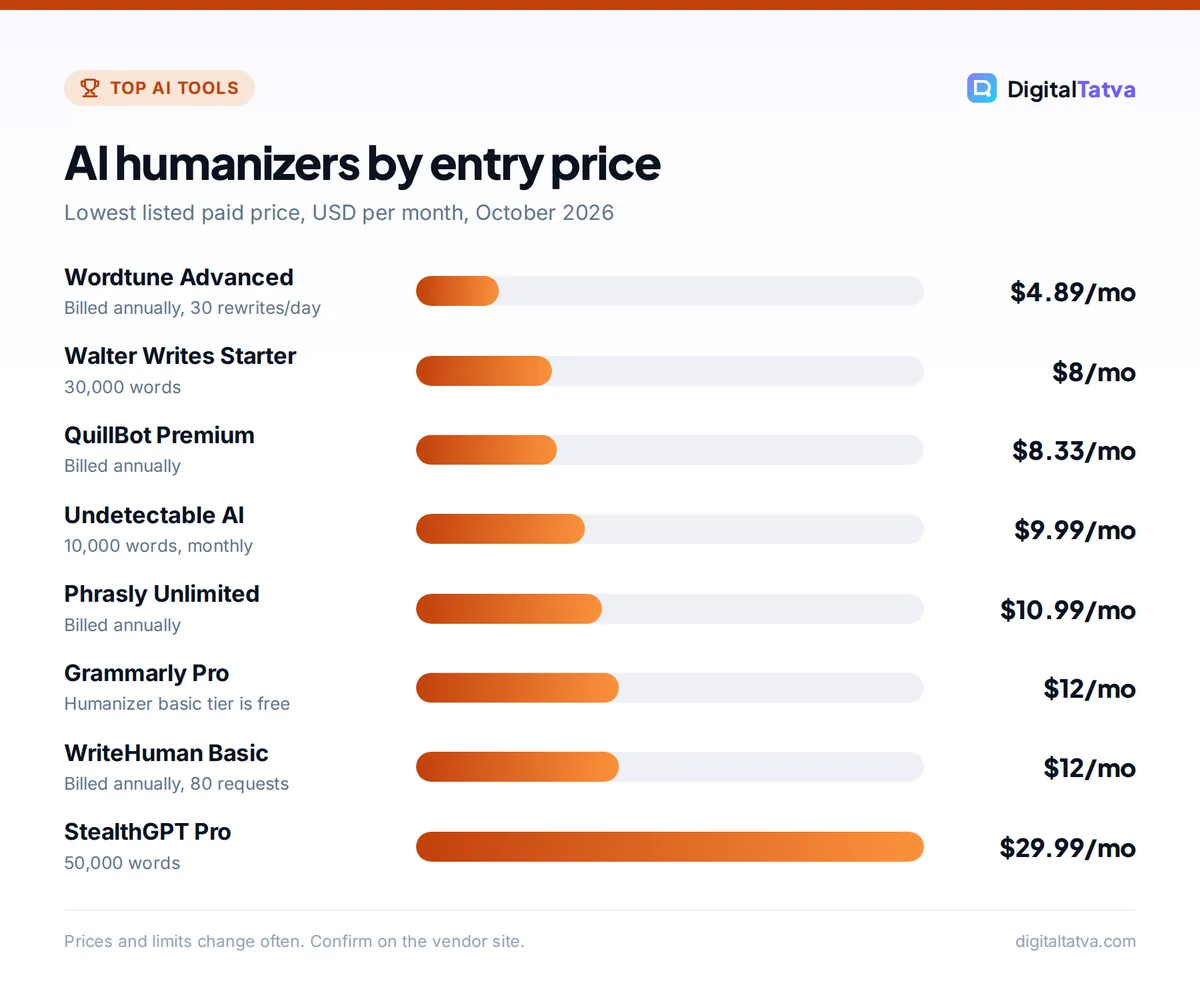
| Tool | Best for | Starting paid price | Free option | Positioning |
|---|---|---|---|---|
| Grammarly Humanizer | Natural tone with transparency | Pro $12/mo | Yes, basic | Editor, “not intended to bypass AI detectors” |
| QuillBot AI Humanizer | Students and quick rewrites | $8.33/mo billed annually | Yes, short texts | Editor, says disclose AI use |
| Wordtune | Sentence-level rewrites | $4.89/mo billed annually | Yes, 10 rewrites/day | Editor |
| ChatGPT or Claude | DIY editing with your own prompt | Go $8/mo, Pro $20/mo | Yes | General assistant |
| Undetectable AI | Low-cost high volume | $9.99/mo (10K words) | 250-word trial | Bypass marketing |
| WriteHuman | Short pieces with variations | $12/mo billed annually | 3 requests/mo | Bypass marketing |
| StealthGPT | Very large word volumes | $29.99/mo (50K words) | No | Bypass marketing |
| Walter Writes AI | Cheap monthly word bundles | $8/mo (30K words) | Limited free use | Bypass marketing |
| HIX Bypass | Multiple rewrite modes | From about $9.99 to $14.99/mo | Sign-up trial | Bypass marketing |
| Phrasly | Unlimited words on a budget | $10.99/mo billed annually | $2 for 3 days | Bypass marketing |
We have not run our own detector benchmark, so we do not rank by pass rates; any precise “bypass score” measures one detector at one moment. We judge each tool on price, limits and how honestly it describes itself.
1. Grammarly Humanizer: Best for natural tone with transparency
- Starting price: Free; Grammarly Pro $12/month
- Free plan: Yes, basic humanization
- Best for: professionals and students who want clearer prose and a record of AI use
Grammarly’s humanizer is free to try: paste text or upload a document, click Humanize and get a rephrased version. A free account adds the Humanizer agent with four voices, custom voice profiles and six languages, and Grammarly Pro unlocks the full experience. Grammarly is clear that “This tool is not intended to bypass AI detectors”, and its Authorship feature shows which parts of a document came from AI, your own typing or online sources. Our Grammarly review covers Pro in detail.
Skip it if: you need long rewrites in many languages beyond the six supported.
2. QuillBot AI Humanizer: Best for students and quick rewrites
- Starting price: Premium $8.33/month billed annually
- Free plan: Yes, basic humanizing for short text (account required)
- Best for: students, bloggers, non-native English writers polishing drafts
QuillBot offers free “basic humanizing” for short text with word and usage limits, while Premium removes the limits and adds long-form humanizing, history, an AI detector and a plagiarism checker (up to 25,000 words a month). QuillBot says the humanizer is not a tool for evading AI detection, calls detector scores “a signal, not a verdict”, and tells users to follow their institution’s AI rules and cite AI help where required. The monthly price was not shown when we checked, only the annual rate.
Skip it if: you write in Hindi; it supports English, Spanish, French, German and Portuguese only.
3. Wordtune: Best for sentence-level rewrites
- Starting price: Advanced $4.89/month billed annually
- Free plan: Yes, 10 rewrites and AI suggestions per day
- Best for: emails, LinkedIn posts and paragraphs that sound robotic
Wordtune is a rewriting assistant rather than a “humanizer”, which is exactly why it is useful: you highlight a clunky sentence and choose from alternative phrasings, so you stay in control of every change. Advanced raises the limit to 30 rewrites a day, and Unlimited ($6.99 a month on annual billing) removes it. Paid plans have a 3-day free trial.
Skip it if: you want a one-click rewrite of a full 2,000-word article.
4. ChatGPT or Claude with an editing prompt: Best free DIY option
- Starting price: Free; ChatGPT Go $8/month, Claude Pro $20/month
- Free plan: Yes on both
- Best for: anyone who wants control over voice, structure and facts
You do not need a dedicated tool to make an AI draft read naturally. Give ChatGPT or Claude your draft plus clear instructions: vary sentence length, cut filler phrases, use your examples, keep the facts, and match a sample of your own writing. Our Claude prompts for writing and editing and ChatGPT vs Claude comparison help you pick the right assistant.
Skip it if: you will not spend five minutes reviewing the output. No assistant knows your real experiences.
5. Undetectable AI: Best for low-cost high volume
- Starting price: $9.99/month for 10,000 words, or $5/month billed annually ($60/year)
- Free plan: 250-word trial
- Best for: marketers rewriting large amounts of their own AI-assisted copy
Undetectable AI sells word bundles from 10,000 to 50,000 words a month (the 50K plan is $42.50 monthly or $21.25 on annual billing), with an AI detector included and API access. It openly markets “Passes AI detectors”, and its pricing page carries no academic use disclaimer, so treat that claim as marketing rather than a promise.
Skip it if: you need a tool your school or employer would recognize as a legitimate editor.
6. WriteHuman: Best for short pieces with several variations
- Starting price: Basic $12/month billed annually ($144/year)
- Free plan: Yes, 3 requests a month up to 250 words each
- Best for: short web copy and emails where you want options
WriteHuman meters by requests rather than total words. Basic gives 80 requests a month at up to 600 words each with two output variations, Pro ($19 a month annually) gives 200 requests up to 1,200 words, and Ultra ($39 a month annually) is unlimited at up to 3,000 words per request. Its pricing page showed conflicting monthly figures ($20, $29 and $59 in one table), so confirm the price at checkout.
Skip it if: you regularly edit long reports.
7. StealthGPT: Best for very large word volumes
- Starting price: Pro $29.99/month (50,000 words, 1,000 per request)
- Free plan: None listed
- Best for: agencies with high volumes and a Chrome or iOS workflow
StealthGPT is one of the pricier options. Max at $49.99 a month gives 200,000 words and three teammate seats, and Enterprise at $179.99 adds API access. Yearly billing saves up to 17.5%, though annual prices were not shown. Its positioning is a red flag for work with AI rules.
Skip it if: you only need a few hundred words a week.
8. Walter Writes AI: Best for cheap monthly word bundles
- Starting price: Starter $8/month (30,000 words, 750 per request)
- Free plan: Limited free usage, terms not stated
- Best for: freelancers on a tight budget
Walter Writes offers generous word counts for the price: Pro is $13 for 70,000 words, Elite $26 for 200,000, and Teams $99 for 500,000 words with 10 members. It lists 80+ languages and an AI detector. It also advertises “ChatGPT watermark removal”, which tells you its target market.
Skip it if: you want a tool with a clear stance on responsible use.
9. HIX Bypass: Best for trying multiple rewrite modes
- Starting price: Standard listed at $14.99/month, shown at $9.99 (billing label unclear)
- Free plan: Sign-up trial, limits not stated
- Best for: users who want fast, aggressive and latest rewrite modes to compare
HIX Bypass (now at hixbypass.com) offers Fast, Aggressive and Latest modes, 50+ languages and tone matching. Standard includes 5,000 words a month and Premium 50,000, with an Unlimited tier above. The page shows a lower price next to each listed price without saying whether it is annual or promotional, so read the checkout terms.
Skip it if: you need transparent, clearly labeled pricing.
10. Phrasly: Best for unlimited words on a budget
- Starting price: Unlimited $10.99/month billed annually
- Free plan: No; $2 for 3-day access (1,000 words)
- Best for: heavy users who want a flat fee
Phrasly’s Unlimited plan removes the humanization word cap, allows up to 5,000 words per request and includes a 100,000-word plagiarism checker. The $2 three-day pass is a cheap way to see whether it suits your writing. It advertises “advanced AI detection bypass”, which no tool can guarantee.
Skip it if: you dislike annual commitments; the monthly rate was not shown.
A better workflow: edit AI drafts so they sound like you
The writing that reads most human is writing a human actually shaped. This five-step process works for blog posts, reports and emails, and it is the same approach we recommend in our guide on how to write a blog post with AI that actually ranks.
- Start with your own outline and notes. Write the key points, opinions and examples yourself before asking AI for a draft. This is where originality comes from.
- Ask for a draft in your voice. Paste a few paragraphs you wrote and ask the assistant to match the tone, sentence length and vocabulary. Our prompt engineering guide shows how to give examples.
- Add what AI cannot know. Insert real numbers from your work, client stories, screenshots described in words and local context, such as Indian pricing or regulations.
- Cut AI tells by hand. Remove filler openings, repeated “moreover” style transitions, vague claims and lists of three that say nothing. Read it aloud.
- Use a humanizer or rewriter only for stubborn sentences. Tools like Wordtune or Grammarly are best for fixing a few awkward lines, not rewriting everything.
Tip: Keep your drafts and version history (Google Docs and Grammarly Authorship both help). If a detector ever flags your genuine work, a visible editing trail is far more convincing than any detector score.
For Google rankings, the goal is helpful, accurate content rather than “undetectable” content. Google’s guidance says using AI “to generate many pages without adding value for users” may violate its spam policy on scaled content abuse. Our list of the best AI SEO tools covers tools that improve content quality instead.
Is it ethical to use an AI humanizer?
The tool is not the problem; the context is.
Generally fine
- Polishing your own AI-assisted marketing copy where clients allow AI
- Making a non-native English draft read more fluently, with your ideas intact
- Rewriting robotic product descriptions for your own store
- Editing internal documents under a company AI policy that permits it
Not acceptable
- Hiding AI use in coursework, exams or theses where AI is banned or must be disclosed
- Passing off AI-written articles as fully human to clients who asked for no AI
- Rewording someone else’s work to avoid plagiarism checks
- Using humanized AI text to fake reviews or testimonials
Students should check their course and university AI policy first, and many tools that help with learning rather than shortcuts are listed in our best AI tools for students. Businesses should write their rules down; our AI usage policy template includes a section on disclosure.
How to choose an AI humanizer and pricing notes
- Prefer editors over bypass tools. Grammarly, QuillBot and Wordtune are built to improve writing and are more defensible if anyone asks how you edited your text.
- Match the billing unit to your use. Word-based plans (Undetectable AI, StealthGPT, Walter Writes) suit bulk users; request-based plans (WriteHuman) suit short pieces; rewrite-count plans (Wordtune) suit light editing.
- Check monthly vs annual. Several pricing pages showed only annual rates or unlabeled discounts. Confirm the real monthly charge at checkout.
- Watch privacy. You are pasting drafts into a third-party service. Do not upload confidential client or student data; see our guide to AI data privacy for business.
- Try free first. Free tiers plus ChatGPT or Claude cover most needs. Our list of the best AI writing tools has more options.
Frequently asked questions
Do AI humanizers really work?
They can make stiff AI text read more smoothly, which is useful. But they cannot guarantee a “human” score, because detectors differ and change often, and Turnitin now looks for signs of humanizer tools. The most reliable way to make text sound human is to add your own ideas, facts and examples, then edit by hand.
Can Turnitin detect humanized AI text?
Turnitin says it can. In August 2025 it added “AI bypasser detection”, trained on patterns left by popular humanizer tools. How accurate that is has not been independently confirmed, and detector scores are probabilities, not proof. If AI use is not allowed in your course, humanizing AI text is still a policy violation whether or not it is flagged.
Are AI detectors accurate?
Not reliably. OpenAI withdrew its own AI text classifier in 2023 because of low accuracy, and a 2023 Stanford study found popular detectors often flag non-native English writing as AI-generated. Detectors can be one signal among many, but a score alone should not be treated as evidence of misconduct.
Is there a free AI humanizer?
Yes. Grammarly and QuillBot both offer free basic humanizers, and Wordtune’s free plan gives 10 rewrites a day. You can also use free ChatGPT or Claude with an editing prompt that asks for varied sentence length, fewer filler phrases and your own tone. Paid tools mainly add higher word limits and longer inputs.
What should I do if a detector falsely flags my writing?
Stay calm and show your process. Share drafts, version history, notes and sources, and offer to explain your work in person. Point out that detector vendors themselves describe scores as indicators rather than proof. Tools like Google Docs version history and Grammarly Authorship make this much easier, so turn them on before you start writing.
Verdict: the best AI humanizer is a good editor
If you want AI drafts to sound natural, start with the free tools that are honest about what they do: Grammarly Humanizer for tone and transparency, QuillBot for quick rewrites, and Wordtune for sentence-level fixes. Use ChatGPT or Claude with a voice-matching prompt for longer pieces, and treat bypass-focused tools with caution, because neither humanizers nor detectors are reliable enough to bet a grade or a client relationship on. Whatever you choose, follow the AI rules that apply to your work. Prices and limits change often, so confirm them on each vendor’s pricing page before you subscribe.
Related reading: 10 best free AI tools you can use today.
Pricing and features are checked at the time of writing and can change. Some links may be affiliate links, which never affect our verdicts.