100 Best ChatGPT Prompts for Work, Study and Everyday Life
100 copy-ready ChatGPT prompts for work, writing, study, careers, money, everyday life and fun, updated for GPT-6 and Intelligent UI, with tips to get better answers on Free or Plus.

On this page
- Key takeaways
- How to use these best ChatGPT prompts
- ChatGPT prompts for work and productivity (1 to 20)
- Writing and communication prompts (21 to 35)
- ChatGPT prompts for study and learning (36 to 50)
- Career and job search prompts (51 to 60)
- Money and planning prompts (61 to 68)
- Everyday life prompts (69 to 85)
- Tech help and data prompts (86 to 93)
- Creativity and fun prompts (94 to 100)
- Get better answers: settings and plan tips
- Frequently asked questions
- Next steps: build your own prompt library
The best ChatGPT prompts tell the model who it is helping, what you want, and what the answer should look like, in one or two sentences. Below are 100 copy-ready prompts for work, study and everyday life, grouped by task, with [brackets] where you add your own details.
Every prompt here works on ChatGPT Free, which now runs on GPT-6 Luna, and on paid plans, which use GPT-6 Sol. Since 7 October 2026, ChatGPT can answer with Intelligent UI (charts, buttons, forms and small tools inside the chat), so we have marked prompts that make good use of it.
Key takeaways
- A strong prompt has four parts: context, task, constraints and format. Even one line of context about you improves answers.
- All 100 prompts work on the free plan; Plus ($20 a month) helps mainly with file uploads, longer limits and higher thinking levels.
- Prompts that ask for plans, comparisons or calculators can trigger Intelligent UI, which has no separate usage quota.
- Ask follow-up questions instead of starting over; ChatGPT improves a draft much faster than it writes a perfect one.
- Never paste passwords, ID numbers or confidential client data, and check facts, numbers and citations before you rely on them.
How to use these best ChatGPT prompts
Copy a prompt, replace everything in [brackets], and add one line about yourself if it helps (“I am a first-year nursing student”). Then refine with follow-ups like “shorter” or “what did you assume?”
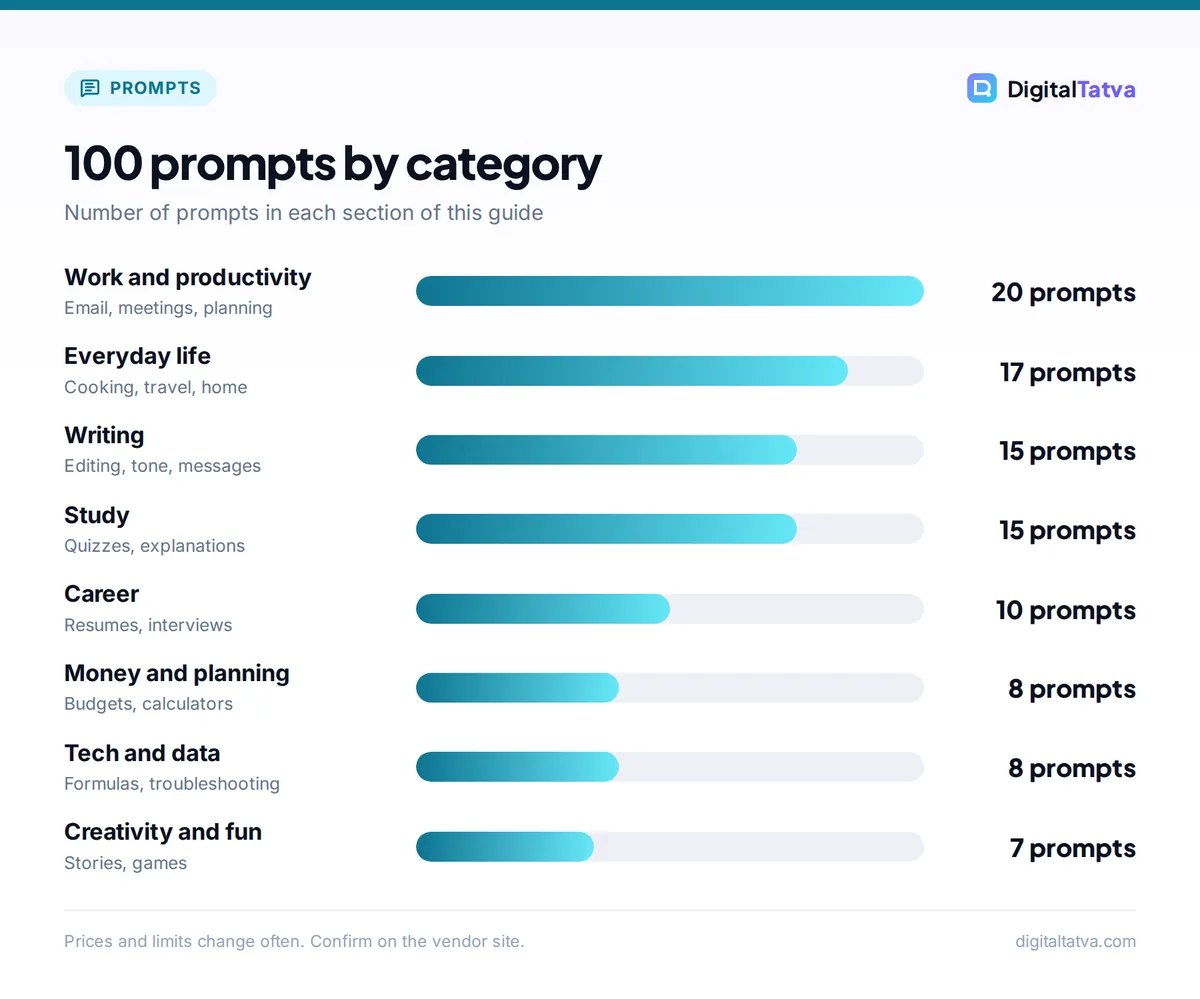
| Section | Prompts | Best for | Plan needed |
|---|---|---|---|
| Work and productivity | 1 to 20 | Email, meetings, planning, reports | Free |
| Writing and communication | 21 to 35 | Editing, tone, difficult messages | Free |
| Study and learning | 36 to 50 | Explanations, quizzes, revision | Free |
| Career and job search | 51 to 60 | Resumes, interviews, negotiation | Free (Plus for many file uploads) |
| Money and planning | 61 to 68 | Budgets, comparisons, calculators | Free |
| Everyday life | 69 to 85 | Cooking, travel, home, health habits | Free |
| Tech help and data | 86 to 93 | Spreadsheets, formulas, troubleshooting | Free (Plus for heavier data analysis) |
| Creativity and fun | 94 to 100 | Games, stories, gifts | Free |
Our prompt engineering guide explains why these work, and OpenAI’s prompt engineering documentation recommends the same habits: clear instructions, examples and a defined format.
Tip: The formula behind most prompts below is “Act as [role]. My situation is [context]. Do [task]. Keep it [constraint]. Format it as [format].”
ChatGPT prompts for work and productivity (1 to 20)
- Turn these rough notes into a clear email to [person] asking for [outcome]. Keep it under 120 words and end with one specific question: [notes]
- Summarize this email thread in five bullets: decisions made, open questions, who owns what, deadlines and anything I need to reply to: [thread]
- Write three versions of a polite reply declining [request], one warm, one neutral and one firm.
- Create an agenda for a [30]-minute meeting about [topic] with [number] people. Include time per item and the decision we need by the end.
- Turn this meeting transcript into minutes with action items, owners and due dates in a table: [transcript]
- I have these tasks today: [list]. Sort them by urgency and impact, estimate time for each and build a schedule from [start time] to [end time].
- Break the project [project] into phases, tasks and milestones over [number] weeks. Show it as a table I can paste into a spreadsheet.
- Write a one-page status update for my manager on [project]: progress, risks, help needed. Plain language, no jargon.
- Act as a skeptical reviewer. List the ten strongest objections to this proposal and how I could answer each: [proposal]
- Draft a standard operating procedure for [task] with numbered steps, a checklist and common mistakes to avoid.
- Rewrite this paragraph for a busy executive: lead with the conclusion, cut it by half, keep every number: [text]
- Give me five questions I should ask before starting [project] so I do not have to redo work later.
- Compare [option A] and [option B] for [goal] in a table with cost, effort, risk and time. Then recommend one and explain why.
- Create a weekly planning template for a [job role] with sections for priorities, meetings, deep work and follow-ups.
- Turn this long document into a two-minute brief with the five points that matter most to [audience]: [document]
- Write a job description for a [role] at a [type of company], with responsibilities, must-have skills and nice-to-haves.
- Help me prepare for a difficult conversation with [colleague] about [issue]. Suggest an opening line, likely reactions and calm responses.
- Generate a simple decision matrix for choosing [tool or vendor] with weighted criteria I can adjust. (Good for Intelligent UI.)
- Draft a polite follow-up to [person] who has not replied for [number] days about [topic]. Keep it short and easy to answer.
- Review my week: [what happened]. Tell me what went well, what slowed me down and three changes for next week.
For business-specific versions of these, see our 60 AI prompts for small business owners.
Writing and communication prompts (21 to 35)
- Edit this text for clarity and grammar only. Do not change my voice. Show changes as a bulleted list after the edited version: [text]
- Make this message sound [friendlier / more professional / more confident] without making it longer: [message]
- Rewrite this for a 12-year-old reader, keeping all the facts correct: [text]
- Write a LinkedIn post about [achievement or lesson] in my voice. Here are two posts I wrote before as style examples: [examples]
- Give me ten headline options for an article about [topic], each under 60 characters.
- Turn these bullet points into a well-structured blog introduction of about 120 words: [bullets]
- I need to apologize to [person] for [mistake]. Write a sincere message that takes responsibility and offers a fix, without over-explaining.
- Translate this into natural [language] as a native speaker would say it, then list any phrases that do not translate directly: [text]
- Write a speech of about [number] minutes for [occasion] with one story, one joke and a short closing line.
- Read this draft and tell me the three weakest sentences and why. Do not rewrite the whole thing: [draft]
- Write a thank-you note to [person] for [reason] that mentions one specific detail: [detail]
- Turn this complaint into a firm but polite message to customer service, including what I want them to do: [complaint]
- Summarize this article in three sentences, then give me the one idea most worth remembering: [article]
- Draft a short bio for [platform] in first person and third person, 50 words each, based on: [details]
- Create a style guide for my writing based on these samples: tone, sentence length, words I use often and words I avoid: [samples]
If you write a lot, Claude is also strong at editing; try our Claude prompts for writing and editing.
ChatGPT prompts for study and learning (36 to 50)
- Explain [concept] in simple terms, then with an everyday analogy, then at university level.
- Quiz me on [topic] with ten multiple-choice questions, one at a time. Wait for my answer and explain anything I get wrong.
- Make flashcards for [chapter or topic] with a term on the front and a one-line definition on the back.
- Show how [concept, such as compound interest or the central limit theorem] works with an interactive example I can adjust. (Good for Intelligent UI.)
- Here are my lecture notes: [notes]. Turn them into a structured summary with headings and a list of likely exam questions.
- Create a [number]-week study plan for [exam] with [hours] per day, including revision days and practice tests.
- I keep getting [type of problem] wrong. Walk me through one example step by step, then give me three similar problems to try.
- Act as a Socratic tutor. Do not give me the answer to [question]; ask guiding questions until I work it out.
- Compare [theory A] and [theory B] in a table with key ideas, evidence, criticisms and who proposed them.
- Check my essay outline for logic gaps and suggest a stronger thesis: [outline]
- Explain the mistakes in my solution without solving it for me: [my working]
- Give me a memory trick for remembering [list or sequence].
- Summarize the main arguments of [book or paper] and list three questions to discuss in class.
- Teach me the basics of [new skill] in 30 days. Give daily 20-minute exercises and a way to measure progress.
- Turn this topic into a one-page cheat sheet with formulas, definitions and one worked example: [topic]
Watch out: ChatGPT can state wrong facts confidently and sometimes invents sources. For assignments, use it to understand and practice, check every fact against your textbook, and follow your school’s AI rules. Our best AI tools for students includes tools that cite sources.
Career and job search prompts (51 to 60)
- Rewrite my resume bullet points to show results, using strong verbs and numbers where I have them. Do not invent figures: [bullets]
- Compare my resume to this job description and list missing keywords and skills I should address: [resume] [job description]
- Write a tailored cover letter for [role] at [company] using these three achievements: [achievements]
- Run a mock interview for [role]. Ask one question at a time, then score my answer and suggest a better version.
- Give me the STAR structure for answering “Tell me about a time you [situation]” using this experience: [experience]
- Draft a short LinkedIn message to [person] asking for a 15-minute chat about working in [field].
- Help me plan a salary negotiation for [role] in [city]. Script my opening, likely pushback and my responses.
- List ten questions I should ask the interviewer at the end of an interview for [role].
- I want to move from [current job] to [target job]. Map my transferable skills and a six-month plan to close the gaps.
- Write a polite resignation letter that keeps the relationship positive and offers a handover plan.
Money and planning prompts (61 to 68)
- Build a monthly budget from my income [amount] and expenses [list]. Show it as a table and flag categories above typical shares.
- Create a savings calculator for a goal of [amount] by [date] that shows the monthly amount needed. (Good for Intelligent UI.)
- Explain the difference between [financial product A] and [B] in plain language, with pros, cons and questions to ask a licensed advisor.
- Help me split a shared bill of [amount] between [names] with these exceptions: [details]. (Good for Intelligent UI.)
- List my subscriptions [list] by cost and usefulness and suggest which to cancel or downgrade.
- Plan a [event] for [number] people with a budget of [amount], including a cost breakdown and ways to save.
- Compare these three [products] for my needs [needs] in a table with price, features and drawbacks: [links or details]
- Create a checklist for [big purchase or move] with timelines from three months out to the day itself.
Note: ChatGPT is not a financial advisor. Use these prompts to organize information and prepare questions, and confirm tax, loan and investment decisions with a qualified professional.
Everyday life prompts (69 to 85)
- I have [ingredients]. Suggest three dinners I can make in under 30 minutes, with steps.
- Create a weekly vegetarian meal plan for [number] people with a combined shopping list grouped by aisle.
- Plan a timing schedule so [dish 1], [dish 2] and [dish 3] are ready at [time]. (Good for Intelligent UI.)
- Plan a [number]-day trip to [place] in [month] for [type of traveler] with a daily itinerary, travel times and a rough budget.
- Make a packing list for [trip] with [weather] and [activities], grouped by bag.
- Map a road trip from [start] to [end] with stops every two to three hours. (Good for Intelligent UI.)
- Write a cleaning schedule for a [size] home that takes 20 minutes a day.
- My [appliance or device] is [problem]. Walk me through safe troubleshooting steps before I call a technician.
- Suggest a beginner [exercise type] routine of 20 minutes, three times a week, with no equipment.
- Help me build a better sleep routine. Ask me five questions about my habits first, then suggest changes.
- Prepare a list of questions to ask my doctor about [symptom or condition], in order of importance.
- Explain this medical or legal letter in plain language and tell me what to ask the sender: [letter]
- Suggest ten gift ideas for [person] who likes [interests], under [budget].
- Help me write a fair chore chart for [household members] with rotating tasks.
- Plan a kids’ birthday party for [age] with [number] guests: games, food, timeline and shopping list.
- Build a wardrobe capsule of [number] pieces for [climate and lifestyle] that mix and match.
- I want to start [hobby]. Tell me what to buy first, what to skip and a four-week plan to get started.
Tech help and data prompts (86 to 93)
- Write an Excel or Google Sheets formula that [goal]. My data is in columns [columns]. Explain how it works.
- Analyze this spreadsheet and tell me the three most important trends, with a chart: [upload file]
- Clean this list: remove duplicates, fix capitalization and split names into first and last: [list]
- Explain this error message and give me the most likely fixes in order: [error]
- Write a simple script in [language] that [task]. Add comments for a beginner.
- Compare [device A] and [device B] for [use case] in a table and recommend one.
- Give me step-by-step instructions to [set up or change a setting] on [device or app].
- Turn this messy data into a clean table with consistent dates and units: [data]
Spreadsheet work goes further with OpenAI’s official add-in; see our guide on using ChatGPT for Excel and data analysis.
Creativity and fun prompts (94 to 100)
- Write a bedtime story for a [age]-year-old about [characters], about 300 words, with a gentle lesson.
- Create a trivia game about [topic] with scores I can track. (Good for Intelligent UI.)
- Give me 20 creative prompts for [drawing / journaling / photography] this month.
- Write a funny toast for [occasion] about [person], with two inside jokes: [jokes]
- Invent a board game for [number] players using only a deck of cards. Explain the rules simply.
- Turn my holiday photos’ descriptions into a short travel diary: [descriptions]
- Play a text adventure set in [setting]. Describe the scene and give me three choices each turn.
Get better answers: settings and plan tips
Free vs Plus for these prompts
Free and Go users chat with GPT-6 Luna and get “unlimited everyday text chats”, but uploads, images and data analysis have separate limits; Free allows 3 file uploads a day. ChatGPT Plus ($20 a month) uses GPT-6 Sol with Medium and High thinking for harder prompts. On Plus, Instant does not automatically switch to a higher thinking level, and typing “think harder” does not switch it either, so pick the level in the model menu. Compare plans in our ChatGPT pricing guide and see the caps in ChatGPT limits by plan.
| Feature | Free | Plus |
|---|---|---|
| Chat model | GPT-6 Luna | GPT-6 Sol (Instant, Medium, High) |
| Intelligent UI | Yes | Yes |
| File uploads | 3 per day | Up to 80 every 3 hours |
| Price | $0 | $20/month |
Make Intelligent UI work for you
Prompts that ask for a plan, calculator, comparison or interactive explanation often come back as tappable components. Intelligent UI has no separate usage quota and works from Instant to Extra High, but not at Pro effort. If you prefer plain text, turn off “Layout and visuals” in Settings on the web. Our Intelligent UI guide shows more examples.
Save prompts you reuse
Use Projects to store context for ongoing work. Custom GPTs still work but OpenAI has announced plans to retire them with a migration path to plugins, so do not build your whole workflow on one. Our beginner guide to ChatGPT covers Projects and memory.
Protect your privacy
To stop your chats training OpenAI models, turn off “Improve the model for everyone” under Settings, Data controls. Temporary chats are not used for training but may be kept for up to 30 days for safety, per OpenAI’s data controls FAQ. Business, Enterprise and Edu content is not used for training by default.
Frequently asked questions
What are the best ChatGPT prompts for beginners?
Start with simple, high-value prompts: summarize this email thread, turn my notes into an email, explain a concept three ways, plan my day from a task list, and suggest dinners from what is in my fridge. Each works on the free plan. Add one line of context and ask for a specific format, such as a table.
Do these prompts work on the free version of ChatGPT?
Yes. All 100 prompts work on ChatGPT Free, which runs on GPT-6 Luna with unlimited everyday text chats. Prompts that need file uploads or data analysis are limited on Free, which allows 3 uploads a day. ChatGPT Plus at $20 a month adds GPT-6 Sol, higher thinking levels and many more uploads.
How do I write a good ChatGPT prompt?
Give context (who you are and why), one clear task, constraints such as length or tone, and the output format you want. Include an example if style matters. Then refine with follow-ups like “shorter” rather than starting again.
Can ChatGPT make interactive answers from my prompts?
Yes. Since 7 October 2026, GPT-6 can reply with Intelligent UI: charts, buttons, forms and small tools such as bill splitters or savings calculators inside the chat. Ask for a calculator, plan or interactive explanation to trigger it. It has no separate usage quota, and you can turn off “Layout and visuals” in web settings if you prefer text.
Is it safe to paste work documents into ChatGPT?
Be careful. On personal accounts, turn off “Improve the model for everyone” in Data controls, and never paste passwords, ID numbers or confidential client data. ChatGPT Business and Enterprise do not use your content for training by default.
Next steps: build your own prompt library
Save the ten prompts you will use every week with your details filled in. For marketing work, continue with our 75 ChatGPT prompts for marketing; for company use, read our AI data privacy guide first. ChatGPT plans and features change often, so confirm current limits and pricing on OpenAI’s site before you upgrade.
Pricing and features are checked at the time of writing and can change. Some links may be affiliate links, which never affect our verdicts.