10 Best AI Research Tools for Students and Analysts
The 10 best AI research tools for 2026, from Perplexity, ChatGPT and Gemini deep research to Gemini Notebook, Elicit, Consensus and scite, with prices and free options.

On this page
The best AI research tool for most students and analysts is Perplexity, which answers questions with citations on its free plan and costs $20 a month for Pro with deep research and premium data sources. For long, structured reports, ChatGPT deep research and Gemini Deep Research are the strongest options, and Gemini’s version is included on the free plan. For academic papers, use Gemini Notebook (formerly NotebookLM) to study your own sources, and Elicit, Consensus, scite or Semantic Scholar to find and check peer-reviewed studies.
This guide gives you a quick picks table, ten tool cards with prices from official pages where we could confirm them, a workflow that combines the tools, and the fact-checking habits that stop AI research from going wrong.
Key takeaways
- Perplexity is the best all-round AI research tool: free with citations, $20 a month for Pro with deep research, file uploads and premium sources such as PitchBook and Statista.
- Gemini’s free plan includes Deep Research, and eligible US college students can get Google AI Pro free for a year (India: Google AI Plus free for a year), with redemption open until 31 December 2026.
- Gemini Notebook (the renamed NotebookLM) is free for 100 notebooks with 50 sources each, and answers only from the documents you upload.
- For academic work, pair a general tool with a scholarly one: Elicit for literature reviews, Consensus for study-based answers, scite for citation checks.
- Always open the source behind any claim before you quote it; AI tools still misread and occasionally invent citations.
Quick picks: best AI research tools compared
Starting prices are the cheapest paid tier in USD per month. Several academic tools could not be verified on official pages, and we say so where that applies.
| Tool | Best for | Starting price | Free plan |
|---|---|---|---|
| Perplexity | Best overall, sourced answers | $20 (Pro) | Yes |
| ChatGPT deep research | Long, structured reports | $20 (Plus) | Yes, limited |
| Gemini Deep Research | Free deep research | $19.99 (Google AI Pro) | Yes |
| Gemini Notebook | Studying your own sources | Via Google AI plans | Yes, generous |
| Claude | Reading very long documents | $20 (Pro), $17 annual | Yes |
| Elicit | Systematic literature reviews | Paid tiers, check site | Yes, Basic |
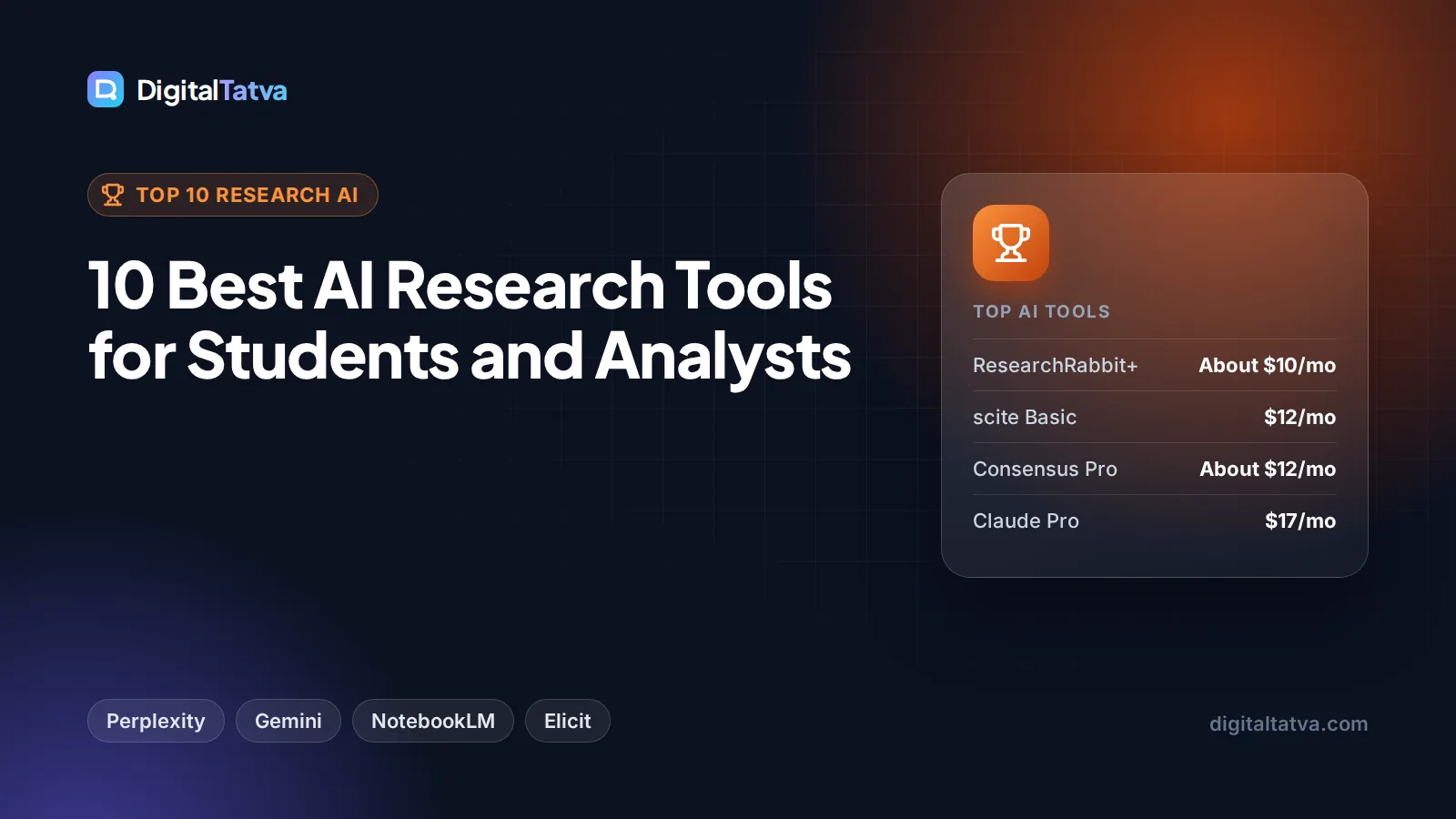
| Consensus | Answers backed by studies | About $12 annual (third-party) | Yes |
| scite | Checking how papers are cited | $20, or $144/year | Limited |
| Semantic Scholar | Free academic search | Free | Yes |
| ResearchRabbit | Mapping related papers | About $10 annual (third-party) | Yes |
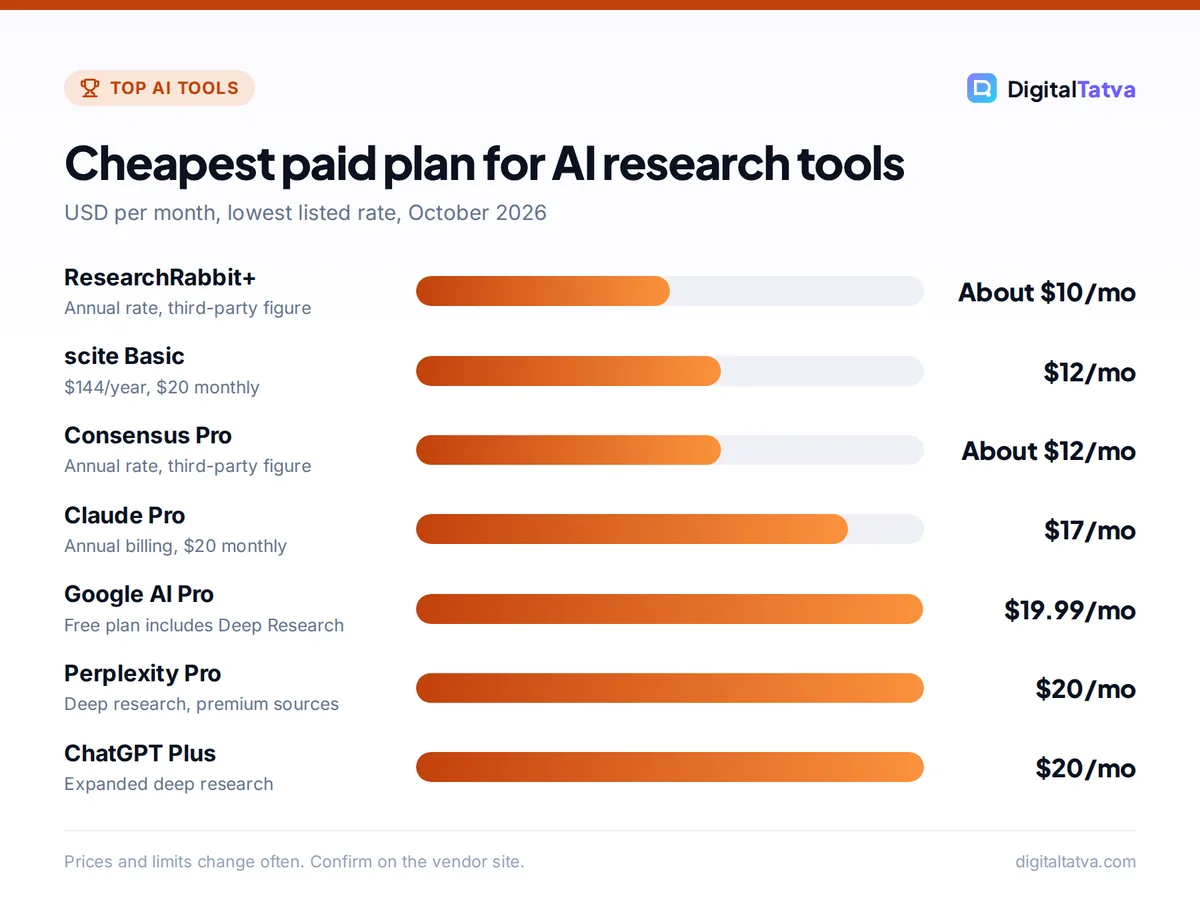
The 10 best AI research tools
We grouped the list into general research assistants first (best for market research, reports and everyday questions) and scholarly tools second (best for coursework, theses and evidence reviews).
1. Perplexity: Best overall AI research tool
- Starting price: Pro $20/month; Max $200/month
- Free plan: Yes, search with citations and limited advanced usage
- Best for: Students, marketers, analysts and journalists who need sources fast
Perplexity answers in plain English with numbered citations, so you can see where each claim came from. Pro adds deep research, a model picker, file uploads (PDFs, CSVs, audio, video and images), 4,000 bonus credits a month, access to the Perplexity Computer agent and premium data sources such as PitchBook and Statista.
Verified students and educators can get Education Pro at a discount, which adds Learn Mode; Perplexity’s help center does not state the exact price. Our Perplexity review covers answer quality, Perplexity pricing compares Pro and Max, and our guide on how to use Perplexity for research shows the search modes worth using.
Skip it if: you need to search only peer-reviewed literature; a scholarly tool below is more precise.
2. ChatGPT deep research: Best for long, structured reports
- Starting price: $20/month (Plus, expanded deep research); Pro from $100/month for maximum
- Free plan: Yes, limited deep research
- Best for: Market research, competitor analysis, literature overviews
Deep research in ChatGPT spends several minutes browsing, reading and reasoning before writing a long report with sources. Free users get a limited allowance, Plus gets “expanded” deep research and Pro gets the maximum, according to OpenAI’s pricing page. OpenAI does not publish exact monthly counts.
GPT-6 with Intelligent UI began rolling out on 7 October 2026, so answers can now include interactive charts and tables, which helps when exploring data. For a head-to-head on research, read Perplexity vs ChatGPT, and see ChatGPT pricing for every plan.
Skip it if: you need a quick answer; deep research is slow by design.
3. Gemini Deep Research: Best free deep research tool
- Starting price: Free; Google AI Pro $19.99/month (Rs 1,950 in India) for higher limits
- Free plan: Yes, Deep Research is included
- Best for: Students and budget-conscious researchers
Google’s subscriptions page lists Deep Research on the free Gemini plan, which makes it the cheapest way to try multi-step research reports. Google AI Plus doubles the free usage limits, AI Pro gives four times the free limits plus “higher access” to Gemini 3 Pro and Deep Search.
Students get a strong deal: eligible US college students can get Google AI Pro free for one year, and eligible university students in India can get Google AI Plus free for one year, both redeemable until 31 December 2026. Our roundup of AI student discounts lists the conditions, and Gemini pricing compares the plans.
Skip it if: you need citations to scholarly databases rather than the open web.
4. Gemini Notebook (NotebookLM): Best for studying your own sources
- Starting price: Free; higher limits through Google AI Plus, Pro or Ultra
- Free plan: Yes, 100 notebooks, 50 sources each, 50 chats a day
- Best for: Students, lawyers, consultants and anyone with a pile of PDFs
Google renamed NotebookLM to Gemini Notebook in July 2026, but it still works the same way: you upload PDFs, Google Docs, Slides, web links, YouTube videos or audio, and it answers only from those sources with citations back to the passage. Each source can hold up to 500,000 words or 200 MB.
The free tier includes 3 Audio Overviews and 3 Video Overviews a day, 10 reports a day and 10 Deep Research runs a month. The Pro tier raises that to 300 sources per notebook, 500 chats a day and 20 Deep Research runs a day. Google says personal account data is not used to train Gemini Notebook unless you send feedback. Our guide on how to use Google NotebookLM for study and research walks through a full setup.
Skip it if: you need the tool to find new sources for you; it works only with what you add.
5. Claude: Best for reading very long documents
- Starting price: Pro $20/month, or $17/month billed annually
- Free plan: Yes, with web search and file uploads
- Best for: Analysts reading contracts, reports, transcripts and long papers
Claude’s strength is careful reading. Paid plans get a 1M token context window on Opus 5.5 and Sonnet 5.5, enough for several long reports at once, and Claude is good at pulling out arguments, comparing documents and flagging contradictions. The free plan includes web search, file creation and connectors.
Pro adds Projects, where you keep source files for a topic and reuse them across chats, plus a Research feature (Anthropic does not publish its limits). Our Claude review covers writing and analysis quality, and our explainer on context windows shows how much text each tool can handle.
Skip it if: citations to the live web matter most; Perplexity is stronger there.
6. Elicit: Best for systematic literature reviews
- Starting price: Paid tiers listed by third parties at about $49/user/month and up; check Elicit’s site
- Free plan: Yes, Basic
- Best for: Graduate students, researchers and evidence teams
Elicit searches academic papers and extracts key details (methods, sample size, findings) into a table you can sort and screen. That makes it the strongest tool here for literature reviews where you need to compare dozens of studies side by side, and higher tiers support systematic review workflows and alerts.
Third-party pricing trackers disagree on Elicit’s current plan names and prices, so we only give a rough range. Try the free Basic plan on a real research question before you decide.
Skip it if: your topic is mostly news or business data rather than academic studies.
7. Consensus: Best for answers backed by studies
- Starting price: Pro about $20/month or $12/month annual (third-party figures)
- Free plan: Yes, with limited advanced answers
- Best for: Students and health, education or policy writers checking “what does the research say?”
Consensus searches peer-reviewed papers and summarizes what the evidence says about a yes-or-no question, such as whether a teaching method improves results. It shows the papers behind each answer, which makes it useful for essays and fact-checking claims.
A third-party tracker lists a free plan, Pro at about $12 a month on annual billing and a higher Deep tier at about $45 annual, plus a student discount. Its figures were inconsistent, so confirm on Consensus’s own pricing page.
Skip it if: your question has no academic literature behind it.
8. scite: Best for checking how papers are cited
- Starting price: Basic $20/month or $144/year; Pro $50/month or $480/year
- Free plan: Limited free access
- Best for: Researchers who need to know whether a finding was supported or disputed
scite’s Smart Citations show not just how often a paper is cited but whether later work supports, contrasts or merely mentions it. That helps you avoid building an argument on a study that others have challenged. Its documentation lists Basic, Pro and Team plans, with Pro and Team at $50 a month per user, and MCP credits for connecting scite to AI assistants.
See the official scite pricing documentation for current limits.
Skip it if: you only need a quick overview of a topic.
9. Semantic Scholar: Best free academic search engine
- Starting price: Free
- Free plan: Yes, fully free
- Best for: Students on a zero budget and anyone starting a literature search
Semantic Scholar, run by the nonprofit Ai2, is a free search engine for academic papers with AI features such as short paper summaries and recommendations. It is a good first stop to find well-cited papers before you take them into Gemini Notebook or Claude for deeper reading.
It does not write reports, so pair it with a general assistant when you need a summary across many papers.
Skip it if: you want a finished answer rather than a list of papers.
10. ResearchRabbit: Best for mapping related papers
- Starting price: ResearchRabbit+ about $12.50/month or $10/month annual (third-party)
- Free plan: Yes
- Best for: Thesis writers exploring a new field
ResearchRabbit starts from a few “seed” papers and builds visual maps of related work, authors and citations, so you can spot the key studies and research clusters in a field. It is especially helpful early in a thesis, when you do not yet know what you are missing.
A third-party tracker lists a free plan with limits and a paid ResearchRabbit+ tier, but we could not confirm these on the official site.
Skip it if: you already know the literature well.
How to choose the right AI research tool
Match the tool to the kind of question you are asking.
| Your question | First choice | Runner-up |
|---|---|---|
| Quick factual question with sources | Perplexity | Gemini |
| Market or competitor report | ChatGPT deep research | Gemini Deep Research |
| Understanding my own PDFs and notes | Gemini Notebook | Claude Projects |
| Literature review for a thesis | Elicit | ResearchRabbit |
| “What does the evidence say?” | Consensus | scite |
| Zero budget | Gemini free plus Semantic Scholar | Perplexity Free |
A simple research workflow
- Scope the topic. Ask Perplexity or Gemini for an overview and the main debates, with sources.
- Find the core sources. Use Semantic Scholar, Elicit or ResearchRabbit for academic work, or deep research for business topics.
- Read in depth. Upload the best sources to Gemini Notebook or a Claude Project and ask targeted questions.
- Check the evidence. Use scite or Consensus to see whether key findings hold up.
- Write and verify. Draft your own conclusions, then open every source you cite to confirm the quote and page.
If you also record interviews or lectures, our guide to the best AI meeting assistants and note takers covers transcription tools that fit this workflow, and our list of AI note taking apps helps you organize what you find.
Save money: You rarely need more than one paid research tool. Students can combine free Gemini Deep Research, Gemini Notebook and Semantic Scholar for no cost, then add Perplexity Pro or a scholarly tool only for a big project. Our list of the best AI tools for students has more free options.
How to avoid wrong answers and fake citations
AI research tools are fast, but they can still misquote a paper, mix up numbers or cite a source that does not support the claim. Build these habits in from the start.
- Open every citation. Click through and find the exact sentence before you quote it.
- Prefer primary sources. Cite the original study or official report, not an AI summary of a blog post about it.
- Check dates. Make sure statistics are current, especially for prices, laws and market sizes.
- Ask for counter-evidence. Prompt the tool for studies that disagree, so you see both sides.
- Follow your institution’s rules. Many universities require you to disclose AI use; check before submitting work.
Watch out: Never paste confidential client data or unpublished research into a free consumer tool without checking its privacy terms. Use business or education plans, or tools that state they do not train on your content.
Frequently asked questions
What is the best free AI research tool?
Gemini is the best free option because its free plan includes Deep Research, and Gemini Notebook is free for 100 notebooks with 50 sources each. Perplexity’s free plan gives cited answers for quick questions, and Semantic Scholar is a fully free academic search engine. Combining these covers most student and analyst needs without paying anything.
Is Perplexity better than ChatGPT for research?
Perplexity is better for quick, sourced answers because it shows citations by default and is built around search. ChatGPT deep research is better for long, structured reports that take several minutes to produce. Both cost $20 a month for their main paid plan, so many researchers use Perplexity daily and ChatGPT for occasional big reports.
Which AI tool is best for academic research papers?
For finding and comparing studies, Elicit is the strongest choice, with Consensus for quick evidence summaries and scite for checking whether findings were supported or disputed. Semantic Scholar is a free starting point. Once you have your papers, upload them to Gemini Notebook or Claude to ask detailed questions about methods and results.
Can I use AI research tools for my thesis?
Yes, for finding sources, summarizing papers and organizing notes, but most universities expect your analysis and writing to be your own and may require you to disclose AI use. Always verify every citation yourself, since AI tools can misquote sources. Check your university’s academic integrity policy before using AI in assessed work.
Are there AI research tools with student discounts in India?
Yes. Eligible university students in India can get Google AI Plus free for one year, redeemable until 31 December 2026, which raises Gemini and Gemini Notebook limits. Perplexity offers Education Pro at a discount for verified students. Many academic tools, such as Consensus, also advertise student pricing, so check each vendor’s page.
Our verdict: the best AI research tool for you
Use Perplexity as your everyday research assistant, and ChatGPT or Gemini deep research when you need a long report. Put your own sources into Gemini Notebook or Claude to read them properly, and add Elicit, Consensus or scite when your work depends on peer-reviewed evidence. Students should start with the free Gemini and Semantic Scholar combination and only pay when a project demands it. Whichever tools you choose, verify every citation yourself, and confirm current prices on each vendor’s site, since plans and limits change often.
Pricing and features are checked at the time of writing and can change. Some links may be affiliate links, which never affect our verdicts.