10 Best AI Meeting Assistants and Note Takers
The 10 best AI meeting assistants in 2026, from Otter.ai, Fathom and Fireflies to Copilot, Gemini and Notion, with verified prices, free plan limits and picks by role.

On this page
- Key takeaways
- Quick picks: best AI meeting assistants compared
- The 10 best AI meeting assistants and note takers
- How to choose the right AI meeting assistant
- Privacy, consent and security
- Pricing notes for Indian teams and small businesses
- Frequently asked questions
- Our verdict: the best AI meeting assistant for you
The best AI meeting assistant for most people in 2026 is Otter.ai, which gives 300 free transcription minutes a month and costs $8.33 a month on annual billing for Pro. Fathom has the most generous free plan, with unlimited recordings and AI summaries, while Fireflies.ai is the strongest choice for sales and customer teams that want searchable meeting intelligence. If your company already pays for Microsoft 365, Google Workspace, Notion or Zoom, check the AI notes built into those tools before buying anything new.
Below you will find a quick picks table, ten tool cards with prices from official pricing pages where we could confirm them, a guide to choosing by role, and the privacy and consent rules every team should follow before letting an AI bot into calls.
Key takeaways
- Otter.ai is the best all-rounder: free for 300 minutes a month (30 minutes per conversation), Pro from $8.33 a month billed annually.
- Fathom’s free plan includes unlimited recordings, transcripts and instant AI summaries, which makes it the best free AI note taker.
- Fireflies.ai Pro costs $10 per seat a month on annual billing with unlimited transcription; Business at $19 adds video recording and conversation intelligence.
- Built-in options (Microsoft 365 Copilot, Gemini in Google Meet, Notion AI Meeting Notes, Zoom’s AI assistant) can save you a separate subscription.
- Always tell participants a meeting is being recorded and transcribed, and set retention rules before rolling a tool out to a team.
Quick picks: best AI meeting assistants compared
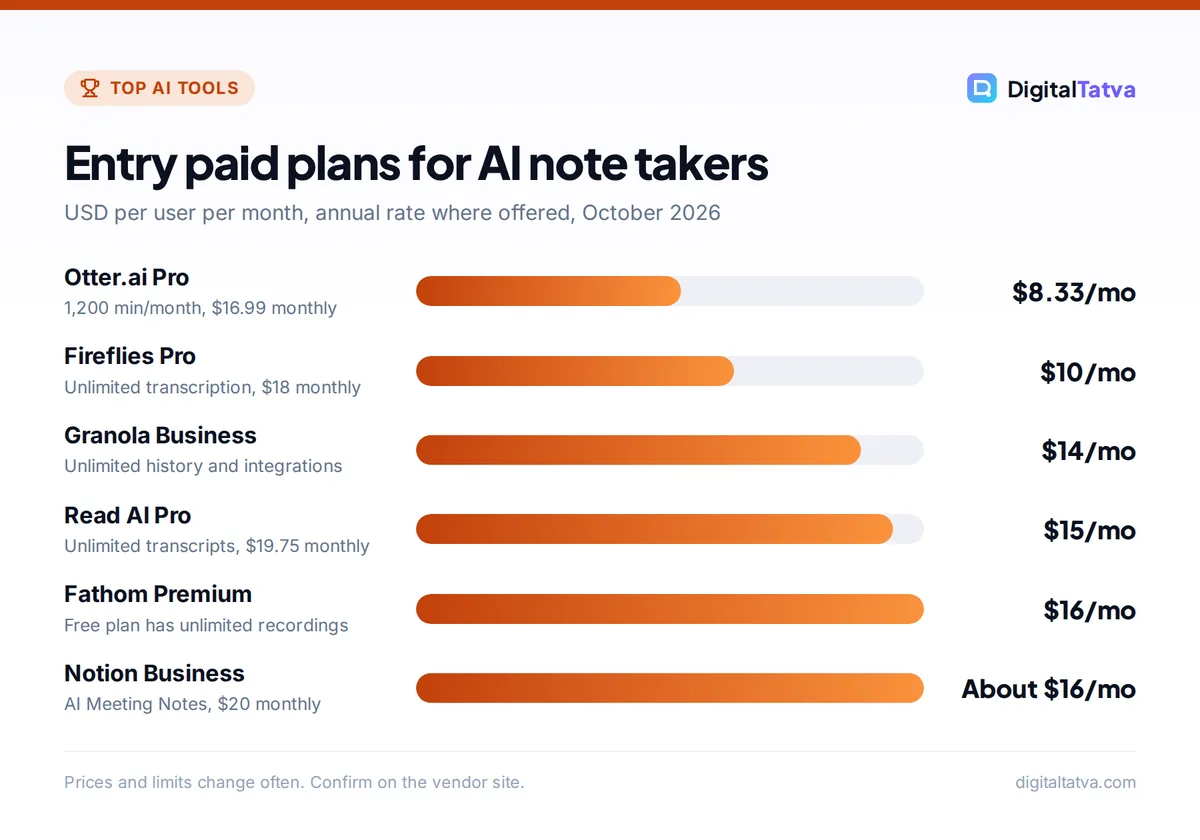
Starting prices are the cheapest paid plan in USD per user per month. Where a vendor offers annual billing, we show the annual rate first because it is the number most pricing pages lead with.
| Tool | Best for | Starting price | Free plan |
|---|---|---|---|
| Otter.ai | Live transcription and notes | $8.33 annual, $16.99 monthly | Yes, 300 min/month |
| Fireflies.ai | Sales and team meeting intelligence | $10 annual, $18 monthly | Yes, limited |
| Fathom | Best free plan | $15 annual (Team), $16 annual (Premium) | Yes, unlimited recordings |
| Granola | Simple AI notes for individuals and small teams | $14 | Yes, 30 days of history |
| Read AI | Meeting reports and analytics | $15 annual, $19.75 monthly | Yes, 5 meetings/month |
| tl;dv | Recording and clipping calls | About $18 annual (third-party) | Yes, lifetime AI caps |
| Notion AI Meeting Notes | Teams that live in Notion | $20 per seat (Business) | Trial only |
| Microsoft 365 Copilot | Companies on Microsoft Teams | $21 (Copilot Business add-on) | No |
| Gemini in Google Meet | Companies on Google Workspace | Included in Business Standard and up | No |
| Zoom AI assistant | Zoom-first teams | Paid tier price not published | Yes, 3 meetings/month |
The 10 best AI meeting assistants and note takers
Most of these tools do the same core job: join or listen to your Zoom, Google Meet or Microsoft Teams calls, transcribe them, and write a summary with action items. The differences are in limits, integrations, team features and price.
1. Otter.ai: Best overall AI meeting assistant
- Starting price: $8.33/month billed annually ($99.96/year), $16.99 monthly
- Free plan: Yes, 300 minutes a month, 30 minutes per conversation
- Best for: Individuals, consultants, students, small teams
Otter is the most balanced option. You get live transcription you can follow, highlight and comment on during the call, plus AI summaries and searchable notes afterward. The free Basic plan covers 300 transcription minutes a month, with a 30 minute cap per conversation and 3 lifetime file imports.
Pro raises that to 1,200 minutes a month, 90 minutes per conversation and 10 imports a month. Business ($19.99 per user a month annual, $30 monthly) adds unlimited meetings, conversations up to 4 hours, unlimited imports, 3 concurrent meetings and custom AI workflows. Students and teachers with a .edu email get 20% off Pro. Full details are on the official Otter pricing page.
Skip it if: you run long sales calls back to back and need CRM sync; Fireflies or Fathom Business fit better. Our Otter vs Fireflies comparison goes deeper.
2. Fireflies.ai: Best for sales and customer-facing teams
- Starting price: $10/seat/month annual, $18 monthly (Pro)
- Free plan: Yes, 400 minutes of storage per team and limited AI summaries
- Best for: Sales, customer success, recruiting, agencies
Fireflies is built for capturing every call across a team and turning it into searchable intelligence. Pro includes unlimited transcription and 8,000 minutes of storage per seat. Business ($19 per seat annual, $29 monthly) adds unlimited storage, video recording, conversation intelligence and team analytics, and Enterprise ($39 per seat, annual) adds SSO, SCIM, HIPAA and custom retention.
Each plan also includes a small pool of AI credits (20 on Free and Pro, 30 on Business, 50 on Enterprise) for extra AI features, according to the Fireflies pricing page. The page does not say how often credits refresh, so check before relying on them.
Skip it if: you just want clean personal notes; the analytics are wasted on solo users.
3. Fathom: Best free AI note taker
- Starting price: Premium $16/user/month annual ($20 monthly); Team $15 annual (2-user minimum)
- Free plan: Yes, unlimited recordings, transcripts and instant AI summaries
- Best for: Freelancers, founders, small sales teams
Fathom’s free plan is the most generous in the category: unlimited recordings and transcriptions, instant call summaries, clips and search. For many freelancers and founders, that is all they will ever need.
Premium adds advanced summaries, AI action items, a conversational meeting assistant and a custom bot. Team adds shared search, playlists, comments, folders and keyword alerts. Business ($25 per user annual, $34 monthly) adds CRM field sync, Deal View, coaching metrics, AI scorecards and custom summaries. The Fathom pricing page also lists a 90-day money-back guarantee.
Skip it if: your company mandates notes inside Microsoft 365 or Google Workspace for compliance.
4. Granola: Best for simple, editable AI notes
- Starting price: Business $14/user/month
- Free plan: Yes, Basic with 30 days of meeting history
- Best for: Founders, investors, consultants who take their own notes
Granola focuses on notes rather than recordings. Its free Basic plan includes AI notes, AI chat across your meetings and templates, but only keeps 30 days of meeting history. Business at $14 per user a month removes the history limit, adds advanced models and connects to Notion, HubSpot, Zapier, Affinity and Attio, plus MCP and an API for custom workflows.
Enterprise costs $35 per user a month and adds SSO, HIPAA and admin controls. The Granola pricing page did not show annual pricing when we checked.
Skip it if: you need video recordings and clips to share with your team.
5. Read AI: Best for meeting reports and analytics
- Starting price: Pro $15/user/month annual, $19.75 monthly
- Free plan: Yes, 5 meetings a month
- Best for: Managers who want summaries across meetings, email and chat
Read AI produces meeting reports with summaries and highlights. The free plan covers 5 meetings a month, which is enough to try it on a weekly team call. Pro unlocks unlimited transcripts, 100 file upload credits a month and premium integrations.
Enterprise ($22.50 annual, $29.75 monthly) adds audio and video playback and highlights, and Enterprise+ ($29.75 annual, $39.75 monthly, 5+ licenses) adds HIPAA and SAML/SCIM.
Skip it if: you only have one or two calls a week; a free Fathom or Otter plan covers that.
6. tl;dv: Best for recording and clipping calls
- Starting price: Pro about $18/user/month annual, about $29 monthly (third-party)
- Free plan: Yes, unlimited recordings with lifetime caps on AI notes
- Best for: Product teams, user researchers, remote teams sharing clips
tl;dv records and transcribes meetings in many languages and makes it easy to clip key moments. Its official pricing page did not load for us, so these figures come from a third-party pricing tracker updated in July 2026. The free plan reportedly includes unlimited recordings but only 10 lifetime AI meeting notes and 10 AI queries, with 3 months of retention.
Pro reportedly unlocks unlimited AI notes and custom templates, and Business adds CRM integrations and coaching on custom pricing. Confirm current prices on tl;dv’s site before you buy.
Skip it if: you want AI summaries forever on a free plan; the lifetime caps run out fast.
7. Notion AI Meeting Notes: Best for teams that live in Notion
- Starting price: Business $20/seat/month monthly, about $16 annual
- Free plan: Trial of Notion AI only on Free and Plus
- Best for: Startups and agencies that run projects and docs in Notion
Notion’s Business plan includes AI Meeting Notes alongside Notion Agent, Enterprise Search (beta) and the rest of Notion AI. The advantage is that notes land directly in the pages and databases where your team already tracks work, with no extra tool to manage.
The catch is price if you only want meeting notes: Business is a full workspace upgrade. Our Notion AI pricing guide breaks down every tier, and the Notion AI review covers how well the AI works in practice.
Skip it if: your team does not already use Notion daily.
8. Microsoft 365 Copilot: Best for companies on Microsoft Teams
- Starting price: Copilot Business add-on $21/user/month annual list ($25.20 monthly billing); Microsoft 365 Copilot $30/user/month annual
- Free plan: No
- Best for: Organizations standardized on Microsoft 365
For companies that already run on Teams, Outlook and SharePoint, Microsoft 365 Copilot brings AI into meetings, email and documents under existing Microsoft security and compliance controls. That integration is the main reason to choose it over a standalone note taker.
The SMB Copilot Business add-on was shown at an $18 promo price when we checked, against a $21 list price, and requires a qualifying Microsoft 365 license. Bundles such as Business Standard with Copilot ($23.50 per user annual) can be cheaper than buying separately. See our Microsoft Copilot pricing guide for every option.
Skip it if: you are a freelancer or a small team on Google Workspace or Zoom.
9. Gemini in Google Meet: Best for Google Workspace teams
- Starting price: Included in Workspace Business Standard (about $14/user/month annual, third-party figure)
- Free plan: No
- Best for: Companies already paying for Google Workspace
On Workspace Business Standard and higher, Gemini in Meet can automatically capture meeting notes and highlights into a Google Doc, according to Google’s help center. Gemini is now bundled into Workspace Business plans rather than sold as a separate add-on, so many teams already have it without realizing.
Workspace prices load dynamically on Google’s site, so the figure above is from third-party sources. Our guide on how to use Gemini in Gmail, Docs and Sheets explains how to switch the features on.
Skip it if: you are on Business Starter, which has only limited Gemini and no Gemini in Meet.
10. Zoom AI assistant (ZoomMate): Best for Zoom-first teams
- Starting price: Paid plan price not shown on Zoom’s page
- Free plan: Yes, summaries for 3 hosted meetings and 3 AI note-taking uses a month on Workplace Basic
- Best for: Teams whose calls happen mostly on Zoom
Zoom now brands its AI assistant as ZoomMate. On the free Workplace Basic tier you get meeting summaries for 3 hosted meetings a month, AI note-taking 3 times a month and 20 AI queries. The paid ZoomMate plan offers unlimited summaries and note-taking with 2,200 AI credits per user a month, but the price was not shown when we checked.
If you already pay for Zoom, check your account’s AI settings before adding a third-party bot.
Skip it if: your calls are spread across Zoom, Meet and Teams; a cross-platform tool like Otter or Fathom is simpler.
How to choose the right AI meeting assistant
Start with where your meetings happen and who needs the notes. This table maps common situations to a first choice.
| Your situation | First choice | Runner-up |
|---|---|---|
| Freelancer or founder on a budget | Fathom Free | Otter Basic |
| Student recording lectures and group calls | Otter (20% education discount) | Fathom Free |
| Sales or customer success team | Fireflies Business | Fathom Business |
| Company on Microsoft 365 | Microsoft 365 Copilot | Otter Business |
| Company on Google Workspace | Gemini in Meet | Fireflies |
| Team that runs everything in Notion | Notion AI Meeting Notes | Granola Business |
Check the limits that actually bite
Free plans differ in what they cap. Otter caps minutes and conversation length, Read AI caps meetings, tl;dv caps lifetime AI notes, and Granola caps history. Think about your heaviest week: if you have ten hour-long calls, Otter’s 30 minute free cap per conversation will cut every one of them short.
Look at integrations before features
A summary is only useful if it lands where your team works. Fireflies and Fathom Business push notes into CRMs, Granola connects to Notion, HubSpot and Zapier, and built-in assistants keep everything inside Microsoft or Google. If you want to wire notes into other apps, our guide on automating tasks with Zapier and AI shows how.
Price per seat, not per plan
Meeting tools charge per user, so a five-person team on Fireflies Business pays 5 x $19 = $95 a month on annual billing, or 5 x $29 = $145 monthly. Only give paid seats to people who host meetings; attendees can usually read shared notes. Our explainer on when AI team plans save money covers this in more depth.
Save money: Annual billing cuts costs sharply in this category. Otter Pro drops from $16.99 to $8.33 a month, about half, and Fireflies Pro from $18 to $10. Test monthly first, then switch. Our guide to annual vs monthly AI plans explains when to commit.
Privacy, consent and security
An AI note taker records other people, so treat it seriously. Recording and consent laws vary by country and state, and some require every participant to agree. Many tools show a bot in the participant list, but you should still tell people at the start of the call that it is being recorded and transcribed.
- Set retention rules. Decide how long recordings and transcripts are kept. Fireflies Enterprise and Fathom Enterprise offer custom retention.
- Check regulated-data options. If you discuss health information, look at HIPAA options on Otter Enterprise (add-on), Fireflies Enterprise, Granola Enterprise or Read AI Enterprise+.
- Control auto-join. Many tools join every calendar event by default. Turn that off for sensitive meetings such as HR or legal discussions.
- Write it down. Add meeting recording to your company AI policy; our AI usage policy template has a section you can adapt.
Watch out: AI summaries can misattribute who said what or miss nuance. Review action items before sending them to clients, and never treat an AI summary as an official record of a legal or HR conversation.
Pricing notes for Indian teams and small businesses
Otter, Fireflies, Fathom, Granola, Read AI and tl;dv bill in USD, so Indian buyers pay their card’s foreign exchange markup on top of the list price. None of the official pricing pages we checked showed rupee prices for these tools. If your company already pays for Microsoft 365 or Google Workspace in rupees, using the built-in assistant may be simpler for accounting.
For a small business, a sensible path is to start with Fathom or Otter free plans, measure how much time notes save each week, and only then pay. Our guide on measuring ROI from AI tools gives a simple way to track that, and the list of best AI tools for small business covers other tools worth pairing with a note taker.
Frequently asked questions
What is the best free AI meeting assistant?
Fathom has the best free plan, with unlimited recordings, transcripts and instant AI summaries. Otter’s free Basic plan is also strong, with 300 minutes a month, but caps each conversation at 30 minutes. Read AI’s free plan covers 5 meetings a month. For more no-cost options across categories, see our list of the best free AI tools.
Is Otter.ai better than Fireflies.ai?
Otter is better for individuals and students who want live transcripts at a low price, with Pro at $8.33 a month on annual billing. Fireflies is better for sales and customer teams that need unlimited transcription, video recording and conversation analytics, with Business at $19 per seat annually. Many solo users choose Otter, while revenue teams lean toward Fireflies.
Do AI meeting assistants work with Zoom, Google Meet and Teams?
Most standalone tools, including Otter, Fireflies and Fathom, work across Zoom, Google Meet and Microsoft Teams. Built-in assistants are tied to their platform: Gemini works in Google Meet, Microsoft 365 Copilot in Teams, and ZoomMate in Zoom. If your calls happen on several platforms, a cross-platform note taker is usually the simpler choice.
Is it legal to record meetings with an AI note taker?
It depends on where you and your participants are. Some places allow recording with one party’s consent, while others require everyone to agree. The safe approach is to announce recording at the start of every call, let people opt out, and set clear retention rules. Check local law or ask your legal adviser for regulated industries.
Are there student discounts on AI note takers?
Yes. Otter offers 20% off Pro for students and teachers with a .edu email, which works out to $6.67 a month on annual billing. Fathom’s free plan is also a strong option for students. Our roundup of AI student discounts lists more offers, and the best AI tools for students covers study tools.
Our verdict: the best AI meeting assistant for you
Choose Otter.ai if you want the best balance of accuracy, live transcription and price, and Fathom if you want strong AI notes without paying anything. Sales and customer teams should pick Fireflies or Fathom Business for CRM sync and analytics. If your company already runs on Microsoft 365, Google Workspace, Notion or Zoom, try the built-in assistant first, because it may already be included in what you pay. Agencies juggling client calls can find workflow ideas in our guide to AI for marketing agencies. Prices and plan limits change often, so confirm current details on each vendor’s pricing page before you subscribe.
Pricing and features are checked at the time of writing and can change. Some links may be affiliate links, which never affect our verdicts.