
What Is MCP (Model Context Protocol)? A Plain English Guide
What is MCP? A plain English guide to the Model Context Protocol: how hosts, clients and servers work, how to add MCP to Claude or ChatGPT, and how to stay safe.

On this page
- Key takeaways
- What is MCP? The quick answer
- Why MCP exists: the integration problem
- How MCP works: hosts, clients and servers
- What you can do with MCP today
- How to add an MCP server to Claude, ChatGPT and coding tools
- MCP security risks and how to stay safe
- MCP vs APIs, plugins and function calling
- What MCP costs
- Frequently asked questions
- Next steps
MCP (Model Context Protocol) is an open standard that lets AI apps such as Claude, ChatGPT, Cursor and VS Code connect to outside tools and data, like your Google Drive, a database, GitHub or Slack, through one common plug. Instead of every AI company building a custom integration for every app, a developer builds one MCP server and any MCP-compatible assistant can use it.
If you have been wondering what is MCP, this guide explains how it works, how to add a server to Claude or ChatGPT, and the security risks to know first.
Key takeaways
- MCP is an open protocol, first announced by Anthropic on November 25, 2024, that standardizes how AI assistants talk to tools and data sources. Its docs call it “a USB-C port for AI applications”.
- Since December 9, 2025, MCP has been governed by the Agentic AI Foundation under the Linux Foundation, co-founded by Anthropic, Block and OpenAI.
- An MCP server can offer three things: tools (actions), resources (data) and prompts (templates). The AI app is the host, and it runs one client per server.
- Claude Pro, Max, Team and Enterprise users can add remote MCP servers as custom connectors. ChatGPT exposes MCP servers as plugins.
- MCP tools can run code and touch real accounts, so only connect servers you trust and keep approval prompts on for anything that writes data.
What is MCP? The quick answer
The official documentation describes MCP as “an open-source standard for connecting AI applications to external systems.” Think of a language model as a very smart person locked in a room with no phone or computer. MCP is the standard doorway that lets that person ask for a file, look up a record or send a message, with your permission.
Here is the short version in a table you can skim.
| Question | Short answer |
|---|---|
| What does MCP stand for? | Model Context Protocol |
| Who created it? | Anthropic, announced November 25, 2024 |
| Who runs it now? | The Agentic AI Foundation, a fund under the Linux Foundation (since December 9, 2025) |
| What problem does it solve? | One standard way to connect any AI app to any tool or data source |
| Which apps support it? | Claude, ChatGPT, Cursor, VS Code, Gemini, Microsoft Copilot and many developer tools |
| Is it free? | Yes, the protocol and SDKs are open source. The AI app or server you use may charge. |
| Latest spec version | 2026-07-28 |
| Main risk | Untrusted servers can trick the AI or take actions you did not intend |
Why MCP exists: the integration problem
Before MCP, each AI vendor built its own connectors, and each software company built separate plugins for every assistant. Five assistants and fifty apps meant up to 250 custom integrations.
MCP turns that into a “build once, use everywhere” model. A company like Sentry, Notion or Figma builds one MCP server. Any host that speaks MCP can then use it. The protocol takes inspiration from the Language Server Protocol, which did the same thing for code editors: one language server works in VS Code, Neovim and JetBrains.
When you see a “connector” or “plugin” inside an AI app today, MCP is often doing the work behind it. Our guide to the best AI agents you can use in 2026 shows how much of the agent wave depends on this kind of tool access.
A short history of MCP
- November 25, 2024: Anthropic announced MCP as “an open standard for connecting AI assistants to the systems where data lives”, with prebuilt servers for Google Drive, Slack, GitHub, Git, Postgres and Puppeteer.
- December 9, 2025: Anthropic donated MCP to the new Agentic AI Foundation under the Linux Foundation. The project then cited more than 97 million monthly SDK downloads, 10,000 active servers and client support in ChatGPT, Claude, Cursor, Gemini, Microsoft Copilot and VS Code.
- July 28, 2026: The current specification version, which made the protocol stateless and deprecated two older features (sampling and logging).
How MCP works: hosts, clients and servers
MCP has three moving parts. Once you learn these names, every MCP tutorial becomes easier to follow.
- Host: the AI application you actually use, such as Claude Desktop, Claude Code, ChatGPT, Cursor or VS Code.
- Client: a small connector inside the host. The host creates one client for each server it connects to, and each client keeps its own dedicated connection.
- Server: a program that provides context or actions, for example a filesystem server on your laptop or the remote Sentry server on Sentry’s platform.
Under the hood, messages use JSON-RPC 2.0, a simple format for “call this function with these arguments and send back the result”. You never need to read these messages as a user, but developers will see them in logs.
Local vs remote MCP servers
| Type | How it connects | Typical example | Good for |
|---|---|---|---|
| Local server | stdio (standard input and output on your machine) | Filesystem server launched by Claude Desktop | Private files, local databases, developer tools |
| Remote server | Streamable HTTP, usually with OAuth sign-in | Sentry, Notion or a SaaS vendor’s hosted server | Cloud apps, team use, connectors in web apps |
Local servers usually serve one client. Remote servers serve many clients at once and are what you add when an app asks for a “server URL”.
The three things a server can offer
- Tools: functions the AI can call to do something, such as “create_issue”, “query_database” or “send_message”. Tools are the most common and the most powerful primitive.
- Resources: data the AI can read for context, such as file contents, a database schema or an API response.
- Prompts: reusable templates the server suggests, such as a code review checklist or a few-shot example set.
Clients can also offer a feature back to servers called elicitation, which lets a server ask you for missing information or for confirmation before an action. Newer extensions add long-running tasks and MCP Apps, which render interactive elements like charts and forms inside the chat.
A real conversation, step by step
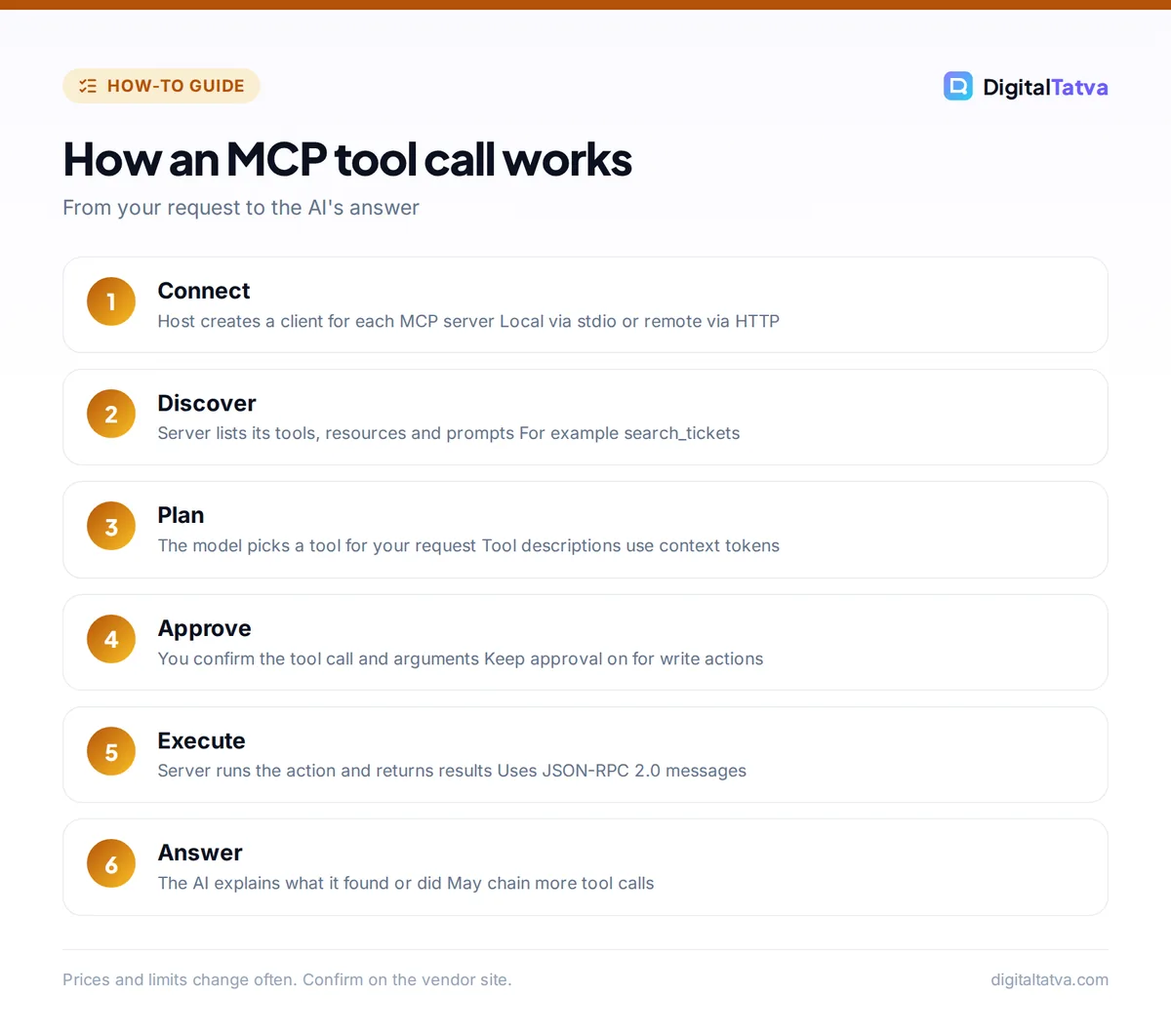
- Discovery. When you connect a server, the host asks what it supports and lists its tools (for example, “search_tickets” and “update_ticket”).
- The model plans. You type “Close every support ticket tagged duplicate from last week.” The model sees the tool list and decides to call “search_tickets” first.
- Approval. The host shows you the tool call and its arguments. You approve it, or you have marked that tool as “always allow”.
- Execution. The client sends the request to the server, the server talks to the ticketing system and returns results.
- Answer. The model reads the results, may call “update_ticket” (with another approval), then tells you what it did.
Every tool definition and every result takes up space in the model’s context window, which is why connecting too many servers can make an assistant slower and more expensive. Our explainers on how context windows work and what tokens are cover why that matters.
What you can do with MCP today
MCP is not just for developers. Here are practical uses grouped by who benefits most.
For developers
- Let Claude Code or Cursor read GitHub issues, Sentry errors or database schemas while they write code. The MCP docs give the example of Claude Code generating a web app from a Figma design.
- Connect documentation servers so the coding agent works from current docs rather than its training data.
- Build an internal MCP server once and use it across every AI tool your team prefers. If you are choosing an editor, see our comparison of Claude Code vs Cursor.
For marketers, founders and operators
- Ask your assistant to pull last month’s numbers from an analytics or CRM tool and draft a summary.
- Connect calendar and notes apps so the assistant can plan your week with real data. The MCP docs list Google Calendar and Notion as examples.
- Trigger automations: Zapier offers an MCP server on all plans (each MCP tool call uses two tasks), and n8n lets AI agents connect to MCP servers. Our Zapier vs Make vs n8n comparison explains how those costs add up.
Tip: Start with read-only servers (search, fetch, list). You get most of the value, such as “find the latest invoice from this client”, with far less risk than tools that can send, delete or pay.
How to add an MCP server to Claude, ChatGPT and coding tools
Setup depends on the host. Here is what the official docs say for the most common apps as of October 2026.
Claude (web and desktop)
Custom connectors using remote MCP are available on Claude Pro, Max, Team and Enterprise, and Anthropic still labels the feature beta. On Pro or Max:
- Open Connectors. Go to the Connectors section of Claude’s settings.
- Add the server. Click “Add custom connector” at the bottom and paste the remote MCP server URL.
- Optional OAuth details. Under Advanced settings, enter an OAuth Client ID and Client Secret if the server provider gave you one.
- Connect and review permissions. Click Add, sign in to the service, and deny any permission that looks unnecessary.
On Team and Enterprise, an Owner adds the connector for the organization, and members find it labeled “Custom” and click Connect. See our Claude pricing guide for what each plan costs, and our beginner guide to Claude Code if you want MCP in the terminal.
ChatGPT
OpenAI’s developer docs say MCP servers are made available in ChatGPT as plugins, which also work in Codex, deep research and company knowledge. You open ChatGPT Plugins, select the plus button, then “Add custom MCP server”, and enter the server URL and authentication details. OpenAI does not state on that page which plans can do this, so check your own settings. OpenAI also notes that “ChatGPT currently requires manual confirmation in any conversation before write actions can be taken.”
For developers, the OpenAI Responses API accepts a remote MCP server as a tool, with options to limit allowed tools and require approval.
Cursor, VS Code and other editors
Cursor and VS Code both document MCP setup in their settings. Our guide on how to use Cursor AI walks through the editor itself.
MCP security risks and how to stay safe
MCP is powerful because tools can take real actions. The specification itself warns that “Tools represent arbitrary code execution and must be treated with appropriate caution,” and that MCP cannot enforce safety at the protocol level. The host app has to ask for consent, and you have to pay attention.
Pros
- One open standard, vendor neutral governance
- OAuth sign-in, so no passwords pasted into chat
Cons
- Malicious servers can hide instructions (prompt injection)
- Too many tools bloat context and raise costs
A simple safety checklist
- Trust the source. Anthropic and OpenAI both say custom servers are not verified by them. Prefer official servers from the software vendor.
- Grant the minimum. During OAuth, deny scopes you do not need. Claude “can only access resources that you’ve given the server permission to access.”
- Keep approvals on for write actions. Use “Allow always” only for tools you would happily let run unsupervised.
- Disable unused tools. Turn off servers that are not relevant to the current chat, and turn off write tools when running deep research.
- Watch for changes. If a tool suddenly asks for new permissions, stop and check.
For company rollouts, pair these rules with a written policy. Our AI data privacy guide for businesses and AI usage policy template are good starting points.
Watch out: Never connect a server that can move money, delete files or email customers to an assistant that also reads untrusted web pages or inbound emails. Hidden text in a page or email could instruct the AI to misuse that tool.
MCP vs APIs, plugins and function calling
People often confuse MCP with the things it builds on. Here is how they relate.
| Term | What it is | How it relates to MCP |
|---|---|---|
| API | A way for software to talk to a service, such as the GitHub API | MCP servers usually wrap an existing API so AI can use it safely |
| Function calling (tool use) | A model feature where the AI outputs a structured request to call a function | MCP standardizes where those functions come from and how they are described |
| Plugins and connectors | Product names for integrations inside AI apps | Many are now built on MCP behind the scenes |
| AI agents | AI that plans and takes multi-step actions | Agents use MCP to reach the tools they act with |
| AGENTS.md and skills | Instruction files that tell agents how to work in a project | Complementary; AGENTS.md is another Agentic AI Foundation project |
If any of these terms are still fuzzy, our AI glossary of 60 terms in plain English defines them in one or two sentences each.
What MCP costs
The protocol, SDKs and reference servers are free. You pay for the AI app plan (Claude custom connectors need Pro at $20 a month, or $17 billed annually), for the service behind the server (Zapier counts each MCP tool call as two tasks), and for tokens, since tool definitions and results count as input. Our guide to reducing Claude Code and Cursor costs suggests disabling unused MCP servers for that reason.
Frequently asked questions
What is MCP in simple terms?
MCP, the Model Context Protocol, is a shared standard that lets AI assistants plug into apps and data sources. A software company builds one MCP server, and any AI app that supports MCP, such as Claude, ChatGPT or Cursor, can use it to read data or take actions, with your permission. The docs compare it to a USB-C port for AI.
Is MCP only for Claude?
No. Anthropic created MCP, but it donated the project to the Agentic AI Foundation under the Linux Foundation in December 2025, co-founded with Block and OpenAI. The project lists client support in ChatGPT, Claude, Cursor, Gemini, Microsoft Copilot and VS Code, and OpenAI’s developer docs explain how to use MCP servers in ChatGPT and its API.
Do I need to code to use MCP?
Not to use it. On Claude Pro and above you can paste a remote server URL into “Add custom connector” and sign in. In ChatGPT you add a custom MCP server from the Plugins area. Building your own server does require coding, though official SDKs and reference servers make it much easier than writing a custom integration.
Is MCP safe?
It is as safe as the servers you connect and the approvals you keep on. The specification says tools are arbitrary code execution and hosts must ask for consent. Use official servers, grant minimal permissions, keep confirmation on for write actions and disconnect servers you are not using. Treat a new server like installing new software.
Is MCP free?
Yes, the protocol and its SDKs are open source and free. You may still pay for the AI app plan that hosts MCP connections, for the service behind a server, or for the extra tokens tool definitions and results use on API billing. Check each vendor’s pricing page for MCP limits.
Next steps
MCP is the quiet standard that turns chatbots into assistants that can actually do things. If you are new to it, connect one read-only server, such as a docs or file search server, to the AI app you already pay for, and see how it changes your daily work. If you are a developer, try a reference server locally and read the security principles before you ship anything to customers. For automation beyond chat, our tutorial on building your first AI workflow in n8n shows MCP-connected agents in action. Plans and feature availability change often, so confirm current details on the official MCP documentation, the Claude connectors help page and the OpenAI MCP docs before you rely on them.
Pricing and features are checked at the time of writing and can change. Some links may be affiliate links, which never affect our verdicts.



