
AI Glossary: 60 AI Terms Explained in Plain English
60 AI terms explained in plain English, from LLMs, tokens and context windows to RAG, MCP, agents and hallucinations, with examples and what each means for your costs.

On this page
- Key takeaways
- AI terms explained: the 10 you will see most often
- AI basics: models, training and the main players
- Tokens, context and cost terms explained
- Prompting and output terms
- Agents, tools and integration terms
- Images, voice and video AI terms
- Safety, privacy and business terms
- How to use this glossary to choose and pay for AI tools
- Frequently asked questions
- Keep learning
This AI glossary gives you 60 AI terms explained in plain English, from LLM and tokens to RAG, MCP, agents and hallucinations, each in one or two sentences with a real example. Skim the quick table of the ten terms you will meet most often, then use the grouped sections below as a reference whenever a product page or news story stops making sense.
Definitions are written for marketers, founders, students and small business owners, not researchers. Where a term affects what you pay, we say so, and we link to our deeper guides so you can go further.
Key takeaways
- Most AI pricing and limits come down to three terms: tokens, context window and model tier. Learn those first.
- A model (like GPT-6 Sol or Claude Opus 5.5) is the engine; an app (like ChatGPT or Claude) is the car built around it.
- RAG, MCP and tool use are the ways AI gets fresh, private or live information beyond its training data.
- Agents are AI systems that plan and take multi-step actions, so they need more supervision than a chatbot.
- Hallucination is the biggest everyday risk: always verify facts, numbers and quotes an AI gives you.
AI terms explained: the 10 you will see most often
If you only learn ten words, learn these. They appear on nearly every pricing page and product launch in 2026.
| Term | Plain English meaning | Why it matters to you |
|---|---|---|
| LLM | A large language model that predicts text | Powers ChatGPT, Claude, Gemini and most AI tools |
| Token | A chunk of text, roughly part of a word | API prices and limits are counted in tokens |
| Context window | How much text the model can consider at once | Decides how long a document or chat it can handle |
| Prompt | Your instruction or question to the AI | Better prompts give better, cheaper answers |
| Hallucination | A confident answer that is false | You must check facts before publishing |
| Reasoning model | A model that “thinks” step by step before answering | Better at hard problems, slower and costlier |
| Agent | AI that plans and takes actions on its own | Can finish tasks, but needs guardrails |
| RAG | Retrieval augmented generation: looking up documents first | How chatbots answer from your own files |
| MCP | Model Context Protocol, a standard plug for tools | Connects AI apps to Drive, Slack, CRMs and more |
| Multimodal | Handles text plus images, audio or video | Lets you upload screenshots or talk by voice |
AI basics: models, training and the main players
- 1. Artificial intelligence (AI): Software that performs tasks that normally need human judgment, such as writing, recognizing images or making predictions. Today the word usually means generative AI.
- 2. Generative AI: AI that creates new content, such as text, images, audio, video or code, rather than only sorting or scoring existing data. ChatGPT, Midjourney and ElevenLabs are all generative AI.
- 3. Machine learning (ML): The broader method of teaching computers by showing them examples instead of writing every rule by hand. Generative AI is one branch of it.
- 4. Neural network: A system of many connected mathematical units, loosely inspired by brain neurons, that learns patterns from data. Modern language models are very large neural networks.
- 5. Large language model (LLM): A neural network trained on huge amounts of text to predict the next token. GPT-6 Astra, Claude Opus 5.5 and Gemini 3.1 Pro are LLMs.
- 6. Model vs app: The model is the engine; the app is the product around it with memory, file uploads and a chat screen. ChatGPT is an app that runs OpenAI models such as GPT-6 Sol and GPT-6 Luna.
- 7. Frontier model: The most capable model a company offers at a given time, usually the most expensive. Anthropic currently recommends starting with Claude Opus 5.5 for most API workloads.
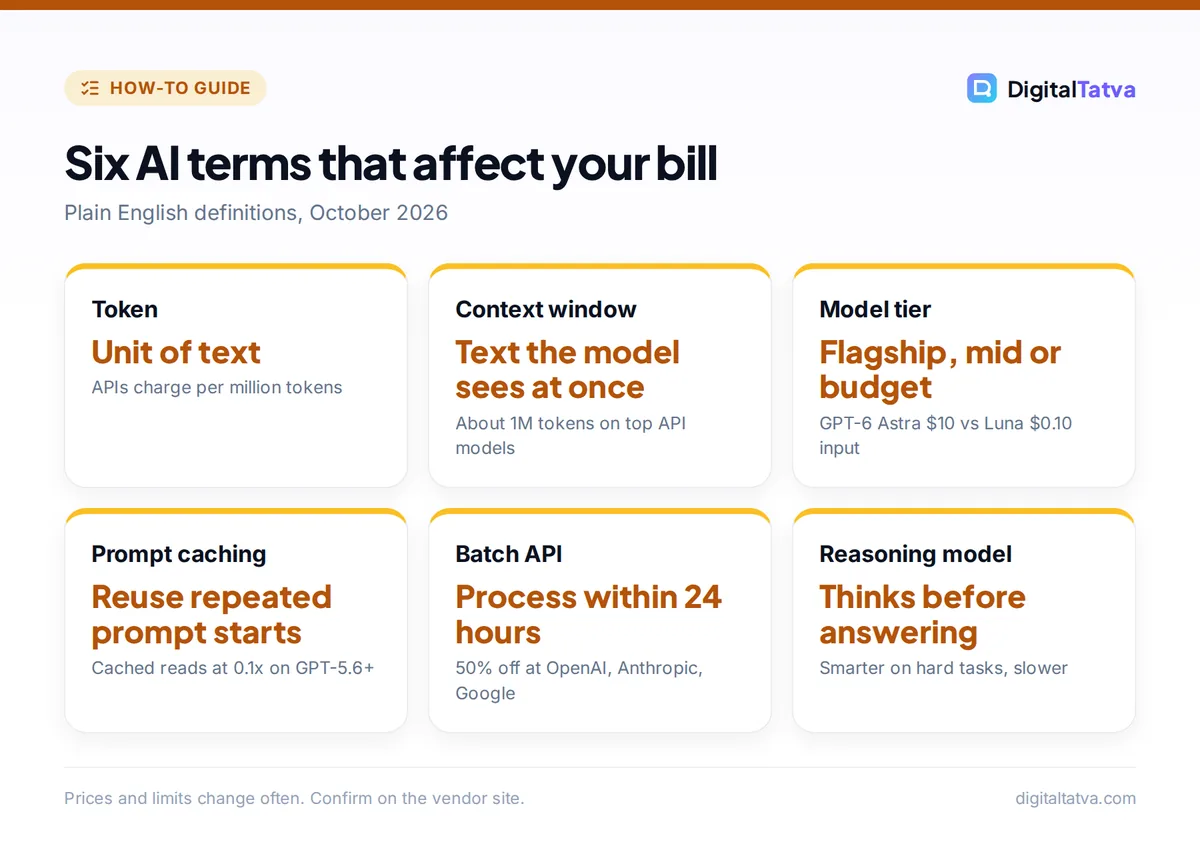
- 8. Model tier (flagship, mid, budget): Most vendors sell a family of sizes. OpenAI’s GPT-6 family has Astra (flagship), Sol and Luna (budget); Anthropic has Opus, Sonnet and Haiku. Our guide to GPT-6 models explained compares them.
- 9. Parameters: The internal numbers a model learns during training. More parameters often means more capability, but also more cost to run.
- 10. Training data: The text, images and code a model learned from. It explains both what a model knows and its blind spots.
- 11. Knowledge cutoff: The date after which a model has no built-in knowledge. GPT-6 Astra’s API page lists April 30, 2026, so anything newer needs web search or RAG.
- 12. Pretraining: The first, massive training phase where a model reads general data and learns language. It is the most expensive step.
- 13. Fine-tuning: Extra training on a smaller, specific dataset to shape a model for one job, such as your brand’s support replies.
- 14. RLHF: Reinforcement learning from human feedback. People rate model answers and the model learns to prefer the kind humans rated higher. It is why chatbots sound helpful and polite.
- 15. Open source and open weight models: Models whose weights you can download and run yourself, such as OpenAI’s gpt-oss or Meta’s Llama. See our list of open source AI models you can use for free.
- 16. Inference: Running a trained model to get an answer. Every chat message or API call is inference, and it is what you pay for.
- 17. Local LLM: A model running on your own computer instead of the cloud, for privacy or zero per-token cost. Our guide on running an LLM locally with Ollama shows how.
Tokens, context and cost terms explained
These terms decide your bill. If you build anything on an API, read this section twice.
- 18. Token: The unit AI models read and write, roughly a short word or part of a longer word. Both your input and the AI’s output are counted in tokens. Our plain English guide to what tokens are in AI shows examples.
- 19. Input and output tokens: Input is what you send (prompt, files, chat history); output is what the model writes back. Output usually costs several times more. GPT-6 Astra lists $10 per million input tokens and $50 per million output.
- 20. Context window: The maximum tokens a model can consider in one request, including history and files. GPT-6 Astra and Claude Opus 5.5 both offer about 1 million tokens via the API. More in our context window guide.
- 21. Max output tokens: The longest single reply a model can write. Claude Opus 5.5 and the GPT-6 family list 128,000 tokens.
- 22. API: Application programming interface, the way developers send requests to a model from their own software and pay per token, separate from any chat subscription.
- 23. Rate limit: The cap on how many requests or tokens you can use per minute or day. Free tiers have tight rate limits.
- 24. Usage limit: The consumer app version of a rate limit, such as Claude Pro’s session limit that resets every five hours.
- 25. Prompt caching: Reusing the unchanged start of a prompt so repeated parts cost less. On OpenAI’s GPT-5.6 and later models, cached reads cost 0.1x the input rate. See prompt caching explained.
- 26. Batch API: Sending many requests to be processed within 24 hours in exchange for a discount, 50% off at OpenAI, Anthropic and Google.
- 27. Model routing: Automatically sending each task to the cheapest model that can handle it, such as a budget model for tagging and a flagship for strategy.
- 28. Latency: How long you wait for a response. Reasoning models and long contexts increase latency.
Prompting and output terms
- 29. Prompt: The instruction you give an AI. A good prompt states the goal, audience, format and constraints.
- 30. System prompt: Hidden instructions that set an AI’s role and rules before the user speaks, such as “You are a polite support agent for an Indian electronics store.”
- 31. Prompt engineering: The skill of writing prompts that get reliable results, using techniques like examples, step-by-step instructions and output templates. Our prompt engineering guide covers 12 techniques.
- 32. Zero-shot and few-shot prompting: Zero-shot means asking with no examples; few-shot means including a few examples of the answer you want. Few-shot is the quickest way to match a style.
- 33. Chain of thought: Having the model work through intermediate steps before the final answer, which helps with math and logic.
- 34. Reasoning model: A model trained to think before it answers, often with a setting for effort. ChatGPT offers Instant, Medium, High and higher thinking levels depending on plan.
- 35. Temperature: A setting that controls randomness. Low temperature gives consistent, predictable answers; high gives more varied, creative ones.
- 36. Hallucination: When an AI states something false with confidence, such as an invented statistic or a fake citation. Always verify facts before you publish or act.
- 37. Grounding: Tying an answer to a trusted source, such as web search results or your documents, so it is less likely to hallucinate.
- 38. Structured output: Forcing the AI to reply in a fixed format like JSON or a table, so software can use the result reliably.
Agents, tools and integration terms
- 39. AI assistant or chatbot: A conversational app that answers questions and helps with tasks, such as ChatGPT, Claude, Gemini or Perplexity. Compare them in our list of the best AI chatbots.
- 40. AI agent: An AI system that plans steps and takes actions, such as browsing sites, editing files or sending emails, with less hand-holding. Our roundup of the best AI agents covers real options.
- 41. Tool use (function calling): A model feature where the AI asks to run a function, like “search_flights”, and uses the result in its answer.
- 42. MCP (Model Context Protocol): An open standard, created by Anthropic and now under the Linux Foundation’s Agentic AI Foundation, that lets any AI app connect to tools and data through MCP servers. Read what MCP is in plain English.
- 43. Connector or plugin: A product feature that links an AI app to another service like Google Drive or Slack. Many are built on MCP.
- 44. RAG (retrieval augmented generation): The AI first searches a knowledge base for relevant passages, then writes its answer using them. It is how a website chatbot answers from your FAQ.
- 45. Embeddings: Lists of numbers that represent the meaning of text, so software can find similar passages even when the words differ. RAG depends on them.
- 46. Vector database: A database built to store embeddings and find the closest matches quickly, such as Pinecone or Qdrant.
- 47. Memory: A feature that lets an assistant remember facts about you across chats, such as your name, job or writing style. See how ChatGPT and Claude memory works.
- 48. Deep research: A mode where the AI runs many searches over several minutes and writes a cited report, offered by ChatGPT, Gemini, Claude and Perplexity.
- 49. Workflow automation: Connecting apps so tasks run on triggers, with AI steps inside, in tools like Zapier, Make or n8n.
- 50. Vibe coding: Building software by describing what you want in plain language and letting AI write the code, common with tools like Lovable, Bolt and Cursor.
Images, voice and video AI terms
- 51. Multimodal: A model that understands or produces more than one type of content, such as text, images and audio in the same conversation.
- 52. Diffusion model: The technique behind many image and video generators. It starts from random noise and refines it step by step into a picture that matches your prompt.
- 53. Text to speech (TTS) and speech to text (STT): TTS turns text into a spoken voice; STT transcribes speech into text. ElevenLabs is a TTS tool; Otter is an STT tool.
- 54. Voice cloning: Creating a synthetic copy of a specific person’s voice from samples. Use it only with clear consent.
- 55. Deepfake: Realistic fake video, audio or images of a real person, often used to mislead. Many platforms now require AI labels.
Safety, privacy and business terms
- 56. Prompt injection: Hidden instructions in a web page, email or file that trick an AI into doing something its user did not ask for. It is the top risk for agents with tool access.
- 57. Guardrails: Rules and filters that stop an AI from producing harmful content or taking risky actions, such as requiring approval before sending an email.
- 58. Alignment: The research goal of making AI systems reliably follow human intentions and values.
- 59. Data retention and training opt-out: How long a vendor keeps your chats and whether it uses them to train models. Business plans usually exclude your data from training by default. See our AI data privacy guide.
- 60. AGI: Artificial general intelligence, a hypothetical AI that matches humans across almost any task. There is no agreed definition or test, so treat AGI claims in headlines with caution.
Tip: When a vendor launches a “new” feature, map it to one of these terms. “Projects” is mostly context plus files, “Gems” and custom GPTs are saved system prompts, and “agent mode” is tool use plus planning. It makes comparing tools far easier.
How to use this glossary to choose and pay for AI tools
Jargon is often where overspending starts. Three examples show how the terms above translate into money and better results.
- Match model tier to task. A budget model like GPT-6 Luna costs $0.10 per million input tokens on the API, while GPT-6 Astra costs $10. That is a 100x gap, so route simple tagging or summaries to the budget tier. Our guide to picking the cheapest AI model for each task goes deeper.
- Watch the context window. A long chat resends its history each turn, so input tokens grow fast. Starting a fresh chat or using Projects keeps costs and usage limits under control.
- Ask for grounding. When accuracy matters, ask the AI to cite sources or answer only from your uploaded files. It reduces hallucinations without a pricier model.
If you are still deciding which assistant to pay for, our comparison of ChatGPT vs Claude applies these ideas to two real products.
Frequently asked questions
What are the most important AI terms for beginners?
Start with LLM, prompt, token, context window and hallucination. An LLM is the model, a prompt is your instruction, tokens are how text is measured and billed, the context window is how much the model can read at once, and a hallucination is a confident wrong answer. Those five explain most of what you see in AI apps.
What is the difference between AI, machine learning and generative AI?
AI is the broad goal of making software do tasks that need human judgment. Machine learning is the main method, teaching software with examples. Generative AI is the branch of machine learning that creates new content such as text, images, audio and code. ChatGPT is generative AI built on machine learning.
What is the difference between a chatbot and an AI agent?
A chatbot answers your messages one at a time and waits for you. An AI agent plans several steps and takes actions with tools, such as searching, filling forms, editing files or sending messages, then reports back. Agents save more time but need permissions, approvals and checks because their mistakes have real effects.
What does LLM stand for?
LLM stands for large language model. It is a neural network trained on vast amounts of text to predict the next token, which lets it write, summarize, translate and answer questions. GPT-6 Astra, Claude Opus 5.5 and Gemini 3.1 Pro are current examples, and apps like ChatGPT and Claude are built on top of them.
Why do AI models hallucinate?
Models predict likely text rather than look up verified facts, so when they lack information they can produce something plausible but false. Gaps after the knowledge cutoff, vague prompts and requests for exact numbers make it worse. Grounding with search or your documents, asking for sources and checking key facts reduces the risk.
Keep learning
Bookmark this page and come back whenever a new term appears in a launch post. The fastest way to make these words stick is to try them: write a few-shot prompt, start a fresh chat to save context, or ask a model to ground its answer in a file you upload. Model names, prices and limits in this glossary reflect October 2026, and they change often, so confirm current details on each vendor’s site, such as the OpenAI API pricing page and Claude API pricing, before you rely on them.
Pricing and features are checked at the time of writing and can change. Some links may be affiliate links, which never affect our verdicts.



