
10 Best AI Interior Design Tools to Redesign Any Room
The 10 best AI interior design tools to redesign any room from a photo, from Interior AI and ReimagineHome to Planner 5D, Collov and free Gemini, with prices and free limits.


On this page
The best AI interior design tool for most homeowners is Interior AI or ReimagineHome: upload a photo of your room, pick a style, and get photorealistic redesigns in under a minute. ReimagineHome gives 5 free designs with no card and can show real furniture you can buy, while Gemini and ChatGPT redesign a room photo free from a simple prompt. For floor plans and 3D layouts, Planner 5D and Homestyler are the better picks.
AI interior design tools fall into three groups: photo redesigners that restyle an existing room, virtual staging tools for real estate, and 3D planners that let you measure and place furniture. This guide ranks ten options across all three, with prices checked on 12 October 2026, free limits, and a practical workflow for turning AI ideas into a room you can actually build.
Key takeaways
- Interior AI offers 50+ styles and seven modes, including virtual staging, sketch to render and “empty the space”.
- ReimagineHome costs $14 to $99 a month and is the best pick if you want to shop the furniture you see.
- Gemini (Nano Banana) and ChatGPT can redesign a room photo free, but they may change window positions and proportions.
- Planner 5D (Premium $59.99/year) and Homestyler (free unlimited 1K renders) are better when exact measurements matter.
- Collov AI ($19/month for 60 photos) and IKEA Kreativ (free) cover virtual staging and IKEA shopping.
Quick picks: best AI interior design tools compared
| Tool | Best for | Starting price | Free option |
|---|---|---|---|
| Interior AI | Photo redesigns with many styles | Paid plans, check site | No trial mentioned |
| ReimagineHome | Redesigns with shoppable furniture | $14/mo | 5 free designs, no card |
| HomeDesigns AI | Interiors, exteriors and gardens | Paid plans, check site | Free credits that refresh |
| RoomGPT | Simplest one-photo redesign | Paid plans, check site | Check site |
| Planner 5D | Floor plans and 3D layouts | $59.99/year (Premium) | Yes, unlimited projects |
| Homestyler | Free 3D design and renders | From $6.8/mo (Pro+) | Yes, unlimited 1K renders |
| Collov AI | Virtual staging for listings | $19/mo (60 photos) | Watermarked trials |
| IKEA Kreativ | Placing IKEA furniture in your room | Free | Yes |
| Gemini (Nano Banana) | Free prompt-based redesigns | $4.99/mo (Google AI Plus) | Yes |
| ChatGPT | Ideas, mood boards and redesigns | $20/mo (Plus) | Yes, limited images |
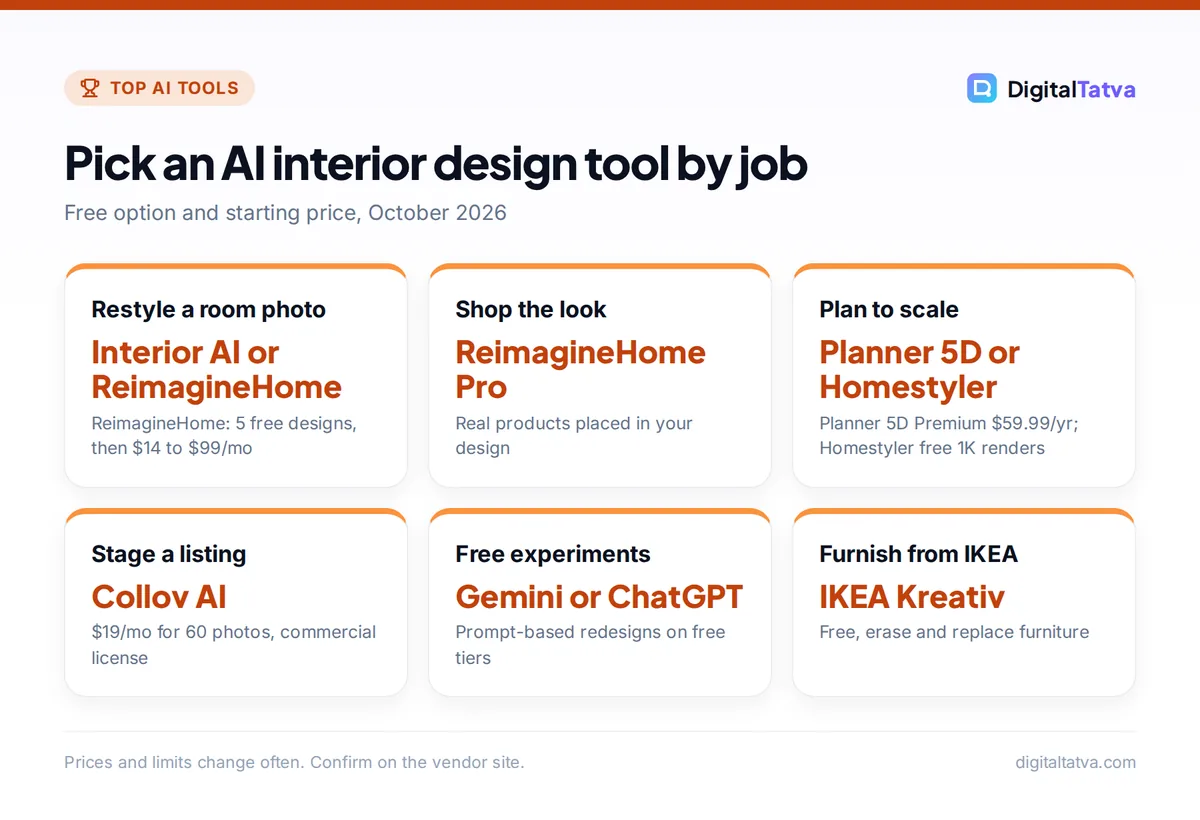
Pick an AI interior design tool by job
Free option and starting price, October 2026
| Item | Detail | Notes |
|---|---|---|
| Restyle a room photo | Interior AI or ReimagineHome | ReimagineHome: 5 free designs, then $14 to $99/mo |
| Shop the look | ReimagineHome Pro | Real products placed in your design |
| Plan to scale | Planner 5D or Homestyler | Planner 5D Premium $59.99/yr; Homestyler free 1K renders |
| Stage a listing | Collov AI | $19/mo for 60 photos, commercial license |
| Free experiments | Gemini or ChatGPT | Prompt-based redesigns on free tiers |
| Furnish from IKEA | IKEA Kreativ | Free, erase and replace furniture |
Prices and limits change often. Confirm on the vendor site.
What AI interior design can and cannot do
AI room redesigners are excellent at the “what would this look like” question. In seconds you can compare Japandi, mid-century and industrial versions of your living room, test a darker wall color, or see an empty flat furnished. That saves hours on Pinterest and helps couples agree on a direction before spending money.
What they cannot do is engineering. Most photo tools do not know your room’s real dimensions, so a sofa in the render may be a meter longer than the wall allows. Some tools move windows, doors or radiators. Treat renders as mood boards, then confirm sizes in a 3D planner or with a tape measure. Lighting, wiring, plumbing and structural changes still need a qualified professional.
Tip: Take your room photo in daylight, from a corner at chest height, with the lights on and clutter cleared. Wide, bright, straight-on photos give every AI tool far better results.
The 10 best AI interior design tools
1. Interior AI: Best for photo redesigns with lots of styles
- Starting price: Paid subscription; check the site (a Premium tier for 5,000 interiors a month is listed as $60 more a month, and Pro virtual staging at $390/year)
- Free option: No free trial mentioned on the homepage
- Best for: Homeowners, designers and Airbnb hosts who want many style options fast
Interior AI turns one room photo into photorealistic redesigns in about half a minute. It lists “30+ room types and 50+ interior styles” and seven modes: interior design (rearranges furniture), style transfer (keeps your layout), virtual staging, Sketch2Image, SketchUp screenshot, outdoor design and “empty the space”. You can generate 1, 4, 8 or 16 designs at once and turn renders into 3D flythrough videos.
The style-transfer mode is the one to use if you want your real layout restyled rather than reinvented. Prices are not shown as a table on the homepage, so check the plans at signup.
Skip it if: you want to try before paying; others offer free designs.
2. ReimagineHome: Best for redesigns you can shop
- Starting price: $14 to $99/month across Essential, Pro, Advanced and Agency
- Free option: 5 free designs for new users, no card required
- Best for: Homeowners ready to buy furniture and decor
ReimagineHome restyles interiors, exteriors and gardens, and its Pro plan adds Real Products Discovery and Visualization, which places real, buyable products in your design. Each visualization costs 1 credit, or 2 with real products, and conversation and idea exploration are free.
Plans range from 30 credits a month (Essential, watermark-free, no shoppable products) to 900 (Agency). See the ReimagineHome pricing page for the exact tier prices in your region.
Skip it if: you only want inspiration and not shopping links.
3. HomeDesigns AI: Best all-in-one for interiors, exteriors and gardens
- Starting price: Paid plans, check site (third-party reviews list about $12/month annual)
- Free option: Free credits (“wait 24 hours for 3 new credits”)
- Best for: Renovators planning the whole property, not just one room
HomeDesigns AI claims “200+ styles and spaces” and the widest toolset here: Redesign, Virtual Staging, Declutter, Sketch to Render, Material Swap, Video Walkthrough and 2D to 3D Floor Plan for interiors, plus sky and weather swaps for exteriors and garden redesigns. It advertises a commercial license with no watermark on its paid output.
Skip it if: you want a minimal, one-button experience.
4. RoomGPT: Best for the simplest one-photo redesign
- Starting price: Paid plans, check site (a 60 percent off promo code was showing when we checked)
- Free option: Check site
- Best for: First-time users who just want to see a few styles quickly
RoomGPT does one thing: upload a room photo, choose a room type and theme, and get a redesign. It says it is “used by over 4 million people”. The interface is the simplest on this list, which is its main appeal; there are no floor plans, staging modes or shopping links.
Skip it if: you need control over layout or furniture.
5. Planner 5D: Best for floor plans and 3D layouts
- Starting price: Premium $59.99/year ($19.99 monthly); Professional $399.99/year
- Free option: Yes, unlimited projects with half the furniture catalog
- Best for: Anyone who needs real measurements before buying
Planner 5D is a 2D and 3D home planner with AI on top. Premium adds the full catalog of 10,000+ items, AI floor plan recognition that turns an uploaded plan into an editable 3D project, and 100 AI Studio credits a month. It works on web and mobile.
Because you enter real dimensions, it answers the question AI photo tools cannot: will it fit? Details are on the Planner 5D pricing page.
Skip it if: you only want quick style ideas from a photo.
6. Homestyler: Best free 3D design and rendering
- Starting price: Pro+ from $6.8/month (180 AI credits); Master+ from $11.8/month
- Free option: Yes, unlimited 1K renders and 3 AI Decor credits
- Best for: DIY designers who want realistic renders without paying
Homestyler is a browser-based floor planner with 100,000+ free 3D models and an AI Studio covering AI Planner, AI Stager, AI Moodboard, AI Texturer and AI Painter. The free plan gives unlimited 1K renders; Pro+ adds 75 renders each at 2K and 4K a month, and Master+ unlimited 4K. You can also pay per render ($0.99 for 2K, $1.99 for 4K).
Skip it if: you want instant results from a photo without building a model.
7. Collov AI: Best for virtual staging of listings
- Starting price: Standard $19/month (60 photo credits), $228/year
- Free option: Watermarked free trials
- Best for: Real estate agents, brokers and rental hosts
Collov furnishes empty rooms in about 10 seconds, with furniture removal, high-resolution downloads and a commercial photo license on paid plans. Advanced ($49) adds multi-angle staging, AI chat editing and listing touch-ups like twilight skies and lawn replacement; Premium ($79) adds virtual tours and 360 panoramas. See Collov’s pricing for current tiers.
Always label staged photos in listings. Our guide to AI for real estate agents covers disclosure and other listing workflows.
Skip it if: you are redesigning your own home; homeowner tools are cheaper.
8. IKEA Kreativ: Best free tool for IKEA shoppers
- Starting price: Free
- Free option: Yes, in the IKEA app (iOS, Android) and on IKEA.com
- Best for: Furnishing a room with IKEA products
Upload a photo of your room, erase your existing furniture, and place IKEA pieces to scale. On LiDAR-equipped phones you can scan a room into 3D; on the web you enter dimensions. There are 50+ ready-made showrooms for ideas. It does not yet support textiles, ceiling-mounted items or full kitchens, and availability varies by country.
Skip it if: you want styles beyond one retailer’s catalog.
9. Gemini with Nano Banana: Best free prompt-based redesign
- Starting price: Free; Google AI Plus $4.99/month (Rs 399/month in India)
- Free option: Yes, 1K downloads
- Best for: Quick, conversational experiments with your own room photo
Upload a room photo to Gemini and ask: “Redesign this living room in Japandi style with light oak, keep the windows and door exactly where they are.” Nano Banana keeps editing in the same chat, so you can say “now try a terracotta accent wall” or “swap the rug for a jute one.” Image editing requires users to be 18 or older.
Results are impressive for a free tool but can shift proportions, and free downloads are 1K. Our Nano Banana editing guide has more prompts, and Gemini pricing explains the paid plans.
Skip it if: you need staging-quality output at high resolution.
10. ChatGPT: Best for ideas, mood boards and room planning
- Starting price: Free; Plus $20/month
- Free option: Yes, limited image creation
- Best for: Planning a room end to end, from style to shopping list
ChatGPT can redesign a room photo, but its bigger strength is the planning around it: describe your room size, budget and lifestyle, and ask for three style directions, a color palette with paint finishes, a furniture layout with dimensions, and a shopping list by priority. Then ask it to visualize the favorite. Our guide on generating images in ChatGPT covers the image side, and ChatGPT pricing shows the plan limits.
Skip it if: you need a precise to-scale plan; use Planner 5D for that.
How to redesign a room with AI in 6 steps
- Measure and photograph. Note wall lengths, ceiling height and window positions. Take two or three bright photos from different corners.
- Explore styles fast. Run your photo through ReimagineHome’s free designs, Interior AI or Gemini with 3 to 5 styles. Save the ones you like.
- Lock the direction. Pick one style and generate variations with “keep the layout” or style-transfer modes so the room stays recognizable.
- Check it fits. Rebuild the room in Planner 5D, Homestyler or IKEA Kreativ with real dimensions and test furniture sizes.
- Build a shopping list. Use ReimagineHome’s shoppable products or ask ChatGPT to turn the render into a list with dimensions and budget ranges.
- Brief your contractor. Share renders as a mood board, but give trades real measurements and specifications, not AI images.
Prompts that work for AI room redesigns
Whether you use Gemini, ChatGPT or a dedicated tool with a prompt box, specific instructions beat vague ones. Our prompt engineering guide explains the principles; these templates apply them to rooms.
| Goal | Prompt template |
|---|---|
| Restyle, same layout | “Restyle this bedroom in [style]. Keep walls, windows, doors and bed position unchanged. Use [2 or 3 colors] and [materials].” |
| Small space | “Redesign this 3 x 3 meter study to feel larger: light colors, wall-mounted storage, a compact desk, no bulky furniture.” |
| Budget refresh | “Show a low-cost refresh of this living room: new paint, curtains, rug, cushions and lighting only. Keep the existing sofa.” |
| Indian home | “Redesign this 2BHK living room in modern Indian style with a pooja corner, cane furniture, warm lighting and easy-to-clean floors.” |
| Virtual staging | “Furnish this empty room as a [room type] in [style], realistic scale, natural daylight, no changes to walls or windows.” |
Save money: Explore with free options first (ReimagineHome’s 5 designs, HomeDesigns AI’s daily credits, Gemini and ChatGPT free tiers, Homestyler’s free renders) and pay for one month of a dedicated tool only when you are ready to finalize.
Free vs paid: what you actually get
Free tiers are enough to choose a style. Paid plans earn their keep when you need many variations, higher resolution, no watermarks, commercial rights (for listings or client work) or features like shoppable products and 3D floor plans. Real estate agents and designers will usually justify a subscription quickly; a homeowner redesigning one room rarely needs more than a month.
If you only need sharper output from a free render, run it through an AI image upscaler rather than upgrading. For more free image tools, see our list of free AI image generators with no watermark and the best AI image generators overall.
Frequently asked questions
What is the best free AI interior design tool?
For free photo redesigns, Gemini with Nano Banana and ChatGPT both restyle a room photo from a prompt, and ReimagineHome gives 5 free designs with no card. HomeDesigns AI refreshes free credits daily. For free 3D planning, Homestyler offers unlimited 1K renders and Planner 5D has a free plan with unlimited projects. IKEA Kreativ is free for IKEA furniture.
Can AI design my room from a photo?
Yes. Tools like Interior AI, ReimagineHome, RoomGPT and HomeDesigns AI take one photo and return photorealistic redesigns in your chosen style within seconds. Use a bright, wide photo taken from a corner. Remember that renders are ideas: confirm furniture sizes and window positions with real measurements before buying anything.
Is AI interior design accurate enough to buy furniture?
Not on its own. Photo-based AI tools do not know your room’s exact dimensions and can change proportions or move windows. Use them to choose a style, then check fit in a measured planner such as Planner 5D, Homestyler or IKEA Kreativ. ReimagineHome’s shoppable products help you find real items that match the look.
Which AI tool is best for virtual staging?
Collov AI is built for agents, with staging in about 10 seconds, furniture removal and a commercial license from $19 a month for 60 photos. Interior AI and HomeDesigns AI also include virtual staging modes, and ReimagineHome’s plans cover staging for common rooms. Always label virtually staged photos in property listings.
Can I use AI interior design for an Indian home?
Yes. Describe the space in your prompt, such as a 2BHK living room, pooja corner, cane furniture or easy-clean flooring, and Gemini or ChatGPT will follow it. Google AI Plus costs Rs 399 a month in India for higher limits. Most dedicated tools charge in USD, so your bank may add a foreign exchange fee.
Our verdict
For fast, beautiful AI interior design from a single photo, start with ReimagineHome’s free designs and move to Interior AI if you want the widest range of styles and modes. Use Gemini or ChatGPT for free experiments and planning, Planner 5D or Homestyler when measurements matter, Collov for listing photos and IKEA Kreativ if you are furnishing from IKEA. Combine a photo redesigner for ideas with a 3D planner for fit, and you will avoid most costly mistakes. Small business owners in design and property can find more tools in our guide to AI for small business. Prices and free credits change often, so confirm the current plan details on each vendor’s site before you pay.
Pricing and features are checked at the time of writing and can change. Some links may be affiliate links, which never affect our verdicts.



