
10 Best AI Summarizers for Articles, PDFs and YouTube Videos
ChatGPT, Claude, Gemini, NotebookLM, Recall and five more AI summarizers compared for articles, PDFs and YouTube videos, with free limits, prices and accuracy prompts.

On this page
- Key takeaways
- Quick picks: the best AI summarizer for each job
- The 10 best AI summarizers, reviewed
- How to get accurate summaries: prompts that work
- Common AI summarizer mistakes and how to catch them
- How to choose an AI summarizer
- Frequently asked questions
- Our verdict: the best AI summarizer is the one that fits your format
The best AI summarizer for most people in 2026 is a general assistant: ChatGPT for articles and files, Claude for very long PDFs, and Gemini for YouTube videos, all with capable free plans. If you study or research from many sources at once, NotebookLM (now called Gemini Notebook) is the best free AI summarizer, and Recall is the best choice for building a searchable library of summaries over time.
Below we compare 10 AI summarizers for articles, PDFs, YouTube videos and lectures by price, free limits and best use, as of October 2026, with prompts that make summaries more accurate and a checklist for catching the mistakes every summarizer makes.
Key takeaways
- ChatGPT, Claude and Gemini summarize articles, PDFs and links on their free plans; paid plans mainly add higher limits and longer context.
- Claude accepts PDFs up to 1,000 pages (visuals analyzed on the first 100), and NotebookLM handles up to 50 sources per notebook on the free tier, including YouTube links.
- Gemini can find and summarize YouTube videos in the Gemini app when you are signed in with Keep Activity on.
- Recall’s free plan gives 10 AI summaries a month; Plus costs $10/month billed yearly for unlimited summaries.
- Every AI summarizer can drop caveats or invent details. Ask for quotes or page references and check anything you will rely on.
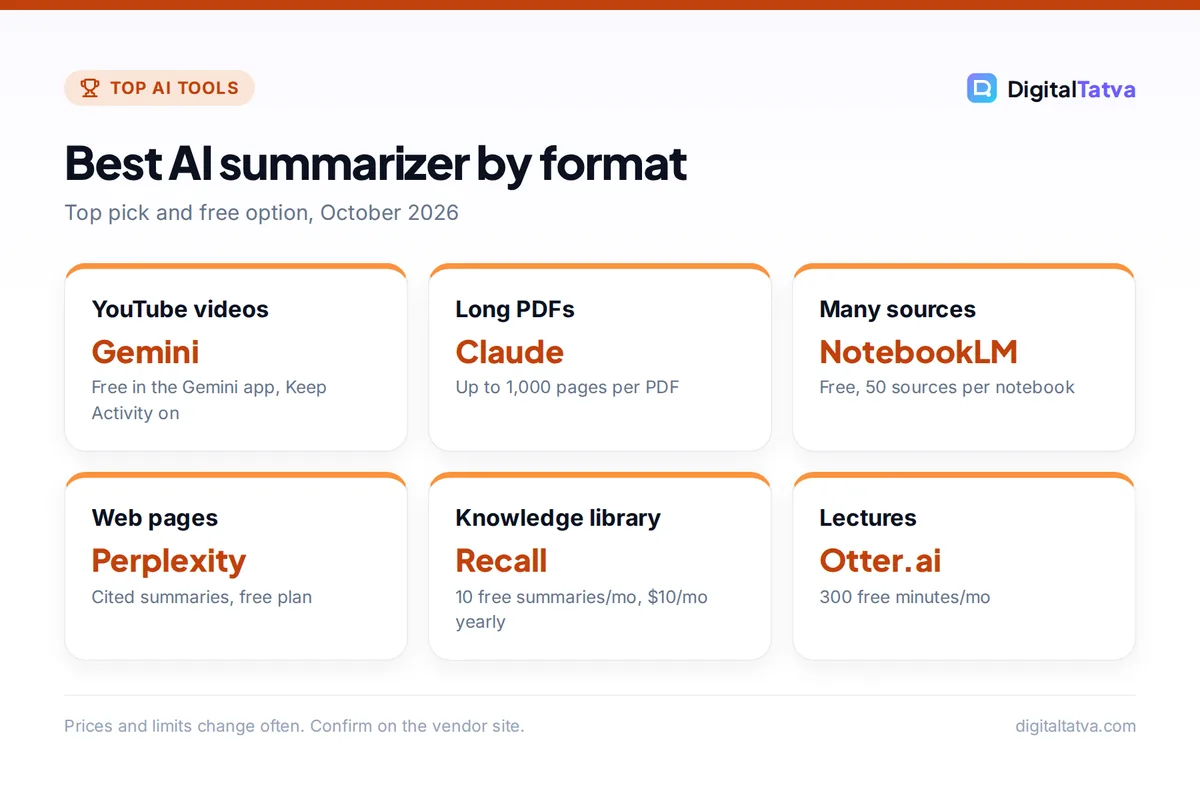
Best AI summarizer by format
Top pick and free option, October 2026
| Item | Detail | Notes |
|---|---|---|
| YouTube videos | Gemini | Free in the Gemini app, Keep Activity on |
| Long PDFs | Claude | Up to 1,000 pages per PDF |
| Many sources | NotebookLM | Free, 50 sources per notebook |
| Web pages | Perplexity | Cited summaries, free plan |
| Knowledge library | Recall | 10 free summaries/mo, $10/mo yearly |
| Lectures | Otter.ai | 300 free minutes/mo |
Prices and limits change often. Confirm on the vendor site.
Quick picks: the best AI summarizer for each job
| AI summarizer | Best for | Starting paid price | Free option |
|---|---|---|---|
| ChatGPT | Articles, files and follow-up work | Go $8/mo, Plus $20/mo | Yes |
| Claude | Very long PDFs and reports | Pro $20/mo ($17 annual) | Yes |
| Gemini | YouTube videos and Gmail threads | Google AI Plus $4.99/mo | Yes |
| NotebookLM (Gemini Notebook) | Studying many sources at once | Included in Google AI plans | Yes, 50 sources/notebook |
| Perplexity | Web pages with cited sources | Pro $20/mo | Yes |
| Recall | A personal library of summaries | $10/mo billed yearly | 10 summaries/mo |
| QuillBot Summarizer | Quick summaries of pasted text | $8.33/mo billed annually | Yes, short texts |
| Adobe Acrobat AI | Professionals working in PDFs daily | Acrobat Express $9.99/mo | Limited |
| Brave Leo | Free page summaries in the browser | Leo Premium $14.99/mo | Yes, no account |
| Otter.ai | Lectures and meetings | Pro $8.33/mo billed annually | 300 minutes/mo |
Tip: Before paying for a dedicated AI summarizer, try the assistant you already use. In most cases, a clear prompt in free ChatGPT, Claude or Gemini produces a summary as good as a specialist tool.
The 10 best AI summarizers, reviewed
We picked tools that cover the three things people summarize most: articles and web pages, PDFs and documents, and video or audio. We have not run a scored accuracy benchmark, so rankings reflect fit, limits and price rather than invented test numbers.
1. ChatGPT: Best all-round AI summarizer
- Starting price: Free; Go $8/month, Plus $20/month
- Free plan: Yes, with limited uploads
- Best for: summarizing articles, reports and spreadsheets, then acting on the summary
ChatGPT summarizes pasted text, uploaded files and links, and it is strongest at what comes next: turning a summary into an email, a slide outline, a table or a study quiz. Since October 2026, GPT-6 with Intelligent UI can present answers with charts and interactive elements, which helps when you summarize data. The Free plan limits file uploads; Go and Plus raise them. Our ChatGPT review covers each plan.
Skip it if: your main need is very long PDFs; Claude handles those more comfortably.
2. Claude: Best for long PDFs and dense reports
- Starting price: Free; Pro $20/month or $17/month billed annually
- Free plan: Yes
- Best for: annual reports, legal documents, research papers, book-length files
Claude accepts files up to 500MB, up to 20 files per chat, and PDFs up to 1,000 pages. It analyzes charts and visuals on the first 100 pages and reads text only beyond that. Paid plans have a 200K-token base context window, and newer models such as Opus 5.5 and Sonnet 5.5 support 1M tokens, so Claude can keep a whole long document in view while summarizing. In everyday use its summaries tend to preserve nuance and caveats well. See our Claude review and our explainer on context windows for what those numbers mean.
Skip it if: you want YouTube summaries; Claude does not watch videos from a link.
3. Gemini: Best AI summarizer for YouTube videos
- Starting price: Free; Google AI Plus $4.99/month (Rs 399 in India), AI Pro $19.99/month
- Free plan: Yes
- Best for: YouTube lectures, tutorials and long podcasts on YouTube
In the Gemini app you can paste a YouTube link or ask Gemini to find videos on a topic, then ask for a summary, key points or timestamps of important sections. Google’s help center notes you must be signed in with Keep Activity turned on, and the feature does not work in Live chats. Gemini in Gmail also offers free email thread summaries, launched first in English in the US. Indian university students can get Google AI Plus free for a year until 31 December 2026. For more video tools, see our list of AI tools for YouTubers.
Skip it if: you keep Gemini Apps Activity turned off for privacy; the YouTube feature needs it on.
4. NotebookLM (Gemini Notebook): Best free AI summarizer for study and research
- Starting price: Free; higher limits with Google AI Plus, Pro or Ultra
- Free plan: Yes, 100 notebooks, 50 sources each, 50 chats a day
- Best for: students and researchers combining PDFs, websites and YouTube videos
NotebookLM, renamed Gemini Notebook in July 2026, summarizes only the sources you add, with citations back to each one. Sources can be PDFs, Google Docs and Slides, web URLs, YouTube URLs, audio files and more, each up to 500,000 words or 200MB. The free tier includes 3 Audio Overviews (podcast-style summaries) a day plus reports, flashcards and quizzes. Google says personal data is not used to train its models unless you send feedback. Our guide to using NotebookLM for study and research walks through setup.
Skip it if: you need a quick one-off summary; ChatGPT or Gemini is faster for that.
5. Perplexity: Best for summarizing web pages with sources
- Starting price: Free; Pro $20/month
- Free plan: Yes, with limited daily Pro searches
- Best for: summarizing news, topics and articles with citations
Perplexity is built around cited answers, so it is ideal when you want a summary of what several sources say rather than one page. Paste a URL or ask about a topic and it summarizes with links you can check. File uploads are capped at 40MB each. Its free Comet browser brings the same assistant to the pages you have open. Our guides on using Perplexity for research and our Comet review cover both.
Skip it if: you mostly summarize private documents rather than the web.
6. Recall: Best for building a library of summaries
- Starting price: Plus $12/month, or $10/month billed yearly
- Free plan: Yes, 10 AI summaries a month with unlimited saves and notes
- Best for: lifelong learners who save articles, videos and podcasts
Recall saves and summarizes YouTube videos up to 10 hours long, podcasts, PDFs up to 300 pages, articles and Google Docs into a personal knowledge base. It links related ideas in a knowledge graph and quizzes you with spaced repetition so you actually remember what you read. Plus gives unlimited summaries and chat; Max ($48 a month or $38 billed yearly) adds frontier models and bulk actions. If you also want a note app, compare it with our list of the best AI note taking apps.
Skip it if: you summarize a few items a month; the free plan or a chatbot is enough.
7. QuillBot Summarizer: Best quick free text summarizer
- Starting price: Premium $8.33/month billed annually
- Free plan: Yes, for shorter texts
- Best for: students condensing articles and notes into key points
QuillBot’s summarizer offers two modes, Key Sentences (bullet points) and Paragraph, with a slider to set summary length. It is simple and fast, with no prompting needed. Free word limits are modest and listed inconsistently by third parties, so expect to need Premium for long texts. Premium also unlocks QuillBot’s paraphraser modes, which we compare in our best paraphrasing tools guide.
Skip it if: you need to summarize PDFs or videos directly.
8. Adobe Acrobat AI: Best for professionals who work in PDFs daily
- Starting price: Acrobat Express $9.99/month; Acrobat Studio $24.99/month
- Free plan: Limited
- Best for: contracts, reports and multi-file PDF projects
Acrobat Studio and Express include AI summaries and Q&A with answers “always cited back to your source documents”, and PDF Spaces combine several files and can create podcast-style overviews. AI features support 13 languages, including English, French, German, Japanese and Spanish, but no Indian languages. For more PDF options see our guide to AI tools to chat with PDFs.
Skip it if: you only summarize the occasional PDF; free Claude or NotebookLM does it well.
9. Brave Leo: Best free summarizer built into a browser
- Starting price: Free; Leo Premium $14.99/month or $149.99/year
- Free plan: Yes, no account needed
- Best for: privacy-minded readers summarizing web pages as they browse
Brave’s built-in assistant summarizes the page you are on, translates and answers questions about it, without an account. Brave says “Leo doesn’t retain or share chats, or use them for additional model training.” It runs on desktop, Android and iOS. Gemini in Chrome offers similar tab summaries for Chrome users. Our list of the best AI browsers compares the options.
Skip it if: you need PDF or video summaries; Leo is for web pages.
10. Otter.ai: Best for summarizing lectures and meetings
- Starting price: Pro $8.33/user/month billed annually ($16.99 monthly)
- Free plan: Basic, 300 minutes a month, 30 minutes per conversation
- Best for: students recording lectures, teams summarizing calls
Otter records and transcribes audio, then produces summaries and action items. Pro gives 1,200 minutes a month and 90 minutes per conversation, and students and teachers with an .edu email get 20% off Pro. Always get permission before recording a class or meeting. Our roundups of the best AI meeting assistants and AI transcription tools cover alternatives.
Skip it if: your lectures run longer than 30 minutes and you will not pay; the free cap cuts them off.
How to get accurate summaries: prompts that work
Most bad summaries come from vague requests. These prompts work in ChatGPT, Claude, Gemini and NotebookLM.
| Goal | Prompt to use |
|---|---|
| Quick overview | Summarize this in 5 bullet points for a busy manager. Put the single most important point first. |
| Study notes | Summarize this chapter as study notes with headings, key terms with definitions, and 5 quiz questions at the end. |
| Fact-safe summary | Summarize this report. After each point, add the page number or a short direct quote that supports it. Say “not stated” if something is missing. |
| YouTube video | Summarize this video in 7 points with approximate timestamps, then list any claims I should verify. |
| Decision memo | Summarize the arguments for and against in two columns, then list the open questions. |
| Different reading level | Summarize this for a Class 8 student in under 150 words using simple English. |
For more on structuring requests, see our prompt engineering guide.
Common AI summarizer mistakes and how to catch them
- Dropped caveats. Summaries often turn “may reduce” into “reduces”. Ask the tool to keep qualifiers and check key claims against the source.
- Invented details. AI can fill gaps with plausible but wrong facts, names or numbers. Requiring quotes or page references makes this easier to spot.
- Missing the end of long files. Very long documents can exceed what a free plan or model reads in one go. Split files or ask for a section-by-section summary.
- Video without captions. YouTube summaries depend on what the tool can access. If a summary looks generic, the tool may not have read the full video.
- Privacy leaks. Do not upload confidential contracts or personal data to free tools without checking their data policy and your company’s rules.
Watch out: Students should never submit an AI summary of a reading as their own work or skip the reading entirely. Use summaries to preview and review, then read the parts your assignment depends on. Our best AI tools for students guide covers smarter study workflows.
How to choose an AI summarizer
- Name the format. Articles and web pages: Perplexity, Brave Leo or ChatGPT. PDFs: Claude, NotebookLM or Acrobat. YouTube: Gemini, NotebookLM or Recall. Audio: Otter.
- Estimate volume. A few summaries a week fit any free plan. Daily heavy use justifies Recall Plus, ChatGPT Plus or Claude Pro.
- Decide if you need citations. NotebookLM, Perplexity and Acrobat cite sources by design, which matters for research and work.
- Check languages. Gemini and ChatGPT support many Indian languages; Acrobat AI does not support any.
- Use what you already pay for. A Google AI plan includes Gemini and higher NotebookLM limits; Microsoft 365 includes Copilot summaries in Word.
Save money: Free NotebookLM plus free Gemini covers PDFs, articles and YouTube for most students. If you pay for one AI subscription, Google AI Plus at $4.99 a month (Rs 399) is the cheapest way to raise both limits together.
Frequently asked questions
What is the best free AI summarizer?
For most people, NotebookLM (Gemini Notebook) is the best free AI summarizer because it handles PDFs, websites and YouTube links with citations, up to 50 sources per notebook. Free ChatGPT, Claude and Gemini are excellent for one-off summaries, and Brave Leo summarizes web pages for free without an account.
Can AI summarize a YouTube video?
Yes. The Gemini app can summarize YouTube videos when you are signed in with Keep Activity on, NotebookLM accepts YouTube URLs as sources, and Recall summarizes videos up to 10 hours long. Results depend on what the tool can access, so check important points against the video itself.
Which AI can summarize a long PDF?
Claude handles PDFs up to 1,000 pages, analyzing visuals on the first 100 pages. NotebookLM accepts sources up to 500,000 words or 200MB each, and Gemini’s paid plans offer a 1M-token context, roughly 1,500 pages. For very long files, ask for section-by-section summaries to avoid missed content.
Are AI summaries accurate?
They are usually good at main points but can drop caveats, mix up numbers or invent details. Ask for page references or direct quotes, compare key claims with the source, and avoid relying on an AI summary alone for legal, medical, financial or academic decisions.
Is it safe to upload documents to an AI summarizer?
It depends on the tool and plan. Some free tools may use content to improve models unless you opt out, while business plans usually exclude your data from training. Remove personal or confidential details first, and follow your employer’s AI policy. Our guide to AI data privacy covers the main vendors.
Our verdict: the best AI summarizer is the one that fits your format
Start with free tools: Gemini for YouTube, Claude for long PDFs, ChatGPT for articles and follow-up work, and NotebookLM when you study from many sources. Add Recall if you want a lasting library of summaries, Otter for lectures, and Acrobat only if PDFs are your daily work. Whatever you use, ask for sources and check anything important. For more no-cost options, see our best free AI tools. Prices and limits change often, so confirm them on each vendor’s site before you subscribe.
Pricing and features are checked at the time of writing and can change. Some links may be affiliate links, which never affect our verdicts.



