10 Best AI Paraphrasing Tools Compared: QuillBot and Alternatives
QuillBot, Grammarly, Wordtune, DeepL Write, ChatGPT and five more AI paraphrasing tools compared on free limits, price and languages, plus how to paraphrase without plagiarism.

On this page
- Key takeaways
- Quick picks: the best paraphrasing tools compared
- The 10 best AI paraphrasing tools, reviewed
- When paraphrasing is fine and when it is plagiarism
- How to paraphrase well with AI: a 5-step method
- How to choose a paraphrasing tool and pricing notes
- Frequently asked questions
- Our verdict: the best paraphrasing tool depends on length
The best paraphrasing tool for most people in 2026 is QuillBot, thanks to its free 125-word paraphraser, multiple rewrite modes and a Premium plan that costs $8.33 a month on annual billing. Grammarly’s free paraphraser is the best alternative if you already use Grammarly, Wordtune is best for sentence-by-sentence rewrites, and ChatGPT or Claude beat every dedicated paraphrasing tool when you need to rewrite long documents with specific instructions.
Below we compare 10 AI paraphrasing tools by price, free limits, languages and best use, as of October 2026. We also cover the part most lists skip: when paraphrasing is good editing and when it becomes plagiarism.
Key takeaways
- QuillBot remains the best all-round paraphrasing tool: free for 125 words at a time in two modes, with nine modes and custom modes on Premium.
- Grammarly, Ahrefs and Wordtune all offer useful free paraphrasers; DeepL Write is the pick for polished European-language rewrites.
- ChatGPT, Claude and Gemini handle long texts and custom instructions better than single-purpose tools, and their free plans are generous.
- Paraphrasing someone else’s ideas still requires a citation. Rewording a source to dodge a plagiarism checker is plagiarism.
- Check the output for meaning changes: paraphrasers sometimes alter facts, numbers or technical terms.
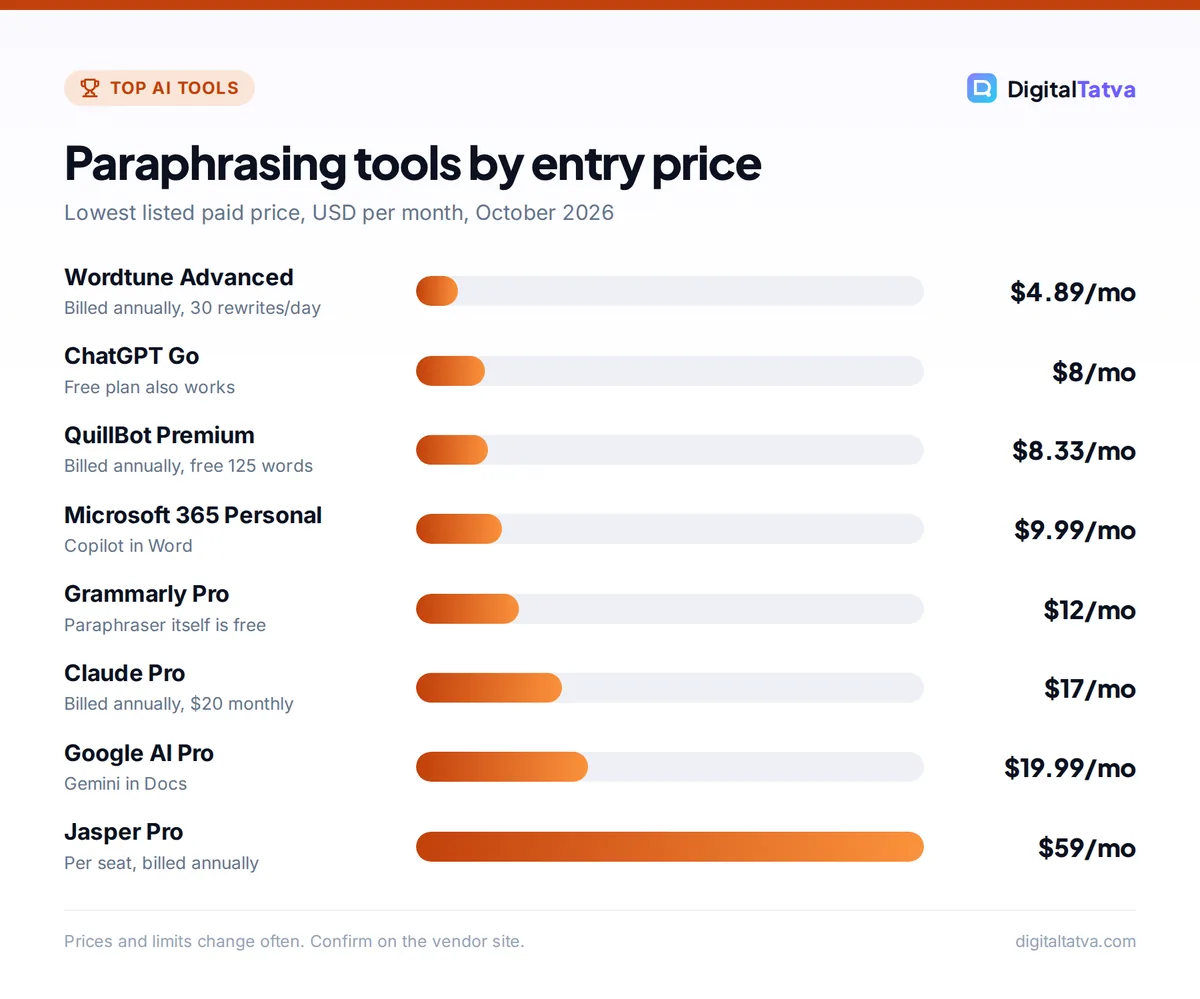
Paraphrasing tools by entry price
Lowest listed paid price, USD per month, October 2026
Prices and limits change often. Confirm on the vendor site.
Quick picks: the best paraphrasing tools compared
| Paraphrasing tool | Best for | Starting paid price | Free option |
|---|---|---|---|
| QuillBot | Everyday paraphrasing and students | $8.33/mo billed annually | 125 words, 2 modes |
| Grammarly Paraphraser | Rewrites inside your existing writing apps | Pro $12/mo (annual) | Yes, 6 styles |
| Wordtune | Sentence-level rewrites | $4.89/mo billed annually | 10 rewrites/day |
| ChatGPT | Long documents with custom instructions | Go $8/mo, Plus $20/mo | Yes |
| Claude | Preserving voice and nuance | Pro $20/mo ($17 annual) | Yes |
| DeepL Write | Polished European-language text | Write Pro add-on (price varies) | Yes, web version |
| Gemini in Google Docs | Google Workspace users | Google AI Pro $19.99/mo | Gemini app free |
| Copilot in Word | Microsoft 365 users | Microsoft 365 Personal $9.99/mo | Free Copilot app (web) |
| Ahrefs Paraphrasing Tool | Quick free rewrites for web copy | Free | Yes, 2,048 characters |
| Jasper | Marketing teams with brand voice | $59/seat/mo annual | 7-day trial |
Watch out: A paraphrasing tool changes words, not ownership. If the ideas, data or structure come from someone else, you still need to cite the source. Grammarly’s own paraphrasing page advises: “always include a citation to credit the original author.”
The 10 best AI paraphrasing tools, reviewed
We judged each paraphrasing tool on free limits, rewrite control, language support, price transparency and how well it fits real workflows. We did not run a scored benchmark, so there are no invented quality percentages here.
1. QuillBot: Best paraphrasing tool overall
- Starting price: Premium $8.33/month billed annually; about $19.95 month to month (third-party listing)
- Free plan: Yes, 125 words per paraphrase in Standard and Fluency modes
- Best for: students, bloggers and non-native English writers
QuillBot is the tool most people mean when they search for a paraphrasing tool. Paste text, pick a mode and adjust a synonym slider to control how much changes. The free plan covers 125 words per run in two modes; QuillBot Premium unlocks nine modes plus custom modes, longer inputs, a plagiarism checker and an AI detector. It also includes a grammar checker, summarizer, citation generator and translator in one place.
The monthly price is steep compared with annual billing, so if you will use it for a full semester or year, pay annually. Symbolab Pro subscribers also get QuillBot writing tools in a bundle.
Skip it if: you need to paraphrase long reports in one go; the free word cap is small.
2. Grammarly Paraphrasing Tool: Best if you already write in Grammarly
- Starting price: Free; Grammarly Pro $12/month (annual billing)
- Free plan: Yes, six preset writing styles
- Best for: professionals rewriting emails, reports and documents
Grammarly’s free paraphraser offers six preset styles and lets you add tone and style direction to build a custom voice it applies to later rewrites. It works in English, Spanish, French, German, Portuguese and Italian (a free account is needed for non-English). The bigger benefit is integration: Grammarly runs in browsers, Google Docs, Microsoft Office and desktop apps, so you can rewrite a sentence where you are working. Pro adds full-sentence rewrites, tone adjustment, plagiarism detection and 2,000 AI prompts a month. See our Grammarly review for the details.
Skip it if: you want fine-grained control over how many words change.
3. Wordtune: Best for sentence-by-sentence rewrites
- Starting price: Advanced $4.89/month billed annually
- Free plan: Yes, 10 rewrites a day
- Best for: emails, LinkedIn posts and polishing single paragraphs
Wordtune works best when you highlight one clunky sentence and choose from several alternatives, including shorter, longer, casual and formal versions. That keeps you in control instead of rewriting a whole page blindly. Advanced raises the cap to 30 rewrites a day, and Unlimited costs $6.99 a month on annual billing. Paid plans include a 3-day trial.
Skip it if: you want to paraphrase whole articles at once.
4. ChatGPT: Best for long documents and custom instructions
- Starting price: Free; Go $8/month, Plus $20/month
- Free plan: Yes
- Best for: rewriting full reports, simplifying technical text, changing audience
A general AI assistant is the most flexible paraphrasing tool you can use. You can say “rewrite this for a Class 10 student”, “keep every number and product name unchanged” or “turn this formal policy into a friendly email”, which no slider can do. ChatGPT now also works inside Microsoft Word through ChatGPT for Word, available on all plans including Free since September 2026. Our ChatGPT vs Claude comparison helps you pick between the two big assistants.
Skip it if: you will not review the output; long rewrites can drift from the original meaning.
5. Claude: Best for preserving voice and nuance
- Starting price: Free; Pro $20/month or $17/month billed annually
- Free plan: Yes (Sonnet and Haiku models)
- Best for: writers, editors and anyone paraphrasing their own long drafts
In everyday editing, Claude tends to keep tone and nuance intact when it rewrites, and it handles very long inputs well. Paste a sample of your own writing, ask Claude to match it, and tell it what must not change. Claude’s preset styles (Normal, Concise, Formal and Explanatory) give quick control over output tone. Our Claude prompts for writing and editing include ready-made rewrite prompts.
Skip it if: you want a one-click button with no prompting.
6. DeepL Write: Best for polished European-language text
- Starting price: Write Pro add-on to DeepL Pro (check DeepL for your region’s price)
- Free plan: Yes, free web version
- Best for: professionals writing in English, German, French, Spanish, Italian or Portuguese
DeepL Write is a rephrasing and correction tool from the makers of DeepL Translator. It suggests alternative wording and can shift writing style or tone, such as business, friendly, confident or diplomatic. Write Pro covers German, British and American English, Spanish, French, Italian and both forms of Portuguese, and the developer API adds Japanese, Korean and Chinese. Write Pro is sold as an add-on to a DeepL Pro subscription. If you work across languages, see our list of the best AI translation tools.
Skip it if: you write in Hindi or other Indian languages; our guide to AI tools for Indian languages covers better options.
7. Gemini in Google Docs: Best for Google Workspace users
- Starting price: Google AI Pro $19.99/month (Rs 1,950/month in India)
- Free plan: The Gemini app is free; Docs integration needs a paid plan
- Best for: students and teams who live in Google Docs
With Google AI Pro or an eligible Workspace business plan, Gemini’s Help me write sits inside Docs and Gmail, so you can select text and ask for a shorter, more formal or simpler version without copying anything. Indian university students can claim Google AI Plus free for a year until 31 December 2026, which includes Gemini in Gmail and Docs. Our guide to using Gemini in Gmail, Docs and Sheets walks through it.
Skip it if: you do not use Google Docs; the free Gemini app works, but you lose the in-document convenience.
8. Copilot in Microsoft Word: Best for Microsoft 365 users
- Starting price: Microsoft 365 Personal $9.99/month or $99.99/year
- Free plan: Free Copilot on the web, but not inside desktop Office apps
- Best for: office workers rewriting documents in Word
Microsoft 365 Personal, Family and Premium include Copilot in Word, so you can select a paragraph and ask for a rewrite in place. It suits people who already pay for Office. AI features in Family plans are for the subscription owner only, and Microsoft does not publish exact monthly AI credit numbers. Our Microsoft Copilot pricing guide explains which plan includes what.
Skip it if: you do not otherwise need Microsoft 365.
9. Ahrefs Paraphrasing Tool: Best free option for quick web copy
- Starting price: Free with an Ahrefs Free account
- Free plan: Yes, up to 2,048 characters per input
- Best for: marketers rewriting product blurbs, meta descriptions and intros
Ahrefs offers a free AI paraphraser with a writing tone menu and options to paraphrase, edit structure or generate variants. The input box caps at 2,048 characters, roughly 300 to 400 words, which is enough for most web snippets. It is a handy free tool for SEO and content teams, and it pairs well with the tools in our best AI SEO tools list.
Skip it if: you need non-English rewrites or academic modes.
10. Jasper: Best for marketing teams with a brand voice
- Starting price: Pro $59/seat/month annual, or $69 monthly
- Free plan: No; 7-day free trial
- Best for: marketing teams rewriting campaigns at scale
Jasper is not a cheap paraphraser, but its rephrase and rewrite tools use your saved Brand Voices and knowledge assets, so rewritten copy stays on brand. Pro includes two Brand Voices, a browser extension and marketing agents. It makes sense when consistency across a team matters more than price. Our Jasper vs Copy.ai comparison covers alternatives for teams.
Skip it if: you are a solo writer or student; QuillBot or a free assistant does the job.
When paraphrasing is fine and when it is plagiarism
Paraphrasing tools are legitimate editing aids. The problems start when they are used to hide where ideas came from or to slip past checks.
Good uses
- Rewriting your own clunky draft for clarity
- Simplifying a technical paragraph for a new audience
- Varying repetitive product descriptions in your own store
- Paraphrasing a source in your own words and citing it
- Improving fluency when English is your second language
Misuse
- Rewording someone else’s article and presenting it as yours
- Running a source through a tool to avoid a plagiarism checker
- Paraphrasing AI output to hide AI use where it is banned
- “Spinning” competitors’ content for SEO
Students should check their course rules first; many tools in our best AI tools for students guide are better used for learning than rewriting. Also know that paraphrased AI text is not reliably “safe” or “caught”: our review of the best AI detectors explains why detector scores swing both ways, and our AI humanizer comparison covers the tools that market evasion.
How to paraphrase well with AI: a 5-step method
- Understand the original first. Read the source and write one sentence about its main point in your own words before using any tool.
- Tell the tool what must stay fixed. In ChatGPT or Claude, list names, numbers, quotes and technical terms that must not change. In QuillBot, use the freeze words option where available.
- Choose the audience and tone. “Formal for a client report” or “simple for a 14-year-old” gives far better results than a generic rewrite.
- Compare side by side. Check that the meaning, claims and numbers survived. Paraphrasers occasionally reverse a meaning or soften a precise claim.
- Add your own voice and cite. Edit the result by hand, add your examples, and credit the original source if the idea is not yours.
Here is a prompt that works in any assistant:
Paraphrase the text below for [audience] in a [tone] tone.
Keep all numbers, names and technical terms unchanged.
Keep the length within 10% of the original.
After the rewrite, list any places where the meaning might have shifted.
Text: [paste]
Our prompt engineering guide explains why constraints like these improve output.
How to choose a paraphrasing tool and pricing notes
- Short texts, free: QuillBot free (125 words), Grammarly free, Ahrefs free or Wordtune’s 10 daily rewrites.
- Long documents: ChatGPT or Claude, free or paid, because you can give detailed instructions and paste far more text.
- Inside your writing app: Gemini in Docs, Copilot in Word or the Grammarly extension.
- Brand consistency for a team: Jasper.
- Annual vs monthly: QuillBot’s annual rate is less than half its monthly price. Pay annually only if you are sure you will use it all year.
- Privacy: do not paste confidential client documents, unpublished research or personal data into free tools without checking their data policy.
Save money: If you already pay for ChatGPT, Claude, Google AI or Microsoft 365, you probably do not need a separate paraphrasing subscription. Use the assistant you have, and keep a free QuillBot account for quick mode-based rewrites.
Frequently asked questions
What is the best free paraphrasing tool?
QuillBot’s free plan is the best dedicated option, with 125 words per paraphrase in Standard and Fluency modes. Grammarly’s free paraphraser offers six styles, Ahrefs handles up to 2,048 characters free, and Wordtune gives 10 rewrites a day. For long texts, the free versions of ChatGPT, Claude and Gemini are more flexible than any single-purpose tool.
Is using a paraphrasing tool cheating?
Not by itself. Rewriting your own work for clarity is normal editing. It becomes cheating when you reword someone else’s ideas without citing them, use a tool to evade plagiarism checks, or hide AI use where your school or client bans it. Check your institution’s policy and cite every source you paraphrase.
Is QuillBot Premium worth it?
It is worth it if you paraphrase often, need more than the two free modes, or regularly exceed 125 words. At $8.33 a month billed annually it is good value, but the month-to-month price is far higher. Occasional users can stay on the free plan and use ChatGPT or Claude for longer rewrites.
Can Turnitin detect paraphrasing tools?
Paraphrasing does not reliably hide copying. Turnitin compares submissions with its database of sources, and since 2025 it also flags text that appears to have been run through AI humanizer or bypass tools. No tool reliably hides copied ideas, and trying to do so is academic misconduct even if it is not flagged.
Which paraphrasing tool supports Hindi?
Most dedicated paraphrasers focus on English and major European languages: QuillBot’s humanizer covers five, Grammarly’s paraphraser six, and DeepL Write mainly European plus Japanese, Korean and Chinese via API. For Hindi and other Indian languages, ChatGPT and Gemini, which both support many Indian languages, are usually the better choice.
Our verdict: the best paraphrasing tool depends on length
For short rewrites, QuillBot is the best paraphrasing tool overall, with Grammarly and Wordtune close behind as free options. For long documents or specific instructions, use ChatGPT or Claude, and if you live in Google Docs or Word, the built-in Gemini or Copilot rewrite saves a subscription. Whatever you use, check the meaning, add your own voice and cite your sources. For a wider view, see our list of the best AI writing tools. Prices and limits change often, so confirm them on each vendor’s site before you pay.
Pricing and features are checked at the time of writing and can change. Some links may be affiliate links, which never affect our verdicts.