How to Learn AI in 2026: A Step-by-Step Roadmap for Beginners
How to learn AI in 2026: a step-by-step roadmap for beginners and future AI engineers, with a 4-week plan, core concepts, free courses, practice tools and portfolio projects.


On this page
- Key takeaways
- Step 1: Decide why you are learning AI
- Step 2: Learn the core concepts
- Step 3: Practice with the main AI tools
- Step 4: Master prompting
- A 4-week plan to learn AI as a beginner
- The technical path: learning to build with AI
- Best free resources to learn AI
- Projects that prove your AI skills
- Mistakes that slow AI learners down
- Frequently asked questions
- The bottom line
The fastest way to learn AI in 2026 is to start using AI tools on real tasks from day one, then add theory in layers: core concepts first, then prompting and workflows, then automation or coding if your goals need it. Most people can become confident everyday AI users in about four weeks with 30 to 45 minutes a day. Becoming an AI engineer who builds models or AI products takes longer, typically six to twelve months of steady study and projects.
This guide gives you a clear roadmap for both paths: a non-technical track for professionals, marketers, business owners and students, and a technical track for people who want to build with AI. It includes a week-by-week plan, the best free courses, the tools to practice with, project ideas and the mistakes that slow most learners down.
Key takeaways
- Pick your goal first: using AI at work, automating workflows, or building AI products. Each needs a different path.
- Learn by doing: use ChatGPT, Claude or Gemini daily on your own tasks while you study the concepts.
- The core concepts every learner needs are LLMs, tokens, context windows, prompting, RAG and AI agents.
- Free, high-quality courses from Google, Microsoft, IBM, Anthropic, OpenAI, DeepLearning.AI and India’s government platforms cover the basics.
- Build a small portfolio of three to five real projects. Projects teach more than certificates and prove your skills to employers.
Step 1: Decide why you are learning AI
“Learning AI” can mean very different things. A marketer learning to draft campaigns with ChatGPT and a developer learning to build a retrieval system need almost nothing in common beyond the basics. Choose the goal that fits you:
| Your goal | Path | Time to useful skill | Coding needed? |
|---|---|---|---|
| Work faster in my current job | AI user | 2 to 4 weeks | No |
| Automate business processes | AI workflow builder | 1 to 3 months | No, but logic helps |
| Build AI apps and agents | AI engineer | 4 to 9 months | Yes, Python or JavaScript |
| Train and research models | Machine learning engineer or researcher | 1 to 2+ years | Yes, plus maths |
Most readers should start on the AI user path even if they later go technical. Knowing how to work with models well is the foundation for every other path. Our list of the most valuable AI skills to learn shows which skills employers ask for most.
Step 2: Learn the core concepts
You do not need maths to understand how modern AI works at a useful level. Learn these ideas first:
- What an LLM is: a model that predicts text one token at a time. Read our plain-English LLM guide.
- Generative AI: AI that creates text, images, audio and video; see what generative AI is.
- Tokens and context windows: how models read text and how much they can consider at once. Our tokens explainer covers it.
- Hallucinations: why AI can be confidently wrong and how to check it.
- RAG: how AI answers from your documents; see what RAG is.
- AI agents: systems that plan and act using tools; read what AI agents are.
Keep our AI glossary open while you study. When a new term appears, look it up immediately rather than pushing past it.
Step 3: Practice with the main AI tools
Pick one main assistant and use it every day for real work. All three leaders have strong free plans:
| Tool | Strong at | Start here |
|---|---|---|
| ChatGPT | All-round help, images, voice, agents | How to use ChatGPT |
| Claude | Writing, long documents, coding | How to use Claude |
| Gemini | Google apps, research, images | How to use Gemini |
| NotebookLM | Studying from your own sources | NotebookLM guide |
| Perplexity | Research with citations | How to use Perplexity |
Give yourself a daily task list: summarize an article, draft an email, analyze a spreadsheet, plan a project, explain a concept you are struggling with. Compare answers across two tools now and then to see how they differ.
Step 4: Master prompting
Prompting is the single highest-return skill for non-technical learners. A good prompt gives the model a role, context, the task, constraints and the output format. Instead of “write a LinkedIn post about AI”, try: “You are a B2B marketer. Write a 150-word LinkedIn post for small business owners in India about saving time with AI for invoicing. Friendly, practical tone, one example, end with a question.”
- Give examples of what good looks like.
- Ask the model to ask you questions before it starts.
- Break big tasks into steps.
- Ask for a critique of its own draft, then a revision.
Our prompt engineering guide and collection of best ChatGPT prompts give you templates to start from.
A 4-week plan to learn AI as a beginner
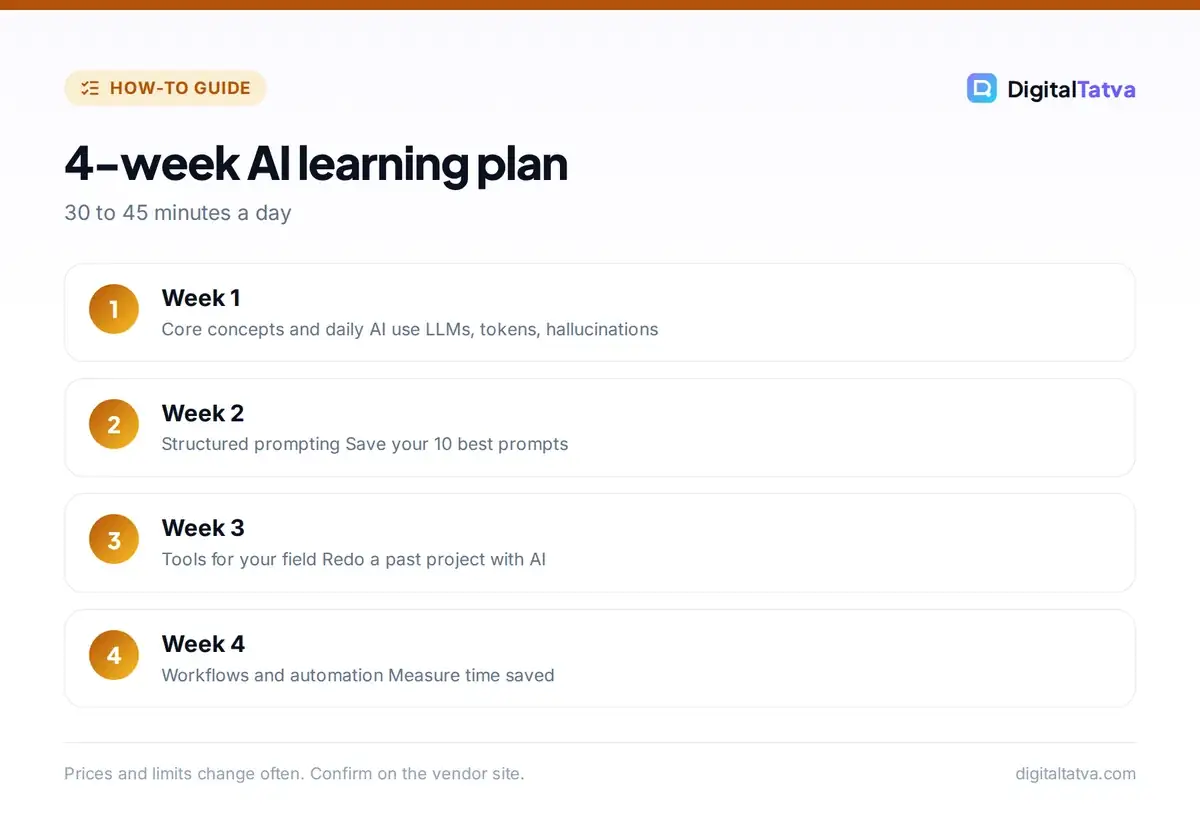
- Week 1, foundations: read the concept guides above, set up ChatGPT, Claude or Gemini and use it daily for at least three small tasks. Take one short intro course.
- Week 2, prompting: practice structured prompts on your real work. Save your ten best prompts in a document you can reuse.
- Week 3, your field: learn the AI tools specific to your work, such as writing, design, data, sales or coding, and redo a past project with AI help.
- Week 4, workflows: connect tools or build one simple automation, such as summarizing new form responses into a sheet. Write down the time you saved.
After four weeks, keep a habit: try one new AI feature or tool each week, and review what is working every month.
The technical path: learning to build with AI
If you want to build AI products, add these layers after the basics:
- Python fundamentals: variables, functions, lists, dictionaries, files and APIs. Four to six weeks of daily practice is typical.
- Calling AI APIs: send prompts to OpenAI, Anthropic or Google models from code, handle responses and costs. Our API cost estimator guide keeps bills predictable.
- RAG and embeddings: build a chatbot that answers from your documents.
- Agents and tools: let models call functions, search and act; see how to build an AI agent.
- AI coding assistants: use Claude Code or Cursor to build faster, while still understanding the code they write.
- Machine learning basics (optional): data, training, evaluation and neural networks, if you want to train your own models.
Best free resources to learn AI
| Resource | Level | Good for |
|---|---|---|
| Google AI Essentials and Google Skills | Beginner | Workplace AI use, prompting |
| Microsoft Learn AI skills paths | Beginner to intermediate | Copilot and Azure AI |
| Anthropic Academy | Beginner to advanced | Claude, prompting, building with the API |
| OpenAI Academy | Beginner to intermediate | ChatGPT use, building with OpenAI |
| DeepLearning.AI short courses | Intermediate | RAG, agents, LLM apps |
| Elements of AI | Beginner | Concepts without coding |
| IndiaAI and SWAYAM courses | Beginner to intermediate | Indian learners, certificates |
Our full list of free AI courses with certificates has links and durations. A good starting point for technical learners is DeepLearning.AI short courses; non-technical learners can try Elements of AI.
Projects that prove your AI skills
- A prompt library for your job with before-and-after examples.
- An automation that saves at least an hour a week, built in Zapier or n8n.
- A custom GPT or Claude Project trained on your team’s documents.
- A content workflow, such as turning one webinar into a blog, social posts and an email.
- For coders: a RAG chatbot, a small agent that completes a task, or a web app built with an AI coding assistant.
Document each project with the problem, your approach, the tools used and the result in time or money saved. That story is what interviewers and clients care about. If you want to earn from these skills, our guide to making money with AI covers freelancing and services.
Mistakes that slow AI learners down
Do
- Use AI daily on real tasks
- Learn concepts alongside practice
- Build small projects early
- Check outputs for accuracy
- Follow a few reliable news sources
Avoid
- Collecting courses without applying them
- Chasing every new tool launch
- Starting with advanced maths if you only need to use AI
- Trusting AI answers without verifying
- Paying for expensive bootcamps before trying free courses
Frequently asked questions
Can I learn AI without coding?
Yes. Most people only need to use AI tools well, which requires no coding. You can learn prompting, AI writing, research, design and no-code automation with tools like ChatGPT, Claude, Gemini, Zapier and n8n. Coding becomes necessary only if you want to build AI apps or models.
How long does it take to learn AI?
Becoming a confident everyday AI user takes about two to four weeks of regular practice. Building no-code automations takes one to three months. Becoming an AI engineer who builds apps typically takes four to nine months, and machine learning research takes a year or more.
What is the best way to learn AI for free?
Combine free courses from Google, Microsoft, Anthropic, OpenAI or DeepLearning.AI with daily practice on the free plans of ChatGPT, Claude and Gemini. Apply each lesson to a real task the same day and build small projects to lock in what you learn.
Do I need maths to learn AI?
Not to use AI or build apps with AI APIs. Maths such as linear algebra, probability and calculus matters if you want to train models or do machine learning research. Many successful AI builders start with tools and code, then learn maths later if needed.
Which AI tool should a beginner learn first?
Start with one general assistant: ChatGPT, Claude or Gemini. All have free plans and similar basics. Pick the one that fits your work, use it daily for a few weeks, then add specialist tools for your field.
The bottom line
Learning AI is less about studying theory and more about building a habit. Choose your goal, learn the core concepts, practice daily with one assistant, master prompting and finish a few real projects. That combination will put you ahead of most people in your field within a month, and give you a strong base if you decide to go technical later.
Pricing and features are checked at the time of writing and can change. Some links may be affiliate links, which never affect our verdicts.