What Is RAG (Retrieval-Augmented Generation)? Explained Simply
What is RAG? A plain-English guide to retrieval-augmented generation: how it works, embeddings and vector databases, RAG vs fine-tuning, business examples and how to build a RAG chatbot.

On this page
- Key takeaways
- What is RAG, in simple terms?
- How RAG works, step by step
- The main parts of a RAG system
- RAG vs fine-tuning vs long context
- Real examples of RAG in business
- Common RAG problems and how to fix them
- How to build a simple RAG chatbot
- Agentic RAG: where it is heading
- Frequently asked questions
- The bottom line
RAG, short for retrieval-augmented generation, is a technique that makes an AI model look up relevant information before it answers. Instead of relying only on what a large language model memorized during training, a RAG system first searches a knowledge source, such as your documents, a help center or the web, then gives the best matching passages to the model so it can write an answer grounded in that material, often with citations.
This guide explains what RAG is in plain English, how it works step by step, the key parts of a RAG system, how it compares with fine-tuning and long context windows, real business examples, common problems and how to build a simple RAG chatbot without being a machine learning expert.
Key takeaways
- RAG connects an LLM to an outside knowledge source, so answers can use private, recent or specialist information the model was never trained on.
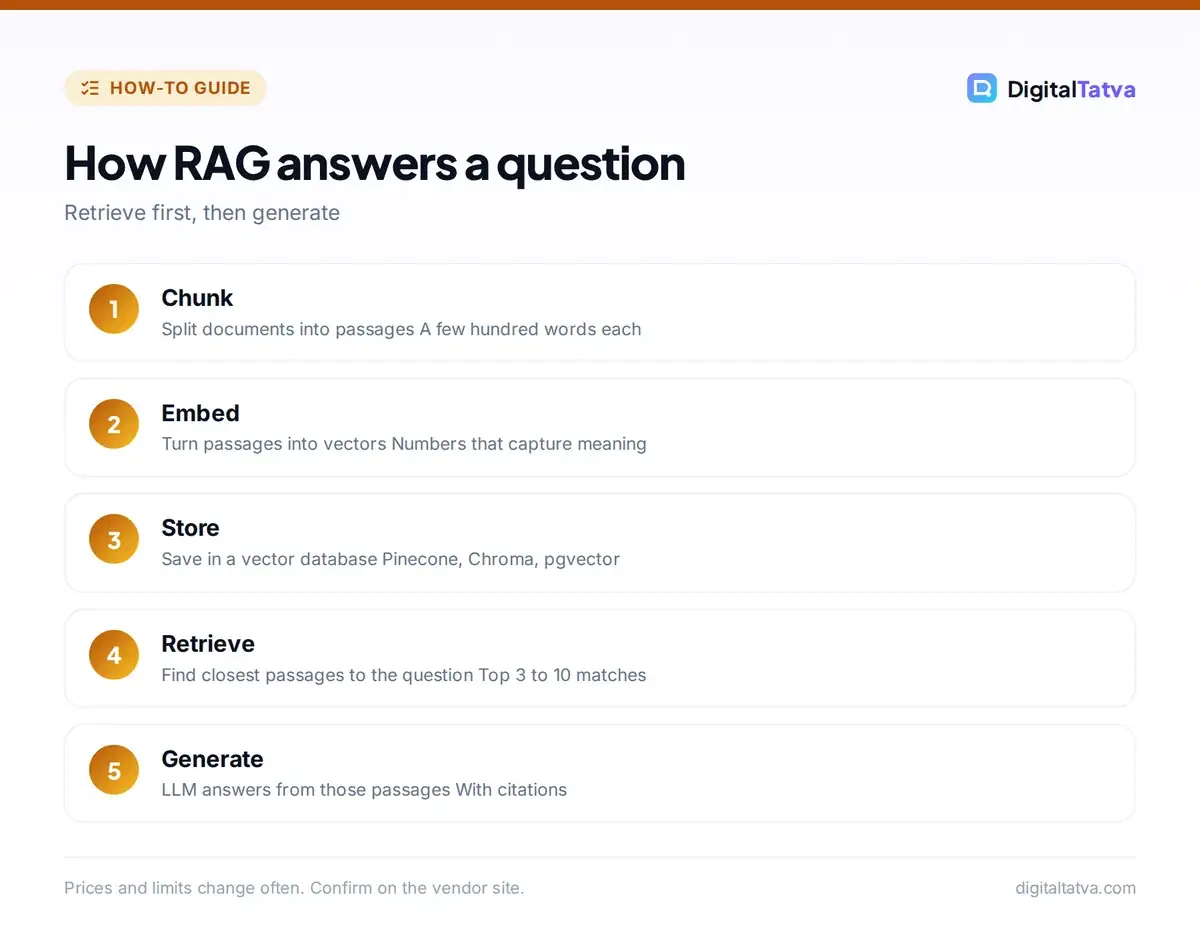
- The basic flow is: split documents into chunks, turn them into embeddings, store them in a vector database, retrieve the closest chunks for each question and pass them to the model.
- RAG reduces hallucinations and allows citations, but it only works as well as the documents and retrieval behind it.
- For most business knowledge tasks, RAG is cheaper and easier to update than fine-tuning a model.
- No-code options such as NotebookLM, Claude Projects and custom GPTs give you RAG-style answers from your own files in minutes.
What is RAG, in simple terms?
Think of an LLM as a very well read assistant who has a great memory but no access to your company files. Ask about your refund policy and it will guess, sometimes confidently and wrongly. RAG gives that assistant a filing cabinet and a librarian. Every time you ask a question, the librarian pulls the most relevant pages from the cabinet, hands them over, and the assistant writes its answer using those pages.
The term comes from a 2020 research paper by Patrick Lewis and colleagues at Facebook AI Research, which combined a retriever with a text generator. Today RAG is the standard pattern behind customer support bots, internal knowledge assistants, AI search engines such as Perplexity and the “chat with your PDF” features in many apps. If you are new to the basics, start with our explainer on what an LLM is.
| Without RAG | With RAG |
|---|---|
| Answers only from training data | Answers from your documents or live sources |
| Knowledge stops at the training cutoff | Updates as soon as you change the documents |
| Cannot cite where facts came from | Can link to the exact source passage |
| Higher risk of made-up answers on niche topics | Lower risk, because the model has evidence to work from |
| No access to private company knowledge | Uses private knowledge with access controls |
How RAG works, step by step
A RAG system has two phases: preparing your knowledge once (indexing), then answering each question (retrieval and generation).
Phase 1: Indexing your knowledge
- Collect the documents. PDFs, web pages, help articles, policies, product sheets, past tickets or database records.
- Split them into chunks. Long documents are cut into passages of a few hundred words, often with a little overlap so ideas are not cut in half.
- Create embeddings. Each chunk is converted into an embedding, a list of numbers that captures its meaning. Chunks about similar ideas end up with similar numbers.
- Store them in a vector database. The embeddings and the original text are saved in a database built to find similar vectors quickly.
Phase 2: Answering a question
- Embed the question. The user’s question is turned into an embedding the same way.
- Retrieve the closest chunks. The database returns the passages whose meaning is closest to the question, usually the top three to ten.
- Build the prompt. The system combines instructions, the retrieved passages and the question, for example: “Answer using only the sources below and cite them.”
- Generate the answer. The LLM writes a response grounded in those passages, ideally with citations back to each source.
The model never “learns” your documents in a permanent way. It simply reads the relevant pieces each time, inside its context window. That is why updating a RAG system is as simple as updating the documents.
The main parts of a RAG system
| Component | What it does | Popular examples |
|---|---|---|
| Document loaders | Pull text out of PDFs, sites, Google Drive, Notion and more | LlamaIndex, LangChain loaders, Unstructured |
| Embedding model | Turns text into meaning vectors | OpenAI embeddings, Google Gemini embeddings, Voyage AI, Cohere, open models |
| Vector database | Stores and searches embeddings | Pinecone, Weaviate, Qdrant, Chroma, pgvector for Postgres |
| Retriever and reranker | Finds and orders the best passages | Hybrid keyword plus vector search, Cohere Rerank |
| LLM | Writes the final answer | GPT-6, Claude Sonnet 5.5, Gemini, open-weight models |
| Orchestration | Connects the steps and handles prompts | LangChain, LlamaIndex, n8n, custom code |
For a no-code pipeline, you can wire these pieces together visually; our n8n AI workflow guide shows the approach. Developers building agents that fetch data from tools may also use the Model Context Protocol, which standardizes how models connect to outside data.
RAG vs fine-tuning vs long context
There are three common ways to give a model your knowledge. They solve different problems.
| Approach | Best for | Drawbacks |
|---|---|---|
| RAG | Large, changing knowledge bases; answers that need citations | Quality depends on retrieval; more moving parts |
| Fine-tuning | Teaching a consistent style, format or narrow skill | Costly to redo when facts change; does not reliably add facts |
| Long context | One-off analysis of a few large documents | Expensive per question at scale; slower with huge inputs |
Modern models can read around a million tokens at once, so for a single long report you can often just paste it in. But if a support bot answers thousands of questions a day across ten thousand pages, sending everything every time would be slow and costly. RAG sends only the few passages that matter. Techniques like prompt caching can lower costs further. To understand how pricing works per token, see our tokens explainer.
Real examples of RAG in business
- Customer support: a chatbot answers from help articles and order policies, and hands complex cases to a human. Our guide to AI customer support tools lists ready-made options.
- Website assistant: a bot trained on your product pages and FAQs; see how to add an AI chatbot to your website.
- Internal knowledge: employees ask about HR policies, sales playbooks or engineering docs instead of searching folders.
- Legal and compliance: lawyers search contracts and case files, with every answer linked to a clause.
- AI search engines: tools such as Perplexity and Google’s AI Mode retrieve web pages and summarize them with links, which is web-scale RAG.
- Research: analysts query hundreds of reports and get answers with page references.
SEO angle: AI search engines are RAG systems that retrieve web pages. Clear, well-structured pages with direct answers are easier for them to retrieve and cite, which is the core idea in our guide on how to rank in AI search.
Common RAG problems and how to fix them
Benefits
- Answers based on current, private knowledge
- Citations users can check
- Easy to update without retraining
- Access controls per user or team
- Cheaper than fine-tuning for knowledge tasks
Common problems
- Retrieves the wrong chunk, so the answer is off
- Outdated or duplicate documents confuse results
- Tables and scanned PDFs extract badly
- Chunks too small lose context; too large add noise
- Model ignores sources and adds its own guesses
Practical fixes that work for most teams:
- Clean your sources first. Remove old versions and duplicates. Garbage in still means garbage out.
- Use hybrid search. Combine keyword search (great for product codes and names) with vector search (great for meaning).
- Add a reranker. Retrieve twenty candidates, then let a reranking model pick the best five.
- Keep metadata. Store titles, dates and document types so the system can filter, for example “only 2026 policies”.
- Instruct the model clearly. Tell it to answer only from the sources and to say “I don’t know” when the answer is missing. Our prompt engineering guide has templates.
- Test with real questions. Build a set of 30 to 50 real user questions with correct answers and measure how often the system gets them right.
How to build a simple RAG chatbot
Option 1: No code, in minutes
- NotebookLM: upload PDFs, docs or links and ask questions with cited answers. See our NotebookLM guide.
- Claude Projects: add files to a project and every chat can draw on them; our Claude Projects guide explains setup.
- Custom GPTs: attach knowledge files to a GPT and share it with your team; see how to create a custom GPT.
Option 2: Low code or code
- Pick an embedding model and a vector database, such as OpenAI embeddings with Chroma for a prototype or Pinecone or pgvector for production.
- Load and chunk your documents with LlamaIndex or LangChain, starting with chunks of around 300 to 800 words.
- Embed and store the chunks with their source titles and links.
- For each question, retrieve the top matches, build a prompt with clear instructions and call your chosen LLM.
- Show citations in the answer and log questions so you can find gaps in your documents.
The official LlamaIndex documentation and LangChain RAG tutorial both include starter projects. Before uploading company data to any tool, review our checklist on AI data privacy for business.
Agentic RAG: where it is heading
Classic RAG retrieves once and answers. Agentic RAG lets an AI agent decide what to search, run several searches, check results, call other tools such as a database or calculator, and only then answer. Deep research features in ChatGPT, Claude, Gemini and Perplexity work this way, searching dozens of sources before writing a report. The trade-off is more time and tokens per question in exchange for more thorough answers.
Frequently asked questions
What does RAG stand for in AI?
RAG stands for retrieval-augmented generation. It is a method where an AI system retrieves relevant information from a knowledge source, such as documents or the web, and gives it to a language model so the answer is grounded in that information rather than memory alone.
Does RAG stop AI hallucinations?
RAG reduces hallucinations but does not remove them completely. If retrieval finds the wrong passage, or the documents are wrong or missing the answer, the model can still produce errors. Clear instructions, citations and testing with real questions keep the risk low.
Is RAG better than fine-tuning?
For adding facts and knowledge that changes, RAG is usually better, cheaper and easier to update. Fine-tuning is better for teaching a model a consistent style, format or narrow behavior. Many production systems combine both.
What is a vector database in RAG?
A vector database stores embeddings, which are numerical representations of text meaning, and quickly finds the ones most similar to a question. Examples include Pinecone, Weaviate, Qdrant, Chroma and the pgvector extension for Postgres.
Can I use RAG without coding?
Yes. Tools such as NotebookLM, Claude Projects and custom GPTs let you upload documents and ask questions with answers based on those files. No-code automation platforms like n8n can also build RAG workflows visually.
The bottom line
RAG is the most practical way to make AI useful with your own information. It lets a language model answer from current, private and checkable sources instead of guessing from memory. Start small with a no-code tool and a clean set of documents, measure answers against real questions, and only build a custom pipeline when you need more control, scale or integration.
Pricing and features are checked at the time of writing and can change. Some links may be affiliate links, which never affect our verdicts.