
10 Best AI Thumbnail Makers for YouTube
The 10 best AI thumbnail makers for YouTube in 2026, from Canva and Pikzels to YouTube Studio's free A/B tests, ChatGPT, Gemini and Midjourney, with prices and specs.

On this page
The best AI thumbnail maker for most YouTubers is Canva, because it combines thousands of thumbnail templates, background removal and AI image generation in one free-to-start editor, while Pikzels is the best dedicated AI tool if you want thumbnails generated with your own face from a prompt. Before paying for anything, use YouTube Studio’s free built-in tools: Ask Studio can suggest thumbnails from your transcript, and you can A/B test up to three thumbnails to see which wins on watch time.
This guide ranks ten AI thumbnail makers, from all-in-one design tools to image generators and YouTube’s own features, with prices checked on 12 October 2026, real free limits, YouTube’s technical requirements and a workflow that turns AI output into thumbnails people actually click.
Key takeaways
- Canva is the best all-round AI thumbnail maker: free templates, 20 AI uses a month on Free, and Pro at US$144 a year (Rs 4,000 in India).
- Pikzels generates thumbnails with your face from 3 photos, from $28 a month on annual billing for up to 1,800 thumbnails a year.
- YouTube Studio lets you A/B test up to 3 titles and thumbnails for free, and picks the winner by watch time share, not clicks.
- ChatGPT, Gemini and Ideogram are strong for backgrounds and bold text; Midjourney is best for cinematic art.
- Upload at 3840 x 2160 (16:9) for best quality; custom thumbnails require a verified YouTube account.
Quick picks: best AI thumbnail makers compared
| Tool | Best for | Starting price | Free option |
|---|---|---|---|
| Canva | Best overall, templates plus AI | US$144/year (Pro) | Yes, 20 AI uses/month |
| YouTube Studio | Free testing and suggestions | Free | Yes |
| Pikzels | AI thumbnails with your face | $28/mo billed annually | Free trial |
| Adobe Express | Free designs with Firefly AI | $9.99/mo (Firefly Standard) | Yes, daily free generations |
| ChatGPT | Concepts and readable text | $20/mo (Plus) | Yes, limited images |
| Gemini (Nano Banana) | Editing your own frames | $4.99/mo (Google AI Plus) | Yes, 1K downloads |
| vidIQ | Thumbnails plus channel research | Paid plans, check site | Yes, 150 AI credits/month |
| Ideogram | Bold text and typography | $15/mo annual (Plus) | Yes, 30 credits/week |
| Midjourney | Cinematic background art | $10/mo (Basic) | No |
| Photoroom | Cutting yourself out cleanly | $7.50/mo billed yearly | Yes, 100 exports/month |
YouTube thumbnail requirements to know first
Every tool below should export to YouTube’s specs. According to YouTube’s custom thumbnail help page, the recommended size is 3840 x 2160 pixels with a minimum width of 640 pixels, a 16:9 aspect ratio, and JPG or PNG format. Desktop uploads allow up to 50MB, while mobile uploads are limited to 2 MB. Shorts thumbnails should be 9:16 (2160 x 3840) and can only be added in YouTube Studio on a computer.
Your account must be verified to upload custom thumbnails; without verification you can only pick from auto-generated options. Many design tools default to 1280 x 720, which still works, but exporting at 4K looks crisper on TVs and large monitors.
Tip: Design at 3840 x 2160, then check your thumbnail shrunk to phone size. If the face and the 2 to 4 words of text are not readable at that size, simplify.
The 10 best AI thumbnail makers
1. Canva: Best AI thumbnail maker overall
- Starting price: Pro US$144/year (Rs 4,000/year in India; Pro Lite Rs 1,590/year)
- Free option: Yes, up to 20 Standard or Premium AI uses a month
- Best for: Most YouTubers, from beginners to small teams
Canva has a huge library of YouTube thumbnail templates at the right size, plus AI image generation, an image upscaler, Magic Resize for turning a thumbnail into a Shorts cover or Instagram post, and a Brand Kit that keeps fonts and colors consistent across videos. Background Remover, essential for the classic “face cutout plus bold text” style, is included with paid plans.
Free works for getting started; Pro adds 10x more AI, 5 Brand Kits and unlimited background removal. Our Canva pricing guide compares Free, Pro and Business.
Skip it if: you want a tool that generates the whole thumbnail from a prompt with your face in it.
2. YouTube Studio: Best free tool for testing and suggestions
- Starting price: Free
- Free option: Yes, for creators with advanced features enabled
- Best for: Every creator, before paying for any other tool
YouTube Studio’s A/B test feature lets you test up to three titles, thumbnails or combinations on desktop. YouTube shows the variants to different viewers and picks the winner by watch time share, not click-through rate, so a misleading clickbait thumbnail will not win. Tests usually finish within two weeks; Shorts, private and made-for-kids videos are not eligible.
Ask Studio can also generate thumbnail suggestions from your video’s transcript, and at Made on YouTube in September 2026 YouTube announced channel-matched thumbnail generation and background thumbnail refreshes for older videos. Our roundup of AI tools for YouTubers covers Studio’s other AI features.
Skip it if: never; at minimum, use the A/B test.
3. Pikzels: Best dedicated AI thumbnail generator
- Starting price: Premium $28/month billed annually ($336/year); Ultimate $56/month annually
- Free option: Free trial (length not stated)
- Best for: Faceless and face-led channels publishing often
Pikzels is built only for YouTube thumbnails. Upload 3 photos once to create a Persona and it can put your face into generated thumbnails; train a Style for consistent branding; paste a YouTube link to Recreate a thumbnail’s format with your own topic; and edit with text instructions. It also scores thumbnails and generates titles.
Premium covers up to 1,800 thumbnails a year (18,000 credits), with each thumbnail costing 10 to 20 credits. The Pikzels pricing page shows higher struck-through prices beside the annual rates, so confirm the monthly billing price at checkout.
Skip it if: you publish once a month; Canva plus a free image generator is cheaper.
4. Adobe Express: Best free alternative to Canva
- Starting price: Free; Firefly Standard $9.99/month (includes Adobe Express Premium)
- Free option: Yes, with free daily Firefly generations
- Best for: Creators who want templates plus commercially safe AI images
Adobe Express offers YouTube thumbnail templates, a free background remover and Firefly image generation. Adobe says outputs from its own Firefly models are safe for commercial use, which matters for monetized channels and sponsor videos. Firefly Standard adds 2,000 monthly credits plus Photoshop on web and mobile. See Canva vs Adobe Firefly for a head-to-head.
Skip it if: your team already lives in Canva.
5. ChatGPT: Best for thumbnail concepts and readable text
- Starting price: Free; Plus $20/month
- Free option: Yes, limited image creation
- Best for: Brainstorming concepts and generating backgrounds with text
Ask ChatGPT for ten thumbnail concepts for your video title, pick the strongest, then generate it, including short text that is usually spelled correctly. You can upload a frame from your video and ask for a dramatic background, brighter colors or a new scene. OpenAI adds C2PA metadata but no visible watermark. Our ChatGPT image generation guide has step-by-step prompts.
Skip it if: you need your face to look exactly like you; use Pikzels or a real photo cutout.
6. Gemini with Nano Banana: Best for editing your own frames
- Starting price: Free; Google AI Plus $4.99/month (Rs 399/month)
- Free option: Yes, 1K downloads (2K with a Google AI plan)
- Best for: Turning a real video frame into a polished thumbnail
Upload a screenshot from your video and ask Gemini to blur the background, add a glowing outline around you, change the lighting or replace the scene, then keep refining in the same chat. Image editing is limited to users 18 and over. Two caveats for thumbnails: free downloads are 1K, below YouTube’s 4K recommendation, and Google has said free and AI Pro images carry a visible sparkle mark. Our Nano Banana guide explains both.
Skip it if: you need full-resolution output without upgrading.
7. vidIQ: Best for thumbnails plus channel research
- Starting price: Pro, Boost and Max plans; check vidIQ for current prices
- Free option: Yes, 150 AI credits a month
- Best for: Creators who already use vidIQ for keywords and ideas
vidIQ’s AI thumbnail maker generates thumbnails from a video, a text description or a reference image, and lets you edit them by asking for changes such as a brighter background or added text. You can finish with fonts, emojis, stickers and branding. Paid plans add more AI credits (1,000 on Pro, up to 10,000 on Max) alongside vidIQ’s research tools.
Skip it if: you only want a thumbnail tool, not a full YouTube growth suite.
8. Ideogram: Best for bold text and typography
- Starting price: Plus $15/month annual or $20 monthly
- Free option: Yes, 30 credits a week when you sign in with Google, Apple or Microsoft
- Best for: Text-heavy thumbnails, listicles and tutorial channels
Ideogram is the image generator most reliable at rendering words, so it is great for thumbnail backgrounds that include a big number or a two-word hook. On the free plan everything you generate is public, so do not use it for unreleased video ideas. Plus adds private generation.
Skip it if: you need faces of real people; add yourself in Canva instead.
9. Midjourney: Best for cinematic thumbnail art
- Starting price: Basic $10/month
- Free option: No
- Best for: Gaming, storytelling, travel and documentary channels
Midjourney produces the most striking, cinematic backgrounds: dramatic skies, epic landscapes, stylized characters. Generate the art at 16:9, then add your cutout and text in Canva or Photoshop. Companies with more than $1M in annual revenue must use the Pro or Mega plan. Our Midjourney pricing guide explains the tiers, and Midjourney vs ChatGPT images compares the two for this job.
Skip it if: you need text inside the image; Midjourney is weaker at lettering.
10. Photoroom: Best for cutting yourself out cleanly
- Starting price: Pro $7.50/month billed yearly
- Free option: Yes, 100 exports a month (up to 2000 px on web)
- Best for: Creating clean face and product cutouts for thumbnails
The most effective thumbnails often feature a clear, expressive face. Photoroom cuts you out of a photo or video frame with clean hair edges and exports a transparent PNG to drop into any design tool. Our best background removers guide compares it with free alternatives.
Skip it if: you already pay for Canva Pro, which includes background removal.
How to make a YouTube thumbnail with AI in 6 steps
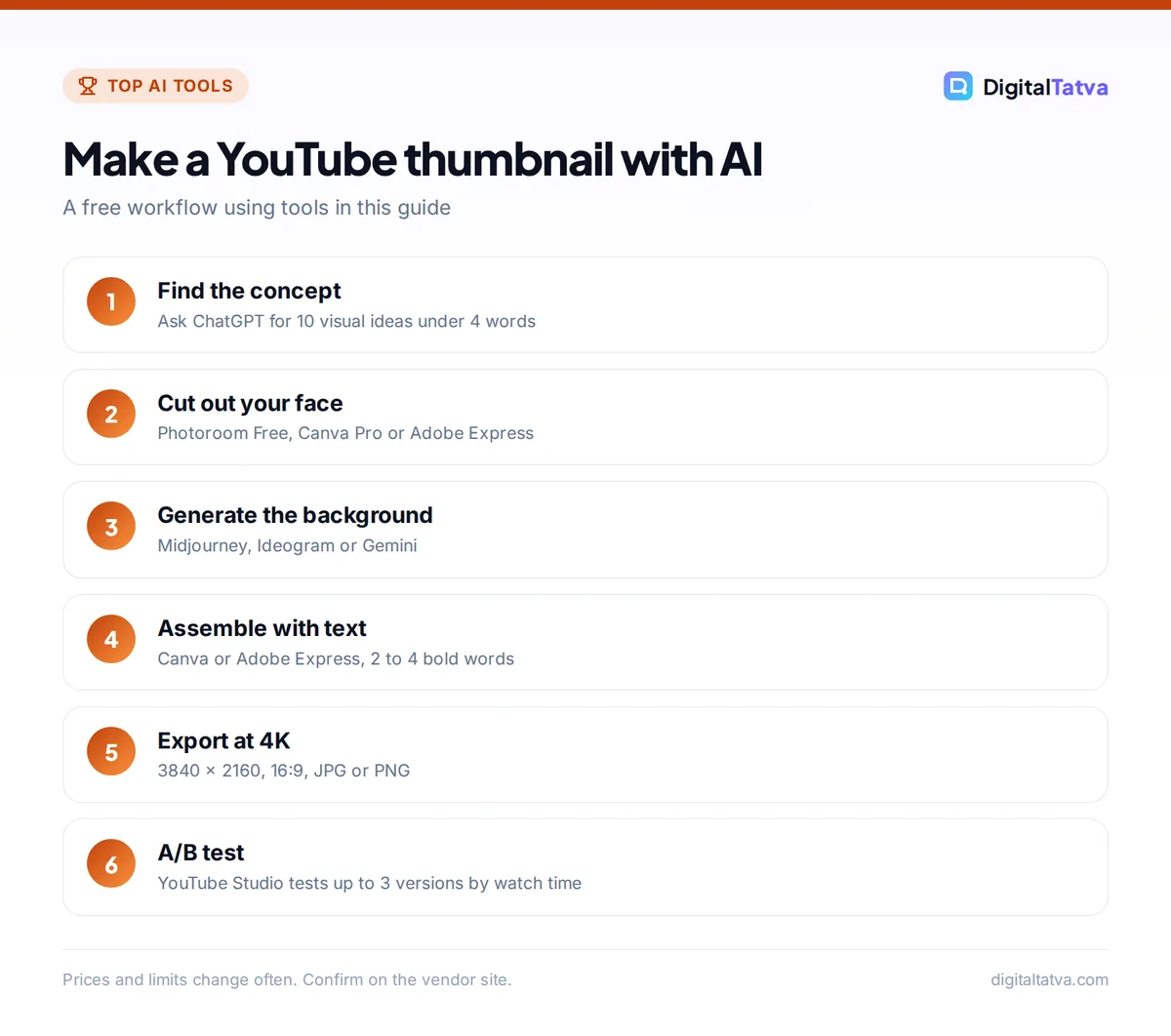
- Start from the promise. Write the one idea your video delivers, then ask ChatGPT for ten visual concepts that show it in under four words.
- Get the face right. Take a well-lit photo with a clear expression, or grab a sharp frame from your video. Cut it out with Photoroom, Canva Pro or Adobe Express.
- Generate the background. Use Midjourney for art, Ideogram for text-led designs, or Gemini to restyle the original frame. Keep it simple so the face stands out.
- Assemble and add text. Combine in Canva or Adobe Express. Use 2 to 4 large words that add to the title rather than repeat it, with strong contrast.
- Export at 4K. Export a 3840 x 2160 JPG or PNG. If your AI background is low-resolution, run it through an AI image upscaler first.
- Test two or three versions. Upload variants with YouTube Studio’s A/B test and let watch time pick the winner.
Thumbnail prompts that work
These templates work in ChatGPT, Gemini or Ideogram. Replace the brackets, and keep text short. For more ready-made marketing prompts, see our ChatGPT prompts for marketing.
| Video type | Prompt template |
|---|---|
| Tutorial | “YouTube thumbnail, 16:9, a laptop showing [result], bright clean background, big bold text ‘[2 words]’, high contrast, empty space on the left for a face.” |
| Comparison | “Split-screen 16:9 thumbnail, [product A] on the left in red, [product B] on the right in blue, large ‘VS’ in the center, dramatic lighting.” |
| Finance or numbers | “16:9 thumbnail with a giant number ‘[Rs 1 lakh]’ in gold 3D text, dark background, subtle upward arrow, no other text.” |
| Travel or vlog | “Cinematic 16:9 photo of [place] at golden hour, wide angle, vivid colors, room in the foreground for a person cutout.” |
| Edit a frame | “Keep my face and expression exactly the same. Blur and darken the background, add a soft white outline around me, boost saturation.” |
Save money: A free stack of YouTube Studio (testing), Canva Free (templates and 20 AI uses), Photoroom Free (cutouts) and ChatGPT or Gemini free (backgrounds) is enough for most new channels. Upgrade to Canva Pro first, and consider Pikzels only once you publish several videos a week.
Honest thumbnails win long term
Because YouTube’s A/B test picks the winner by watch time, not clicks, a thumbnail that overpromises can lose even if it gets more clicks. Show what the video actually delivers. Avoid fake screenshots, misleading faces and imitating another creator’s exact style or likeness, and follow YouTube’s thumbnail policy. If you use AI-generated people or scenes that look real, consider whether viewers could be misled. For the rest of your workflow, our guides to the best AI video editors and AI tools for social media help you repurpose each video.
Frequently asked questions
What is the best free AI thumbnail maker?
Canva Free is the best free AI thumbnail maker for most creators, with YouTube templates and 20 AI uses a month. Adobe Express is a strong free alternative with a free background remover. Pair either with YouTube Studio’s free A/B testing and a free image generator like ChatGPT, Gemini or Ideogram for backgrounds. Note that Gemini’s free downloads are limited to 1K resolution.
Can AI make a YouTube thumbnail with my face?
Yes. Pikzels creates a Persona from 3 photos and can place your face in generated thumbnails. A more reliable free method is to cut yourself out of a real photo with Photoroom or Canva, then add an AI-generated background. Prompt-only tools like ChatGPT and Gemini can alter facial features, so check the result looks like you.
What size should a YouTube thumbnail be?
YouTube recommends 3840 x 2160 pixels at a 16:9 aspect ratio, with a minimum width of 640 pixels, in JPG or PNG format. Desktop uploads can be up to 50MB, while mobile uploads are capped at 2 MB. Shorts thumbnails should be 9:16 (2160 x 3840). You need a verified account to upload custom thumbnails.
Does YouTube have a free thumbnail A/B test?
Yes. In YouTube Studio on desktop you can test up to three titles, thumbnails or combinations for free. YouTube picks the winner by watch time share, and tests usually finish within two weeks. Shorts, private and made-for-kids videos are not eligible, and you need advanced features enabled on your channel.
Can I use AI-generated thumbnails on a monetized channel?
Generally yes, provided you follow YouTube’s policies and each tool’s terms. Use paid plans when commercial terms require it, such as Midjourney Pro or Mega for companies with over $1M in revenue, and avoid copying other creators’ likeness or branded characters. Adobe says images from its own Firefly models are safe for commercial use.
Our verdict
Canva is the best AI thumbnail maker for most creators: templates, AI images and background removal in one place, free to start and affordable on Pro. Add YouTube Studio’s free A/B testing to every upload, use ChatGPT, Ideogram or Midjourney for standout backgrounds, and consider Pikzels when you publish often enough to justify a dedicated tool. Whatever you use, a clear face, a few bold words and an honest promise will do more for your click-through rate than any single app. Prices and free limits change frequently, so confirm current plan details on each vendor’s site before you subscribe.
Pricing and features are checked at the time of writing and can change. Some links may be affiliate links, which never affect our verdicts.



