Perplexity Comet Review: Is the AI Browser Worth Switching To?
Our Perplexity Comet review: what the free AI browser does well, what Comet Plus, Pro and Max add, the prompt injection risks and who should switch in 2026.

On this page
- Key takeaways
- Our verdict
- Comet browser at a glance
- What is Perplexity Comet?
- Key features of the Comet browser
- Comet pricing: free, Comet Plus, Pro and Max
- How well does Comet work in daily use?
- Is Comet safe? Privacy and prompt injection
- Comet vs Amazon: the shopping agent lawsuit
- Comet vs other AI browsers
- Pros and cons of Comet
- Who should switch to Comet?
- Frequently asked questions
- Final verdict: a great research browser, a cautious agent
Perplexity’s Comet browser is worth switching to if you research, compare products or summarize pages every day: it is free on Mac, Windows, Android and iPhone, and its built-in assistant is the most capable we have seen in a free browser. It is not worth it if you want a set-and-forget agent for banking, work logins or anything sensitive, because prompt injection attacks on AI browsers are still an unsolved problem.
This Comet browser review covers what Comet does, what it costs in October 2026 (free, with optional Comet Plus, Pro and Max upgrades), how it handles privacy and security, the Amazon court fight over its shopping agent, and who should switch.
Key takeaways
- Comet is a free Chromium-based browser with Perplexity’s assistant built into every page, available on Mac, Windows, Android and iPhone.
- Comet Plus costs $5 a month for premium publisher content and is included in Perplexity Pro ($20) and Max ($200); Max adds background assistants.
- The assistant can summarize pages, PDFs and YouTube videos, answer questions across tabs and attempt multi-step tasks such as filling forms or building a shopping cart.
- Security researchers have repeatedly shown prompt injection attacks on Comet, so keep the agent away from banking, health and work accounts.
- A US appeals court lifted the injunction that blocked Comet’s agent from shopping on Amazon in August 2026, but the case continues.
Our verdict
7.5/10
The best free AI browser for research and everyday page help, held back by agent reliability and security risks that every AI browser shares. Use it as a smart reading and research tool first, and an agent second.
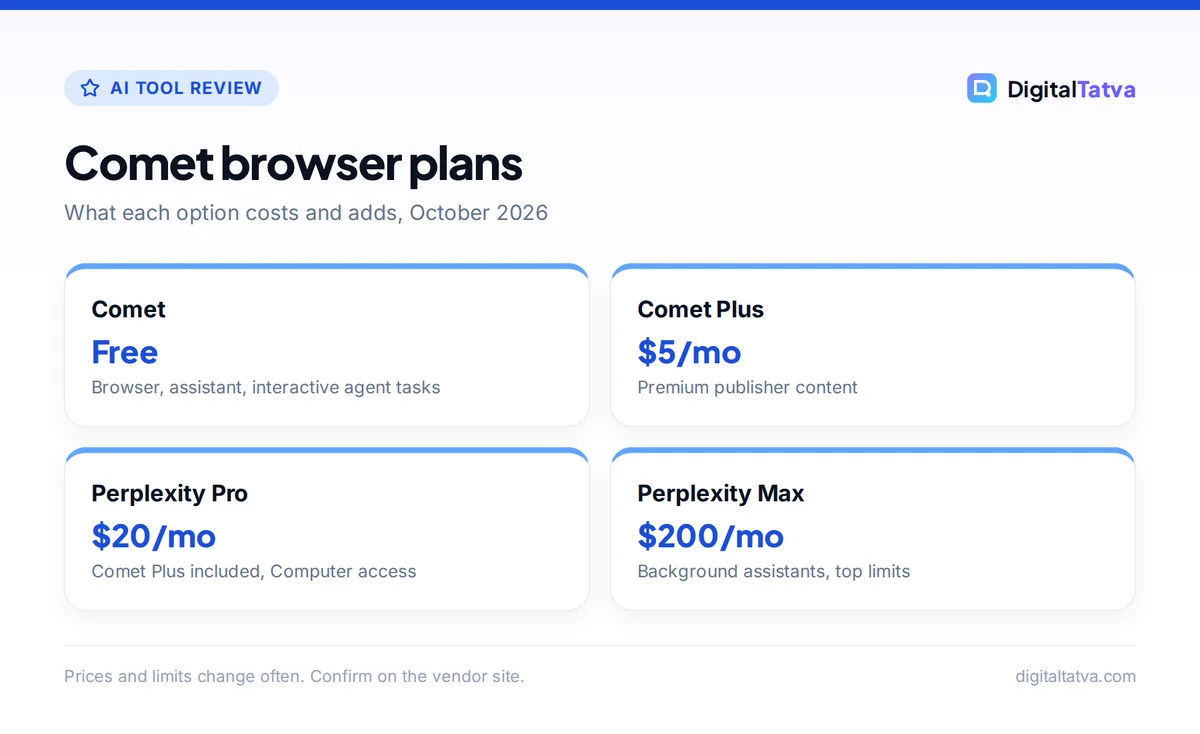
Comet browser plans
What each option costs and adds, October 2026
| Item | Detail | Notes |
|---|---|---|
| Comet | Free | Browser, assistant, interactive agent tasks |
| Comet Plus | $5/mo | Premium publisher content |
| Perplexity Pro | $20/mo | Comet Plus included, Computer access |
| Perplexity Max | $200/mo | Background assistants, top limits |
Prices and limits change often. Confirm on the vendor site.
Comet browser at a glance
If you want the short answer before the details, this table sums up the comet browser in one place.
| Question | Answer (October 2026) |
|---|---|
| What is it? | A Chromium-based browser from Perplexity with an AI assistant in a side panel |
| Price | Free; Comet Plus $5/month; included in Perplexity Pro ($20) and Max ($200) |
| Platforms | Mac, Windows, iPhone and Android |
| System requirements | Windows 10+, macOS Big Sur+, Android 12+, iOS 18+ (per third-party trackers) |
| Best for | Research, summarizing, comparison shopping, tab-heavy work |
| Biggest risk | Prompt injection when the agent acts inside logged-in accounts |
| Our rating | 7.5/10 |
What is Perplexity Comet?
Comet is a full web browser, not an extension. It is built on Chromium, the open-source engine behind Chrome and Edge, so websites behave as you expect and you can import Chrome bookmarks and extensions when you set it up. The difference is the Comet Assistant: a side panel that can read the page you are on, your open tabs and, if you allow it, connected accounts such as Gmail and Google Calendar.
Perplexity launched Comet on Windows and macOS in July 2025 for its most expensive tier, made it free for everyone on 2 October 2025, and added Android in November 2025 and iPhone in March 2026. The official Comet page now lists Mac, Windows, iOS and Android. The default search experience is Perplexity’s answer engine, which we cover in our full Perplexity AI review.
If you are new to the category, our roundup of the best AI browsers explains how Comet compares with Gemini in Chrome, Edge Copilot, Dia and others.
Key features of the Comet browser
Comet Assistant on every page
Open the assistant and ask about whatever you are reading. It can summarize long articles and PDFs, pull the key points from a YouTube video, explain jargon or draft a reply to the email in front of you. Perplexity’s own examples include comparing how different outlets cover the same story, building a study plan from a course syllabus and drafting an email that shares your schedule.
Questions across tabs
This is where Comet beats a normal chatbot. With five product pages open, you can ask which laptop has the best battery life for the price and get one answer that draws on all of them. For research-heavy work, that saves a lot of copying and pasting into a separate AI tool.
Agent tasks
Comet can also act: visit sites, click through pages, fill forms and build shopping carts. Free users run these tasks interactively in the browser, and a “Pause Comet Assistant” control lets you stop it mid-task. Paid users get more: a third-party review says Pro and Max can run tasks in the background through Perplexity Computer, the company’s cloud agent, using credits, and Max adds background assistants that run several jobs at once and can be scheduled.
Email and calendar help
Once you connect a Google account, the assistant can read and write Gmail and Calendar, for example summarizing an inbox or proposing meeting times. This is powerful and also the riskiest part of Comet, as the security section explains.
Tip: Comet’s research features work best when you write prompts the way you would brief a colleague. Our guide on how to use Perplexity for research has prompt patterns that transfer directly to the Comet Assistant.
Comet pricing: free, Comet Plus, Pro and Max
The browser and its assistant cost nothing. You only pay if you want premium publisher content or heavier agent use.
Comet (free)
$0
- Full browser and assistant
- Summaries and tab questions
- Interactive agent tasks
Comet Plus
$5/mo
- Premium publisher content
- Included in Pro and Max
Perplexity Pro
$20/mo
- Comet Plus included
- Model picker and deep research
- Perplexity Computer access
Perplexity Max
$200/mo
- Background assistants
- Highest limits, priority access
The Perplexity Pro help article lists what Pro unlocks, and Perplexity’s pricing page lists Pro at $20 a month with 4,000 bonus credits and Max at $200 with 10,000 monthly credits plus 35,000 bonus credits. Third-party reviewers report that the Pro bonus credits expire after 30 days, so do not assume a monthly allowance. Our Perplexity pricing guide breaks down each plan and whether Pro or Max is worth it, and our tips to save money on AI subscriptions help if you already pay for several tools.
Watch out: Airtel’s free 12-month Perplexity Pro offer in India ended on 16 January 2026. Existing redeemers keep their year, but new sign-ups cannot claim it. Comet itself remains free in India, and our roundup of free AI Pro plans in India lists offers that are still live.
How well does Comet work in daily use?
In everyday browsing, Comet’s reading features are its strongest point. Summaries, tab comparisons and “explain this page” requests are fast and genuinely useful, and they need no setup beyond installing the browser. If summarizing is your main need, compare it with the dedicated tools in our list of the best AI summarizers. If you already use Perplexity, the search results will feel familiar.
The agent is more uneven. Reviews collected by third-party trackers describe good results on clearly described tasks, with failures more common on sites that require logins, pages heavy with JavaScript and precise form filling. Some reviewers report that a meaningful share of multi-step jobs fail or need correction, and that it can be hard to see what went wrong afterward. Users also mention high memory use while the AI is active. Perplexity says it rebuilt the assistant in mid-2026 and claims better multi-step performance, but that is the company’s own testing.
Our editorial view: treat Comet like a capable intern. It is excellent at reading, summarizing and gathering options. Check its work before anything is submitted, purchased or sent. For a wider look at what agents can and cannot do today, see our list of the best AI agents.
Is Comet safe? Privacy and prompt injection
When an AI agent reads a web page, hidden text on that page can trick it into following instructions you never gave. This is called prompt injection. Because Comet’s assistant can act inside your logged-in accounts, a malicious page, email or calendar invite could in theory make it leak data or take an action on your behalf.
This is not hypothetical. Researchers have published several attacks on Comet:
- Brave reported a prompt injection issue in 2025, which Perplexity patched.
- LayerX described “CometJacking”, where a crafted link could pull Gmail data to an attacker’s server. Perplexity initially said it saw no security impact.
- Zenity Labs and Guardio reported tests in which Comet was tricked by a calendar invite, a fake store or a phishing page, according to third-party summaries.
- Trail of Bits published a threat-modeling audit in February 2026.
Perplexity has responded with a classifier that screens page content, file-access boundaries and permission prompts before the assistant acts. Those help, but no vendor has solved indirect prompt injection. Also note that when AI features are on, page content is processed on Perplexity’s servers rather than on your device. Our guide to AI data privacy for business explains what that means for client data.
- Use a separate profile for agent work. Keep banking, health and work accounts in another browser.
- Connect the minimum. Only link Gmail or Calendar if you actually use those features.
- Read every confirmation. When Comet asks permission to act, check what it is about to do.
- Avoid unknown links during tasks. Do not let the agent open links from emails or messages you do not trust.
Comet vs Amazon: the shopping agent lawsuit
Amazon sued Perplexity in November 2025 over Comet’s agent shopping on Amazon for users. A district court granted a preliminary injunction in March 2026 that blocked it, and the Ninth Circuit stayed that order within weeks. In early August 2026 the appeals court vacated the injunction, reasoning that on the current record the assistant acts on the user’s instructions and Amazon was unlikely to win its computer-access claims at this stage. The court stressed the ruling is narrow and sent the case back to the district court, so the dispute is not over. For shoppers, it means Comet’s agent can currently be used on Amazon, but retailers may keep pushing back on AI agents.
Comet vs other AI browsers
| Browser | Price for AI features | Agent tasks | Best for |
|---|---|---|---|
| Perplexity Comet | Free; Plus $5/mo | Yes; background assistants on Max | Research and tab-heavy work |
| Gemini in Chrome | Free assistant; auto browse in US preview for AI Pro and Ultra | Limited, US preview | Staying in Chrome |
| Edge with Copilot | Free features; Browse with Copilot needs Microsoft 365 Premium (US) | US only | Windows and Microsoft 365 users |
| Dia | Free tier; Pro $20/mo | Limited | Mac users |
| Opera Neon | $19.90/mo | Yes | Power users who want agents and MCP |
| ChatGPT Atlas | Discontinued | Replaced by ChatGPT extension and Work | No longer available |
OpenAI deprecated ChatGPT Atlas in July 2026 and moved browser tasks into ChatGPT Work and the ChatGPT extension. If you mainly want ChatGPT, read our Perplexity vs ChatGPT comparison to decide which ecosystem suits you.
Pros and cons of Comet
Pros
- Free on all four major platforms
- Excellent page summaries and questions across tabs
- Chromium base, so Chrome extensions and bookmarks carry over
- Perplexity’s cited search built in
- Agent tasks available without paying
Cons
- Repeated prompt injection findings
- Agent is unreliable on logins and complex forms
- Page content goes to Perplexity’s servers when AI is on
- Best agent features need Max at $200 a month
- Legal uncertainty over shopping on some retail sites
Who should switch to Comet?
- Switch if you are a student, researcher, marketer or analyst who reads dozens of pages a day and wants summaries and comparisons without copying text into a chatbot. Students should also see our list of AI research tools.
- Switch if you already pay for Perplexity Pro, since Comet Plus is included.
- Stay with Chrome if you rely on Google’s ecosystem and only need occasional AI help; Gemini in Chrome covers that.
- Look elsewhere if you want a different assistant altogether; our guide to the best ChatGPT alternatives covers other options by use case.
- Skip agent features if you manage money, client data or company systems in the browser.
Frequently asked questions
Is the Comet browser free?
Yes. Perplexity made Comet free for everyone on 2 October 2025, and the browser and assistant still cost nothing on Mac, Windows, Android and iPhone. Comet Plus, which adds premium publisher content, costs $5 a month or comes included with Perplexity Pro at $20 and Max at $200. Background assistants that run several tasks at once are a Max feature.
Is Comet browser safe to use?
It is safe for normal browsing and reading, but its agent carries real risk. Security firms including Brave and LayerX have shown prompt injection attacks where hidden page content tricks the assistant. Perplexity has added content screening and permission prompts, yet the problem is not solved industry-wide. Keep banking, health and work accounts out of any session where the agent can act.
Is Comet better than Chrome?
For research and summarizing, Comet’s assistant is more capable than Chrome’s built-in Gemini features today, and it can attempt multi-step tasks for free. Chrome remains better if you depend on Google’s ecosystem, want the widest support or prefer Google’s security track record. Because Comet is Chromium-based, your Chrome extensions and bookmarks move over easily if you want to try it.
Can I use Comet in India?
Yes. Comet is free to download in India on desktop and mobile. The Airtel offer that gave Perplexity Pro free for 12 months ended on 16 January 2026, so Indian users who want Comet Plus or Pro features now pay the standard price. Some agent features from other browsers, such as Chrome auto browse, are still US only.
Does Comet work with Chrome extensions?
Yes. Comet is built on Chromium, the same engine as Chrome, and reviews report that it can import your Chrome bookmarks and extensions during setup. Most extensions work as they do in Chrome. As with any browser, install only extensions you trust, since they can read page content too.
Final verdict: a great research browser, a cautious agent
Perplexity Comet earns 7.5 out of 10. It is the best free AI browser for people who research, compare and summarize all day, and the cross-tab assistant alone justifies a trial. The agent is impressive when it works, but reliability gaps and unsolved prompt injection risks mean you should supervise it and keep it away from sensitive accounts. Install it alongside your current browser, use it for reading and research for a week, and decide from there. Features and prices change quickly, so check Perplexity’s site for the current Comet and plan details before you subscribe.
Pricing and features are checked at the time of writing and can change. Some links may be affiliate links, which never affect our verdicts.