How to Use AI for Email Marketing: Tools, Prompts and Workflow
How to use AI for email marketing: a six-step workflow, the best tools from Klaviyo to Mailchimp and HubSpot, copy-ready prompts and how to protect deliverability.

On this page
Last updated: 22 October 2026
Quick answer: To use AI for email marketing, let an AI assistant such as ChatGPT or Claude draft subject lines, copy and sequences in your brand voice, then use your email platform’s built-in AI (Klaviyo K:AI, Mailchimp Intuit Assist or HubSpot) to segment lists, personalize content and pick send times. Always review drafts, test against human-written emails and keep consent and unsubscribe rules intact.
Email is one of the easiest places to get real value from AI, because every step (planning, writing, segmenting, testing and reporting) produces text or data that AI handles well. Email platforms now ship AI agents that can build whole campaigns and automated flows from a prompt.
This guide gives you a practical workflow for AI email marketing, the best tools and their prices as of October 2026, prompts you can copy, and the mistakes that hurt deliverability.
Key takeaways
- Use a general AI assistant for writing and your email platform’s AI for data tasks such as segments and send times.
- Klaviyo’s K:AI Marketing Agent can build a marketing plan from your website URL and draft campaigns and flows.
- Mailchimp’s Standard plan (from $20 a month for the first 12 months) includes its generative AI features.
- Klaviyo and Mailchimp both have free plans for up to 250 contacts and 500 emails a month.
- Test AI copy against your best human email and watch spam complaints, not just open rates.
What is AI email marketing?
AI email marketing is the use of generative AI and machine learning to plan, write, personalize, send and analyze marketing emails. It covers simple jobs like subject lines and complex ones like automated flows that adapt to each subscriber’s behavior.
| Key fact | Detail (October 2026) |
|---|---|
| Writing tools | ChatGPT, Claude, Gemini, Jasper |
| Platform AI | Klaviyo K:AI, Mailchimp Intuit Assist, HubSpot AI agents |
| Free plans | Klaviyo and Mailchimp: up to 250 contacts, 500 sends a month |
| Typical paid start | Klaviyo about $20/month (251 to 500 profiles); Mailchimp Essentials from $13 |
| Biggest risk | Generic copy and poor deliverability |
| Best for | Ecommerce, B2B nurture, newsletters |
Marketers are adopting this quickly: HubSpot’s 2024 State of Marketing report found that 64% of marketers used generative AI tools, and those using AI said it saved about 3 hours per piece of content. See more data in our AI marketing statistics roundup.
How do you use AI for email marketing, step by step?
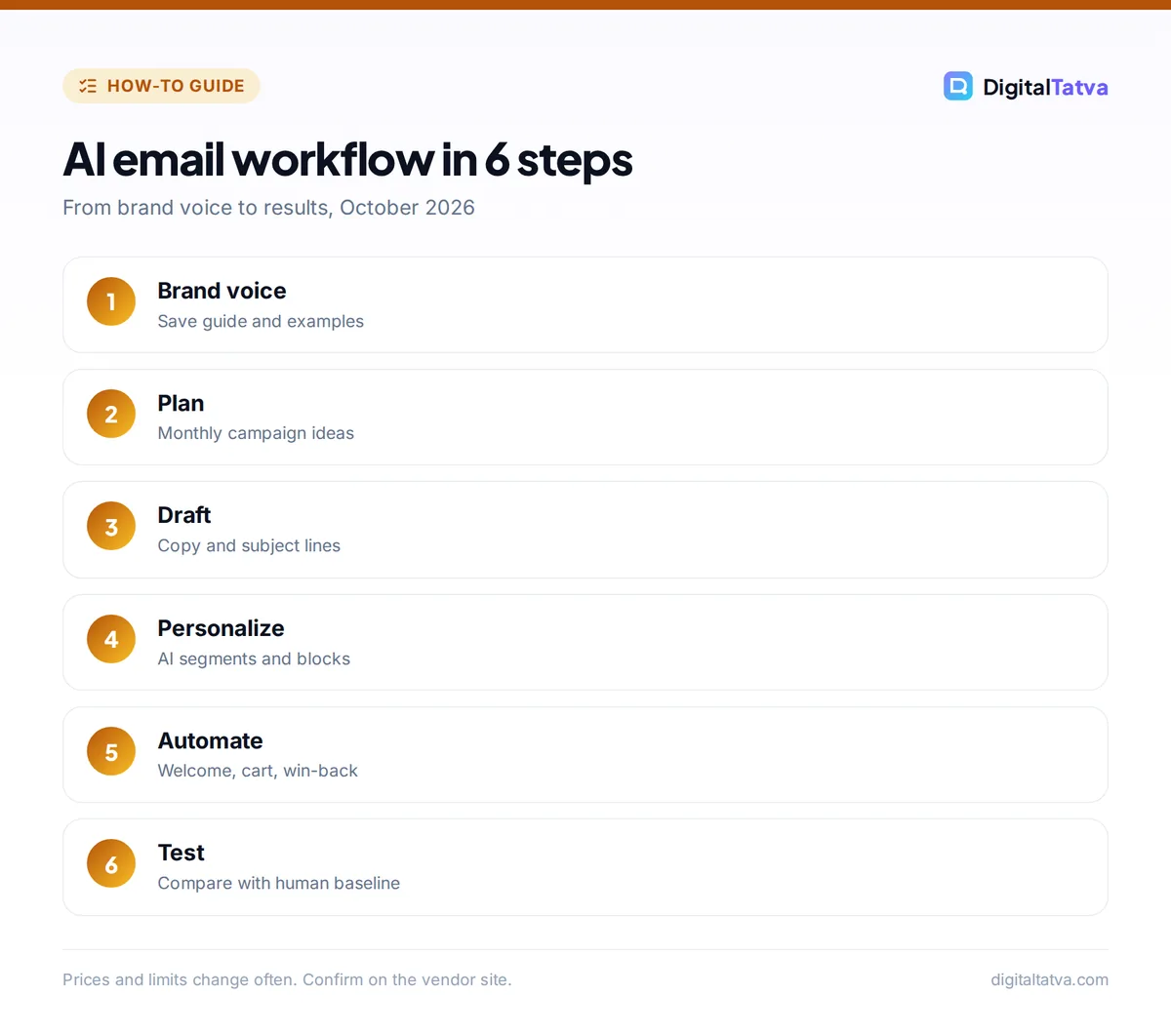
The most reliable AI email workflow has six steps: set your brand voice, plan the calendar, draft, personalize, test and review results. Each step pairs a person’s judgment with an AI tool.
- Teach the AI your brand voice. Save your voice guide, three of your best emails and banned phrases in a ChatGPT project, Claude project or your platform’s brand settings. Our guide to training AI on your brand voice shows how.
- Plan the calendar. Ask the AI for a month of campaign ideas tied to launches, holidays and your sales goals, then choose the best five.
- Draft emails and subject lines. Generate the email, then ask for 10 subject lines and 5 preview texts. Keep the best two subject lines for an A/B test.
- Personalize with data. Use your platform’s AI to build segments (for example “bought twice, no order in 90 days”) and dynamic product blocks.
- Automate flows. Build welcome, abandoned cart, post-purchase and win-back flows. Klaviyo’s Composer and K:AI agent can draft these from a prompt.
- Test and learn. Run subject line and content tests, then ask the AI to summarize results and suggest the next test.
Tip: Give the AI the job, the reader and one example every time: “Write a win-back email for customers who bought running shoes 6 months ago, friendly tone, under 120 words, like this example.”
Which AI email marketing tools are best?
The best AI email marketing tool depends on your business model: Klaviyo for ecommerce, Mailchimp for small businesses and newsletters, HubSpot for B2B teams already on its CRM, and a general assistant for writing in every case.
| Tool | AI features | Free plan | Paid start |
|---|---|---|---|
| Klaviyo | K:AI Marketing Agent, Customer Agent, Composer for flows from a prompt, Remix photo editor | 250 profiles, 500 emails/month | About $20/month for 251 to 500 profiles |
| Mailchimp | Intuit Assist generative AI on Standard and above | 250 contacts, 500 sends/month | Essentials from $13; Standard from $20 (first 12 months) |
| HubSpot Marketing Hub | AI agents incl. nurture email agent (beta), Content Agent | Free tools | Starter $9/seat/month annual |
| ChatGPT or Claude | Drafting, rewriting, analysis of results | Yes | About $20/month for paid plans |
| Jasper | Brand voice, campaign workflows | No (7-day trial) | $69/seat/month ($59 annual) |
Klaviyo’s pricing scales with active profiles: about $30 a month for 1,000, $100 for 5,000 and $150 for 10,000 profiles on email only, according to a May 2026 pricing breakdown. Klaviyo’s K:AI agents work in English, with more languages planned in 2026, according to Klaviyo. For a full review of HubSpot’s AI, read HubSpot Breeze AI review, and for inbox assistants rather than campaign tools, see best AI email assistants.
What are the best AI prompts for email marketing?
The best email marketing prompts give the AI a goal, an audience, a format and your voice. Copy these and replace the brackets.
- Welcome email: “Write a welcome email for new subscribers to [brand], who signed up for [lead magnet]. Deliver the lead magnet link, set expectations for 1 email per week, and end with one question they can reply to. Under 150 words, warm and direct.”
- Subject lines: “Give me 10 subject lines under 45 characters for this email. Mix curiosity, benefit and urgency. No all caps, no emojis, no words like FREE or GUARANTEED.”
- Abandoned cart: “Write a 3-email abandoned cart sequence for [product]. Email 1 after 1 hour (reminder), email 2 after 24 hours (top objection: [objection]), email 3 after 72 hours (social proof from real reviews pasted below).”
- Segment ideas: “Here is a CSV of customer purchase data. Suggest 5 segments worth emailing this month and one campaign idea for each.”
- Results analysis: “Here are the results of my last 8 campaigns. Explain what drove the best click rates and suggest 3 tests for next month.”
Find 50 more in our ChatGPT email prompts and ChatGPT prompts for marketing collections.
Does AI hurt email deliverability?
AI does not hurt deliverability by itself, but generic, spammy or misleading AI copy can increase spam complaints and unsubscribes, which damages your sender reputation. Inbox providers judge engagement and complaints, not whether a human typed the words.
- Avoid spam triggers that AI loves: excessive urgency, all-caps words and too many exclamation marks.
- Keep it specific. Real product details and real customer quotes beat generic benefits.
- Never invent reviews. AI-written testimonials from people who do not exist are banned under the US FTC rule that took effect in October 2024.
- Respect consent. AI does not change permission rules: only email people who opted in, and keep a clear unsubscribe link.
- Protect data. Do not paste full customer lists into consumer chatbots; read AI data privacy for business first.
Watch out: AI can confidently invent discount codes, prices or deadlines. Check every number and link in the final email before you send.
How do you measure AI email results?
Measure AI email results by comparing AI-assisted campaigns with your previous human-only baseline on revenue per recipient, click rate, conversion rate, unsubscribes and spam complaints. Open rates are less reliable because privacy features inflate them.
| Metric | Why it matters |
|---|---|
| Revenue or leads per recipient | The clearest business outcome |
| Click rate | Shows whether copy and offer worked |
| Unsubscribe and spam rate | Early warning for generic or annoying copy |
| Time saved per campaign | The main productivity gain from AI |
For a broader framework, see how to measure AI ROI. Ecommerce brands should also read AI for ecommerce, and teams that want to connect email with other tools can automate the handoffs with an n8n AI workflow.
Frequently asked questions
Can ChatGPT write marketing emails?
Yes. ChatGPT writes strong first drafts of marketing emails, subject lines and full sequences, especially when you give it your brand voice, audience and an example email. It cannot send emails or see your subscriber data unless connected, so pair it with an email platform such as Klaviyo or Mailchimp.
What is the best AI email marketing tool?
It depends on your business. Klaviyo is the strongest choice for ecommerce, with K:AI agents that build campaigns and flows. Mailchimp suits small businesses and newsletters, and HubSpot suits B2B teams on its CRM. All three offer free or low-cost starting plans.
Is Klaviyo AI free?
Klaviyo includes K:AI features in its platform, and its free plan covers up to 250 active profiles and 500 emails a month. Paid email plans start around $20 a month for 251 to 500 profiles. Check Klaviyo’s pricing page for which AI agents are included on your plan.
Will AI replace email marketers?
No. AI speeds up drafting, segmenting and analysis, but people still set strategy, choose offers, protect the brand voice and decide what to test. Gartner’s 2026 research found nearly two-thirds of marketers expect AI to change their jobs, which means new skills rather than no jobs.
Should I tell subscribers an email was written with AI?
There is no general legal requirement to label AI-written marketing emails. What matters is that claims are true, testimonials are real and consent rules are followed. Some brands choose to be open about using AI, which can build trust.
Next steps
Pick one flow, such as your welcome or abandoned cart sequence, and rebuild it with AI this week: set your brand voice, draft with ChatGPT or Claude, build segments in your email platform and test against the old version for a month. Email platform prices and AI features change often, so confirm current plans on Klaviyo, Mailchimp or HubSpot before you upgrade.
Sources
- What is K:AI, Klaviyo, checked 22 October 2026
- Mailchimp marketing plans, Mailchimp, checked 22 October 2026
- HubSpot Marketing Hub pricing, HubSpot Blog, 14 September 2026, checked 22 October 2026
- Klaviyo pricing breakdown, Spoks, May 2026, checked 22 October 2026
- AI insights from HubSpot’s State of Marketing report, Jasper, checked 22 October 2026
Pricing and features are checked at the time of writing and can change. Some links may be affiliate links, which never affect our verdicts.