
50 ChatGPT Prompts for Professional Emails That Get Replies
50 copy-ready ChatGPT prompts for email: follow-ups, payment reminders, cold outreach, customer support, team updates, job search and difficult messages, plus a simple prompt formula.

On this page
- Key takeaways
- The email prompt formula
- Follow-up email prompts
- Sales and cold outreach prompts
- Customer support email prompts
- Internal and team email prompts
- Job search and career prompts
- Difficult and sensitive email prompts
- Editing and improving prompts
- Best AI tools for writing emails
- Common mistakes with AI emails
- Frequently asked questions
- Final tips
The best ChatGPT prompts for email give the AI four things: who you are writing to, what you want them to do, the tone, and any facts it must include. A prompt like “Write a polite follow-up email to a client who has not paid invoice #245 for Rs 48,000, due 10 days ago. Keep it friendly, under 120 words, and suggest UPI or bank transfer” will get a usable draft in seconds. Below are 50 copy-ready ChatGPT prompts for email, grouped by situation, that also work in Claude, Gemini and Copilot.
Each prompt has placeholders in [brackets]. Replace them with your details, paste the prompt, then ask ChatGPT to shorten, soften or sharpen the draft until it sounds like you.
Key takeaways
- Great email prompts specify the recipient, the goal, the tone, the length and the key facts.
- Ask for a subject line and two or three versions so you can pick the best one.
- Paste the email you are replying to, but remove personal and confidential details first.
- Always edit the draft: check names, numbers, dates and promises before you hit send.
- The 50 prompts below cover follow-ups, sales outreach, customer support, internal updates, job search and difficult messages.
The email prompt formula
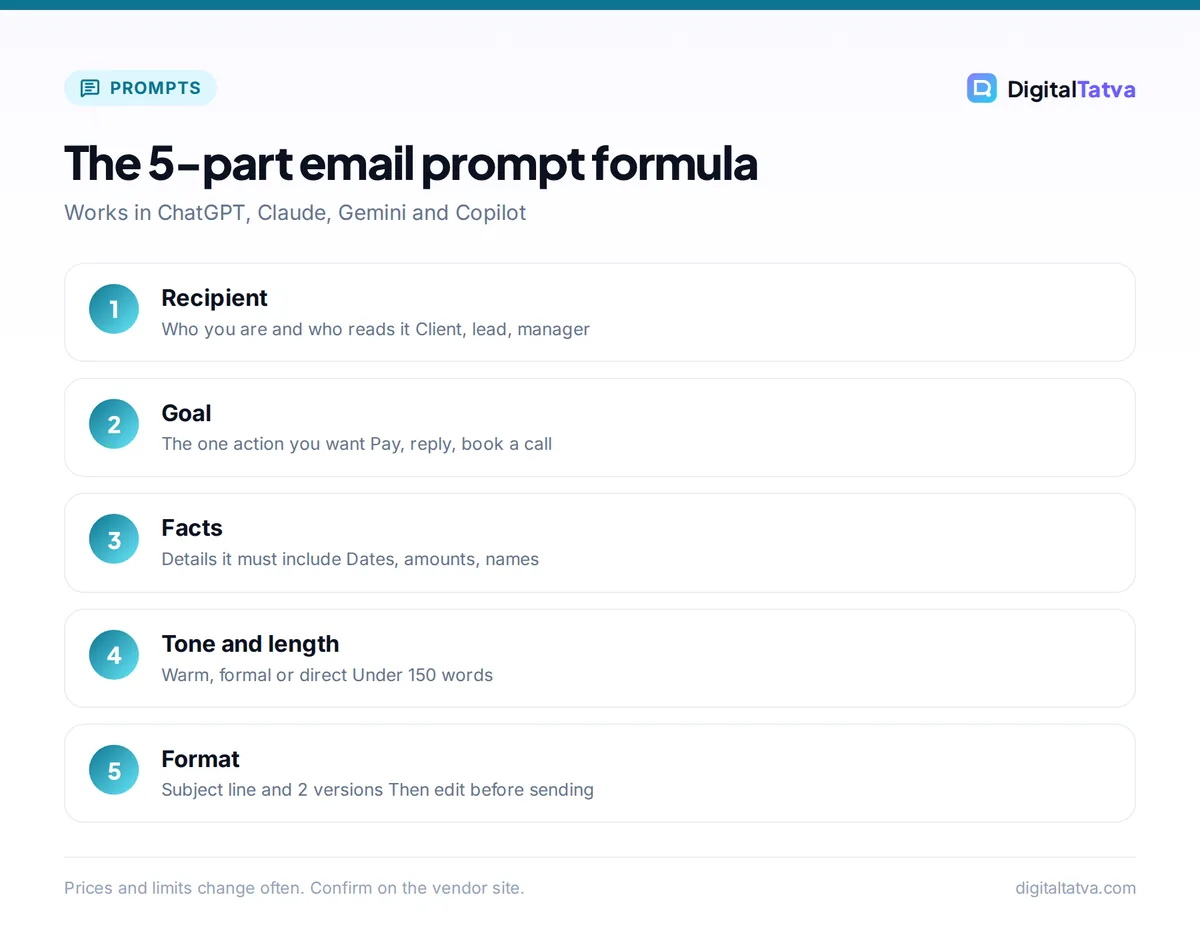
Use this structure for any email and fill in the five parts. It works on every plan, including ChatGPT Free.
| Part | What to include | Example |
|---|---|---|
| Role and recipient | Who you are, who reads it | “I run a digital agency. Write to a new lead, a clinic owner.” |
| Goal | The one action you want | “Book a 20-minute call this week.” |
| Context and facts | Details the email must contain | “We met at the Ahmedabad expo. They asked about Google Ads.” |
| Tone and length | Formal, warm, direct; word limit | “Warm, professional, under 120 words.” |
| Format | Subject line, versions, sign-off | “Give two subject lines and two versions.” |
Want the theory behind this? Our prompt engineering guide explains why context and constraints improve output.
Follow-up email prompts
- “Write a short, friendly follow-up to [name] about my proposal for [project] sent on [date]. Ask if they have questions and suggest a quick call. Under 100 words.”
- “Write a second follow-up after no reply for two weeks. Keep it light, add one new useful point about [benefit], and make it easy to say no.”
- “Write a polite payment reminder for invoice [number] for [amount], due [days] days ago. Include payment options [UPI/bank transfer] and keep the relationship warm.”
- “Write a firmer final payment reminder for invoice [number], now [days] days overdue. State that work will pause from [date] if unpaid. Professional, not rude.”
- “Write a follow-up after a sales meeting with [name]. Summarize the three points we agreed: [points], confirm next steps and the date of our next call.”
- “Write a check-in email to a client I have not heard from in three months. Share one relevant idea for their business and ask how things are going.”
- “Write a follow-up after a networking event. Remind [name] where we met, mention [topic we discussed] and suggest coffee next week.”
- “Write a follow-up asking a vendor for an update on order [number], expected on [date]. Ask for a new delivery date.”
Sales and cold outreach prompts
- “Write a cold email to a [job title] at a [industry] company in [city]. We help with [service]. Lead with their likely problem, offer one proof point: [result], and ask for a 15-minute call. Under 120 words, no hype.”
- “Write three subject lines for a cold email offering [service] to [audience]. Under 7 words each, no clickbait.”
- “Rewrite this cold email to sound more human and less salesy. Keep it under 100 words. [paste email]”
- “Write a short case study email showing how we helped [client type] achieve [result] in [time]. End with a soft call to action.”
- “Write a referral request email to a happy client, [name], asking if they know two businesses that need [service].”
- “Write a re-engagement email to leads who downloaded our [lead magnet] but never replied. Offer a free [audit/consultation].”
- “Write a polite email announcing our new [product/plan] to existing customers, explaining the benefit in two sentences and the price [price].”
- “Write a LinkedIn-to-email follow-up after [name] accepted my connection request. Mention their recent post about [topic].”
For more selling help, see our list of the best AI sales tools and our ChatGPT prompts for marketing.
Customer support email prompts
- “Write an apology email to a customer whose order [number] arrived late. Acknowledge the problem, explain briefly, and offer [discount/free shipping].”
- “Reply to this complaint calmly and helpfully. Do not admit legal fault, offer a clear next step and a timeline. [paste complaint]”
- “Write a refund confirmation email for [amount], processed on [date], with the expected time to reach the customer’s account.”
- “Write a polite email declining a refund request because [reason], and offer an alternative such as [store credit/repair].”
- “Write a response to a customer asking how to [task] in our product. Give numbered steps and offer a short call if they get stuck.”
- “Write a thank-you email to a customer who left a positive review, and invite them to our loyalty program.”
- “Write an email asking a customer for a Google review after a successful [service], with the link [link]. Short and warm.”
- “Write a service outage notice to customers. We are down because [reason], expected fix by [time], and we will update by [time].”
Internal and team email prompts
- “Write a weekly update to my manager covering done, in progress and blocked items: [list]. Under 150 words, bullet points.”
- “Write an email announcing a new process for [task] starting [date]. Explain why, what changes and who to ask.”
- “Write a meeting request to [team] to discuss [topic]. Suggest two time slots and include a three-point agenda.”
- “Turn these meeting notes into a recap email with decisions, owners and deadlines. [paste notes]”
- “Write an email welcoming [name] to the team as [role], with first-week plan and key contacts.”
- “Write a polite email asking a colleague for help with [task] by [date], explaining why I need them specifically.”
- “Write a leave request email to my manager for [dates], with handover plan and who covers my work.”
- “Write an appreciation email to [name] for [specific contribution], copying their manager.”
Job search and career prompts
- “Write a short cover email applying for [role] at [company]. Highlight [two achievements] and attach my résumé. Under 150 words.”
- “Write a thank-you email after my interview with [name] for [role]. Mention one thing we discussed about [topic].”
- “Write a polite follow-up asking about the status of my application for [role], interviewed on [date].”
- “Write a salary negotiation email thanking [company] for the offer and asking whether there is flexibility to [amount], based on [reasons].”
- “Write a gracious email declining a job offer from [company], leaving the door open for the future.”
- “Write a resignation email to my manager with my last working day [date] and an offer to help with handover.”
- “Write a request to a former manager asking if they would be a reference for [role].”
Pair these with our AI interview prep prompts and list of AI resume builders.
Difficult and sensitive email prompts
- “Write a polite email saying no to [request] because [reason], and offer an alternative if possible.”
- “Write an email pushing back on a deadline of [date] for [project], explaining the risk and proposing [new date].”
- “Write an email telling a client the project will cost more than quoted because [reason]. Explain the new amount [amount] and options.”
- “Write a calm reply to this angry email. Acknowledge their frustration, correct the facts politely and propose a call. [paste email]”
- “Write an email ending a working relationship with a client professionally, with notice period [period] and handover details.”
- “Write an apology email for a mistake I made in [task]. Take responsibility, explain the fix and how I will prevent it.”
Editing and improving prompts
- “Make this email shorter and clearer without losing any facts. [paste]”
- “Make this email sound warmer and less formal, suitable for a long-time client. [paste]”
- “Rewrite this email in simple English for a reader whose first language is not English. [paste]”
- “Check this email for tone problems, unclear sentences and anything that could be misread. List issues, then give a fixed version. [paste]”
- “Translate this email into Hindi and keep it professional, then give the English version below it. [paste]”
Tip: Teach ChatGPT your style once. Paste three emails you have written and say “Learn my writing style from these. Use it for every email I ask you to write in this chat.” In ChatGPT, saving this in a Project keeps it for later chats.
Best AI tools for writing emails
| Tool | Best for | Price |
|---|---|---|
| ChatGPT | All-purpose drafting with these prompts | Free; Plus $20/month |
| Claude | Long, careful replies and natural tone | Free; Pro $20/month |
| Gemini in Gmail | Drafting inside Gmail | Included with Google AI plans |
| Microsoft Copilot | Outlook users | Free chat; Microsoft 365 plans for Outlook |
For dedicated inbox tools that sort, summarize and draft replies, see our list of the best AI email assistants. Our ChatGPT Free vs Plus comparison explains whether you need a paid plan for email work. Claude users can try our Claude prompts for writing.
Common mistakes with AI emails
- Sending without reading. AI can invent dates, promises or names. Read every line.
- Pasting private data. Remove account numbers, ID numbers and confidential details. Our guide on whether ChatGPT is safe explains the data controls to change.
- Generic tone. Add one specific detail about the recipient so it does not read like a template.
- Too long. Set a word limit. Most business emails work best under 150 words.
- Over-polished language. Ask ChatGPT to “use plain words a busy person would write”, or see our list of AI humanizer tools if drafts still sound robotic.
Frequently asked questions
What is the best ChatGPT prompt for writing emails?
The best prompt names the recipient, the goal, the tone, the length and the facts to include, for example: “Write a warm follow-up to [name] about my proposal sent on [date], under 100 words, and ask for a call this week.” Ask for two versions and a subject line, then edit.
Can ChatGPT write professional emails for free?
Yes. ChatGPT Free includes unlimited text chats with GPT-5.6 Luna, which is enough for drafting and editing emails. Paid plans help mainly with long documents, file uploads and more advanced reasoning, not everyday email writing.
Is it safe to paste emails into ChatGPT?
Remove personal and confidential details first, such as phone numbers, account numbers and client data. On personal plans, turn off training in Data Controls if you do not want chats used to improve models. For company email, use a business plan your employer approves.
How do I make AI emails sound like me?
Paste three of your own emails and ask ChatGPT to learn your style, then reuse that chat or a Project for future emails. Also tell it which words you never use and set a word limit, which removes most generic AI phrasing.
Can I use these prompts in Gemini or Claude?
Yes. The prompts are plain instructions, so they work the same in Claude, Gemini, Microsoft Copilot and Meta AI. Gemini is handy if you write in Gmail, and Claude is good at long, careful replies.
Final tips
Save the 10 prompts you use most in a note, fill in the brackets in seconds, and always give the AI one specific detail about the reader. You will write clearer emails faster, and replies will come quicker because each message asks for one clear action. Tool features and plan prices change, so check each vendor’s site for current details. For more templates, browse our best ChatGPT prompts and AI prompts for small business.
Pricing and features are checked at the time of writing and can change. Some links may be affiliate links, which never affect our verdicts.



