
Is ChatGPT Safe? Privacy, Data and Security Explained
Is ChatGPT safe? What OpenAI does with your chats, training opt-outs, Temporary Chat, MFA, Lockdown Mode, past incidents and the five settings to change today.

On this page
- Key takeaways
- Is ChatGPT safe? Quick answer by risk
- What happens to your data when you use ChatGPT
- Temporary Chat: the safest way to ask sensitive questions
- How secure is ChatGPT? Encryption, MFA and past incidents
- The new risk: agents, browser extensions and prompt injection
- Is ChatGPT safe for kids and teens?
- Is ChatGPT safe for work and business data?
- How to make ChatGPT safer in 5 minutes
- Frequently asked questions
- Our verdict: safe, if you take control of the settings
Is ChatGPT safe? Yes, for most everyday use, if you change two or three settings and avoid pasting sensitive data. OpenAI encrypts your data, supports multi-factor authentication, and lets you stop your chats from being used for training, but on personal plans your conversations can train its models by default, and some content may be kept for up to 30 days even after you delete it.
So the honest answer to “is ChatGPT safe” depends on what you type and how you set it up. This guide explains, using OpenAI’s own help pages, what happens to your data, the real security risks in 2026 (including AI agents and browser extensions), what has gone wrong in the past, and the exact settings to change in five minutes.
Key takeaways
- Personal ChatGPT plans (Free, Go, Plus, Pro) can use your chats for training unless you turn off “Improve the model for everyone” in Data Controls.
- Temporary Chat keeps a conversation out of your history and out of training, but OpenAI may keep a copy for up to 30 days for safety.
- Business, Enterprise and Edu workspaces are not used for training by default and add admin controls; data is encrypted with AES-256 at rest and TLS 1.2 or higher in transit.
- Turn on multi-factor authentication, and consider Lockdown Mode (available to personal accounts since June 2026) if you use browsing, plugins or agents.
- Never paste passwords, ID numbers, health records, client secrets or unreleased financials into any AI chatbot.
Is ChatGPT safe? Quick answer by risk
Safety is really five separate questions. Here is the short version for each, with what you can do about it.
| Risk | What OpenAI does | What you should do | Risk level |
|---|---|---|---|
| Chats used to train models | On by default for personal plans; off by default for Business, Enterprise, Edu | Turn off “Improve the model for everyone” | Medium |
| Data kept after you delete it | Deleted chats scheduled for removal within 30 days, with legal and security exceptions | Use Temporary Chat for one-off sensitive questions | Low to medium |
| Account takeover | MFA with authenticator app, push, SMS or WhatsApp, or passkey | Enable MFA today | Medium if MFA is off |
| Prompt injection via websites, files or plugins | Lockdown Mode and “Elevated Risk” labels | Approve agent actions carefully; use Lockdown Mode for sensitive work | Rising |
| Wrong or harmful answers | Safety training and teen protections | Verify facts, especially health, legal and money advice | Medium |
If you are weighing assistants on privacy rather than features, our AI data privacy guide for businesses compares ChatGPT, Claude and Gemini side by side.
What happens to your data when you use ChatGPT
When you send a message, ChatGPT stores the conversation in your history so you can return to it. Depending on your settings, it may also save details to memory, and on personal plans the conversation can be used to improve future models.
Training on your chats
OpenAI’s data controls let you choose whether your conversations help train its models. On personal accounts the setting is on unless you change it. The official data controls FAQ explains that when you turn off “Improve the model for everyone,” your conversations “will still appear in your chat history but won’t be used to train ChatGPT,” and the choice applies across all your devices.
Business is different. OpenAI’s business data page states, “We don’t train our models on your organization’s data by default,” covering ChatGPT Business, Enterprise, Edu, ChatGPT for Healthcare, ChatGPT for Teachers and the API.
Memory
ChatGPT can remember facts about you across chats. Saved memories are stored separately from chat history, so deleting a chat does not delete a memory. You can review, delete or turn off memory in Settings, and our guide to how ChatGPT and Claude memory works walks through every control.
Deleted chats and legal holds
Deleting a chat removes it from your account right away and schedules permanent deletion within 30 days, with exceptions for data OpenAI must keep for security or legal reasons. That exception mattered in 2025: during the New York Times lawsuit, a court order from May 2025 required OpenAI to preserve chat logs that would otherwise have been deleted. OpenAI says those broad obligations ended on 26 September 2025, though a limited set of historical data from that period was kept under a separate demand. The lesson: “deleted” is a strong promise, not an absolute one.
Temporary Chat: the safest way to ask sensitive questions
Temporary Chat is ChatGPT’s incognito mode. According to the Temporary Chat FAQ, it stays out of your history unless you save it, it is not used for model improvement, and it does not create or update memories. You choose Personalized (uses your existing memories and custom instructions) or Unpersonalized (uses none of them) before your first message.
Two limits are worth knowing. First, “OpenAI may keep a copy of a temporary chat for up to 30 days for safety purposes.” Second, if you use a GPT action or plugin inside a temporary chat, the third party that receives your data follows its own privacy policy, which may keep data longer.
Tip: Use Temporary Chat in Unpersonalized mode for anything you would not want tied to your profile, such as a medical symptom, a salary negotiation or a draft resignation letter. It gives you the cleanest separation available on a personal plan.
How secure is ChatGPT? Encryption, MFA and past incidents
OpenAI states that business data is encrypted with AES-256 at rest and TLS 1.2 or higher in transit, and that its practices align with SOC 2 Type 2 criteria, CSA STAR and several ISO/IEC certifications. Enterprise customers can also manage their own encryption keys and choose data residency in regions including the US, Europe and Japan.
Turn on multi-factor authentication
The biggest real-world risk for most people is not OpenAI being hacked; it is someone logging in to your account with a reused password and reading your history. ChatGPT supports MFA under Settings, Security and login. Options include an authenticator app, push notifications to a trusted device, a code by text message or WhatsApp, and passkeys. Email is not an MFA option, and recovering an account after losing every MFA method goes through support and can take a few days, so set up a backup method.
What has gone wrong before
In November 2025, an attacker compromised Mixpanel, an analytics vendor OpenAI used, and exported names, email addresses and approximate locations of some API platform users. OpenAI said ChatGPT users were not affected and that passwords, API keys and chat content were not accessed; it stopped using Mixpanel. Incidents like this are why phishing emails pretending to be from OpenAI are a bigger practical threat than a direct breach of your chats.
Watch out: Fake “ChatGPT” apps, browser extensions and “free GPT-6 Pro” offers are common. Download only the official apps, buy plans only on chatgpt.com or official app stores, and be wary of resellers selling cheap shared accounts. Our guide to paying for ChatGPT Plus in India covers safe payment options.
The new risk: agents, browser extensions and prompt injection
ChatGPT now does more than chat. ChatGPT Work can carry out multi-step tasks, the ChatGPT browser extension can read and act on sites where you are signed in, and plugins connect it to your email, files and calendar. That power creates a new kind of attack called prompt injection: a web page, document or email hides instructions that try to make the AI leak data or take actions you did not ask for.
OpenAI’s answer is Lockdown Mode, introduced in February 2026 for Enterprise and education workspaces and extended to personal accounts and self-serve Business on 4 June 2026. It “deterministically disables certain tools and capabilities” and limits browsing to cached content, so live requests do not leave OpenAI’s network. Personal users can turn it on under Settings, Security. OpenAI also marks riskier features with an “Elevated Risk” label.
- Read every approval prompt before an agent sends, buys or deletes anything.
- Give the browser extension access to specific sites rather than “allow for all sites.”
- Avoid running agents on your primary email or bank while logged in, unless you need to.
Our guides to ChatGPT agent mode and Work and AI browsers and prompt injection go deeper on safe setups.
Is ChatGPT safe for kids and teens?
OpenAI’s terms set a minimum age of 13, with a parent or guardian’s permission required for users under 18, and since January 2026 ChatGPT uses age prediction to spot accounts that likely belong to someone under 18. Those accounts get extra protections that limit graphic violence, risky viral challenges, sexual or violent role play, self-harm content and extreme dieting or beauty content. Adults placed in the teen experience by mistake can verify their age with a selfie through Persona, a third-party identity service.
Parents can use ChatGPT’s parental controls to set quiet hours, control memory and model training, and receive alerts if signs of acute distress are detected. These tools help, but they do not replace talking with your child about what to share and how to check AI answers.
Is ChatGPT safe for work and business data?
For client data, contracts and anything regulated, use a business plan rather than a personal account. ChatGPT Business costs $25 per user per month ($20 annually) with a two-seat minimum, excludes your data from training by default, and adds MFA, SAML SSO and admin roles. Enterprise adds SCIM, custom roles, data residency and retention controls. See our breakdown of ChatGPT pricing for every plan.
Whatever the plan, write down the rules. Our AI usage policy template gives you a ready list of allowed and banned data types. If you cannot send data to any cloud service, running an open source model on your own hardware keeps everything in-house.
What ChatGPT does well on safety
- Clear training opt-out and Temporary Chat
- Strong encryption and MFA with passkeys
- Lockdown Mode for agent and browsing risks
- No training by default on business plans
Where to be careful
- Training is on by default for personal plans
- Up to 30 days retention even for temporary chats
- Legal holds can override deletion
- Free and Go plans are testing ads in the US
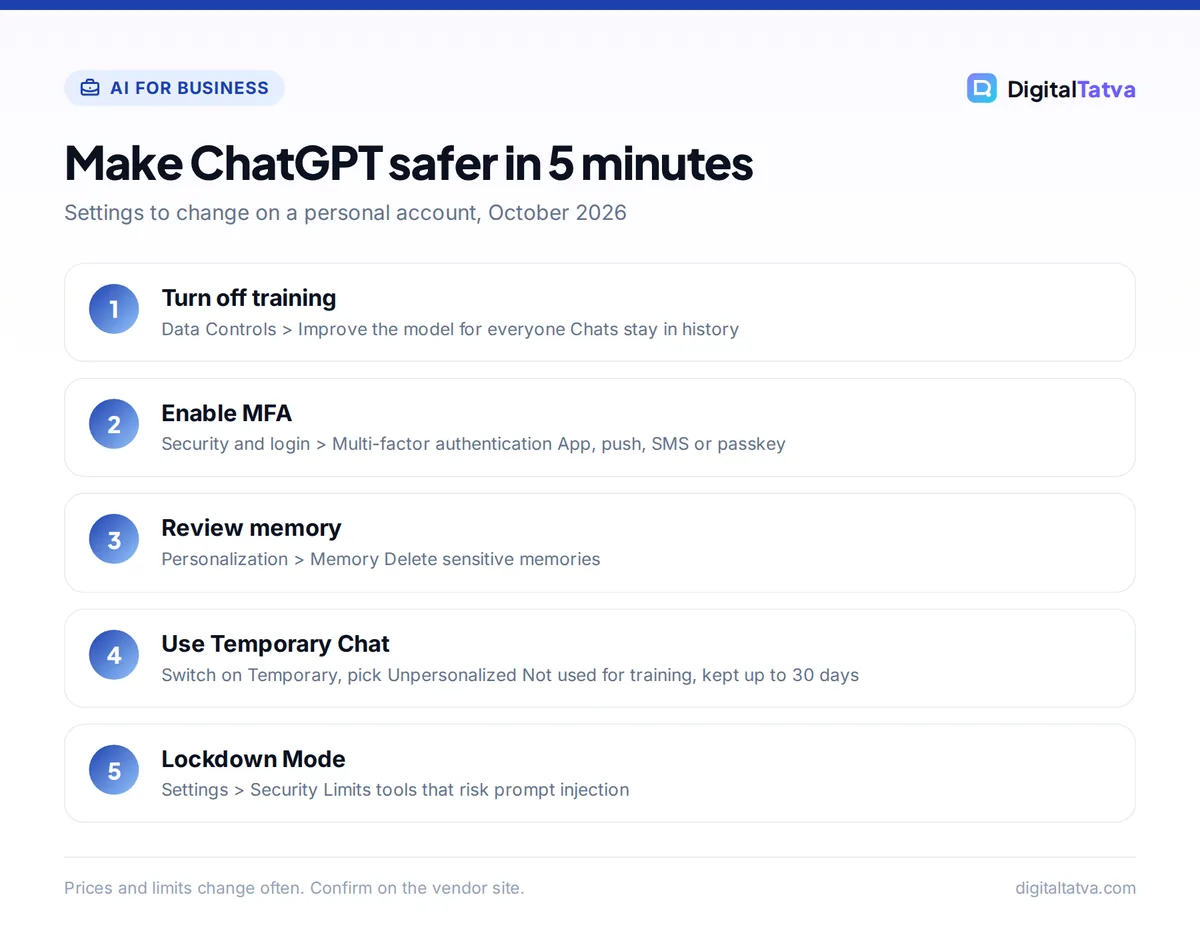
How to make ChatGPT safer in 5 minutes
- Turn off training. Open Settings, Data Controls, and switch off “Improve the model for everyone.”
- Enable MFA. Go to Settings, Security and login, choose Multi-factor authentication, and add an authenticator app or passkey plus a backup method.
- Review memory. In Settings, Personalization, check what ChatGPT has saved and delete anything sensitive, or turn memory off.
- Use Temporary Chat for sensitive one-offs. Start a new chat, switch on Temporary, and pick Unpersonalized.
- Lock down agents. If you use browsing, plugins or Work on sensitive accounts, turn on Lockdown Mode under Settings, Security.
- Clean up shared links. Review any chats you have shared publicly and delete links you no longer need.
What you should never paste into ChatGPT
- Passwords, OTPs, API keys and recovery codes
- Aadhaar, PAN, passport or bank account numbers
- Full medical records or someone else’s health details
- Client data covered by an NDA, and unreleased financial results
Need a different assistant? Our comparison of DeepSeek vs ChatGPT on privacy explains why some apps carry more risk, not less.
Frequently asked questions
Is it safe to give ChatGPT personal information?
Share only what you would be comfortable storing with any online service. Your name, job and general preferences are low risk, especially with training turned off. Avoid passwords, ID numbers, bank details, full medical records and confidential client data. For one-off sensitive questions, use Temporary Chat, which stays out of history and training.
Does ChatGPT sell or train on my data?
OpenAI may use conversations from personal accounts to train models unless you turn off “Improve the model for everyone” in Data Controls. Business, Enterprise and Edu workspaces are not used for training by default. Temporary chats are never used for training. Free and Go plans are testing ads in the US, while paid tiers stay ad-free.
Can ChatGPT be hacked?
Your account can be taken over if your password leaks and MFA is off, which is the most common risk. OpenAI encrypts data at rest and in transit, and a November 2025 vendor breach exposed some API users’ names and emails but not chats or passwords. Enabling MFA and avoiding fake apps blocks most real-world attacks.
Does deleting a ChatGPT chat delete it permanently?
Deleting removes the chat from your account immediately and schedules permanent deletion within 30 days. OpenAI may keep data longer when it must for security or legal reasons, as happened during the 2025 New York Times case. Saved memories are separate, so delete those too if a chat contained something you want gone.
Is ChatGPT safe for students?
Yes, with supervision for younger users. ChatGPT requires users to be at least 13, applies teen protections to accounts it predicts are under 18, and offers parental controls. Students should verify facts, follow their school’s AI policy and use study mode for learning rather than copying answers.
Our verdict: safe, if you take control of the settings
ChatGPT is as safe as most mainstream cloud apps, with better privacy controls than many, but the defaults favor OpenAI on personal plans. Turn off training, enable MFA, use Temporary Chat for sensitive topics and treat agents with the same caution you would give a new employee with your passwords. Businesses handling client data should move to ChatGPT Business or Enterprise and write a clear AI policy. If you are still deciding which assistant to trust, see our ChatGPT review and our list of ChatGPT alternatives. Plans, prices and privacy terms change, so confirm the current details on OpenAI’s site before relying on them.
Pricing and features are checked at the time of writing and can change. Some links may be affiliate links, which never affect our verdicts.



