
ChatGPT vs Google Search: When to Use Which in 2026
ChatGPT vs Google Search compared for 2026: accuracy, live results, local search, research, privacy and cost, plus a simple rule for which one to open for each question.

On this page
- Key takeaways
- ChatGPT vs Google: the quick verdict
- How ChatGPT and Google Search work differently
- Accuracy and trust: who gets it right?
- Freshness, news and local results
- Research and complex questions
- Writing, planning and doing things
- Privacy and ads
- Cost: free vs paid
- ChatGPT vs Google for Indian users
- What this means for businesses and SEO
- Choose ChatGPT if, choose Google if
- Frequently asked questions
- Final verdict: use both, for different jobs
In the ChatGPT vs Google debate, the short answer for 2026 is: use Google Search when you need something live, local or official (today’s news, a shop’s opening hours, a train status, a government website), and use ChatGPT when you need something explained, compared, planned or written. Google is still faster for finding a specific page or fact, while ChatGPT is better at turning many sources into one clear answer you can act on.
The line between them has blurred. ChatGPT now searches the web for free with cited sources, and Google’s AI Mode and AI Overviews give conversational answers at the top of Search. This guide compares both on accuracy, freshness, local results, research, privacy and cost, with a simple rule for which one to open for each kind of question.
Key takeaways
- Google wins for navigation, local businesses, live scores, maps, shopping prices and official pages. ChatGPT wins for explanations, comparisons, planning and drafting.
- ChatGPT search is free for everyone, even signed out, and shows citations, but answers can still be incomplete or outdated, so click the sources for anything important.
- Google’s AI Overviews have more than 2.5 billion monthly users and AI Mode more than 1 billion, according to Google, so Google now gives AI answers too, for free.
- In India, Google AI Mode works in Hindi and eight more Indian languages, and Search Live lets you ask by voice and camera.
- Most people get the best results using both: Google to find and verify, ChatGPT to understand and create.
ChatGPT vs Google: the quick verdict
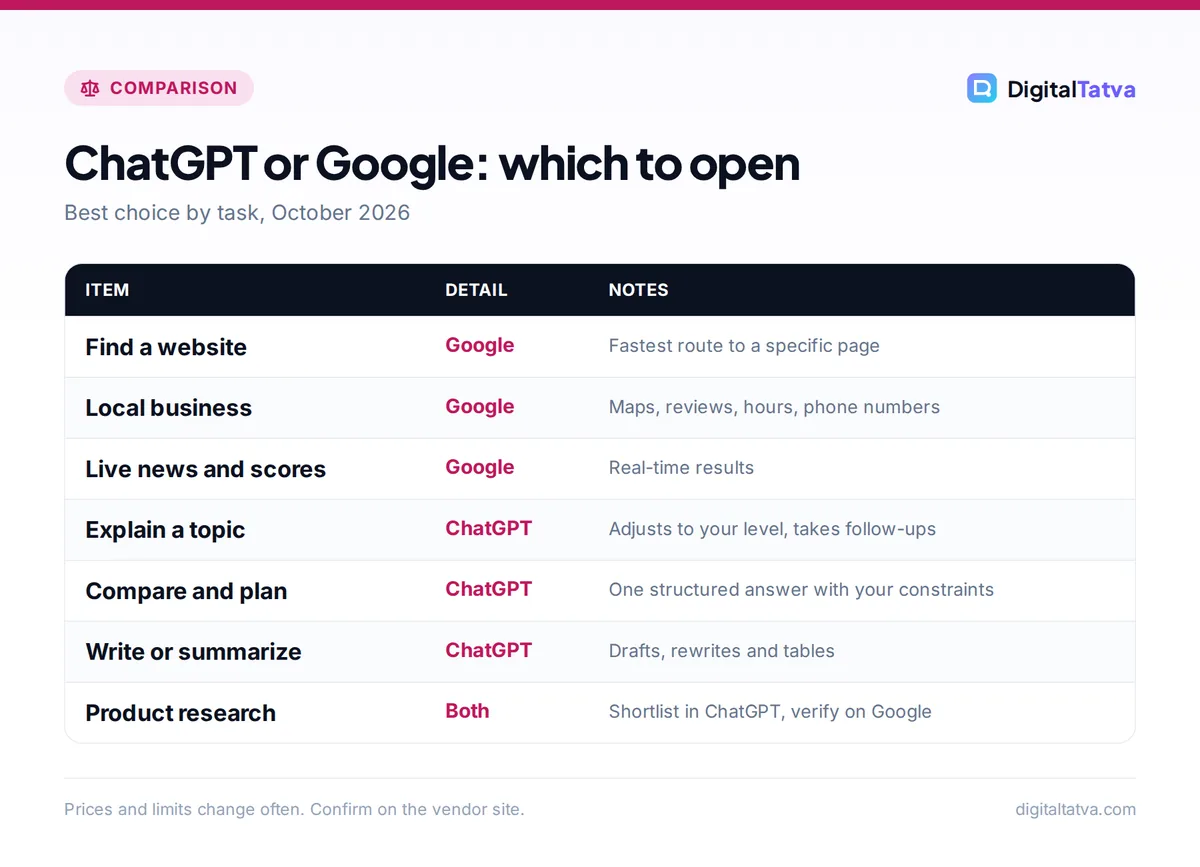
Use this table when you are not sure which tab to open.
| Your task | Better choice | Why |
|---|---|---|
| Find a specific website or login page | One query, top result, done | |
| Restaurant, shop or doctor near you | Maps, reviews, hours and phone numbers | |
| Live scores, breaking news, stock prices | Real-time data and news sources | |
| Official rules (taxes, visas, exam dates) | Google, then the official site | Go straight to the authoritative source |
| Explain a concept simply | ChatGPT | Adjusts to your level and answers follow-ups |
| Compare options with your constraints | ChatGPT | Weighs trade-offs in one answer |
| Plan a trip, meal plan or study schedule | ChatGPT | Builds a full plan, not ten links |
| Write, rewrite or summarize | ChatGPT | Search engines do not write for you |
| Product research before buying | Both | ChatGPT to shortlist, Google to check prices and reviews |
How ChatGPT and Google Search work differently
Google Search crawls and indexes billions of web pages and ranks them for your query. Its classic result is a list of links, plus maps, shopping, news, images and videos. It also shows AI Overviews (an AI summary at the top of some results), and AI Mode, a separate conversational tab where you can ask long, complex questions and follow up. Google says Gemini 3.5 Flash became the default model in AI Mode at I/O 2026, and that people ask AI Mode questions nearly three times longer than traditional searches.
ChatGPT is an AI assistant built on OpenAI’s large language models (GPT-6 Sol for paid plans and GPT-6 Luna for Free and Go in the Chat tab). It answers from what it learned in training, and when a question needs current information it searches the web and cites sources. You can also trigger search yourself: choose Search from the tools menu or type / and select Search. OpenAI says search partners receive a rewritten version of your query, not your whole conversation.
So the difference is less “AI vs links” than it used to be. It is now about where each one starts: Google starts from the web index and adds AI on top; ChatGPT starts from the AI and adds the web when needed.
Accuracy and trust: who gets it right?
Both make mistakes, in different ways.
- Google’s links are only as good as the pages behind them, and you judge each source yourself. AI Overviews can occasionally misread or merge sources, but the links are right there to check.
- ChatGPT can hallucinate: produce a confident answer that is wrong, especially when it does not search. OpenAI’s own help page warns that search results “can be incomplete, outdated, or incorrect” and tells you to check sources and publication dates. OpenAI reports a 4.2% hallucination rate for GPT-6 Astra on its internal test, which is low but not zero.
Tip: For money, health, legal or exam questions, use ChatGPT to understand the topic and frame your questions, then confirm the final facts on the official website you find through Google.
Freshness, news and local results
Google is built for the live web. It updates constantly, has deep Maps and business data, and is the default for “near me” searches, timings, directions and today’s headlines.
ChatGPT can search the web on every plan, and it may use your approximate location from your IP address for local results. Precise device location is optional and off by default (Settings, Data controls, Location). It can even help with restaurant reservations through OpenTable globally and Resy and Yelp in the US on eligible consumer plans. Still, for local businesses, reviews and maps, Google’s data is richer, especially in Indian cities.
Google is pushing AI into travel too: AI Mode can track flight prices in more than 180 countries and, in the US, help book hotels with partners. Our guide to planning a trip with AI shows how to combine both tools.
Research and complex questions
This is where ChatGPT shines. Ask “Should I choose a Tata Nexon EV or a petrol SUV if I drive 40 km a day in Pune and want to keep the car eight years?” Google gives you articles to read; ChatGPT gives you a structured comparison, asks about your budget and charging options, and updates the answer when you add details.
ChatGPT also does deep research (multi-page reports with sources) with limits on Free and more on paid plans, and since 7 October 2026 its Intelligent UI can answer with interactive charts, calculators and tables. Read our guide to ChatGPT Intelligent UI to see what that looks like.
Google’s AI Mode handles complex, multi-part questions too, and is free. If research with citations is your main job, also look at Perplexity: our comparison of Perplexity vs ChatGPT for research and the list of the best AI research tools go deeper.
Writing, planning and doing things
Google Search finds information; it does not write your cover letter, build your study timetable or turn notes into a presentation. ChatGPT does all of these, keeps context across a conversation, remembers preferences if memory is on, and its Work mode can handle longer multi-step tasks and produce files. For a beginner walkthrough, see how to use ChatGPT.
Google’s equivalent for creation is the Gemini app rather than Search. If you are weighing those two assistants, our ChatGPT vs Gemini comparison covers features and pricing.
Privacy and ads
| ChatGPT | Google Search | |
|---|---|---|
| Ads | OpenAI said it would test ads on Free and Go in the US; Plus, Pro, Business and Enterprise stay ad-free | Sponsored results and shopping ads are a core part of Search |
| Training on your data | Personal chats may help train models unless you turn off “Improve the model for everyone”; Business and Enterprise are excluded by default | Search activity is tied to your Google account settings (My Activity) |
| Location | Approximate IP location; precise location off by default | Uses location for local results based on your settings |
| Temporary or private mode | Temporary Chat (not used for training, may be kept up to 30 days) | Incognito in your browser, plus activity controls |
For a full breakdown of ChatGPT’s data controls, read is ChatGPT safe?.
Cost: free vs paid
Google Search, including AI Overviews and AI Mode, is free. Google’s paid AI plans (AI Plus at $4.99/month or Rs 399 in India, AI Pro at $19.99/month or Rs 1,950) mainly add more Gemini usage and features, with some extras like Personal Intelligence in AI Mode starting with Pro and Ultra subscribers in the US.
ChatGPT’s free plan includes web search, unlimited everyday chats with GPT-6 Luna and limited deep research and images. Go costs $8/month, Plus $20/month, and Pro tiers run from $100 to $500/month. Our ChatGPT pricing guide explains what each tier adds. For search alone, you do not need to pay for either.
ChatGPT vs Google for Indian users
Both work well in Indian languages. ChatGPT’s settings list 59 supported interface languages, including Hindi, Bengali, Gujarati, Marathi, Tamil, Telugu, Kannada, Malayalam, Punjabi and Urdu. Google AI Mode added Bengali, Kannada, Malayalam, Marathi, Tamil, Telugu and Urdu in October 2025 alongside Hindi and English, and Search Live, which lets you talk to Search and point your camera, expanded in March 2026 to Gujarati, Odia and more. India was the first country outside the US to get Search Live: tap “Live” under the search bar in the Google app or in Lens.
Our list of the best AI tools for Hindi, Gujarati and other Indian languages compares accuracy across tools.
What this means for businesses and SEO
If you run a website, you now need visibility in both places. Google rankings still matter for most sites, while ChatGPT search can only show your pages if you allow OpenAI’s OAI-SearchBot crawler in robots.txt. You can block GPTBot (used for training) and still allow OAI-SearchBot. Our guide on how to use ChatGPT for SEO and the list of the best AI SEO tools for Google and AI search cover the practical steps.
Choose ChatGPT if, choose Google if
Choose ChatGPT if
- You want an explanation, not a list of links
- You need to compare options against your own situation
- You want a plan, draft, summary or table you can use right away
- You like asking follow-up questions in one conversation
Choose Google if
- You know the site or page you want
- You need local businesses, maps, directions or opening hours
- You want live news, scores, prices or official government pages
- You want to compare many sources and judge them yourself
Frequently asked questions
Is ChatGPT better than Google?
Neither is better at everything. ChatGPT is better for explaining topics, comparing options, planning and writing, because it combines information into one answer and handles follow-ups. Google is better for finding specific websites, local businesses, live news, prices and official pages. Most people get the best results by using ChatGPT to understand and Google to find and verify.
Can ChatGPT replace Google Search?
For some people and some tasks, yes, since ChatGPT search is free with cited sources and you can even set it as your Chrome address bar search with OpenAI’s extension. But Google still has richer maps, local business data, shopping results and real-time information. Typing !g in ChatGPT’s Chrome search sends a query to Google when you need it.
Is ChatGPT search free?
Yes. OpenAI’s help center says web search is available on Free, Go, Plus, Pro, Business, Enterprise and Edu plans and even to signed-out users. Searches count toward your plan’s usage limits. Answers include citations you can click, and a Sources button shows the pages ChatGPT used.
What is Google AI Mode and how is it different from ChatGPT?
AI Mode is a conversational tab inside Google Search, powered by Gemini, where you can ask long questions and follow up, with links to sources. It is free and built on Google’s search index, maps and shopping data. ChatGPT is a general assistant that also writes, analyzes files, creates images and runs longer tasks, and adds web search when needed.
Which is more accurate, ChatGPT or Google?
Google’s links are as accurate as the pages they point to, and you can judge each source. ChatGPT is usually accurate on well-known topics, especially when it searches, but it can still state wrong facts confidently. For important decisions, check ChatGPT’s citations or confirm on the official website through Google.
Final verdict: use both, for different jobs
In 2026 the smartest approach is not choosing one. Open Google when you need to find something specific, local or live, and open ChatGPT when you need to understand, decide or create. If you only want one AI answer engine for free, Google’s AI Mode is excellent for search-style questions, while ChatGPT is the better all-round assistant. For a wider view of the field, see our list of the best ChatGPT alternatives. Check OpenAI’s ChatGPT search help page and the official ChatGPT pricing page for current details, since features and prices change often.
Pricing and features are checked at the time of writing and can change. Some links may be affiliate links, which never affect our verdicts.



