
AI for Accountants and CAs: Best Tools, Prompts and Safe Use
AI for accountants and CAs in India: the best tools for bookkeeping, GST reconciliation and Excel, 12 ready prompts, client data rules under the DPDP Act and ICAI's AI resources.

On this page
AI for accountants is now practical for everyday work: tools like ChatGPT, Claude and Microsoft Copilot in Excel draft client emails, explain notices, build formulas and summarize documents, while specialist tools such as AI Accountant, Vyapar TaxOne and Clear Finance Cloud turn bank statements and invoices into Tally-ready entries and reconcile purchases against GSTR-2B. Used well, AI cuts hours of data entry and drafting, but it does not replace professional judgment, and client data needs careful handling under India’s DPDP Act and your firm’s confidentiality duties.
This guide is for chartered accountants, bookkeepers, tax practitioners and finance teams. It covers the best AI tools by task, what they cost, 12 copy-ready prompts, a safe-use policy for client data, ICAI’s AI resources and where AI still goes wrong.
Key takeaways
- General AI assistants (ChatGPT, Claude, Gemini) handle drafting, research summaries, notice explanations and Excel help for $0 to $20 a month per person.
- Copilot in Excel, Claude for Excel, Julius AI and Shortcut help with formulas, reconciliations and analysis directly on spreadsheets.
- India-focused tools such as AI Accountant, Vyapar TaxOne and Clear Finance Cloud automate bookkeeping entries, document collection and GSTR-2B matching.
- Never paste client PAN, Aadhaar, bank account numbers or full financials into a consumer AI tool; use business plans that do not train on your data, and redact.
- ICAI’s AI Committee has published guides such as AI Essentials for Chartered Accountants and AI Prompt Engineering for Chartered Accountancy.
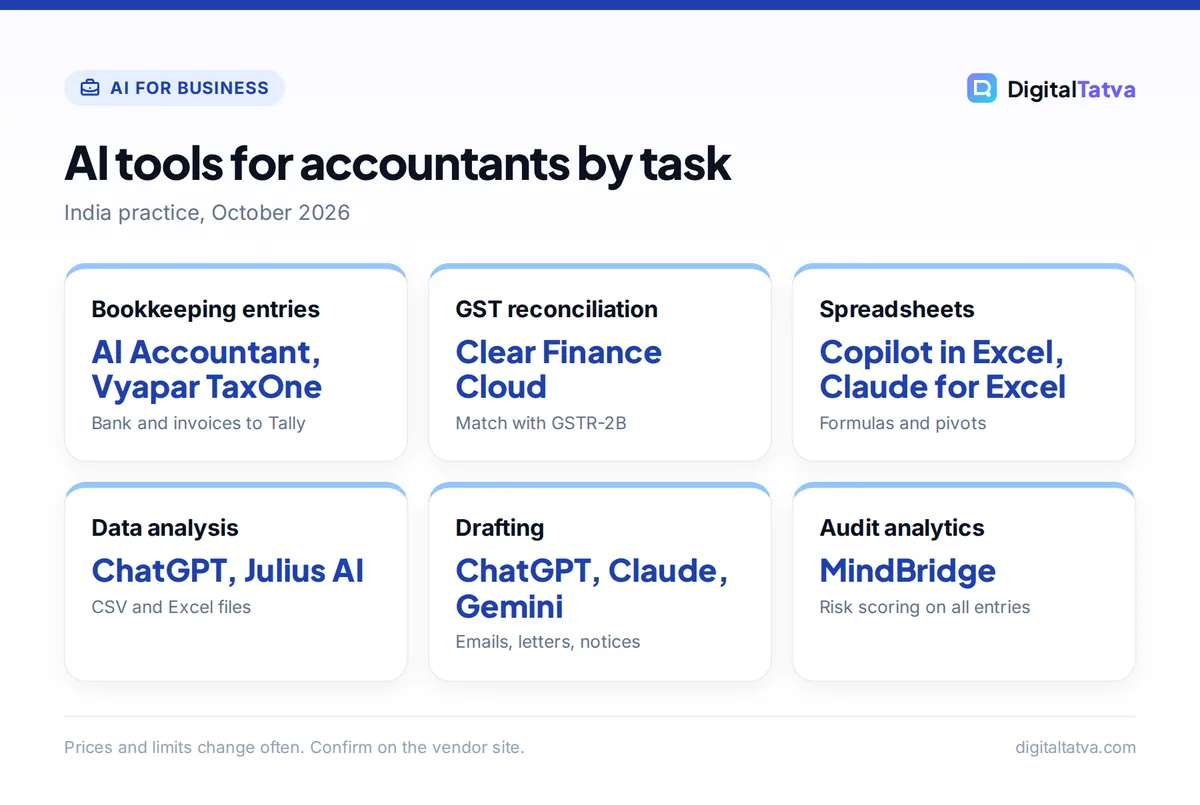
Where AI helps accountants most
| Task | How AI helps | Example tools | Human check needed |
|---|---|---|---|
| Bookkeeping entries | Reads bank statements and invoices, suggests ledger entries | AI Accountant, Vyapar TaxOne | Review classifications |
| GST reconciliation | Matches purchase register with GSTR-2B, flags invalid GSTINs | Clear Finance Cloud | Resolve mismatches |
| Excel work | Writes formulas, builds pivots, finds outliers | Copilot in Excel, Claude for Excel, Shortcut | Test formulas on samples |
| Data analysis | Analyzes CSV and Excel files, charts trends | ChatGPT, Julius AI | Confirm totals |
| Client communication | Drafts emails, reminders, engagement letters | ChatGPT, Claude, Gemini | Tone and facts |
| Notices and circulars | Summarizes and explains in plain language | Claude, ChatGPT | Verify against the source |
| Audit analytics | Scores risk across all transactions | MindBridge | Professional judgment |
Best AI tools for accountants and CAs
General AI assistants
ChatGPT is free to start, with Go at about Rs 399 and Plus at about Rs 1,999 a month in India. Plus adds stronger models and file analysis that runs Python on your spreadsheets, which is useful for quick ratio analysis or ageing reports. Our ChatGPT Free vs Plus comparison explains which plan you need.
Claude is strong at reading long documents such as agreements, notices and annual reports, and drafting careful explanations. It has a free plan, and Pro costs $20 a month or $17 billed annually. See our Claude pricing guide.
Gemini works well if your firm runs on Google Workspace, with help inside Gmail and Docs.
Spreadsheet AI
Microsoft Copilot in Excel helps with formulas, editable charts and PivotTables, and trend and outlier detection. Workbooks must be stored on OneDrive or SharePoint. Microsoft 365 Copilot Business was listed at $18 per user per month on a promotion through December 31, 2026, then $21. Claude for Excel and Shortcut (free with 20 weekly credits, Pro $100 a month billed annually) are agent-style alternatives. Compare them in our list of the best AI tools for Excel and our guide to using ChatGPT for Excel.
Julius AI analyzes uploaded CSV and Excel files conversationally. It has a free plan with daily credits, Plus at $20 a month and Pro at $45. Our roundup of AI tools for data analysis covers more.
India-focused accounting AI
- AI Accountant: converts bank statements, card bills and invoices into categorized entries with Tally sync and MIS dashboards. A 30-day free trial is offered; pricing is custom.
- Vyapar TaxOne (formerly Suvit): extracts data from PDFs and images into Tally-ready entries and collects documents from clients over WhatsApp. Pricing on request.
- Clear Finance Cloud (from the ClearTax team): reconciles purchase invoices against GSTR-2B, flags errors such as invalid GSTINs before filing and handles e-invoicing. Pricing depends on GSTIN count and invoice volume.
- MindBridge: enterprise audit analytics that scores risk across 100% of transactions. Custom pricing.
Note: The India-specific tool details above come from vendor descriptions summarized in early 2026. Ask each vendor for a demo on your own sample data, and confirm Tally and GST portal compatibility for your setup before you commit.
12 AI prompts for accountants
Replace the brackets with your details and remove anything that identifies a client before pasting.
- “Explain this GST notice in simple English for a small business owner. List what it asks for, the deadline, and the documents needed. [paste redacted notice]”
- “Write a polite reminder email to a client asking for March bank statements and purchase invoices by [date] for GST filing.”
- “Create an Excel formula that flags rows where the GSTIN in column B is not 15 characters or does not match the standard GSTIN pattern.”
- “From this trial balance, calculate current ratio, quick ratio and debt-equity ratio, and explain each in one line. [paste anonymized figures]”
- “Draft an engagement letter for monthly bookkeeping and GST return filing for a proprietorship. Include scope, client responsibilities, fees section and exclusions.”
- “Summarize this circular in five bullet points and list who it affects and from what date. [paste text]”
- “Build a checklist for year-end closing for a small trading company using Tally.”
- “Turn these meeting notes into action items with owners and deadlines. [paste notes]”
- “Write a VBA macro that splits one Excel sheet into separate sheets by the value in column A.”
- “Create a client onboarding questionnaire for a new private limited company covering incorporation documents, bank, GST and payroll.”
- “Suggest five analytical review procedures for revenue in a retail business, with what each would reveal.”
- “Rewrite this explanation of advance tax for a client who is not from a finance background, under 150 words.”
Our prompt engineering guide explains how to give AI the context it needs for accurate answers.
How to use AI safely with client data
Confidentiality is the biggest risk. Chartered accountants have strict confidentiality duties, and India’s Digital Personal Data Protection Act, 2023 governs how personal data is processed. Treat any AI tool like an outside service provider.
- Use business plans. Business and Enterprise plans from OpenAI, Anthropic and Google do not use your workspace data to train models by default. Personal free plans may, unless you turn it off.
- Redact first. Remove names, PAN, Aadhaar, GSTIN, bank account numbers and addresses, or replace them with placeholders, before pasting.
- Turn off training on personal accounts. In ChatGPT, switch off “Improve the model for everyone” in Data Controls.
- Write a firm policy. Define which tools are approved, what data can go into them and who reviews outputs. Our AI usage policy template is a ready starting point.
- Record AI use in working papers. Note where AI helped and what you verified, so reviewers can follow your work.
- Get client consent where needed. Add a line about approved technology providers in engagement letters.
For a deeper look at vendor data practices, read our guide to AI data privacy for businesses.
Watch out: AI tools can state wrong section numbers, outdated rates or invented case law with total confidence. Always verify tax and legal positions against the official act, rules, notifications and portals before advising a client.
ICAI resources on AI
ICAI’s AI Committee has released a series of low-cost publications, including AI Essentials for Chartered Accountants (June 2026), AI and the DPDP Era (March 2026), AI Prompt Engineering for Chartered Accountancy (January 2026), AI Law and the Chartered Accountant, Ethics in AI and Privacy in AI. It also offers a CA GPT tool platform and an AI certification programme. Check the ICAI website for current titles and course schedules.
How to start AI in your practice
- Pick one painful task. Bank entry posting, GST reconciliation or client reminders are good first targets.
- Run a two-week pilot. Measure time per task before and after, plus error rates.
- Train the team. Share prompts that work and the redaction rules.
- Scale what works. Move to paid or business plans only for tools that clearly save time. Our guide to measuring AI ROI shows how to calculate the payback.
- Automate the handoffs. Once tasks are stable, connect tools with automation platforms; see our list of the best AI automation tools.
For meetings with clients, an AI meeting assistant can produce notes and action items, but ask clients before recording. For long PDF reports, our list of AI PDF tools helps.
Frequently asked questions
Will AI replace accountants?
No. AI automates data entry, matching, drafting and first-pass analysis, but accountants remain responsible for judgment, compliance, client advice and sign-off. Firms that use AI well can handle more clients and spend more time on advisory work, so the role shifts rather than disappears.
What is the best AI tool for chartered accountants in India?
There is no single best tool. Use ChatGPT or Claude for drafting and explanations, Copilot in Excel or Claude for Excel for spreadsheets, and an India-focused tool like AI Accountant, Vyapar TaxOne or Clear Finance Cloud for Tally entries and GST reconciliation. Pilot two or three on your own data.
Is it safe to upload client data to ChatGPT?
Only with care. Use a business plan that does not train on your data, turn off training on personal accounts, and redact names, PAN, Aadhaar, GSTIN and bank details first. Follow your firm’s AI policy, your confidentiality duties and the DPDP Act.
Can ChatGPT file GST returns?
No. ChatGPT can explain rules, draft checklists and help prepare data in Excel, but filing happens on the GST portal or through approved software. Reconciliation tools such as Clear Finance Cloud help prepare accurate data before filing.
Does ICAI have guidelines on AI?
ICAI’s AI Committee publishes resources such as AI Essentials for Chartered Accountants, AI Prompt Engineering for Chartered Accountancy, Ethics in AI and AI and the DPDP Era. Check the ICAI website for the latest publications, courses and any formal guidance on AI use in practice.
The bottom line
AI can take hours of routine work off an accountant’s plate today, from entries and reconciliations to emails and explanations. Start with one task, use business-grade tools, redact client data and verify every tax or legal point against the source. The firms that build these habits now will serve more clients with the same team. Tool prices and features change often, so confirm details with each vendor before rolling out.
Related reading: AI for small business and how to measure AI ROI.
Pricing and features are checked at the time of writing and can change. Some links may be affiliate links, which never affect our verdicts.



