10 Best AI Headshot Generators for LinkedIn and Work Profiles
The 10 best AI headshot generators for LinkedIn in 2026, from HeadshotPro, Aragon and BetterPic to free options in ChatGPT, Gemini and Canva, with prices, privacy and selfie tips.

On this page
The best AI headshot generator for most people is HeadshotPro, which costs $29 to $59 one time for 30 to 70 professional headshots and offers a money-back guarantee if the results do not look like you. Aragon AI and BetterPic are close alternatives in the $35 to $79 range, while ChatGPT, Gemini, Canva and Fotor can give you a free or low-cost headshot if you only need one good photo for LinkedIn. You upload a few selfies, choose outfits and backgrounds, and get studio-style photos in minutes to a few hours.
This list ranks 10 AI headshot generators by realism, price, speed and privacy, with exact package prices where vendors publish them. It also covers how to take selfies that produce better results, what to check in the privacy policy, and when a real photographer is still the better choice.
Key takeaways
- HeadshotPro is our top pick: $29 for 30 headshots, $39 for 50, or $59 for 70, with a money-back Realism Guarantee and input photos deleted 30 days after generation.
- BetterPic has a free tier with up to 10 headshots and paid packs from $35 for 20 to $79 for 120.
- Aragon AI starts at about $35 for 40 headshots on a promotional price, with faster delivery on bigger packs.
- For a free option, restyle an existing photo with ChatGPT Images, Gemini or Canva, but expect fewer choices and more retries.
- Better selfies give better headshots: recent, solo, natural light, varied angles, no sunglasses or heavy filters.
Best AI headshot generators: quick picks
| Tool | Best for | Starting price | Free option |
|---|---|---|---|
| HeadshotPro | Best overall, teams | $29 for 30 headshots | No, money-back guarantee |
| Aragon AI | Fast delivery | About $35 for 40 (promo) | Limited free generations |
| BetterPic | Free trial and large packs | $35 for 20 | Yes, up to 10 headshots |
| Secta AI | Lots of variety | About $49 for 200+ | No |
| Try It On AI | Budget packs | From about $19 | No |
| Dreamwave AI | Big packs | From about $35 | Free tier listed |
| Fotor | Quick free test | $9.99/month | 2 free headshots |
| Canva | Improving a photo you have | Free feature | Yes |
| ChatGPT Images | DIY restyle with prompts | Free tier available | Yes, limited |
| Google Gemini | DIY edits with Nano Banana | Free tier available | Yes, limited |
Prices are in US dollars, one-time unless noted, and some vendors run frequent discounts or show local prices. Third-party prices are marked “about”.
The 10 best AI headshot generators
1. HeadshotPro: Best overall AI headshot generator
- Starting price: $29 one time
- Free plan: No
- Best for: Professionals and company teams
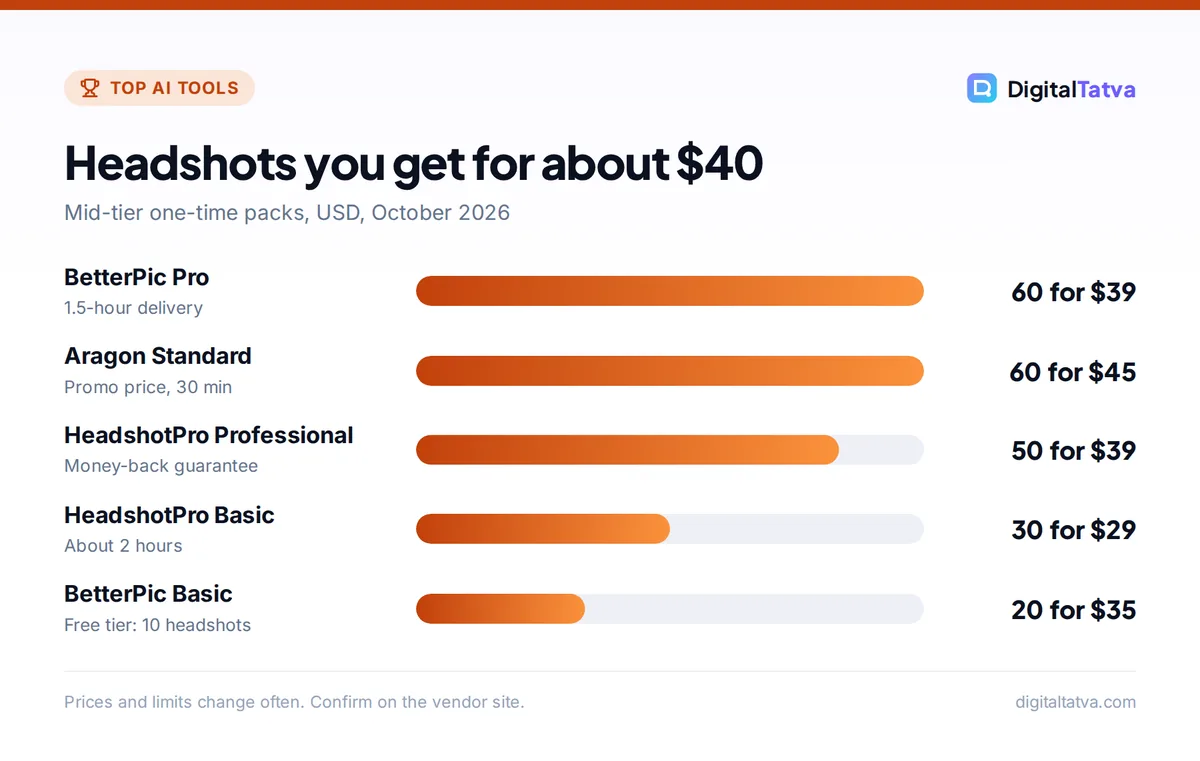
HeadshotPro publishes clear packages: Basic at $29 for 30 headshots in about 2 hours, Professional at $39 for 50 in about 30 minutes, and Executive at $59 for 70 in about 15 minutes with 4K downloads. Every package has a money-back Realism Guarantee if the results do not look like you, and Professional and Executive add a free redo within 14 days. HeadshotPro says input photos are deleted 30 days after generation. Team pricing starts around $25 per person, which makes it a strong pick for consistent staff photos. See the HeadshotPro pricing page.
2. Aragon AI: Best for speed
- Starting price: About $35 (promo), $44 list
- Free plan: Limited free generations
- Best for: Fast, polished results
Aragon AI’s packs, as checked in August 2026, were Basic with 40 headshots in about 45 minutes, Standard with 60 in about 30 minutes, and Executive with 100 in about 15 minutes at higher resolution. Prices were shown as $35, $45 and $75 under a 20% discount, against list prices of $44, $56 and $94. Aragon asks for at least six selfies and offers a full refund if you have not downloaded your photos. It claims SOC 2 Type II compliance.
3. BetterPic: Best free trial and biggest packs
- Starting price: $35 one time
- Free plan: Yes, up to 10 headshots
- Best for: Trying before you pay
BetterPic lets you generate up to 10 headshots free in a queue, which is the easiest way to test whether AI headshots suit your face. Paid packs are Basic at $35 for 20 headshots with 2-hour delivery, Pro at $39 for 60 in 1.5 hours, and Expert at $79 for 120 in 1 hour. Team seats cost $49 per person. Check its official pricing for current offers.
4. Secta AI: Best for variety
- Starting price: About $49 one time
- Free plan: No
- Best for: Picking from many options
Secta AI was listed at about $49 for 200 or more headshots in a 2026 roundup, which is a lot of choice for one price. It suits people who want to browse many looks and pick a few winners. Confirm the current package and delivery time on its site before buying.
5. Try It On AI: Best budget pack
- Starting price: From about $19
- Free plan: No
- Best for: Low cost
Try It On AI listed creative and express packs from about $19 to $21 and a premium pack around $47, with 100 to 200 photos per pack in an early 2026 roundup. It is a good choice if you want many images for little money and do not need a guarantee.
6. Dreamwave AI: Best for large photo sets
- Starting price: From about $35
- Free plan: Free tier listed
- Best for: Creators who need many images
Dreamwave AI was listed with a starter pack around $35 for 100 images and larger packs up to around $99 for 400. It is useful if you need headshots plus casual and creative portraits for social media, not just one LinkedIn photo.
7. Fotor: Best quick free test
- Starting price: $9.99/month
- Free plan: 2 free headshots
- Best for: Seeing results before committing
Fotor’s AI headshot tool was listed with two free headshots and no account needed for the free tier, with paid access around $9.99 a month. It is handy for a quick test, and it sits inside a broader photo editor. For more editing options, see our list of the best AI photo editors.
8. Canva: Best for improving a photo you already have
- Starting price: Free feature
- Free plan: Yes
- Best for: Quick touch-ups and backgrounds
Canva’s AI headshot feature works on one decent recent photo and improves it, rather than generating a full set from many selfies. It is ideal if you already have a good picture and just want a cleaner background and a professional finish. Our Canva Magic Studio review covers its other AI tools, and our background remover list helps if you only need a new backdrop.
9. ChatGPT Images: Best DIY option with prompts
- Starting price: Free tier, Plus $20/month
- Free plan: Yes, limited image creation
- Best for: Custom styles you describe yourself
ChatGPT Images 2.5, available on all ChatGPT plans, keeps closer to reference photos and makes precise edits that change only what you ask. Upload a clear photo and ask for “a professional LinkedIn headshot, navy blazer, soft studio lighting, plain grey background, keep my face exactly the same”. Results vary, so expect a few tries. Our guide on how to generate images in ChatGPT has more prompt tips.
10. Google Gemini (Nano Banana): Best free edit in the Gemini app
- Starting price: Free tier, Google AI plans for more
- Free plan: Yes, limited
- Best for: Changing outfit, light or background
Gemini’s Nano Banana image models can restyle a photo while keeping your face consistent, and the newest Nano Banana 2.1 improves realism. Image editing in Gemini is for users 18 and over. See our guide to Nano Banana image editing for step-by-step instructions.
How to get realistic AI headshots: selfie checklist
- Use recent photos. Upload pictures from the last few months so the result looks like you today.
- Shoot in natural light. Face a window in daylight. Avoid harsh overhead light and strong shadows.
- Vary angles and expressions. Include front and slight side angles, with and without a smile.
- Keep it solo. No group photos, pets or people cropped in the frame.
- Skip filters and sunglasses. Beauty filters, heavy makeup changes and hats confuse the model.
- Upload enough. Paid tools typically want six to twenty selfies. Follow each tool’s minimum.
- Choose realistic styles. Pick outfits and backgrounds that match your industry, then shortlist the two or three most natural results.
Tip: After you pick a headshot, run it through an upscaler for print or large banners. Our list of the best AI image upscalers covers free and paid options.
Privacy: what to check before uploading your face
A headshot generator needs your face photos, which are sensitive personal data. Before you pay, check four things in the privacy policy: how long uploaded selfies are kept (HeadshotPro says 30 days), whether you can delete them yourself, whether your photos are used to train models, and who owns the results. Avoid tools that do not answer these questions clearly. For company-wide use, involve whoever handles data protection; our guide to AI data privacy for businesses explains what to ask vendors.
Watch out: Never upload photos of other people without their permission, and do not use AI headshots that change your appearance so much that clients or employers would not recognize you. Recruiters notice.
AI headshot vs a real photographer
| Factor | AI headshot generator | Studio photographer |
|---|---|---|
| Cost | Free to about $79 | Usually much higher per session |
| Time | Minutes to a few hours, from home | Booking, travel and session time |
| Variety | Dozens to hundreds of looks | Limited outfits per session |
| Accuracy | Usually good, sometimes slightly off | Exactly you |
| Best for | LinkedIn, résumés, team pages, social | Press kits, books, high-stakes branding |
For a job search, a good AI headshot pairs well with a strong résumé and interview prep. See our lists of the best AI resume builders and AI interview prep prompts.
Frequently asked questions
What is the best AI headshot generator?
HeadshotPro is our top pick for most people because it publishes clear prices from $29 to $59, delivers 30 to 70 headshots, offers a money-back Realism Guarantee and deletes input photos after 30 days. BetterPic is best if you want to try free first, and Aragon AI is best for fast delivery.
Is there a free AI headshot generator?
Yes. BetterPic offers up to 10 free headshots, Fotor gives two free, and Canva’s headshot feature is free for improving an existing photo. You can also restyle a photo for free with ChatGPT Images or Google Gemini, though you will need a few attempts and get fewer variations.
Are AI headshots okay for LinkedIn?
Generally yes, as long as the photo still looks like you and is not misleading. Choose a natural result with realistic lighting and a simple background, and avoid heavy retouching. If people meet you on a video call, they should recognize you instantly.
How many selfies do I need for an AI headshot?
It depends on the tool. Aragon AI asks for at least six selfies, and many paid generators work best with around 10 to 20 varied photos. Single-photo tools like Canva, ChatGPT and Gemini need just one good, well-lit picture.
Are AI headshot generators safe for my privacy?
The better ones explain how long they keep your photos and let you delete them. HeadshotPro says input photos are deleted 30 days after generation. Read each tool’s privacy policy, check whether photos are used for training, and avoid services that do not say.
Our verdict
For a professional headshot without a studio, HeadshotPro gives the best mix of realism, clear pricing and guarantees, with BetterPic and Aragon AI as strong alternatives. If you only need one photo, start free with Canva, ChatGPT or Gemini and pay only if the results fall short. Whichever you choose, good selfies matter more than the tool. Prices and packages change often, so confirm the current offer on each vendor’s site before you buy.
Related reading: best AI image generators and free AI image generators.
Pricing and features are checked at the time of writing and can change. Some links may be affiliate links, which never affect our verdicts.