
10 Best AI Resume Builders and Cover Letter Generators
We compare the 10 best AI resume builders and cover letter generators for 2026, from Teal and Kickresume to Rezi and Jobscan, with prices, free plans and trial traps.

On this page
- Key takeaways
- Quick picks: best AI resume builders compared
- The 10 best AI resume builders, reviewed
- How to write a resume with AI (step by step)
- AI resume prompts that actually work
- ATS, honesty and privacy: what to know
- Best AI resume builders in India
- Frequently asked questions
- Our verdict: the right AI resume builder for you
The best AI resume builder for most job seekers in 2026 is Teal, which has a genuinely useful free plan and a flexible $13 weekly upgrade for active searches. Kickresume is the best value for polished templates at $8 a month on yearly billing (and free for verified students), while Jobscan is the best tool for checking how well your resume matches a specific job before you apply.
Below we compare 10 AI resume builders and cover letter generators on price, free plan limits, ATS features and the trial traps to avoid, with prices checked in October 2026. We also show how to use AI on your resume without sounding generic or making claims you cannot back up in an interview.
Key takeaways
- Teal (free, Teal+ from $13 a week) is the best all-round AI resume builder, with job tracking and keyword matching built in.
- Kickresume costs $8 a month on yearly billing and is free for students verified through ISIC, ITIC or UNiDAYS.
- Rezi offers a $149 lifetime plan, a rare one-time option for people who job hunt every year or two.
- Some builders, such as Resume.io, turn a 7-day trial into a recurring subscription unless you cancel, so read the billing terms first.
- A free chatbot like Claude or ChatGPT plus a clean template can match paid tools if you write good prompts and check every claim.
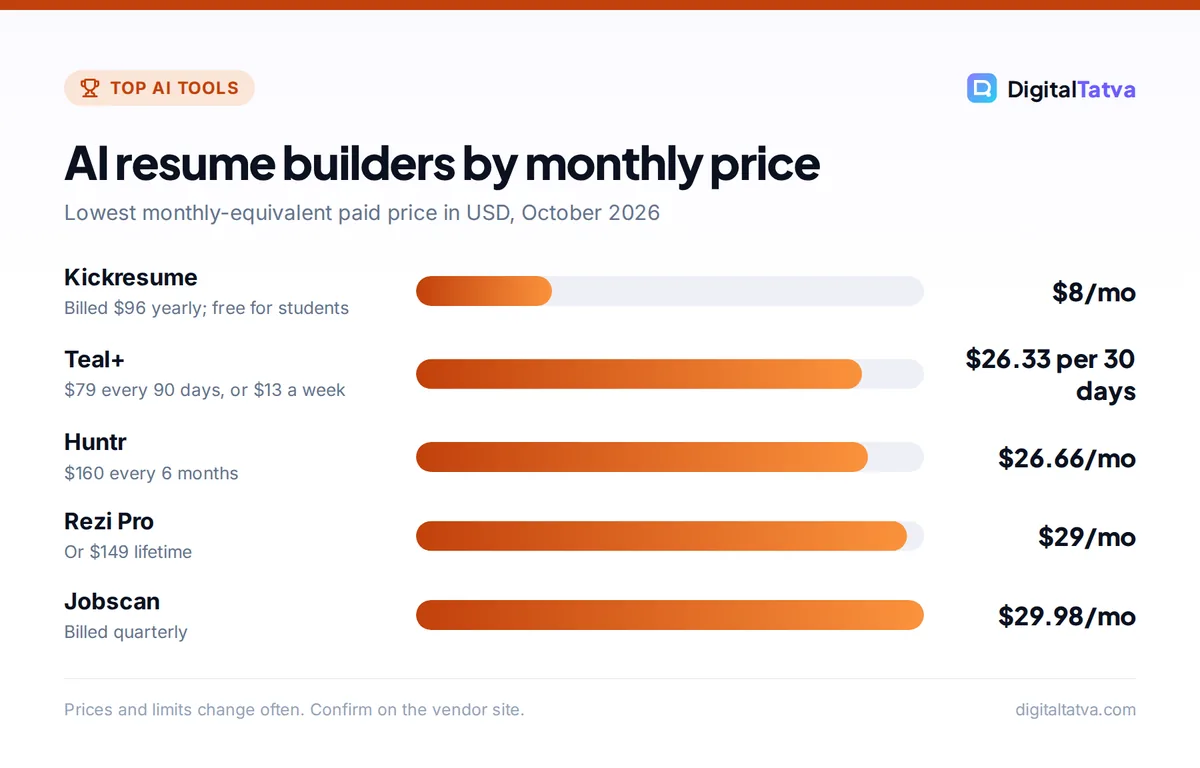
AI resume builders by monthly price
Lowest monthly-equivalent paid price in USD, October 2026
Prices and limits change often. Confirm on the vendor site.
Quick picks: best AI resume builders compared
Use this table to shortlist. Prices are USD list prices from each vendor’s pricing page unless marked.
| Tool | Best for | Starting price | Free plan |
|---|---|---|---|
| Teal | Best overall, job tracking | $13 per 7 days | Yes, generous |
| Kickresume | Templates and students | $8/mo (yearly) | Yes, 4 templates |
| Rezi | Lifetime deal | $29/mo or $149 once | Yes, 1 resume |
| Jobscan | ATS match checking | From $29.98/mo (quarterly) | Yes, 5 scans |
| Huntr | Tailored resumes plus tracker | $40/mo or $160 per 6 months | Yes |
| Enhancv | Senior and creative layouts | From about $16.50 (per vendor page title) | 7-day free plan |
| Claude or ChatGPT | Free custom writing | $0 (paid from $8 to $20/mo) | Yes |
| Grammarly Resume Builder | Tailoring to a job post | Free sign-up | Yes |
| Canva | Design-led resumes | $0 | Yes |
| Resume.io | Quick guided builder | 7-day trial (price not listed) | Limited |
The 10 best AI resume builders, reviewed
1. Teal: Best AI resume builder overall
- Starting price: Teal+ $13 per 7 days, $29 per 30 days, $79 per 90 days
- Free plan: Yes, unlimited resumes and job tracking
- Best for: active job seekers applying to many roles
Teal combines a resume builder, job tracker and keyword matcher. The free plan is unusually useful: unlimited resumes and job tracking, 10 templates, matching for the top 5 keywords per job, and a small AI allowance (10 bullet points, 2 summaries and 2 cover letters). Teal+ removes the AI limits and shows every keyword in a job description plus a Match Score.
The weekly plan is smart if you are in a short, intense search: pay $13, tailor a batch of applications and cancel. The official Teal pricing page says no card is needed to start.
Skip it if: you want highly designed, creative layouts; Teal favors clean, ATS-friendly formats.
2. Kickresume: Best value for templates and students
- Starting price: $8/month billed yearly ($96), $18/month quarterly, $24 monthly
- Free plan: Yes, 4 basic templates, unlimited downloads
- Best for: students, graduates, anyone who wants polished templates
Kickresume’s Premium plan includes 40+ resume and cover letter templates, an AI Resume Writer that drafts a full resume from your job title and the job ad, an AI Cover Letter Writer, an ATS checker and LinkedIn or PDF import. The yearly plan works out to $8 a month, and the monthly plan has a 14-day money-back guarantee, per the official Kickresume pricing page.
The standout perk: Kickresume is free for students who verify through ISIC, ITIC or UNiDAYS. If you are still studying, check that first, along with our roundup of AI student discounts.
Skip it if: you only need one resume once; the free plan or a chatbot may be enough.
3. Rezi: Best lifetime deal
- Starting price: $29/month Pro or $149 one-time Lifetime
- Free plan: Yes, 1 resume, 3 PDF downloads
- Best for: people who job hunt every year or two
Rezi focuses on ATS-friendly resumes. Its Rezi Score checks a resume against 23 metrics, and AI tools write bullets, summaries, cover letters and even resignation letters, plus an AI interview practice mode. Pro adds one free expert review a month. The $149 Lifetime plan gives Pro features permanently, without the monthly expert review.
Rezi offers a 30-day money-back guarantee on paid plans. Skip it if: you need just one month of help; Teal’s weekly plan is cheaper for a short search.
4. Jobscan: Best for ATS match checking
- Starting price: from $29.98/month billed quarterly
- Free plan: Yes, 5 scans
- Best for: checking a finished resume against specific job posts
Jobscan compares your resume with a job description and gives a Match Rate across 30+ factors including keywords, skills and formatting. It can identify which applicant tracking system (ATS, the software companies use to filter applications) a posting uses, such as Workday, Greenhouse, iCIMS or Taleo, and adjust its advice. AI Optimize suggests edits you accept or reject, and there is a builder, LinkedIn audit and DOCX export.
The free plan gives 5 scans without generative AI. Skip it if: you want a design-led builder; Jobscan is an optimizer first.
5. Huntr: Best for tailored resumes plus a job tracker
- Starting price: $40/month, $90 per 3 months, $160 per 6 months
- Free plan: Yes, unlimited base resumes, 2 tailored resumes
- Best for: organized applicants managing many applications
Huntr’s free plan includes unlimited base resumes with PDF export, all templates, a tracker for up to 100 jobs, a Chrome job clipper and application autofill, plus a few AI credits. Pro unlocks unlimited job-tailored resumes, AI cover letters and AI resume reviews. The six-month plan is the cheapest per month.
Skip it if: you apply to only a handful of roles; the free tier of Teal covers the same ground.
6. Enhancv: Best for senior and creative layouts
- Starting price: from about $16.50 (per Enhancv’s pricing page title; check the period)
- Free plan: 7-day free plan with Enhancv branding
- Best for: experienced professionals who want a modern design
Enhancv offers attractive templates plus AI tools: a bullet point generator, resume tailoring with a match score, an ATS check, AI feedback and even resume translation. The free plan lasts 7 days, adds Enhancv branding and caps you at 12 section items. Prices did not display clearly when we checked, so confirm the billing period on the page. Enhancv only offers refunds if something on its side breaks.
Skip it if: you want a permanent free option; this free plan expires.
7. Claude or ChatGPT: Best free AI resume writer
- Starting price: $0; paid plans from $8 (ChatGPT Go) to $20 a month
- Free plan: Yes
- Best for: custom wording, career changers, cover letters
A general chatbot is often the best writer of the bunch, because you can give it your full history, the job ad and your tone. Claude is especially good with long documents and natural phrasing; ChatGPT is strong at quick rewrites and now builds interactive answers. Paste the result into a clean template in Google Docs, Word or Canva. Our ChatGPT vs Claude comparison helps you choose.
The trade-off: no ATS scoring, no job tracking and a real risk of generic, inflated wording. Use the prompts below and edit hard. Our list of best ChatGPT prompts has more templates for work writing.
8. Grammarly Resume Builder: Best for tailoring to a job post
- Starting price: free sign-up (plan requirements not stated)
- Free plan: Yes
- Best for: people who already use Grammarly
Paste a job description or posting link and Grammarly’s Resume Builder compares it with your resume, giving an ATS score and an alignment score, flagging gaps and suggesting role-specific rewrites you can accept inline. It is a natural add-on if Grammarly already checks your writing; see our Grammarly review for what Pro adds.
Skip it if: you need templates and design control.
9. Canva: Best free design-led resume maker
- Starting price: $0; Pro $144/year (Rs 4,000/year in India)
- Free plan: Yes
- Best for: creative roles, visual portfolios
Canva says creating a resume is “totally free”, with hundreds of free templates and Magic Write for first drafts. Translate is a Pro feature. Canva is great for designers and marketers, but heavily designed layouts with columns and graphics can confuse some ATS software, so keep a plain version for online applications. Our Canva pricing guide explains Free vs Pro.
Skip it if: you apply mainly through large company portals.
10. Resume.io: Best quick guided builder (watch the trial)
- Starting price: 7-day premium trial (price not shown on the pages we read)
- Free plan: Limited
- Best for: first-time job seekers who want step-by-step guidance
Resume.io walks you through each section with suggestions and offers polished templates and cover letters. The catch is billing: per its help center, the 7-day trial automatically becomes a premium subscription billed every 4 weeks unless you cancel. Six-month and yearly plans revert to free when they end, and there is a 7-day money-back guarantee.
Skip it if: you are likely to forget to cancel; set a reminder the day you start.
Watch out: many resume sites let you build for free but charge to download, or start with a cheap trial that renews at a much higher rate. Before you invest an hour, check whether you can export a PDF on the free plan.
How to write a resume with AI (step by step)
- Collect your raw material. Gather your old resume, LinkedIn profile, performance reviews and a list of achievements with numbers you can prove.
- Pick the target job. Copy the full job description. AI works best when tailoring to one role, not writing a generic resume.
- Draft with a chatbot or builder. Ask for bullet points in the “action, task, result” format, using only facts you supplied.
- Check the match. Run the draft through Jobscan, Teal or Grammarly to see missing keywords and formatting issues.
- Edit for truth and voice. Delete anything you cannot explain in an interview. Replace buzzwords with specifics.
- Export a clean PDF and DOCX. Some portals prefer Word files; keep both, plus a plain-text version for copy-paste forms.
- Write a short, specific cover letter. Use AI for the first draft, then add one detail about the company that only a real applicant would know.
AI resume prompts that actually work
These prompts work in Claude, ChatGPT, Gemini or any builder with a custom prompt box. Our full guide to prompt engineering explains why context and constraints matter.
| Goal | Prompt |
|---|---|
| Tailor bullets | “Here is my experience and the job description. Rewrite my bullets to match the role. Use only facts I gave you. Keep each bullet under 25 words.” |
| Find gaps | “List the skills and keywords in this job description that are missing from my resume, ranked by importance.” |
| Quantify results | “For each bullet, ask me one question that would help me add a number or measurable result.” |
| Summary | “Write a 3-line professional summary for a [role] with [X] years in [industry]. No cliches like ‘results-driven’.” |
| Cover letter | “Draft a 200-word cover letter using my resume and this job ad. Mention one specific company project I will add later as [PLACEHOLDER].” |
| Career change | “I am moving from [old field] to [new field]. Show which of my experiences transfer and how to phrase them.” |
For the interview stage, our AI interview prep prompts help you practice answers that match your new resume.
ATS, honesty and privacy: what to know
Keep the format simple for ATS
Applicant tracking systems read text, not design. Use standard headings (Experience, Education, Skills), avoid text inside images and keep fancy columns for printed copies. Most builders above offer ATS-friendly templates; Jobscan and Teal can check your file.
Never let AI invent experience
AI tools will happily add skills or numbers you never mentioned. Recruiters ask about every line, and inflated claims can cost you an offer. Do not rely on detectors either way: our review of AI detectors shows how often they misfire. Treat AI output as a draft from an eager assistant, not the truth.
Protect your personal data
Resumes contain your phone number, address and work history. Remove details you do not need, such as your full address or date of birth, before pasting into a free chatbot, and check whether the tool uses your data for training. Our guide to AI data privacy shows how to turn off training in ChatGPT and Claude.
Best AI resume builders in India
Every tool above works in India, with prices charged in USD unless noted. Kickresume’s yearly plan at $96 and Teal’s free plan are the best value. Students should claim Kickresume’s free Premium and look at AI tools for students for other free perks. Canva is cheaper in rupees, with Pro at Rs 4,000 a year. Many Indian employers also accept a DOCX file, so make sure your builder can export Word documents, not just PDFs.
Frequently asked questions
What is the best free AI resume builder?
Teal has the most useful free plan, with unlimited resumes, job tracking, 10 templates and a small AI allowance. Huntr’s free plan is similar and includes a job tracker. For pure writing, a free Claude or ChatGPT account paired with a Google Docs or Canva template works well. Check that any free plan lets you download a PDF before you start.
Do recruiters know if a resume is written by AI?
Recruiters often spot generic AI phrasing such as “results-driven professional” and vague bullets without numbers. There is no reliable automatic test, and AI detectors are known to be inaccurate. The bigger risk is false or inflated claims, which come out in interviews. Use AI for structure and wording, then rewrite in your own voice with specific, provable results.
Are AI resume builders worth paying for?
They are worth it during an active search if you apply to many roles and need fast tailoring and ATS checks. Short plans make sense: Teal’s $13 weekly plan or a single month elsewhere. If you only update your resume once a year, a free plan or chatbot is enough, or consider Rezi’s $149 lifetime option if you job hunt regularly.
Can ChatGPT write my resume?
Yes. ChatGPT, Claude and Gemini can draft a strong resume if you give them your real experience and the job description, and the free plans are enough. They do not score ATS compatibility or format a file, so pair them with a template and a checker like Jobscan. Always verify every claim and remove anything you did not actually do.
What is the best AI cover letter generator?
Kickresume, Teal, Rezi and Huntr all include AI cover letter writers, and Teal+ makes them unlimited. A general chatbot is just as good if you paste your resume and the job ad. The key is personalization: add one real detail about the company or team, because generic AI cover letters are easy to spot.
Our verdict: the right AI resume builder for you
Start with Teal’s free plan and upgrade to the weekly Teal+ plan only during an intense search. Choose Kickresume for the best templates per dollar, or free if you are a student, and Rezi if a one-time $149 payment suits you better than subscriptions. Run every final draft through Jobscan or Grammarly’s builder to catch missing keywords, and keep your claims honest. For other writing help, see our ranking of the best AI writing tools. Resume builder prices and trial terms change often, so confirm the current details on each vendor’s pricing page before you pay.
Pricing and features are checked at the time of writing and can change. Some links may be affiliate links, which never affect our verdicts.



