
How to Use ChatGPT Work: Agent Tasks, Limits and Tips
How to use ChatGPT Work step by step: start agent tasks, connect apps with @, schedule jobs, understand Plus usage limits with GPT-6 Astra and Sol, and fix common problems.

On this page
ChatGPT Work is ChatGPT’s agent mode for longer, multi-step tasks: you describe a job, such as “research our five main competitors and build a comparison sheet”, and it plans the work, browses, uses your connected apps and files, and hands back a finished spreadsheet, document, slide deck or web page. To use it, open the ChatGPT desktop app (or chatgpt.com on paid plans), switch from Chat to Work, describe the task with the result you want, and approve important actions as it works. Plus and higher plans get GPT-6 Astra and GPT-6.1 Sol inside Work, while Free users get limited access in the desktop app.
OpenAI introduced ChatGPT Work on July 9, 2026, and it replaced the older ChatGPT agent, which is no longer available. This guide shows how to start your first task, the features worth knowing, how the usage limits work, prompts that produce good results, safety settings and fixes for common problems.
Key takeaways
- ChatGPT Work handles long, multi-step jobs and delivers finished files: sheets, docs, slides and web apps through ChatGPT Sites.
- It can run on a schedule (once, recurring, on an event or as monitoring), use plugins with @ plus an app name, and work in a built-in browser.
- On the desktop app it can also use local files and apps through Computer Use, asking before consequential actions.
- Work and Codex share one allowance on Plus, measured over five-hour and weekly windows; GPT-6 Astra uses it fastest.
- ChatGPT agent has been retired; old agent scheduled tasks need to be rebuilt in Work.
What ChatGPT Work can do
Chat answers a question. Work completes a job. OpenAI describes it as “an agent for longer, more involved tasks”, and in practice it can stay on a project for a long time, check its own progress and ask you questions along the way.
| Capability | What it means | Example |
|---|---|---|
| Finished deliverables | Builds sheets, docs, slides and web apps | “Turn this sales data into a 10-slide review deck” |
| Research and analysis | Browses, reads sources and summarizes | “Compare pricing of five CRM tools for a 10-person team” |
| Connected apps | Uses plugins such as your drive, email or CRM | “@Drive find last quarter’s reports and summarize them” |
| Scheduled tasks | Runs once, on repeat, on an event or as monitoring | “Every Monday at 9 am, summarize new leads” |
| Browser tasks | Works on websites, including sign-in sites, with confirmation | “Fill this supplier form with our company details” |
| Computer Use (desktop) | Clicks, types and moves local files | “Rename these invoices by date and client” |
If agents are new to you, our explainer on what AI agents are covers the basics, and our older guide to the retired ChatGPT agent shows how far things have moved.
Which plans include ChatGPT Work
| Plan | Price | Work access | Models in Work |
|---|---|---|---|
| Free | $0 | Limited, in the macOS and Windows desktop apps | Default models |
| Go | $8/month | Not detailed by OpenAI, check your plan page | No GPT-6 models |
| Plus | $20/month | Yes, shared allowance with Codex | GPT-6 Astra, GPT-6.1 Sol and GPT-5.6 models |
| Pro 100, 200, 500 | $100 to $500/month | Yes, no five-hour limit, weekly allowance | Same, plus Ultrafast on Pro 500 |
| Business and Enterprise | Per seat or credits | Yes, admin controls | Set by workspace admins |
Our ChatGPT Free vs Plus comparison and Plus vs Pro guide help you choose a plan, and our GPT-6 models explainer covers Astra, Sol and Luna.
How to use ChatGPT Work: step by step
- Install the desktop app. The new ChatGPT desktop app for macOS and Windows combines Chat, Work and Codex. OpenAI’s own Academy course starts with “Download the desktop app and begin working on your first task.” Paid plans can also use Work on the web and mobile.
- Switch to Work. Choose Work instead of Chat at the top of the window.
- Pick a model and effort. Start with GPT-6.1 Sol or a GPT-5.6 model at Medium effort. Save GPT-6 Astra for the hardest tasks.
- Describe the job and the deliverable. Say what you want, who it is for, the sources to use and the format, for example “a Google Sheet with columns for tool, price, free plan and best for”.
- Connect what it needs. Type @ and an app name to bring in a plugin, attach files, or allow the browser. Missing access is the most common reason tasks fail.
- Watch and steer. Follow progress, answer its questions and change direction if it drifts. Approve important actions only when you are sure.
- Review the output. Check numbers, links and claims before you share the result.
- Schedule it if it repeats. Turn a good task into a scheduled task so it runs weekly or when an event happens.
Tip: Ask Work to “show me your plan first and wait for my OK”. You catch wrong assumptions before it spends your allowance on the wrong job.
ChatGPT Work usage limits explained
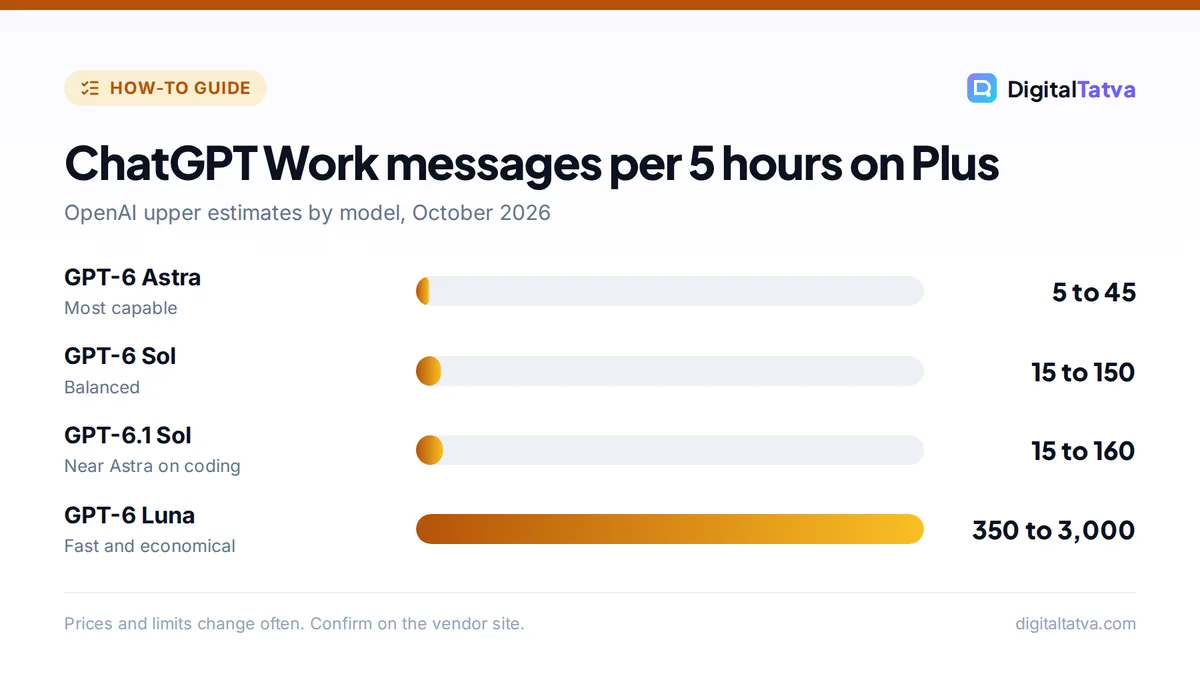
Work and Codex share one allowance on Plus, Pro and Business seats. OpenAI says the allowance “does not correspond to a fixed number of messages or tasks”, because usage depends on the model, effort level, task length and tools. Limits apply over a five-hour window and a weekly window, and you need allowance left in both.
| Model (Plus plan) | Estimated messages per 5 hours |
|---|---|
| GPT-6 Astra | 5 to 45 |
| GPT-6.1 Sol | 15 to 160 |
| GPT-6 Sol | 15 to 150 |
| GPT-6 Luna | 350 to 3,000 |
Cloud tasks can use more than local messages. Pro tiers currently have no five-hour limit in Work and Codex but still have a weekly allowance. Check what is left in Settings > Usage, where the desktop app also shows credits used per chat. Eligible Plus and Pro users can buy instant resets, and Business admins can set per-user limits.
Save money: OpenAI notes that higher effort does not always give better results, and that Astra at Low effort can beat Sol at High. Try a cheaper model or lower effort first, and only raise it if the output falls short. Our guide to ChatGPT message limits covers chat caps too.
OpenAI’s help article on managing usage in Work and Codex has the latest numbers.
ChatGPT Work prompts that work well
- “Research the five most-used project management tools for small agencies. Build a sheet with price per user, free plan, key features and best for. Cite sources in a final column.”
- “Read the attached quarterly sales file and create a 10-slide review deck: summary, top products, regions, trends and three recommendations.”
- “Every Monday at 9 am, check our shared inbox label ‘Leads’, summarize new leads in a table and draft a reply for each.”
- “Monitor these three competitor pricing pages and tell me when any price changes. [links]”
- “Turn this meeting transcript into a project plan doc with tasks, owners and deadlines.”
- “Build a simple one-page website for our workshop on [date] with agenda, speaker bios and a registration link.”
For more ideas on what to automate, see our list of the best AI agents and what OpenAI announced next in our DevDay 2026 recap, including always-on dots.
Safety and privacy in ChatGPT Work
- Approve carefully. Work asks for confirmation before consequential actions on websites. Read what it is about to submit, send or buy.
- Limit access. Connect only the apps and folders a task needs, and remove access you no longer use.
- Watch for prompt injection. Web pages and files can contain hidden instructions. Keep sensitive tasks to trusted sources.
- Check data controls. On personal plans, review whether your chats help train models. Our guide on whether ChatGPT is safe explains the settings.
- Know the browser extension. The ChatGPT browser extension lets Work act on sites where you are signed in and asks before each new site. Compare it with others in our AI Chrome extensions list.
ChatGPT Work not working? Quick fixes
- Update the desktop app. OpenAI suggests updating and fully restarting the app if a model or feature is missing. An October 7, 2026 outage that blocked new Work threads was fixed by an app update.
- Check your allowance. If tasks stop, open Settings > Usage to see whether a five-hour or weekly window has run out.
- Give it access. Many failures come from missing files, plugins or permissions, not the model. Higher effort cannot fix missing access.
- Break up huge jobs. Split a large task into stages with a clear deliverable for each.
- Rebuild old agent tasks. Scheduled tasks from the retired ChatGPT agent do not carry over automatically.
For wider outages and errors, see our guide on what to do when ChatGPT is not working.
Frequently asked questions
What is ChatGPT Work?
ChatGPT Work is OpenAI’s agent mode for longer, multi-step tasks, launched on July 9, 2026. It plans and carries out work across the web, your files and connected apps, and returns finished deliverables such as spreadsheets, documents, slide decks and simple web apps.
Is ChatGPT Work free?
Free users get limited access in the ChatGPT desktop apps for macOS and Windows. Plus at $20 a month adds GPT-6 Astra and GPT-6.1 Sol in Work with a shared Work and Codex allowance, and Pro tiers raise the limits further.
What happened to ChatGPT agent mode?
OpenAI retired ChatGPT agent and now directs users to ChatGPT Work for longer, multi-step tasks and finished deliverables. Scheduled tasks created with the old agent need to be set up again in Work.
How many tasks can I run in ChatGPT Work on Plus?
There is no fixed number. OpenAI estimates 5 to 45 GPT-6 Astra messages, 15 to 160 GPT-6.1 Sol messages or 350 to 3,000 GPT-6 Luna messages per five-hour window on Plus, plus a weekly limit. Longer, cloud-based tasks use more.
Can ChatGPT Work use my computer?
Yes, in the desktop app. With Computer Use it can click, type and move local files, and it can use a built-in browser for websites. It asks for confirmation before consequential actions, and you control which apps and folders it can reach.
The bottom line
ChatGPT Work turns ChatGPT from a chat window into a capable assistant that finishes real jobs, from research sheets to slide decks to weekly reports. Start with a small, repeatable task, give it the access it needs, ask for a plan first and review every output. Use cheaper models first to stretch your allowance. Plans, limits and features change quickly, so confirm the current details on OpenAI’s help pages.
Related reading: how to use ChatGPT and what MCP is.
Pricing and features are checked at the time of writing and can change. Some links may be affiliate links, which never affect our verdicts.



