
15 Best AI Chrome Extensions to Save Time Every Day
The 15 best AI Chrome extensions for 2026, from ChatGPT, Claude in Chrome and Gemini to Grammarly, Fathom, DeepL and ElevenReader, with free limits, prices and safety tips.

On this page
- Key takeaways
- Best AI Chrome extensions: quick picks
- AI assistant and agent extensions
- AI writing extensions
- AI meeting extensions
- Translation and reading extensions
- Specialist extensions for teachers and content teams
- Are AI Chrome extensions safe?
- How to choose the right AI Chrome extensions
- Frequently asked questions
- Our verdict: the AI Chrome extensions worth installing
The best AI Chrome extensions in 2026 are the official ChatGPT extension for asking about any page, Claude in Chrome for handing off multi-step browser tasks, Grammarly for writing everywhere, Fathom for free meeting notes, and DeepL or Immersive Translate for reading foreign-language sites. Chrome also has Gemini built in, so you may need fewer AI Chrome extensions than you think.
We picked 15 AI Chrome extensions that save real time every day, grouped by job: assistants and agents, writing, meetings, translation and reading, and specialist tools for teachers and content teams. For each one you get the free limit, the paid price where the vendor publishes it, and who should skip it. Because AI extensions can read everything in your browser, we also explain which permissions to watch.
Key takeaways
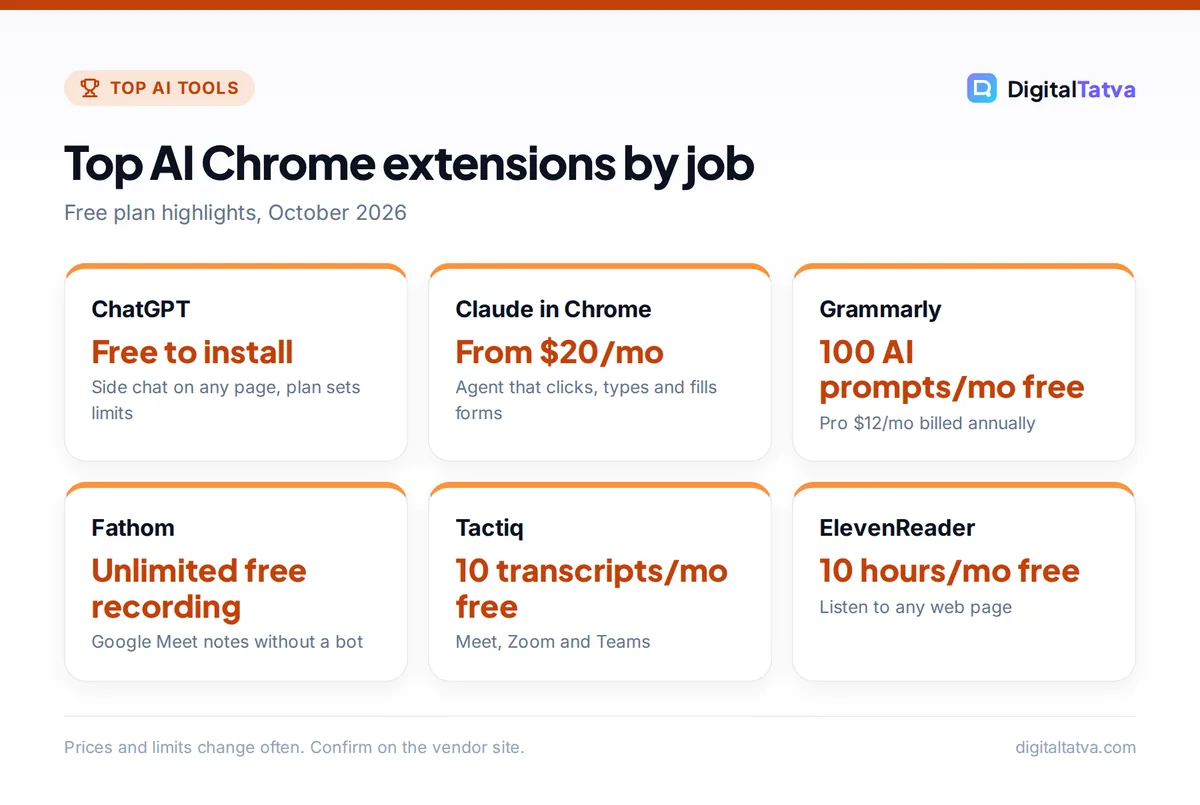
- The ChatGPT extension is free to install and adds Side chat next to any page; your ChatGPT plan sets the model and limits.
- Claude in Chrome can click, type and fill forms for you on Pro, Max, Team and Enterprise plans, and asks before purchases or sharing personal data.
- Fathom (unlimited free recording and transcription) and Tactiq (10 free transcripts a month) are the best free meeting extensions.
- Grammarly Free includes 100 AI prompts a month; Wordtune Free gives 10 rewrites a day; QuillBot Premium costs $8.33 a month billed annually.
- Install only from the Chrome Web Store, check the publisher, and limit “read and change all your data” permissions to the sites you need.
Best AI Chrome extensions: quick picks
Here are all 15 picks at a glance. Prices are USD and come from official pages unless marked as reported.
| Extension | Best for | Free plan | Paid from |
|---|---|---|---|
| ChatGPT | Asking about any page | Yes, with a ChatGPT account | Plus $20/mo |
| Claude in Chrome | Browser tasks and agents | No | Claude Pro $20/mo |
| Gemini in Chrome (built in) | Tabs, Gmail and Google apps | Yes | Google AI Pro for auto browse |
| Grammarly | Writing everywhere | 100 AI prompts/mo | $12/mo (annual) |
| QuillBot | Paraphrasing | Yes, limited | $8.33/mo (annual) |
| Wordtune | Quick rewrites | 10 rewrites/day | $4.89/mo (annual) |
| Fathom | Free meeting notes | Unlimited recording | $16/user/mo (annual) |
| Tactiq | Live transcripts | 10 transcripts/mo | $8/user/mo (annual) |
| DeepL | Accurate translation | Selected text | Pro, full-page translation |
| Immersive Translate | Bilingual web pages | Yes, daily caps | Pro, price not published |
| ElevenReader | Listening to pages | 10 hours/mo | $11/mo |
| Merlin | Multi-model sidebar | Daily free queries | About $19/mo (reported) |
| Brisk Teaching | Teachers | Free Forever plan | Educator Pro |
| Originality.ai | Content teams | 60 credits | $14.95/mo |
| Copyleaks | Plagiarism and AI checks | Not listed | $13.99/mo (annual) |
Prefer an AI browser to a stack of extensions? Our guide to the best AI browsers compares Perplexity Comet, Gemini in Chrome, Edge and more.
AI assistant and agent extensions
1. ChatGPT: Best AI Chrome extension for ChatGPT users
- Free plan: Yes, free to install
- Browsers: Chrome, Edge, Brave, Opera, Vivaldi
- Key feature: Side chat beside any page, @-mention other tabs
- Paid: your ChatGPT plan sets the model and limits
OpenAI’s extension opens Side chat next to the page you are reading, so you can summarize an article, ask about a YouTube video or highlight text and choose “Ask ChatGPT.” Since a July 2026 update you can reference other open tabs. It also connects to the ChatGPT desktop app for longer browser tasks, and “ChatGPT can read or act on sites where you’re already signed in,” according to OpenAI’s extension documentation. It asks before using each new website, which is the right default. New to ChatGPT? Start with our beginner guide to ChatGPT.
2. Claude in Chrome: Best for handing off browser tasks
- Free plan: No
- Plans: Pro, Max, Team, Enterprise (admin may need to enable)
- Browsers: Google Chrome only
- Key feature: clicks, types, navigates and fills forms across tabs
Claude in Chrome is an agent, not just a chat box. It reads pages and acts on them, manages tabs in its own tab group, runs scheduled tasks and can request logins through 1Password (beta, macOS) so Claude never sees your password. Since August 2026 the side panel runs a full Claude Cowork session, so you can start a task in the browser and finish it in the desktop app. It asks before purchases or sharing personal data, but Anthropic itself calls browser use “still risky.” See our Claude pricing guide for plan costs and our list of AI agents for alternatives.
3. Gemini in Chrome: Best built-in option (no extension needed)
- Free plan: Yes, built into Chrome
- Works with: open tabs, Gmail, Google Flights, Gemini Live
- Auto browse: preview for Google AI Pro and Ultra in the US
- India: launched March 2026 with Hindi and 50+ more languages
Before installing anything, try the Gemini button already in Chrome. It summarizes and compares open tabs, answers questions about a page and works with Gmail and other Google apps. In India it added multi-tab comparison tables and Nano Banana 2 image editing in the side panel, and it asks for confirmation before sensitive actions. Agentic auto browse is a US preview for Google AI Pro and Ultra subscribers. Users must be 18 or older.
4. Merlin: Best multi-model sidebar
- Free plan: daily free queries (store listing says 102 a day)
- Features: summarize pages, videos and papers, chat with PDFs, answers beside search
- Paid from: about $19/month (reported)
- Publisher: Foyer Tech
Merlin puts several AI models in one sidebar that works across sites, with one-click YouTube and article summaries. It is handy if you do not want to pay for both ChatGPT and Claude. Its Chrome Web Store listing advertises 102 free queries per day, but that listing was last updated in 2024 and third-party reviews report hidden credit caps on Pro, so check current limits before paying.
AI writing extensions
5. Grammarly: Best AI writing extension overall
- Free plan: 100 AI prompts a month, basic corrections, tone detection
- Paid from: Pro $12/member/month billed annually (2,000 AI prompts)
- Works in: Gmail, Docs, LinkedIn and most text boxes
- Extras: AI detector, Authorship, plagiarism checks on Pro
Grammarly is the extension most people should install first. It fixes grammar and tone as you type in almost every website, and the free plan’s 100 AI prompts cover occasional rewrites. Pro adds full-sentence rewrites, style guides and plagiarism and AI text detection. Our Grammarly review explains whether Pro is worth it.
6. QuillBot: Best for paraphrasing and summarizing
- Free plan: Yes, limited paraphrasing (reported 125 words at a time, 2 modes)
- Paid from: Premium $8.33/month billed annually
- Features: paraphraser, summarizer, grammar checker, AI detector
- Best for: students and non-native English writers
QuillBot’s extension lets you rephrase a sentence in place, which is faster than copying text into a separate tool. The free version is enough for occasional use; Premium unlocks more modes and longer inputs. Our comparison of the best paraphrasing tools shows how it stacks up.
7. Wordtune: Best for quick rewrites
- Free plan: 10 rewrites a day
- Paid from: Advanced $4.89/month (annual), 30 rewrites a day; Unlimited $6.99/month (annual)
- Trial: 3 days on paid plans
- Best for: emails and social posts
Wordtune offers several alternative phrasings for any sentence you select, with options to shorten, expand or change tone. It is the cheapest paid writing extension here, and 10 free rewrites a day covers light email work.
AI meeting extensions
8. Fathom: Best free AI meeting notes
- Free plan: “Free forever. Unlimited recording, transcription, and storage.”
- Paid from: Premium $16/user/month annual ($20 monthly)
- Works with: Google Meet (bot-free capture)
- Integrations: ChatGPT, Claude, HubSpot, Salesforce, Slack, Notion, Zapier
Fathom’s Google Meet extension records, transcribes and summarizes calls without a visible bot joining, then sends a summary and action items. The free plan’s unlimited recordings make it the best value in this category. Paid plans add advanced summaries, CRM sync and team features. Compare it with Otter, Fireflies and others in our AI meeting assistants roundup.
9. Tactiq: Best for live transcripts across platforms
- Free plan: 10 transcripts and 5 AI credits a month, no card
- Paid from: Pro $8/user/month billed annually (unlimited transcripts)
- Works with: Google Meet, Zoom, Microsoft Teams
- Team: $16.67/user/month annual, unlimited AI credits
Tactiq transcribes calls in Google Meet, Zoom and Microsoft Teams from a Chrome extension, which is useful for following fast calls or meetings in a second language, then generates summaries with AI credits. Ten free transcripts a month suit freelancers with a few client calls a week.
Translation and reading extensions
10. DeepL: Best for accurate translation
- Free plan: translate selected text and your own writing
- Pro: adds full-page translation
- Works in: Gmail, Google Docs, Slides, YouTube, WhatsApp, LinkedIn, X
- Languages: 100+ including Hindi, Bengali, Tamil, Gujarati, Marathi
DeepL’s extension translates highlighted text and lets you write in one language and send in another. Free users get selected-text translation; DeepL Pro adds instant full-page translation and stronger data protection, since Pro texts are deleted after translation. Our AI translation tools guide compares DeepL with Google Translate.
11. Immersive Translate: Best for bilingual web pages
- Free plan: Yes, with daily request caps (higher after sign-up)
- Models: DeepL, OpenAI, Claude, Gemini, DeepSeek for members
- Browsers: Chrome, Edge, Firefox, Safari, plus mobile apps
- Paid: Pro, price not shown on the pricing page
Immersive Translate shows the original text and the translation side by side, paragraph by paragraph, which is excellent for learning a language or reading research in another language. The free tier is generous for everyday reading; paid members get higher limits.
12. ElevenReader: Best for listening to articles
- Free plan: 10 hours a month
- Voices: 1,000+ natural voices, up to 4x speed
- Paid from: Ultra $11/month or $8.25/month annual
- Also on: iOS, Android, web
ElevenReader’s Chrome extension reads web pages aloud in ElevenLabs voices, so you can clear your reading list while cooking or commuting. Ten free hours a month is plenty for most readers. For more free voice tools, see our list of free text to speech tools.
Specialist extensions for teachers and content teams
13. Brisk Teaching: Best for teachers
- Free plan: Free Forever with 20+ tools and a daily usage cap
- Paid: Educator Pro removes the daily limit (price not shown)
- Browsers: Chrome and Edge
- Features: feedback in Google Docs comments, text leveling, translation into 50+ languages
Brisk works inside Google Docs and other sites teachers already use, drafting feedback, rewriting texts for different reading levels and replaying how a student wrote an essay. It is the most useful single extension for classrooms; see our guide to AI for teachers for full workflows.
14. Originality.ai: Best for SEO and content teams
- Free plan: 60 credits (3 scans a day), AI detection only
- Paid from: Pro $14.95/month or $12.95/month annual, 2,000 credits
- Extension: Chrome extension for Google Docs
- Features: AI and plagiarism checks, fact-checking aid, readability
Content managers use Originality.ai’s extension to scan drafts in Google Docs before publishing. One credit covers 100 words. Remember that every AI detector makes mistakes; our guide to the best AI detectors explains how accurate they really are.
15. Copyleaks: Best for multilingual plagiarism checks
- Free plan: not listed on the pricing page
- Paid from: Personal $13.99/month billed annually or $16.99 monthly
- Languages: AI detection in 30+, plagiarism in 100+
- Extras: Google Docs add-on, browser extension, AI image detection
Copyleaks suits schools, publishers and agencies that check work in many languages. It offers a browser extension and a Google Docs add-on, so checks happen where you write. It is a paid tool, so skip it unless you check content every week.
Are AI Chrome extensions safe?
AI extensions need broad access to work. OpenAI notes that installing its extension can trigger Chrome’s “Read and change all your data on all websites” permission, and that is common across AI extensions. That access is fine for a trusted publisher but dangerous for a copycat.
- Install from the Chrome Web Store only. Check that the publisher matches the company (for example, Fathom Video Inc. for Fathom). We found look-alike extensions using big AI brand names from independent developers with only a few hundred users.
- Restrict site access. In Chrome, open the extension’s details and set site access to “On click” or specific sites instead of all sites.
- Watch out for prompt injection. Agent extensions can be tricked by hidden instructions on web pages. Approve actions one by one on sensitive sites like banking and email.
- Keep fewer extensions. Every extension is another piece of software with access to your browsing. Remove the ones you have not used in a month.
- Follow your company’s policy. Do not let extensions read client systems unless your employer approves; our AI data privacy guide lists questions to ask vendors.
Watch out: Perplexity does not appear to offer an official Chrome extension; the “Perplexity” extensions we found came from independent developers. Use Perplexity’s Comet browser instead, reviewed in our Perplexity Comet review.
How to choose the right AI Chrome extensions
Most people need three or four AI Chrome extensions, not fifteen. Use this starter kit by role.
- Students: Gemini in Chrome (built in), QuillBot, ElevenReader and Immersive Translate.
- Freelancers and marketers: ChatGPT or Merlin, Grammarly, Tactiq and Originality.ai.
- Founders and managers: Claude in Chrome or ChatGPT, Fathom and Grammarly.
- Teachers: Brisk Teaching, Grammarly and DeepL.
Save money: If you already pay for ChatGPT Plus, Claude Pro or Google AI Pro, use their official extensions before buying a separate AI sidebar subscription. You are paying for the same models twice otherwise. For inbox-specific help, see our AI email assistants guide.
Frequently asked questions
What is the best AI Chrome extension?
For most people, the official ChatGPT extension is the best all-round AI Chrome extension because it is free to install and works on any page. Claude in Chrome is better for multi-step tasks if you pay for Claude. Grammarly is the best writing extension, and Fathom is the best free meeting note taker.
Are there free AI Chrome extensions?
Yes. ChatGPT, Gemini in Chrome, Fathom, Tactiq, DeepL, Immersive Translate, ElevenReader, Brisk Teaching, Grammarly, QuillBot and Wordtune all have free plans or free use. Free tiers have limits, such as Grammarly’s 100 AI prompts a month, Tactiq’s 10 transcripts a month and ElevenReader’s 10 listening hours.
Is it safe to use AI extensions in Chrome?
Official extensions from known companies are generally safe, but they can read the pages you visit. Install only from the Chrome Web Store, verify the publisher, restrict site access to the sites you need, and approve agent actions carefully. Remove extensions you no longer use.
Does Chrome have built-in AI?
Yes. Gemini in Chrome is built in on Windows, macOS and Chromebook Plus, plus Chrome on Android and iOS. It summarizes and compares tabs, answers questions about pages and works with Gmail. It launched in India in March 2026 with Hindi and more languages. Agentic auto browse is a US preview for Google AI Pro and Ultra subscribers.
Can I use Claude in Chrome for free?
No. Claude in Chrome is available on Claude Pro, Max, Team and Enterprise plans, and Enterprise admins may need to enable it. Claude Pro costs $20 a month or $17 a month billed annually. It works only in Google Chrome, not other Chromium browsers or mobile.
Our verdict: the AI Chrome extensions worth installing
Start with the official assistant you already use: ChatGPT’s extension, Claude in Chrome or the built-in Gemini. Add Grammarly for writing, Fathom or Tactiq for meetings, and DeepL or Immersive Translate if you read in more than one language. Keep the list short, verify every publisher and restrict site access. If you want to understand the risks of giving AI access to your browser, read our guide on whether ChatGPT is safe. Extension features and prices change often, so confirm the current details on each vendor’s site before you subscribe.
Pricing and features are checked at the time of writing and can change. Some links may be affiliate links, which never affect our verdicts.



