10 Best Free Text to Speech Tools With Natural AI Voices
The best free text to speech tools in 2026, from ElevenLabs Free and TTSMaker to ElevenReader, Edge Read Aloud, Google Cloud and open-source Kokoro, with exact free limits and commercial rules.

On this page
The best free text to speech tool for natural AI voices is ElevenLabs’ free plan, which gives about 10 minutes of studio-quality speech every month. If you need free text to speech you can use commercially, TTSMaker allows 20,000 characters a week with commercial rights, and if you only want to listen to articles and PDFs, ElevenReader (10 free hours a month) and Microsoft Edge’s built-in Read Aloud cost nothing at all.
This list covers free tools only: free plans, generous free tiers, built-in features and open-source models you can run yourself. For each one we explain the exact free limit, whether you can download the audio, and whether you may use it in YouTube videos or client work. If you are ready to pay for premium voices, our guide to the best AI voice generators compares the paid plans.
Key takeaways
- ElevenLabs Free has the most natural voices (10,000 credits, about 10 minutes a month) but no commercial license and no voice cloning.
- TTSMaker is the best free text to speech for commercial voiceovers: 1,000 characters per conversion, 20,000 per week, MP3 and WAV downloads.
- For listening rather than creating, ElevenReader gives 10 free hours a month and Microsoft Edge Read Aloud reads web pages and PDFs free.
- Developers get large free monthly allowances from Google Cloud (up to 4 million characters), Amazon Polly (5 million Standard) and Azure (0.5 million Neural).
- Kokoro and Piper are open-source voices you can run on your own computer with no usage limits at all.
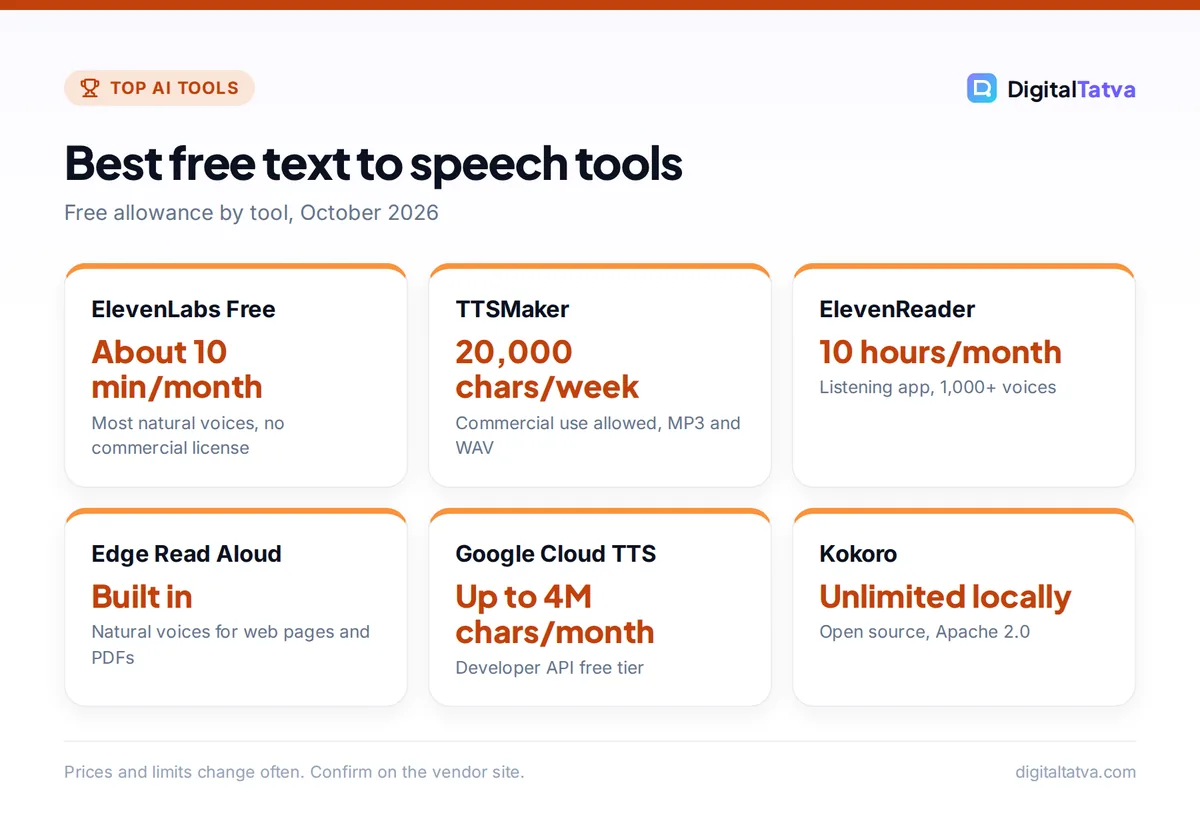
Free text to speech tools compared
Use this table to match a tool to your job. “Commercial use” refers to the free tier only; paid plans often change the answer.
| Tool | Best for | Free allowance | Download audio | Commercial use on free |
|---|---|---|---|---|
| ElevenLabs Free | Most natural voices | 10,000 credits a month (about 10 min) | Yes | No |
| TTSMaker | Free commercial voiceovers | 20,000 characters a week | Yes (MP3, WAV and more) | Yes |
| ElevenReader | Listening to articles and books | 10 hours a month | No, playback app | Not applicable |
| Microsoft Edge Read Aloud | Reading web pages and PDFs | Built in, no account | No | Not applicable |
| Google Cloud Text-to-Speech | Developers, many languages | Up to 4M characters a month (Standard, WaveNet) | Yes, via API | Check Google Cloud terms |
| Amazon Polly | Developers on AWS | 5M Standard characters a month | Yes, via API | Check AWS terms |
| Azure AI Speech | Developers on Microsoft | 0.5M Neural characters a month | Yes, via API | Check Azure terms |
| Kokoro | Unlimited local voices | Unlimited on your computer | Yes | Yes (Apache 2.0) |
| Piper | Offline voices on low-power devices | Unlimited on your device | Yes | Software GPL-3.0; check each voice license |
| Descript Free | Podcast and video drafts | Free plan with monthly media limit | Yes, 720p watermark on video | Check Descript terms |
The 10 best free text to speech tools
1. ElevenLabs Free: Best free text to speech for natural voices
- Free allowance: 10,000 credits a month, about 10 minutes of speech
- Commercial license: No (Starter at $6/month adds it)
- Voice cloning: No
- Languages: 90+ listed, including Hindi, Tamil, Bengali and Gujarati
ElevenLabs still sets the standard for expressive, human-sounding AI voices, and its official pricing page includes a real free plan. Ten minutes a month is enough to test scripts, voice a short explainer or narrate a personal project. You also get speech to text, sound effects, Voice Design and three Studio projects. The free plan has no commercial license, so do not use it for monetized YouTube videos or client work. When you outgrow it, see our ElevenLabs pricing breakdown.
2. TTSMaker: Best free text to speech for commercial use
- Free allowance: 1,000 characters per conversion, 20,000 per week
- Commercial use: Yes, “100% commercial usage rights”
- Formats: MP3, OGG, AAC, OPUS, WAV, plus SRT subtitles
- Voices: claims 600+ voices in 100+ languages
TTSMaker is the rare free tool that says its audio comes with commercial usage rights. The free tier caps each conversion at 1,000 characters (roughly 150 to 200 words) and 20,000 characters a week, and some voices do not count toward the quota at all. Voices are less expressive than ElevenLabs, but fine for tutorials, product demos and narration. Two cautions: generated files are deleted after 30 minutes, so download promptly, and the site reserves the right to change its free policy.
3. ElevenReader: Best free app for listening to text
- Free allowance: 10 hours of text to audio a month
- Voices: 1,000+
- Platforms: iOS, Android, web reader and a Chrome extension
- Upgrade: Ultra $11/month or $8.25/month annual
ElevenReader is ElevenLabs’ reading app. Paste a link, upload a PDF or ebook, and it reads aloud in natural voices at up to 4x speed, with bookmarks and a sleep timer. The 10 free hours reset each month and are measured at normal 1x speed. It is ideal for students and commuters who want to listen to articles, notes and documents. It is not a voiceover tool, so you cannot export audio for videos. Its Chrome extension also features in our list of the best AI Chrome extensions, and pairing it with one of the best AI summarizers turns long reading lists into short listening sessions.
4. Microsoft Edge Read Aloud: Best built-in free option
- Free allowance: Built into Edge, no account needed
- Shortcut: Ctrl+Shift+U, or right-click and choose “Read aloud”
- Voices: natural voices (may need an internet connection)
- Works on: web pages and PDFs
If you use Windows, you already own one of the best free readers. Open any article or PDF in Edge, press Ctrl+Shift+U, pick a voice marked “natural” and adjust the speed slider. There is nothing to install and no limit to worry about. Windows 11 also lets you download natural voices for Narrator under Settings, Accessibility, Narrator, and they work offline once downloaded. Like ElevenReader, this is for listening, not for exporting audio.
5. Google Cloud Text-to-Speech: Best free tier for developers
- Free allowance: up to 4M characters (Standard, WaveNet) and 1M characters (Neural2, Studio, Chirp 3: HD) per month
- Paid after free tier: $4 per 1M characters (Standard) to $30 (Chirp 3: HD)
- Setup: Google Cloud account and API key
- Best for: apps, bulk audio, many languages
Google’s Text-to-Speech pricing page lists one of the most generous free allowances anywhere. At roughly 1,000 characters per minute of speech, one million characters is about 16 hours of audio, so even the 1M premium-voice allowance covers most small projects. You need basic coding or a no-code tool to call the API, and you should set budget alerts so you never slip into paid usage by accident. Gemini TTS voices are billed separately and have no free tier.
6. Amazon Polly: Best for projects on AWS
- Free allowance: 5M Standard characters a month; Neural 1M a month for the first 12 months
- Also free for 12 months: Long-Form 500K, Generative 100K characters a month
- Paid: Standard $4, Neural $16, Generative $30 per 1M characters
- Best for: developers already using AWS
Amazon Polly’s Standard voices sound more robotic than ElevenLabs, but the 5 million free characters a month never expire, which is plenty for notifications, IVR prompts or accessibility features. The more natural Neural, Long-Form and Generative voices have free allowances only for the first 12 months, so plan your costs before that window closes.
7. Azure AI Speech: Best for Microsoft-based teams
- Free allowance: 0.5M Neural characters a month on the F0 tier
- Voices: Neural and HD voices, custom neural voice on paid tiers
- Paid: varies by region, see the Azure calculator
- Best for: apps in the Microsoft ecosystem
Azure’s free F0 tier gives half a million Neural characters a month, roughly 8 hours of speech, using the same voice family behind Edge’s natural voices. It is a smart free choice if your app already runs on Azure.
8. Kokoro: Best free open-source voice model
- Free allowance: unlimited on your own computer
- License: Apache 2.0, commercial use allowed
- Size: 82 million parameters
- Best for: technical users who want no limits
Kokoro is a small open-weight text to speech model released in December 2024 under the Apache 2.0 license, which allows commercial use. Because it is so small, it runs on ordinary hardware, and you can generate as much audio as you like with no account, quota or watermark. You will need to be comfortable installing Python packages or a community app. If running AI locally is new to you, our guide to running models locally explains the basics.
9. Piper: Best for offline and low-power devices
- Free allowance: unlimited, fully offline
- Runs on: a Raspberry Pi in real time
- License: GPL-3.0 since 2025 (check each voice model’s license)
- Best for: home automation, kiosks, privacy-first setups
Piper is a fast local neural voice engine created by Michael Hansen and now maintained by the Open Home Foundation. It is popular in Home Assistant setups because it runs in real time on a Raspberry Pi with no internet connection, so nothing you type leaves your device. Voices sound clear rather than dramatic.
10. Descript Free: Best for podcast and video drafts
- Free allowance: free plan with a monthly media limit and 100 one-time AI credits
- AI speech: text to speech and Regenerate on all plans, including Free
- Export: 720p with watermark on free
- Best for: editing narration alongside video
Descript lists text to speech, Regenerate (which fixes a misspoken word in your own recording) and custom voice clones on every plan, including Free, with a limited set of stock AI speakers. It shines when you are editing a podcast or video and need to patch a line without re-recording. Free video exports are 720p with a watermark, so treat it as a drafting tool. For a full short-video workflow, see our guide to making YouTube Shorts with AI.
Free text to speech in Hindi and other Indian languages
Most free tools handle English best, but Indian languages are improving fast.
- ElevenLabs Free lists Hindi, Tamil, Bengali, Gujarati, Marathi, Telugu, Kannada, Malayalam, Punjabi and Urdu among its 90+ languages.
- Sarvam AI offers natural voices across 11 Indic languages through its Bulbul v3 API at Rs 3 per 1,000 characters, with free credits on sign-up (amount not stated).
- Google Cloud and Azure free tiers cover a wide range of languages for developers; check each language list for the Indian voices you need.
Our list of AI tools for Hindi, Gujarati and other Indian languages compares accuracy and support in detail.
How to choose a free text to speech tool
- Decide if you are listening or publishing. For listening, use ElevenReader or Edge Read Aloud. For publishing audio, you need a tool with downloads and clear rights.
- Check commercial rights first. Monetized YouTube, ads and client work need a commercial license. On free tiers, TTSMaker and the open-source models are the safest bets; ElevenLabs Free is not allowed.
- Estimate your volume in characters. A 5-minute voiceover is roughly 4,000 to 5,000 characters. ElevenLabs Free covers about two of those a month; TTSMaker covers four or five a week.
- Test the same script everywhere. Paste one paragraph with a name, a number and a question into three tools and compare pronunciation and pacing.
- Upgrade only when the free limit hurts. If you hit limits weekly, a $6 ElevenLabs Starter plan is cheaper than wasting hours; compare options in our ElevenLabs vs Murf comparison.
Tip: Write for the ear. Short sentences, spelled-out numbers (“twenty twenty-six” instead of “2026” if a voice stumbles) and commas where you want a pause make even basic free voices sound far more natural.
Free tools we left out, and why
- Play.ht: shut down on 31 December 2025 after Meta acquired the team, so it is no longer an option.
- Speechify: has a free tier, but third-party reports describe basic voices and limited speed, and we could not confirm its free terms on an official page.
- NaturalReader: free use relies mainly on your device’s voices, which cannot be downloaded as MP3, and premium voices are limited to a 5-minute daily sample.
- Murf: offers 10 free minutes, but third-party reports say free audio cannot be downloaded and has no commercial rights.
Watch out: Never clone or imitate a real person’s voice without their consent, even with a free tool. If you want your own voice, follow our guide on how to clone your voice safely, which requires a paid ElevenLabs plan.
Frequently asked questions
What is the best free text to speech with natural voices?
ElevenLabs Free has the most natural, expressive voices, with about 10 minutes of speech a month. For unlimited listening, ElevenReader gives 10 free hours monthly and Microsoft Edge’s Read Aloud uses natural voices at no cost. For unlimited generation, the open-source Kokoro model runs free on your own computer.
Is there a free text to speech with no limits?
Hosted tools always have limits, but Microsoft Edge Read Aloud has no practical cap for listening, and open-source models like Kokoro and Piper have no limits because they run on your hardware. Among online generators, TTSMaker’s 20,000 characters a week is one of the most generous free allowances.
Can I use free text to speech on YouTube?
Only if the tool’s free tier allows commercial use. TTSMaker states that audio comes with commercial usage rights, and Kokoro’s Apache 2.0 license allows commercial use. ElevenLabs Free does not include a commercial license, so monetized channels should upgrade to Starter at $6 a month or use another tool.
Which free text to speech supports Hindi?
ElevenLabs Free supports Hindi and many other Indian languages, and Sarvam AI offers voices in 11 Indic languages with free sign-up credits. Developers can also check the language lists on Google Cloud and Azure free tiers. Whatever you choose, test pronunciation of names and numbers before publishing.
Is Google text to speech free?
Google Cloud Text-to-Speech has a free monthly allowance of up to 4 million characters for Standard and WaveNet voices and 1 million for Neural2, Studio and Chirp 3: HD voices, then charges per million characters. It requires a Google Cloud account and API setup, so it suits developers more than casual users.
Our verdict: the best free text to speech for you
Use ElevenLabs Free when quality matters and the project is personal, TTSMaker when you need free audio you can use commercially, and ElevenReader or Edge Read Aloud when you simply want to listen. Developers should start with Google Cloud’s free tier, and privacy-minded users should try Kokoro or Piper locally. For related free tools, see our guides to the best free AI tools, AI voice changers and AI tools for YouTubers. Free limits and plan terms change often, so confirm the details on each vendor’s site before you rely on them.
Pricing and features are checked at the time of writing and can change. Some links may be affiliate links, which never affect our verdicts.