
AI Caption Generator: 60 Prompts for Instagram Captions and Hashtags
Turn ChatGPT, Claude, Gemini or Meta AI into a free Instagram caption generator with 60 prompts for posts, Reels, hooks, festivals, Hindi captions and the new 5-hashtag limit.

On this page
- Key takeaways
- How to use AI as a free Instagram caption generator
- Instagram caption prompts by post type (1 to 12)
- Hook prompts for scroll-stopping first lines (13 to 20)
- Caption generator prompts by business niche (21 to 32)
- Festival and occasion caption prompts for India (33 to 40)
- Hashtag generator prompts for Instagram’s 5-hashtag limit (41 to 48)
- Call to action and engagement prompts (49 to 54)
- Editing, translating and repurposing prompts (55 to 60)
- Turn captions into a weekly content workflow
- Common AI caption mistakes to avoid
- Frequently asked questions
- Our verdict: the best way to generate Instagram captions with AI
You do not need a paid Instagram caption generator: ChatGPT, Gemini, Claude or Meta AI will write strong captions and hashtags for free if you give them the right prompt. Below are 60 copy-ready prompts that turn any AI assistant into an Instagram caption generator for posts, carousels and Reels, plus hook, hashtag, festival and translation prompts, with [brackets] for your details.
One rule changed recently: Instagram now caps posts and Reels at 5 hashtags, so the hashtag prompts here ask for a tight, relevant set instead of 30 generic tags. Captions can still run to about 2,200 characters, but the first line does most of the work.
Key takeaways
- Set up your brand voice once with a master prompt, then reuse it for every caption so the AI sounds like you, not like a template.
- Instagram limits posts and Reels to 5 hashtags (in effect since December 2025, per industry reports), so ask AI for 3 to 5 specific tags, not long lists.
- Free tools are enough: ChatGPT, Gemini, Claude and Meta AI all write captions on free plans, and Buffer’s free plan includes an AI Assistant for 3 channels.
- Always ask for several options with different hooks, then pick and edit one. AI is fastest as a first-draft writer.
- Check facts, prices and offers in every caption, and keep the final voice human.
How to use AI as a free Instagram caption generator
Every prompt below follows the same pattern: tell the AI what the post shows, who it is for, the goal, and the format you want back. Upload the photo or describe it, because captions written from the actual image are more specific. Our prompt engineering guide explains why this structure works.
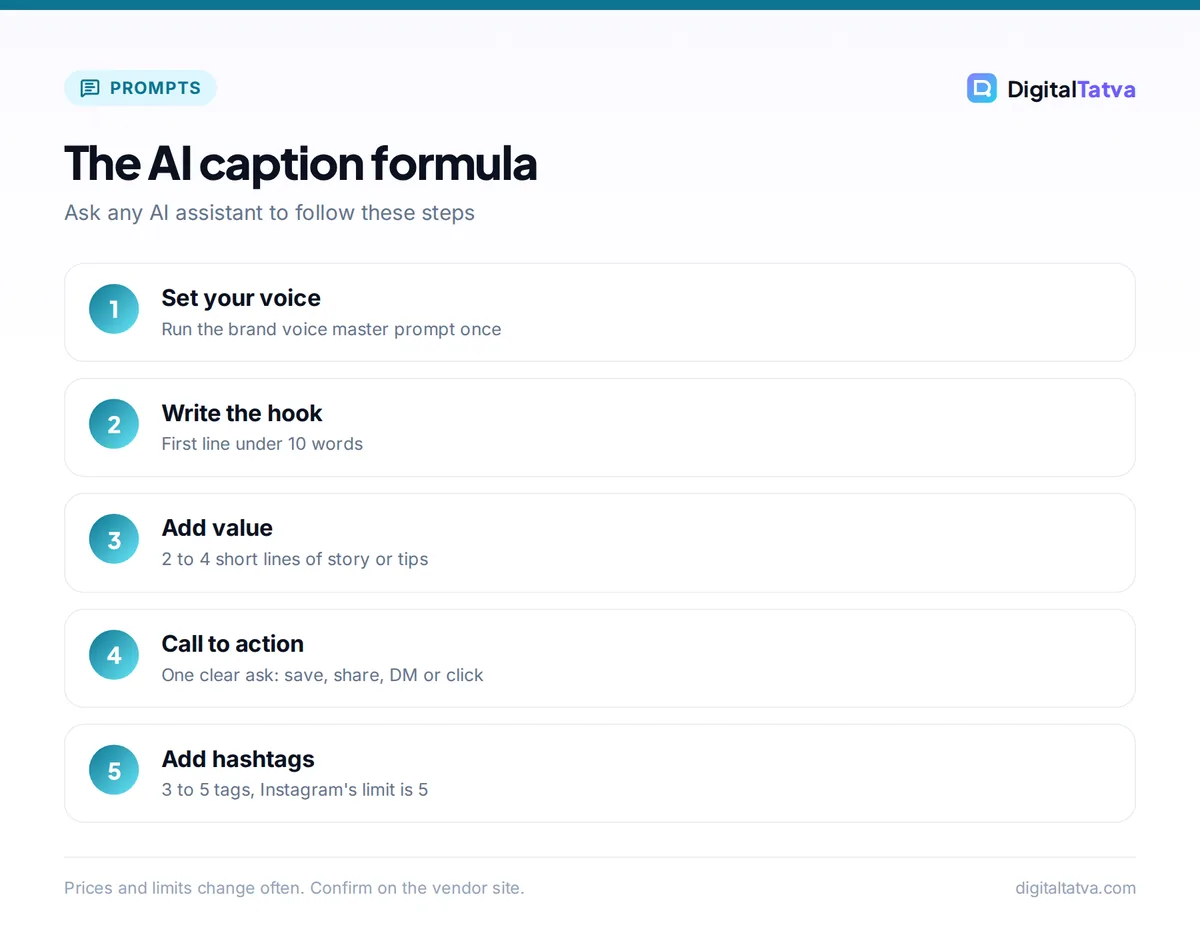
Tip: The caption formula is “Hook (first line) + value or story (2 to 4 short lines) + call to action + 3 to 5 hashtags.” Ask the AI to follow it, and to keep the hook under 10 words so it shows before the “more” cut-off.
Which free AI caption tool to use
| Tool | Free plan | Best for captions | Watch out |
|---|---|---|---|
| ChatGPT | Yes (GPT-6 Luna) | Fast variations, writing from an uploaded photo | Can sound generic without a voice guide |
| Claude | Yes | Natural brand voice, storytelling captions | No image generation |
| Gemini | Yes | Captions plus image edits in one place | Free images download at 1K |
| Meta AI | Yes | Quick help inside Instagram and WhatsApp | Shorter, simpler output |
| Buffer AI Assistant | Yes (3 channels) | Writing and scheduling in one tool | 10 scheduled posts per channel on Free |
For a wider toolkit, see our list of the best AI tools for social media marketing.
Start with this brand voice master prompt
Run this once in a ChatGPT Project, a Claude Project or a Gemini Gem, then use the 60 prompts below in the same space.
You are my Instagram copywriter. My brand is [name], we sell [product or service] to [audience] in [city or country]. Our voice is [3 adjectives, e.g. warm, witty, expert]. We never use [banned words or emojis]. Captions should be [short or long], use [number] emojis at most, write in [English, Hindi, Hinglish], and end with one clear call to action. Here are three captions we liked: [paste examples]. Confirm you understand, then wait for my first post.
Instagram caption prompts by post type (1 to 12)
- Write 5 Instagram captions for this product launch photo of [product]. Hook in the first line, two benefit lines, a call to action to [action], and 5 relevant hashtags.
- Write a behind-the-scenes caption for this photo of our team [doing what]. Make it personal and honest, under 80 words, end with a question.
- Write a caption for a 7-slide carousel about [topic]. Tease the payoff in the first line and tell people to swipe and save.
- Write a Reel caption for a video showing [what happens]. Keep it under 40 words because the video does the talking. Add a comment prompt.
- Write a giveaway caption for [prize]. Include clear steps to enter, the end date [date], how winners are picked, and 5 hashtags.
- Turn this customer review into an Instagram caption without changing their words: [review]. Add a short thank-you line and a call to action.
- Write an announcement caption for [news: new branch, new hours, price change]. Lead with the key fact, keep it friendly and clear.
- Write a caption inviting followers to our event [name] on [date] at [venue]. Create urgency without sounding pushy.
- Write a caption for a quick tutorial Reel on how to [task]. Summarize the 3 steps in the caption for people watching on mute.
- Write a before-and-after caption for [transformation]. Describe the change in one vivid line, then explain how we did it.
- Write a caption introducing our team member [name], a [role] who loves [fun fact]. Warm and human, 60 words.
- Write a milestone caption celebrating [10,000 followers or 5 years in business]. Thank the community, share one lesson, and ask what they want next.
Hook prompts for scroll-stopping first lines (13 to 20)
Only the first line or two show before “more”, so test hooks separately.
- Give me 10 first lines for a caption about [topic]. Each under 10 words. Mix curiosity, bold claims, questions and numbers.
- Write 5 hooks that start with a common mistake my audience makes about [topic].
- Write 5 “nobody tells you this” style hooks about [topic] for [audience], without clickbait or false claims.
- Rewrite this first line three ways: shorter, more emotional and more specific: [line]
- Write 5 hooks that use a surprising number or time frame about [topic]. Only use numbers I give you: [numbers].
- Write 5 question hooks that make [audience] want to answer in the comments about [topic].
- Turn this boring fact into a story-style opening line: [fact].
- Give me 5 hooks in Hinglish for a post about [topic], casual and fun, for followers aged 18 to 30.
Caption generator prompts by business niche (21 to 32)
- Restaurant: write 3 captions for this photo of our [dish]. Make people hungry, mention it is available [days], and invite them to tag a friend.
- Salon: write a caption for this hair transformation. Credit stylist [name], mention booking via DM, keep it upbeat.
- Fitness coach: write a motivational caption for this workout clip that gives one practical tip and avoids body shaming.
- Real estate: write a listing caption for a [2 BHK] in [area] with [features]. Highlight lifestyle, not just specs, and add a “DM for details” line.
- Fashion boutique: write 4 captions for our new [collection] lookbook. Mention sizes [range] and price from [price].
- Travel creator: write a caption for this photo from [place] with one insider tip and a save-for-later call to action.
- Coach or consultant: write a caption sharing a client win (anonymous): [result]. Focus on the lesson, end with a soft offer.
- Online store: write a caption for [product] that answers the top objection [objection] and links to the shop in bio.
- Photographer: write a caption for this portrait session that tells the story behind the shot in 3 sentences.
- Tutor or coaching class: write a caption announcing admissions for [course], with batch timings, a deadline and a reassuring tone for parents.
- Home bakery: write a caption for these custom cakes that mentions pre-order time [days] and delivery areas [areas].
- Wedding planner: write a romantic caption for this decor setup, crediting vendors [names] in a neat list.
For prompts beyond Instagram, see our 60 AI prompts for small business owners.
Festival and occasion caption prompts for India (33 to 40)
- Write 5 Diwali captions for [brand] that wish followers well, mention our festive offer [offer], and avoid cliches like “light up your life”.
- Write a playful Holi caption for this colorful team photo, under 50 words, with 3 relevant hashtags.
- Write an Independence Day caption for a [type of business] that celebrates local makers without being preachy.
- Write a Raksha Bandhan caption for our gift hampers, with an emotional sibling angle and the last order date [date].
- Write 9 short Navratri captions, one for each day’s color, connecting each color to our [products].
- Write a warm Eid caption for [brand] in English with an optional Urdu greeting line.
- Write a Christmas and New Year caption that thanks customers for the year and teases what is coming in [year].
- Write a monsoon caption for a cafe that pairs rainy weather with our [chai or snack] special.
Hashtag generator prompts for Instagram’s 5-hashtag limit (41 to 48)
With a 5-hashtag cap, each tag must earn its place. Instagram’s own creator guidance favors fewer, targeted hashtags over many generic ones, and head of Instagram Adam Mosseri said in 2025 that hashtags no longer increase reach on their own. Treat them as labels that describe your topic.
- Suggest 5 hashtags for this post about [topic] for [audience] in [city]: 1 broad, 2 niche, 1 local and 1 branded. Explain each in a few words.
- From this list of hashtags I use, pick the 5 most specific and relevant for this caption: [list] [your caption].
- Create a branded hashtag for [brand or campaign] that is short, easy to spell and not already a common word.
- Give me 3 sets of 5 hashtags for my [niche] account so I can rotate them by content type: tips, products and behind the scenes.
- Suggest 5 local hashtags for a [business] in [neighborhood, city] that real customers might search.
- Write 5 hashtags for this Reel and tell me which 2 to put first if I want the most relevant topic signal.
- Review these hashtags and flag any that are too generic, banned-sounding or unrelated to my post: [hashtags].
- Replace hashtags with 3 searchable keywords I can use naturally in the caption text for [topic].
Watch out: Old advice to use 20 to 30 hashtags no longer applies, because industry reports describe the 5-tag cap as a hard limit that also covers hashtags in comments. Update your saved hashtag templates and any scheduling tool presets.
Call to action and engagement prompts (49 to 54)
- Give me 10 calls to action for [goal: saves, shares, DMs, link clicks, store visits], each under 8 words.
- Write 5 comment prompts that start real conversations about [topic], not “comment YES”.
- Write a caption ending that asks people to save the post, with a reason to come back to it.
- Write 5 polite replies to common comments on this post: [comments]. Friendly, short and on-brand.
- Write a “this or that” question for my audience about [topic] that fits in one line.
- Write a DM keyword call to action, such as “comment GUIDE and we will send it”, for [lead magnet], plus the follow-up DM text.
Editing, translating and repurposing prompts (55 to 60)
- Translate this caption into natural Hindi (not word-for-word) and into Hinglish. Keep emojis and hashtags: [your caption].
- Cut this caption to under 125 characters without losing the main message: [your caption].
- Write descriptive alt text for this image for screen reader users, under 100 characters, no hashtags.
- Turn this Reel script into a caption that summarizes the key points for people watching without sound: [script].
- Repurpose this blog post into 5 Instagram captions, each covering one idea, with a link-in-bio call to action: [post].
- Write two versions of this caption for an A/B test: one story-led and one benefit-led. Tell me what to measure.
Indian creators can also use Meta AI’s free Reels translation, which now supports Hindi, Bengali, Tamil, Telugu, Marathi and Kannada on Instagram, according to Meta’s official announcement. For more language tools, read about AI tools for Hindi, Gujarati and other Indian languages.
Turn captions into a weekly content workflow
- Plan the week. Ask ChatGPT for a 7-day content calendar with post type, topic and hook for each day. Our ChatGPT prompts for marketing include calendar prompts.
- Create the visuals. Shoot on your phone or generate graphics; our 100 AI image prompts cover carousels, banners and product shots.
- Draft captions in batches. Use the master voice prompt plus prompts 1 to 32, asking for 3 options each.
- Edit and add hashtags. Pick the best option, edit it in your own words, and add 3 to 5 tags with prompts 41 to 48.
- Schedule. Buffer’s free plan covers 3 channels with 10 scheduled posts per channel; paid Essentials starts at $6 per channel a month, per the official Buffer pricing page.
- Review results weekly. Paste your top and bottom posts into the AI and ask what the best ones have in common.
Making Reels too? See the best AI tools for Instagram Reels and our guide to making Shorts with AI, since the same clips often work on both.
Common AI caption mistakes to avoid
- Posting the first draft: AI captions often overuse words like “elevate” and “unleash”. Edit them out and add a specific detail only you know.
- Inventing facts: AI may make up prices, dates or claims. Feed it the real details and check before posting.
- Emoji overload: set an emoji limit in your master prompt.
- One voice for every account: a bakery and a law firm should not sound the same. Update the master prompt per brand.
- Ignoring disclosure: if a post is a paid partnership, use Instagram’s branded content label and say so clearly.
Frequently asked questions
What is the best free Instagram caption generator?
ChatGPT is the best free Instagram caption generator for most people because it writes several options quickly and can read your uploaded photo. Claude is better for natural storytelling captions, and Meta AI is handy inside Instagram itself. All three are free; a paid plan mainly helps if you upload many images or need longer usage.
How many hashtags should I use on Instagram in 2026?
Use 3 to 5. Instagram limits posts and Reels to 5 hashtags, a change reported in December 2025, and it recommends fewer, more targeted tags. Choose one broad, a couple of niche and one local or branded hashtag, and use searchable keywords in the caption text as well.
Can AI write Instagram captions in Hindi?
Yes. ChatGPT, Gemini and Claude can write captions in Hindi and Hinglish; ask for natural, conversational Hindi rather than a literal translation, and have a native speaker check important posts. ChatGPT lists Hindi, Bengali, Gujarati, Marathi, Tamil and Telugu among its supported languages.
How long should an Instagram caption be?
Instagram allows about 2,200 characters, but length should match the post. Reels and product photos often work best with one to three lines, while carousels, stories and educational posts can go longer. Whatever the length, put the most important idea in the first line, because only the opening shows before “more”.
Will Instagram penalize AI-written captions?
There is no public rule against AI-written captions. What matters is whether people engage with the post. Generic, repetitive captions tend to perform worse, so use AI for drafts, add real details and your own voice, and avoid misleading claims. Images made or heavily edited with AI may carry Meta’s AI labels.
Our verdict: the best way to generate Instagram captions with AI
Set up the brand voice master prompt once, use these 60 prompts to draft three options per post, and spend your time editing the best one rather than writing from scratch. Keep hashtags to 5, lead with a strong hook, and check every fact before you post. For more prompt ideas, browse our 100 best ChatGPT prompts and 40 Claude prompts for writing and editing, and for the full toolkit, see the best AI marketing tools. Platform rules and tool pricing change often, so confirm current limits in the Instagram app and on each tool’s pricing page.
Pricing and features are checked at the time of writing and can change. Some links may be affiliate links, which never affect our verdicts.



