How to Use DeepSeek: App, Web and API Guide for Beginners
Learn how to use DeepSeek on the web, in the Android and iPhone app and through the API, with DeepThink tips, real token prices, a Python example and privacy advice.

On this page
- Key takeaways
- How to use DeepSeek: web, app or API at a glance
- How to use DeepSeek on the web step by step
- How to use the DeepSeek app on Android and iPhone
- What DeepSeek is good at (and where it struggles)
- DeepSeek prompts that work well for beginners
- How to use the DeepSeek API step by step
- DeepSeek API pricing and how to keep costs low
- Privacy and safety tips for using DeepSeek
- Frequently asked questions
- Next steps with DeepSeek
To use DeepSeek, go to chat.deepseek.com or install the DeepSeek app on Android or iPhone, sign up with your email, Google account or phone number, and type your question. Turn on the DeepThink button for math, coding and planning, and leave it off for quick answers. Developers can use the DeepSeek API by creating a key at platform.deepseek.com and pointing any OpenAI-compatible code to https://api.deepseek.com.
This beginner guide covers how to use DeepSeek on the web, in the app and through the API, with step-by-step instructions, real API prices from DeepSeek’s official docs, prompt tips, and the privacy points you should weigh before pasting anything sensitive.
Key takeaways
- DeepSeek’s web chat and mobile apps are free to use, and DeepSeek does not publish a daily message cap.
- The DeepThink toggle switches on step-by-step reasoning. Use it for math, code and multi-step problems.
- The API is OpenAI-compatible and very cheap: deepseek-flash costs $0.15 per million input tokens (cache miss) and $0.60 per million output tokens off-peak.
- Off-peak API usage is half price, so schedule big jobs outside the peak windows.
- DeepSeek is a Chinese company and its privacy policy says data is stored on servers in China, so keep confidential data out of the free app.
How to use DeepSeek: web, app or API at a glance
Pick the version that matches what you want to do. Most people only need the free web chat or app.
| Option | Where | Cost | Best for |
|---|---|---|---|
| Web chat | chat.deepseek.com | Free | Everyday questions, writing, coding help on a laptop |
| Mobile app | Play Store and App Store | Free | Quick answers, voice input on the go |
| API | platform.deepseek.com | Pay per token, prepaid balance | Building apps, bulk processing, automation |
| Open weights | Hugging Face, Ollama | Free, needs your own hardware | Private, offline or self-hosted use |
If you are still deciding between assistants, our DeepSeek vs ChatGPT comparison covers quality, cost and privacy side by side.
How to use DeepSeek on the web step by step
The web chat is the easiest way to start, and it has the same core features as the app.
- Open the site. Go to chat.deepseek.com in Chrome, Edge, Safari or Firefox. Make sure you are on the official domain, because many look-alike sites use the DeepSeek name.
- Create an account. Sign up with an email address, a Google account or a phone number, depending on what your region offers. Verify the code you receive.
- Start a chat. Click the message box and type a clear request, for example: “Explain GST input tax credit for a small online store in simple English, with one example.”
- Decide on DeepThink. The DeepThink button sits above the input box. Turn it on for problems that need reasoning, such as debugging code, solving math or comparing options. Leave it off for quick facts or short writing, because thinking mode is slower.
- Refine the answer. Reply with follow-ups like “make it shorter,” “add a table” or “rewrite for a 12 year old.” DeepSeek keeps the conversation context.
- Organize your chats. Past conversations appear in the sidebar. Start a new chat for each new topic so old context does not confuse new answers.
Tip: DeepSeek has no model picker in the chat app. Instead of choosing a model, you choose how hard it should think with the DeepThink toggle. That keeps things simple for beginners.
How to use the DeepSeek app on Android and iPhone
The mobile app mirrors the web version and syncs your chat history across devices.
- Install the official app. Search for DeepSeek in the Play Store or App Store and check that the developer is DeepSeek. Ignore “DeepSeek AI chat” clones with different publishers.
- Log in. Use the same account you created on the web so your history carries over.
- Use voice input. Tap the microphone in the keyboard area to dictate prompts instead of typing.
- Toggle DeepThink as needed. The same button controls reasoning mode in the app.
- Copy and share answers. Long-press a reply to copy it into WhatsApp, email or notes.
Note: DeepSeek is available to private users in India. In early 2025, India’s Finance Ministry told staff to avoid AI tools such as ChatGPT and DeepSeek on office devices, and several countries restrict it on government devices. Italy’s data protection regulator went further and the app was removed from Italian app stores. If you work for a government body or a large company, check your IT policy first.
What DeepSeek is good at (and where it struggles)
DeepSeek’s V4 generation models are strong at reasoning, math and code, and its API is among the cheapest from any major lab. In everyday use it handles explanations, summaries, drafting and coding questions well, especially with DeepThink on.
Pros
- Free web chat and apps with no published daily cap
- Strong step-by-step reasoning for math and code
- Extremely low API prices, with half-price off-peak hours
- Open-weight models you can run yourself
Cons
- Data stored on servers in China under its privacy policy
- Fewer extras than ChatGPT or Gemini, such as image creation
- Answers on politically sensitive topics can be limited
- Busy periods can mean slow replies or “server busy” messages
For a wider view of free assistants and where DeepSeek fits, see our list of the best AI chatbots and our roundup of ChatGPT alternatives.
DeepSeek prompts that work well for beginners
DeepSeek responds best to clear, structured prompts. State the task, add context, and describe the format you want. Our prompt engineering guide explains these techniques in depth.
| Task | DeepThink | Example prompt |
|---|---|---|
| Explain a concept | Off | “Explain compound interest with an example in rupees. Keep it under 150 words.” |
| Solve math | On | “Solve this step by step and check your answer: a train covers 360 km in 4 hours…” |
| Debug code | On | “This Python function returns None instead of a list. Find the bug and explain the fix.” (paste code) |
| Draft an email | Off | “Write a polite follow-up email to a client who has not paid an invoice for 30 days.” |
| Plan a project | On | “Create a 4 week plan to launch a Shopify store selling handmade jewelry, with weekly tasks.” |
How to use the DeepSeek API step by step
The DeepSeek API lets you call its models from your own code, spreadsheets or automation tools. It uses the same format as OpenAI’s API, so most OpenAI-compatible tools work after you change two settings: the base URL and the API key.
- Create a platform account. Go to platform.deepseek.com and sign up. The API platform is separate from the chat app and is billed separately.
- Top up your balance. The API is prepaid. Add a small amount from the billing section. Fees are deducted from your topped-up or granted balance, and any granted balance is used first.
- Create an API key. Open the API keys page and create a key. Copy it right away and store it somewhere safe, such as an environment variable named DEEPSEEK_API_KEY.
- Set the base URL. Use https://api.deepseek.com for OpenAI-compatible tools, or https://api.deepseek.com/anthropic for tools that speak Anthropic’s format.
- Choose a model. Use deepseek-flash (DeepSeek-V4.1-Flash) for most work. It supports image input, JSON output and tool calls. Use deepseek-v4-pro for harder tasks where you accept higher cost.
- Send your first request. Use the Python example below, or any OpenAI-compatible library.
from openai import OpenAI
import os

client = OpenAI(
    api_key=os.environ["DEEPSEEK_API_KEY"],
    base_url="https://api.deepseek.com",
)

response = client.chat.completions.create(
    model="deepseek-flash",
    messages=[
        {"role": "system", "content": "You are a helpful assistant."},
        {"role": "user", "content": "Write three taglines for an organic tea brand."},
    ],
)
print(response.choices[0].message.content)
DeepSeek’s official quick start shows that thinking mode is switched on with a thinking setting of type “enabled” and a reasoning_effort value such as “high.” The API is stateless, so your code must send the earlier messages each time if you want a multi-turn conversation.
Watch out: Never paste your API key into client-side JavaScript, public GitHub repos or shared spreadsheets. Anyone with the key can spend your balance.
DeepSeek API pricing and how to keep costs low
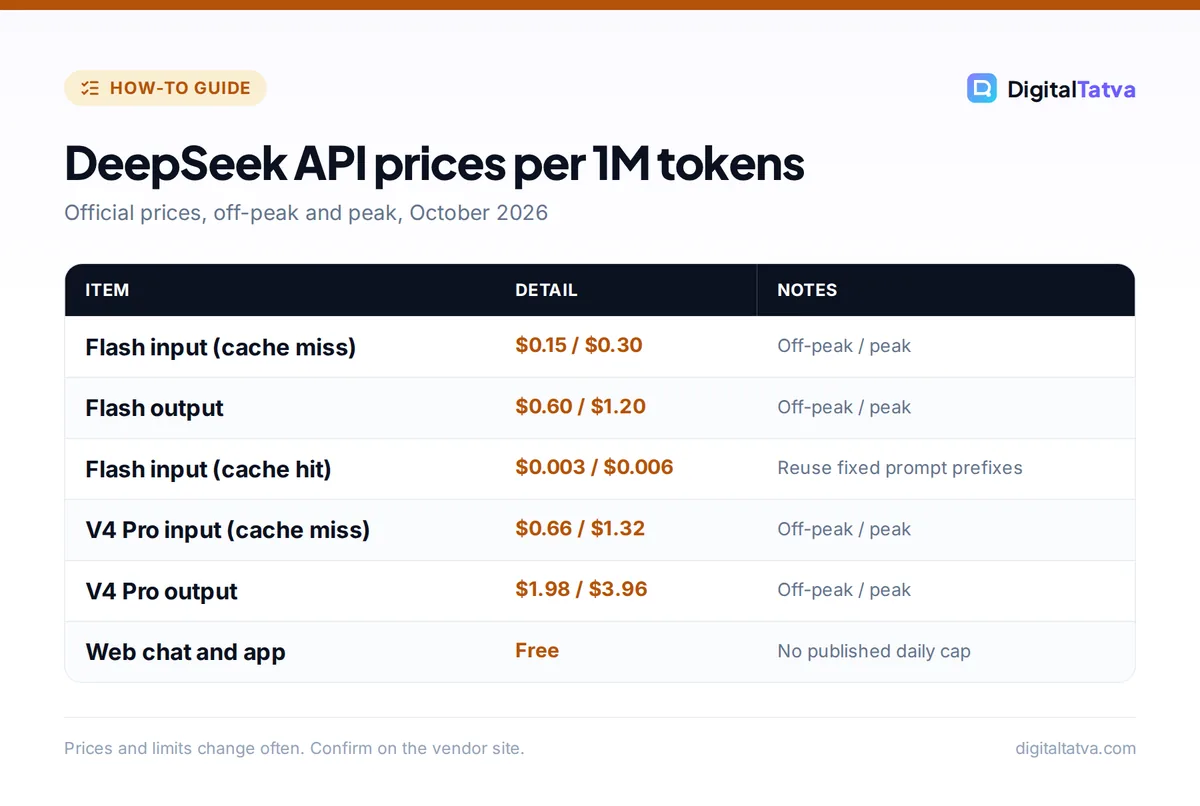
These are the official prices per million tokens from DeepSeek’s pricing page. Tokens are small chunks of text, roughly three quarters of a word in English. Our guide to what tokens are explains them in plain words.
| Model | Input, cache hit (off-peak / peak) | Input, cache miss (off-peak / peak) | Output (off-peak / peak) |
|---|---|---|---|
| deepseek-flash | $0.003 / $0.006 | $0.15 / $0.30 | $0.60 / $1.20 |
| deepseek-v4-pro | $0.022 / $0.044 | $0.66 / $1.32 | $1.98 / $3.96 |
Peak hours are 01:00 to 04:00 and 06:00 to 10:00 UTC, Monday to Friday, excluding Chinese holidays. In India that is 6:30 to 9:30 am and 11:30 am to 3:30 pm IST on weekdays. Everything else is off-peak at half price.
Worked example: say you summarize 1,000 product reviews, each with 2,000 input tokens and a 500-token summary, on deepseek-flash with no cache hits.
- Input: 1,000 x 2,000 = 2 million tokens x $0.15 = $0.30 off-peak ($0.60 at peak).
- Output: 1,000 x 500 = 0.5 million tokens x $0.60 = $0.30 off-peak ($0.60 at peak).
- Total: $0.60 off-peak versus $1.20 at peak. Running the same job in the evening in India halves the bill.
Save money: Keep your system prompt and fixed instructions identical at the start of every request. Repeated prefixes count as cache hits, which cost $0.003 per million tokens off-peak on deepseek-flash instead of $0.15. Our guide to prompt caching shows how to structure prompts for this.
For full pricing detail, including limits and older model names, read our DeepSeek API pricing guide, and use our walkthrough on estimating AI API costs before you build anything large.
Privacy and safety tips for using DeepSeek
DeepSeek is based in China, and its privacy policy states that data is stored on servers in the People’s Republic of China. That matters if you handle client data, health information or anything covered by a confidentiality agreement.
- Do not paste secrets. Keep passwords, Aadhaar or PAN numbers, bank details and private client files out of the free app.
- Use the API with care. API requests also go to DeepSeek’s servers. Check whether that is acceptable under your clients’ contracts.
- Run it locally for full privacy. DeepSeek releases open-weight models, and distilled DeepSeek R1 versions are available in Ollama, so you can run them on your own computer with no data leaving it. Our guide to running an LLM locally with Ollama shows how, and our list of open source AI models compares other options.
- Fact-check. Like every chatbot, DeepSeek can be confidently wrong. Verify numbers, laws and citations.
Teams should cover AI tools in a written policy. Our AI data privacy guide for businesses is a good starting point.
Frequently asked questions
Is DeepSeek free to use?
Yes. The DeepSeek web chat at chat.deepseek.com and the official Android and iPhone apps are free, and DeepSeek does not publish a daily message limit. Only the API costs money. It is prepaid and billed per million tokens, starting at $0.15 per million input tokens on deepseek-flash off-peak.
Is DeepSeek safe to use in India?
DeepSeek is legal and available for private users in India, but its privacy policy says data is stored in China. India’s Finance Ministry advised staff against AI tools like DeepSeek on office devices in 2025. For personal learning it is fine; for confidential business data, use a local open-weight model or a tool your company approves.
What is DeepThink in DeepSeek?
DeepThink is a toggle above the chat box that turns on reasoning mode. DeepSeek works through the problem step by step before answering, which improves results on math, coding and planning. It is slower, so leave it off for simple questions, quick facts and short writing tasks.
How do I get a DeepSeek API key?
Sign up at platform.deepseek.com, add a prepaid balance in the billing section, and create a key on the API keys page. Copy it immediately and store it securely. Then set the base URL to https://api.deepseek.com in any OpenAI-compatible library and use the model name deepseek-flash.
Can I run DeepSeek offline on my computer?
Yes, with open-weight versions. DeepSeek publishes model weights, and smaller distilled DeepSeek R1 models are available in Ollama in sizes from 1.5B parameters upward. Small versions run on an ordinary laptop, while the full-size models need powerful GPUs. Running locally keeps all your data on your own machine.
Next steps with DeepSeek
Start with the free web chat, learn when to switch DeepThink on, and keep sensitive data out. If you build apps, the API’s low prices and off-peak discount make it one of the cheapest ways to add AI, and our guide to picking the cheapest AI model for each task helps you decide when DeepSeek is the right choice. DeepSeek changes its prices and model names often, so confirm current details on its official pricing page before you commit.
Pricing and features are checked at the time of writing and can change. Some links may be affiliate links, which never affect our verdicts.