
100 AI Image Prompts for ChatGPT, Gemini and Midjourney
100 copy-ready AI image prompts for ChatGPT, Gemini and Midjourney: portraits, products, social posts, posters, landscapes, food, interiors, art styles and photo edits.

On this page
- Key takeaways
- How to write AI image prompts that work
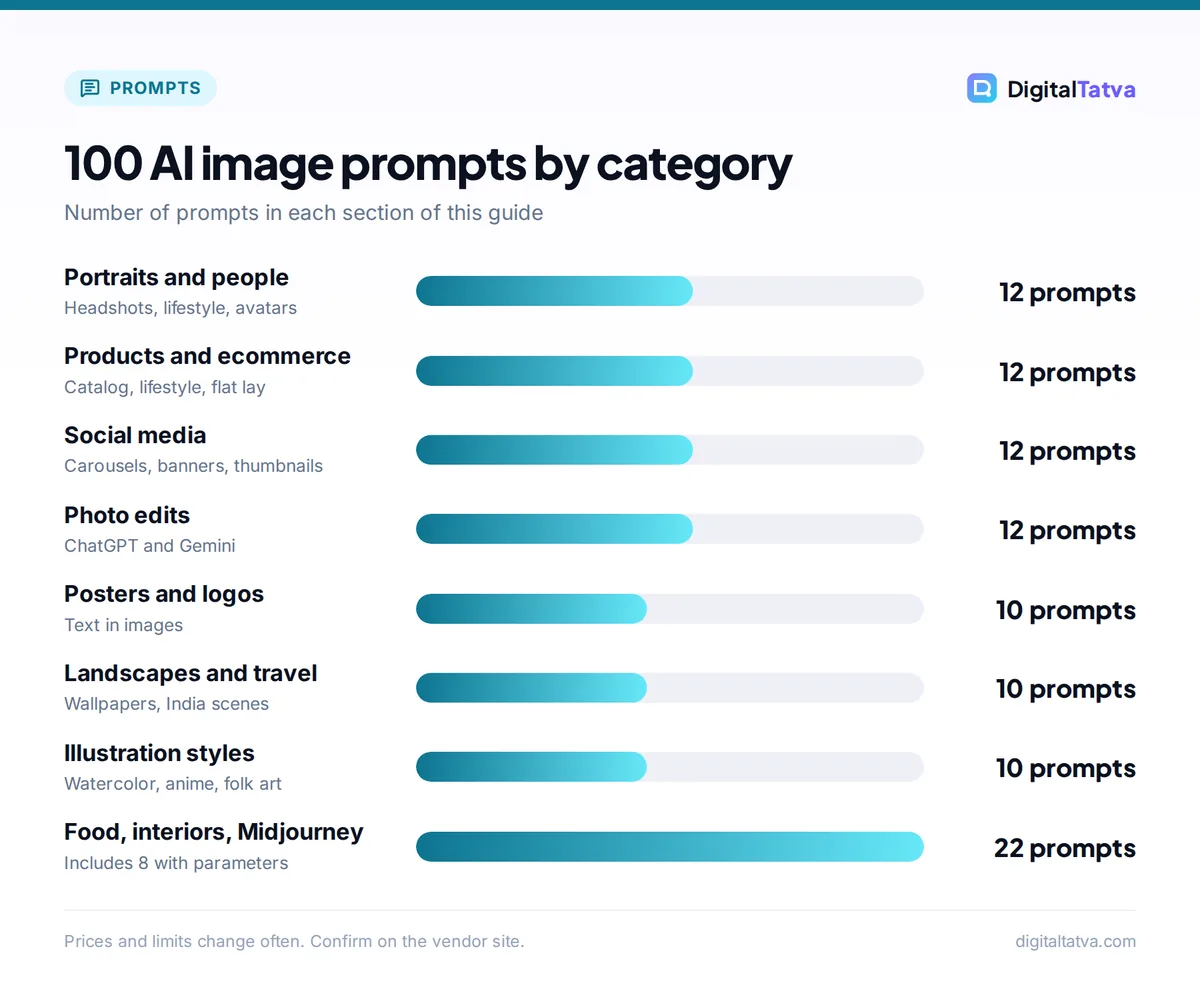
- AI image prompts for portraits and people (1 to 12)
- AI image prompts for products and ecommerce (13 to 24)
- AI image prompts for social media and marketing (25 to 36)
- AI image prompts for posters, logos and text (37 to 46)
- AI image prompts for landscapes, travel and nature (47 to 56)
- AI image prompts for food and drink (57 to 62)
- AI image prompts for architecture and interiors (63 to 70)
- AI image prompts for illustration and art styles (71 to 80)
- AI photo editing prompts for ChatGPT and Gemini (81 to 92)
- Midjourney-ready AI image prompts with parameters (93 to 100)
- Common AI image prompt mistakes and how to fix them
- Frequently asked questions
- Final tips for better AI image prompts
The best AI image prompts describe five things in one or two sentences: the subject, the setting, the style, the lighting and the framing. Below are 100 copy-ready AI image prompts for ChatGPT, Gemini and Midjourney, grouped by use (portraits, products, social posts, posters, landscapes, food, interiors, illustration, photo edits and Midjourney-ready prompts), with [brackets] where you add your own details.
Every prompt works as plain English in ChatGPT (now on ChatGPT Images 2.5) and Gemini (Nano Banana 2 by default). For Midjourney V8.2, paste the same prompt and add the suggested parameters, such as --ar 4:5 for an Instagram portrait.
Key takeaways
- Use the formula: subject + setting + style + lighting + framing (+ aspect ratio). Specific nouns beat long lists of adjectives.
- ChatGPT and Gemini understand conversational prompts and are best for editing your own photos; Midjourney gives the most artistic look but has no free trial (Basic is $10 a month).
- ChatGPT Images 2.5 is available on every ChatGPT plan, and Gemini’s free plan includes Nano Banana 2 with 1K downloads (2K on Google AI plans).
- For text in images (posters, logos), keep wording short and put it in quotes; small text still renders poorly in many models.
- Never upload photos of other people without consent, and check commercial rights before using AI images in ads.
How to write AI image prompts that work
Write your prompt like a short brief to a photographer. Start with the formula, then refine with follow-ups like “make the background darker” or “same image, wider shot”. Our prompt engineering guide explains why specific, structured prompts get better results.
Tip: The formula behind most prompts below is “[Subject] in [setting], [style], [lighting], [camera angle or framing], [mood].” Example: “A street chai seller in old Ahmedabad at dawn, documentary photo, soft golden light, eye-level medium shot, warm and calm.”
ChatGPT vs Gemini vs Midjourney for image prompts
| Feature | ChatGPT (Images 2.5) | Gemini (Nano Banana 2) | Midjourney (V8.2) |
|---|---|---|---|
| Free use | Yes, limited on Free | Yes, 1K downloads | No free trial |
| Paid from | Go $8/mo, Plus $20/mo | AI Plus $4.99/mo (Rs 399) | Basic $10/mo |
| Prompt style | Conversational | Conversational | Descriptive plus parameters |
| Best at | Precise edits, layouts, text, transparent backgrounds | Photo edits, character consistency, speed | Artistic style, mood, texture |
| Aspect ratio | Ask in words (“vertical”, “16:9”) | Ask in words | --ar 9:16 (whole numbers only) |
| Watermark | C2PA metadata and SynthID, no visible mark | SynthID; visible sparkle on free images (per Google, 2025) | Check current terms |
For a head-to-head on quality and price, see Midjourney vs ChatGPT image generation, and our step-by-step guide on how to generate images in ChatGPT.
AI image prompts for portraits and people (1 to 12)
For Midjourney, add --ar 4:5 --raw for natural-looking portraits.
- Professional LinkedIn headshot of a [age] [gender] [profession], navy blazer, plain light gray background, soft studio lighting, shoulders up, friendly confident expression.
- Candid portrait of a grandmother laughing on a sunlit balcony in [city], film photography look, warm tones, shallow depth of field.
- Bride in a red Banarasi saree with gold jewelry, standing in a palace courtyard, golden hour light, editorial wedding photography, full-length shot.
- Young software developer working late in a cozy home office, glow from two monitors, rain on the window, cinematic lighting, side angle.
- Close-up portrait of an elderly fisherman with weathered skin, overcast coastal light, black and white documentary style, sharp detail on the eyes.
- Fitness coach mid-workout in a modern gym, dramatic rim lighting, motion blur on the weights, energetic sports magazine style.
- Family of four having breakfast in a bright kitchen, natural morning light, lifestyle photography, everyone laughing, wide shot.
- Stylized 3D avatar of [description] with big expressive eyes, Pixar-like animation style, soft pastel background, head and shoulders.
- Street fashion photo of a college student in Mumbai wearing [outfit], colorful wall behind, midday sun, full-body, magazine style.
- Doctor in a white coat explaining a report to a patient, clean hospital interior, soft daylight, trustworthy and calm, medium shot.
- Musician playing sitar on a rooftop at dusk, city lights behind, warm and cool contrast, cinematic wide shot.
- Silhouette of a hiker on a mountain ridge at sunrise, vast clouds below, epic scale, telephoto compression.
AI image prompts for products and ecommerce (13 to 24)
For Midjourney, add --ar 1:1 for marketplace listings. ChatGPT can also make transparent backgrounds if you ask for one.
- Studio product photo of [product] on a seamless white background, soft shadow underneath, high-key lighting, ecommerce catalog style, centered.
- [Product] on a marble countertop with fresh lemons and mint leaves, morning window light, lifestyle product photography, shallow depth of field.
- Flat lay of [product] surrounded by [related items] on a pastel [color] background, top-down view, even lighting, Instagram style.
- Luxury perfume bottle on black glass with reflections, single dramatic spotlight, mist in the background, premium advertising look.
- Handmade ceramic mug on a rustic wooden table, steam rising, cozy cafe background blurred, warm tones, close-up.
- Pair of running shoes splashing through a puddle, frozen water droplets, high-speed sports photography, low angle.
- Skincare jar floating on water with soft ripples, pink and white color palette, clean minimal aesthetic, soft daylight.
- Product exploded view of [product] showing each component floating in the air, technical illustration style, white background.
- Gift box of Indian sweets with marigold flowers and diyas, festive Diwali mood, warm bokeh lights, overhead angle.
- [Clothing item] on an invisible mannequin, ghost mannequin effect, pure white background, sharp fabric detail.
- Smartwatch on a wrist during a morning jog by the sea, sunrise glow, lifestyle advertising, close-up with background blur.
- Transparent-background PNG of [product], soft natural shadow, ready for a website hero section.
AI image prompts for social media and marketing (25 to 36)
Use --ar 4:5 for Instagram feed posts and --ar 9:16 for Stories and Reels covers in Midjourney.
- Instagram carousel cover with bold headline “[5 words max]” on a gradient [brand color] background, modern sans-serif type, lots of empty space.
- Scroll-stopping image of a person surprised looking at a phone, bright yellow background, pop art style, vertical.
- Behind-the-scenes photo of a small bakery team decorating cakes, candid, natural light, authentic small business feel.
- Minimal quote card with the text “[short quote]” in elegant serif font, beige paper texture, centered.
- Festive Holi sale banner with colorful powder clouds, product [product] in the center, space for text at the top, wide format.
- Before and after split image of a messy desk and an organized desk, same angle, clean bright lighting.
- Webinar promo graphic with a speaker photo placeholder, title “[title]”, date badge, professional blue and white palette.
- Customer success story visual: happy shop owner holding a tablet showing a rising sales chart, warm store interior.
- Story background with soft abstract shapes in [brand colors], subtle grain, no text, vertical 9:16.
- Meme-style image of a cat at a laptop looking stressed, office setting, humorous, square format.
- LinkedIn post image showing a team brainstorming at a whiteboard with sticky notes, modern office, candid and diverse.
- YouTube thumbnail of [person description] pointing at a giant red arrow, shocked expression, bold “[3 words]” text, high contrast.
For more on thumbnails, see the best AI thumbnail makers for YouTube.
AI image prompts for posters, logos and text (37 to 46)
ChatGPT Images 2.5 handles complex layouts well, and Images 2.0 added multilingual text including Hindi. Keep text short and in quotes in every tool.
- Vintage travel poster of [city] with the title “[CITY]” in large Art Deco letters, limited color palette, screen print texture.
- Minimal flat logo for a coffee brand called “[Name]”, coffee bean icon inside a circle, two colors, white background, vector style.
- Movie poster for a sci-fi film titled “[Title]”, lone astronaut on a red planet, dramatic lighting, credits block at the bottom.
- Event flyer for “[Event name]” on [date] at [venue], bold modern layout, neon accents on a dark background.
- Hindi typography poster with the word “[Hindi word]” in bold Devanagari letters, vibrant colors, festive patterns.
- Restaurant menu board design with three sections, chalkboard texture, hand-drawn illustrations of dishes.
- Mascot logo of a friendly [animal] wearing headphones for a podcast named “[Name]”, cartoon style, bold outlines.
- Infographic-style poster explaining “[topic]” in four numbered steps with simple icons, clean flat design.
- Book cover for a thriller called “[Title]” by [author], dark foggy street, single red umbrella, minimal typography.
- Monogram logo with the letters “[AB]” in gold foil on a deep green background, luxury brand style.
For full brand kits, our list of the best AI logo generators covers tools that export vector files.
AI image prompts for landscapes, travel and nature (47 to 56)
For Midjourney, try --ar 16:9 for wallpapers and --s 250 for a more stylized look.
- Misty tea gardens in Munnar at sunrise, rolling green hills, soft fog in the valleys, aerial drone view.
- Rann of Kutch white salt desert under a full moon, a lone camel caravan, blue night tones, wide panorama.
- Houseboat on the Kerala backwaters at golden hour, palm reflections in still water, peaceful travel photography.
- Snowy Himalayan village with prayer flags, clear blue sky, crisp winter light, wide angle.
- Rainy Mumbai street at night with neon reflections on wet roads, yellow taxis, cinematic cyberpunk mood.
- Underwater coral reef with a sea turtle, sun rays from above, vivid colors, National Geographic style.
- Autumn forest path with orange leaves, soft backlight through the trees, dreamy and quiet, vertical.
- Desert fort in Jaisalmer at sunset, warm sandstone glowing, long shadows, travel magazine cover.
- Northern lights over a frozen lake with a small wooden cabin, long exposure, starry sky.
- Tiny island with a single tree in a turquoise sea, minimal composition, top-down drone shot.
AI image prompts for food and drink (57 to 62)
- Overhead shot of a South Indian thali on a banana leaf, colorful curries and rice, natural daylight, food magazine style.
- Steaming masala chai in a clay kulhad, cinnamon and cardamom scattered around, dark moody background, close-up.
- Stack of fluffy pancakes with maple syrup pouring, berries on top, bright breakfast table, slow-motion feel.
- Street food stall frying jalebis at night, warm light, motion of hands, candid documentary photo.
- Colorful cocktail with a citrus garnish on a bar counter, bokeh lights behind, premium advertising look.
- Hand-pulled noodles being stretched by a chef, flour in the air, dramatic side light, action shot.
AI image prompts for architecture and interiors (63 to 70)
- Modern Indian living room with jaali screens, terracotta tones, indoor plants, afternoon light, interior design magazine shot.
- Scandinavian bedroom with white walls, oak furniture, linen bedding, soft morning light, minimal and calm.
- Small balcony garden in a city apartment with fairy lights, potted herbs, cozy evening mood.
- Futuristic glass skyscraper covered in vertical gardens, aerial view, clear day, architectural visualization.
- Home office in a compact 10 by 10 foot room, built-in shelves, standing desk, warm wood and white palette.
- Traditional Kerala house with sloped tiled roof and a central courtyard, monsoon rain, lush greenery.
- Boutique cafe interior with green velvet chairs, brass lamps and a marble bar, warm evening ambience.
- Kids’ playroom with a reading nook, pastel colors, soft rugs, safe rounded furniture, bright daylight.
To redesign your actual room from a photo, try the tools in our list of the best AI interior design tools.
AI image prompts for illustration and art styles (71 to 80)
- Watercolor illustration of a fox in a snowy forest, soft washes, white paper texture, children’s book style.
- Madhubani-style folk art of two peacocks and a tree of life, intricate line patterns, bright natural colors.
- Isometric 3D illustration of a tiny city block with shops and trees, soft pastel colors, clean shadows.
- Anime-style scene of a girl on a bicycle by the sea at sunset, Studio Ghibli inspired, warm sky.
- Ink sketch of an old Kolkata tram on a busy street, loose hatching, sepia paper.
- Low-poly 3D mountain landscape with a river, geometric shapes, gradient sky.
- Retro 1980s synthwave poster of a sports car on a neon grid road, purple and pink palette.
- Paper cut-out layered illustration of an underwater scene, depth and soft shadows between layers.
- Oil painting portrait of a [pet] in Renaissance royal clothing, dramatic chiaroscuro lighting.
- Seamless pattern of [motif] in a flat vector style, two colors, suitable for fabric printing.
AI photo editing prompts for ChatGPT and Gemini (81 to 92)
Upload your photo first, then use these prompts. In Gemini, go to Library or upload an image and chat; editing images is not available to users under 18. Always compare edits with the original.
- Remove the people in the background and fill the space naturally. Keep everything else exactly the same.
- Change the background to a clean white studio backdrop. Keep the product’s shape, color and shadow unchanged.
- Make this photo look like it was taken at golden hour, with warm light from the left. Do not change faces.
- Turn this selfie into a professional headshot: neutral gray background, soft studio lighting, keep my face and hairstyle identical.
- Extend this image to a 16:9 landscape by continuing the scenery on both sides.
- Restore this old, faded family photo: fix scratches, improve sharpness and add natural color.
- Replace the cloudy sky with a clear blue sky and soft clouds, matching the lighting on the buildings.
- Put this product on a wooden kitchen counter with soft window light and a blurred plant in the background.
- Change my shirt to a navy linen shirt. Keep the pose, face and background the same.
- Convert this photo into a watercolor illustration while keeping the composition.
- Add the text “[short text]” at the top in bold white letters with a subtle shadow. Do not change anything else.
- Create four variations of this room photo in different styles: Scandinavian, industrial, boho and modern Indian.
Gemini’s editing workflow is covered step by step in our guide on how to use Nano Banana in Gemini to edit photos, and Google’s official Gemini image help page lists the current limits.
Midjourney-ready AI image prompts with parameters (93 to 100)
These use V8.2 parameters from Midjourney’s official parameter list: --ar (whole numbers), --s stylize (0 to 1000, default 100), --c chaos (0 to 100), --raw, --no and --tile. For 50 more, see our Midjourney prompts with styles and parameters.
- Editorial portrait of a jazz singer in a smoky club, deep red light, film grain
--ar 4:5 --raw --s 50 - Ancient temple ruins overgrown with jungle, god rays, epic fantasy concept art
--ar 16:9 --s 400 - Minimal product shot of a white sneaker on a pastel plinth, soft shadow
--ar 1:1 --raw --no text, logo - Seamless pattern of mango leaves and paisleys, block print style
--tile --s 150 - Surreal floating islands with waterfalls above a sea of clouds, dreamy palette
--ar 21:9 --c 30 --s 600 - Cozy reading corner in a rainy-day cottage, warm lamp light, illustration
--ar 2:3 --s 250 - Macro photo of a dewdrop on a spider web at sunrise, extreme detail
--ar 3:2 --raw - Bold abstract poster with overlapping circles in orange and navy, Bauhaus style
--ar 2:3 --s 300 --no photo
New to Midjourney? Start with how to use Midjourney and check plan costs in our Midjourney pricing guide.
Common AI image prompt mistakes and how to fix them
- Too vague: “a beautiful woman” gives generic results. Add age, clothing, setting, light and mood.
- Long text in images: Google’s own model card notes small text and long paragraphs often render poorly. Keep text to a few words, or add it later in a design tool.
- Left and right mix-ups: models can confuse directions, so describe positions with objects (“the lamp is next to the window”) and check the result.
- Using real people without consent: do not generate or edit images of real people in ways they have not agreed to, and never create misleading images of public figures.
Watch out: Commercial rights differ by tool and plan. Midjourney requires companies with more than $1M in annual revenue to use Pro or Mega, and pure AI images may not be protected by copyright in the US. Read our guide on whether you can copyright AI generated content before using images in paid campaigns.
Frequently asked questions
What is a good AI image prompt?
A good AI image prompt names the subject, setting, style, lighting and framing in one or two clear sentences, for example “a street chai seller at dawn, documentary photo, golden light, eye-level medium shot”. Add the aspect ratio you need and any text in quotes. Then refine with short follow-ups instead of rewriting from scratch.
Do the same prompts work in ChatGPT, Gemini and Midjourney?
Mostly yes. ChatGPT and Gemini read natural language, so the prompts work as written. Midjourney also understands descriptive prompts but uses parameters for control, such as –ar for aspect ratio and –s for stylization. Editing prompts for your own photos work best in ChatGPT and Gemini, which handle uploads conversationally.
Which AI image generator is free?
ChatGPT and Gemini both include image generation on their free plans, with limits. Gemini’s free images download at 1K resolution and, per Google’s 2025 policy, carry a visible sparkle watermark, while paid Google AI plans download at 2K. Midjourney has no free trial. Our list of free AI image generators with no watermark covers more options.
How do I write prompts for realistic photos?
Name the camera angle, lens feel (close-up, wide, telephoto), light source and time of day, and add “documentary photo” or “editorial photography”. In Midjourney, add –raw to remove default styling for stronger prompt adherence, and keep stylize low, around 50.
Can I use AI-generated images for commercial work?
Often yes, but check each tool’s terms. OpenAI assigns you rights in outputs, Google says it will not claim ownership of generated content, Adobe Firefly outputs are marketed as commercially safe, and Midjourney requires Pro or Mega for companies over $1M in revenue. Pure AI images may lack copyright protection, so avoid relying on them as exclusive brand assets.
Final tips for better AI image prompts
Save the prompts that work as templates. Start in ChatGPT or Gemini when you need edits or text, and switch to Midjourney when you want a distinctive artistic look. For a wider tool comparison, see the best AI image generators in 2026, and for everyday text prompts, our 100 best ChatGPT prompts. Image plans, limits and watermark rules change often, so confirm the current details on each vendor’s site before you subscribe.
Pricing and features are checked at the time of writing and can change. Some links may be affiliate links, which never affect our verdicts.



