How to Use Grok AI: Free Features, Imagine and Tips
Learn how to use Grok AI on grok.com, the app and X: what the free plan includes, how Grok Imagine works and costs, availability in India, prompts and safety tips.

On this page
- Key takeaways
- How to use Grok AI: quick start by platform
- Is Grok available in India?
- How to use Grok step by step
- Grok free features: what you get without paying
- How to use Grok Imagine for images and video
- Grok plans and prices (unverified)
- Best ways to use Grok, with example prompts
- Grok privacy and safety tips
- Frequently asked questions
- Our take: who should use Grok
To use Grok AI, open grok.com or the Grok app on Android or iPhone and sign in with your X, Google or email account, or tap the Grok icon inside the X app. Then type or speak your question, and Grok answers using its own model plus real-time search across the web and X posts. Grok is available in India, and the free plan covers everyday chat, while Grok Imagine image and video generation now mostly needs a paid plan.
This guide shows how to use Grok step by step on each platform, which features are free in October 2026, how Grok Imagine works and what it costs, plus practical prompts and safety tips. Where xAI does not publish official numbers, we say so plainly.
Key takeaways
- You can use Grok on grok.com, in the standalone Grok app or inside X. The Grok app and website do not require an X account.
- The free plan gives limited chat with real-time web and X search. xAI does not publish exact free limits.
- Grok Imagine (images and video) was restricted to paying users after a deepfake backlash in January 2026. Video needs a paid plan.
- Paid SuperGrok plans are listed at about $10, $30, $100 and $300 a month by third-party trackers. Official prices did not load for us.
- Grok is strongest for live news, trends and X discussions. Double-check facts, because posts on X can be wrong.
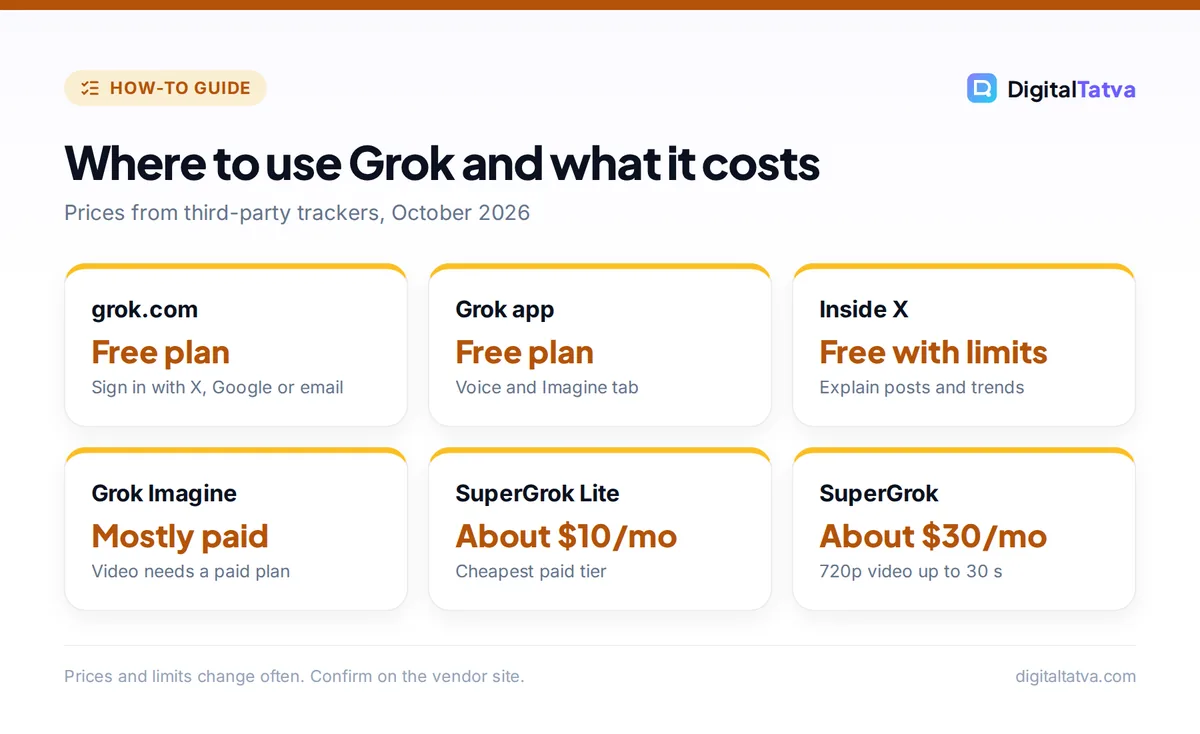
How to use Grok AI: quick start by platform
Grok works in three places. Pick the one that matches how you already work.
| Platform | How to start | Account needed | Best for |
|---|---|---|---|
| grok.com (web) | Open the site and sign in | X, Google or email | Long chats and file questions on a laptop |
| Grok app (Android, iPhone) | Install the official xAI app and sign in | X, Google or email | Voice, Imagine tab, quick questions |
| Inside X | Tap the Grok icon in the X app or sidebar | X account | Explaining posts, trends and threads |
| Mentions on X | Reply to a post and tag @grok with a question | X account | Public fact checks and context |
If you are choosing between Grok and other assistants, our head-to-head on Grok vs ChatGPT covers quality, features and price.
Is Grok available in India?
Yes. Grok is available in India on X, on grok.com and in the Grok apps, and we found no block or ban as of October 2026. Many Indian users chat with Grok in Hindi, Bengali or mixed Hinglish, and xAI has been hiring native Hindi and Bengali speakers to make its answers sound more natural.
Note: Grok has faced scrutiny in India. After Grok was used to create sexualized images of real people without consent in early 2026, X limited image generation to paying subscribers on 9 January 2026, and India’s IT ministry opened an investigation into X over the misuse. Chat features continued to work. Grok INR pricing was not published on any source we could verify.
How to use Grok step by step
- Get the official app or site. Go to grok.com, or install the Grok app from the Play Store or App Store and check that the developer is xAI. If you already use X, you can skip installing and tap the Grok icon in X instead.
- Sign in. On grok.com or the Grok app, sign in with X, Google or email. If you are under 18, some features will be unavailable.
- Check your privacy settings. Open settings and review the data controls before you start, so you know whether your chats can be used to improve the model and how to delete history.
- Ask your first question. Type a specific prompt, such as “What are people on X saying about the new iPhone today? Summarize the main opinions with links to posts.”
- Use search on purpose. Grok can pull live web and X results. Ask for “sources” or “link the posts” whenever accuracy matters.
- Try voice. In the app, tap the voice button and talk naturally. Voice is handy for quick questions while commuting.
- Upload a file or image. Attach a PDF, screenshot or photo and ask Grok to summarize, explain or extract data from it.
- Follow up and refine. Reply with “shorter,” “make it a table” or “explain like I am new to this” to shape the answer.
Tip: On X, you can reply to any post and tag @grok with a question like “@grok is this claim accurate?” The reply is public, so do not include personal details, and treat the answer as a starting point rather than a final fact check.
Grok free features: what you get without paying
xAI’s official plan pages would not load for our research, so the details below come from third-party trackers updated in 2026. Treat them as a guide and check the plans screen in your own app.
- Chat with Grok: free users reportedly get the same Grok 4.6 model that powers the apps on every plan, with tighter usage limits. xAI does not publish the exact number of messages.
- Real-time search: limited web and X search is included free, which is Grok’s biggest advantage over many free assistants.
- Voice mode: available on the free plan with limits.
- File and image understanding: upload documents and photos for questions and summaries.
- Images: very limited at best. Some reports say free users get a small daily allowance, while others say free image generation ended entirely in March 2026. Expect to need a paid plan for regular use.
- Video: not available free.
If you mainly want a capable free assistant, compare Grok with the options in our list of the best free AI tools and our best AI chatbots ranking.
How to use Grok Imagine for images and video
Grok Imagine is xAI’s image and video generator. It lives in the Imagine tab of the Grok app and on grok.com, and third-party trackers list the current models as Imagine Image 2.0 and Imagine Video 1.5, with video up to 1080p on higher plans.
- Open the Imagine tab. In the Grok app or on grok.com, switch from chat to Imagine.
- Choose image or video. Pick what you want to create. Video options appear only on eligible paid plans.
- Write a detailed prompt. Describe the subject, setting, style, lighting and camera angle, for example: “A street food vendor in Old Delhi at dusk, warm lights, shallow depth of field, cinematic photo.”
- Animate an image. On paid plans you can turn a still image into a short clip, which is useful for social posts.
- Refine and download. Ask for variations or edits, then save the result.
Watch out: Never create images of real people without their consent. Generating sexualized or misleading images of real people can break the law in India and elsewhere, and xAI has said users who prompt illegal content face the same consequences as if they uploaded it themselves.
Since free Imagine access is so limited, look at our guides to free AI image generators with no watermark and free AI video generators before paying. For animating photos specifically, our list of image to video AI tools compares stronger options.
Grok plans and prices (unverified)
These prices come from third-party trackers updated in October 2026, because xAI’s official pricing pages did not render for us. X Premium prices also vary by country.
| Plan | Listed price | What it adds |
|---|---|---|
| Free | $0 | Grok chat, limited web and X search, voice |
| SuperGrok Lite | About $10/month | Expert mode, longer chats, trial of image and video |
| SuperGrok | About $30/month | Faster replies, 720p video up to 30 seconds |
| SuperGrok Plus | About $100/month | 1080p video, much higher usage, priority |
| SuperGrok Heavy | About $300/month | Highest usage, larger agent team, X Premium+ |
| X Premium / Premium+ | About $8 / $40 a month | Higher Grok limits / SuperGrok access, plus X perks |
Save money: If you only want occasional images, a $10 tier is the cheapest way in, and annual billing is listed at about two months free. If you also use X heavily, compare X Premium+ before buying SuperGrok separately. Our guide to saving money on AI subscriptions has more ways to cut costs.
Best ways to use Grok, with example prompts
Grok shines when a question depends on what is happening right now. Use these prompts as templates, and see our prompt engineering guide for the techniques behind them.
| Use case | Prompt to copy |
|---|---|
| Trend research | “What topics are trending on X in India today in tech? Give five with one line each and link example posts.” |
| Explain a post | “Explain this thread in simple terms and list the main arguments on each side.” (inside X) |
| Social content | “Write five X posts under 200 characters announcing our new cold brew, witty tone, no hashtags.” |
| Competitor watch | “Summarize what customers said about [brand] on X in the past week. Separate praise and complaints.” |
| Learning | “Teach me the basics of mutual fund SIPs in 5 short steps, with an example in rupees.” |
Marketers can pair Grok with the tools in our list of the best AI social media tools. For deeper, citation-heavy research, a dedicated research assistant is usually better; see our guide on how to use Perplexity for research.
Grok privacy and safety tips
- Keep it professional. Grok includes companion characters and an 18+ mode. Keep work accounts away from those features.
- Do not share secrets. Leave passwords, ID numbers and client data out of prompts. Paid business plans are reported to exclude data from training by default, but consumer plans may not.
- Check facts. Grok’s real-time answers draw on X posts, which can include rumors. Ask for sources and verify important claims.
- Public replies are public. When you tag @grok on X, both your question and its answer are visible to everyone.
For company rules on AI tools, read our AI data privacy guide for businesses. If you mainly chat inside WhatsApp and Instagram instead of X, our guide on how to use Meta AI covers the free assistant built into those apps.
Frequently asked questions
Is Grok AI free to use?
Yes, Grok has a free plan on grok.com, the Grok app and X. It includes chat with limited real-time web and X search, plus voice. xAI does not publish exact free limits, and image and video creation in Grok Imagine now mostly require a paid plan such as SuperGrok Lite, listed at about $10 a month.
Can I use Grok without an X account?
Yes. The standalone Grok app and grok.com let you sign in with a Google account or email instead of X. You only need an X account if you want to use Grok inside the X app or tag @grok in replies to posts.
Is Grok Imagine free?
Mostly not anymore. After a deepfake backlash in January 2026, image generation was limited to paying subscribers, and some reports say free generation ended completely in March 2026. Video always needs a paid plan. Check the Imagine tab in your app to see what your account currently allows.
Is Grok available in India and does it understand Hindi?
Yes. Grok works in India on X, grok.com and the mobile apps, and many Indian users chat with it in Hindi, Bengali and Hinglish. Official INR pricing for SuperGrok was not available when we checked, so Indian users may see prices in USD or app store local pricing.
What is Grok best used for?
Grok is best for questions about current events, trends and discussions on X, because it can search posts in real time. It also handles writing, summaries and coding questions. For long documents or careful research with citations, other assistants such as ChatGPT, Claude or Perplexity are often more reliable.
Our take: who should use Grok
Use Grok if you follow news, trends or brands on X and want a free assistant that can read the conversation in real time. Skip paying for it if you mainly want image or video creation, since cheaper and free alternatives often do that better. Start on the free plan, learn its limits, and upgrade only if you hit them regularly. Grok’s plans and features change frequently, so confirm current prices and limits on xAI’s official site at x.ai before you subscribe.
Pricing and features are checked at the time of writing and can change. Some links may be affiliate links, which never affect our verdicts.