How to Use Meta AI on WhatsApp, Instagram and Facebook
Learn how to use Meta AI on WhatsApp, Instagram, Facebook and meta.ai: start chats, use @Meta AI in groups, create images, try Hindi voice and protect your privacy.

On this page
- Key takeaways
- How to use Meta AI: quick answer by app
- What Meta AI is and what changed in 2026
- How to use Meta AI on WhatsApp step by step
- How to use Meta AI on Instagram and Facebook
- How to use meta.ai and the Meta AI app
- Best prompts to try with Meta AI
- Meta AI privacy: what Meta sees and how to control it
- Meta AI limits and common problems
- Meta AI vs other free AI assistants
- Frequently asked questions
- Next steps: get the most from Meta AI
To use Meta AI, open WhatsApp, Instagram, Facebook or Messenger, tap the blue Meta AI circle (or the search bar), and type or speak your question. In group chats you can type @Meta AI followed by your request, and you can also use it on the web at meta.ai or in the standalone Meta AI app. This guide shows exactly how to use Meta AI on each app, what it is good at, how to control your privacy, and where it falls short compared with dedicated assistants.
Meta AI is free, it is available in India, and it understands Hindi as well as English. Since April 2026 it runs on Meta’s new Muse Spark model in the Meta AI app and on meta.ai, with the upgrade spreading to WhatsApp, Instagram and Facebook in stages.
Key takeaways
- Meta AI is built into WhatsApp, Instagram, Facebook and Messenger, plus meta.ai and the Meta AI app. It costs nothing to use.
- Start a chat by tapping the blue circle icon, or mention @Meta AI inside a group chat to bring it into the conversation.
- Type “imagine” followed by a description to create an image right inside a chat.
- Your personal WhatsApp chats stay end-to-end encrypted, but anything you send to Meta AI is shared with Meta, so keep sensitive details out.
- Meta AI is great for quick answers, captions and fun images. For long documents, research or coding, a dedicated assistant does a better job.
How to use Meta AI: quick answer by app
Here is the fastest way to open Meta AI on each platform. Menus change between app updates, so look for the blue and purple ring icon if a button has moved.
| Where | How to open Meta AI | Best for |
|---|---|---|
| Tap the blue circle above the new chat button, or type @Meta AI in a group | Quick questions, group plans, images in chat | |
| Tap the search bar and ask, or start a Meta AI chat in your messages | Caption ideas, Reel scripts, translations | |
| Use the search bar, or ask Meta AI about a post from the post itself | Explaining posts, planning, Marketplace help | |
| Messenger | Search for Meta AI and open a chat | Casual Q&A with friends |
| meta.ai and Meta AI app | Open the site or app and log in with your Meta account | Longer chats, voice, Thinking mode, live camera |
If you are comparing Meta AI with other free assistants, our roundup of the best AI chatbots in 2026 shows where each one fits.
What Meta AI is and what changed in 2026
Meta AI is the assistant Meta builds into its own apps. It answers questions, writes short text, translates, creates images and helps you plan things without leaving the app you already use. Meta AI first launched in India on 24 June 2024 across WhatsApp, Facebook, Messenger and Instagram, and Hindi support followed in July 2024.
The big change came on 8 April 2026, when Meta introduced Muse Spark, the first model from its new Superintelligence Labs. It replaced the older Llama models behind Meta AI. According to Meta’s official Muse Spark announcement, the new Meta AI adds:
- Instant and Thinking modes: a fast mode for casual questions and a slower reasoning mode for harder problems.
- Better image understanding: identify items in a photo or compare products you scan.
- Health answers with more detail, including images and charts.
- Shopping help, including Facebook Marketplace search.
- Voice conversations you can interrupt, plus live camera help in the Meta AI app.
- Side chats: tap the Meta AI icon in a group chat for a private answer based on the group discussion.
Note: Muse Spark rolled out first in the US, in the Meta AI app and on meta.ai. Meta said in May 2026 that it was beginning to appear across WhatsApp, Instagram, Facebook and Messenger, with some features still in testing. Meta has not confirmed which model powers Meta AI inside WhatsApp in India today, so some features below may not show up on your phone yet.
How to use Meta AI on WhatsApp step by step
WhatsApp is where most Indian users meet Meta AI. Since 15 January 2026, WhatsApp no longer allows other general-purpose chatbots such as ChatGPT and Microsoft Copilot on its platform, so Meta AI is the only built-in assistant left there. Business customer-service bots are still allowed, which our guide to WhatsApp AI for business covers in detail.
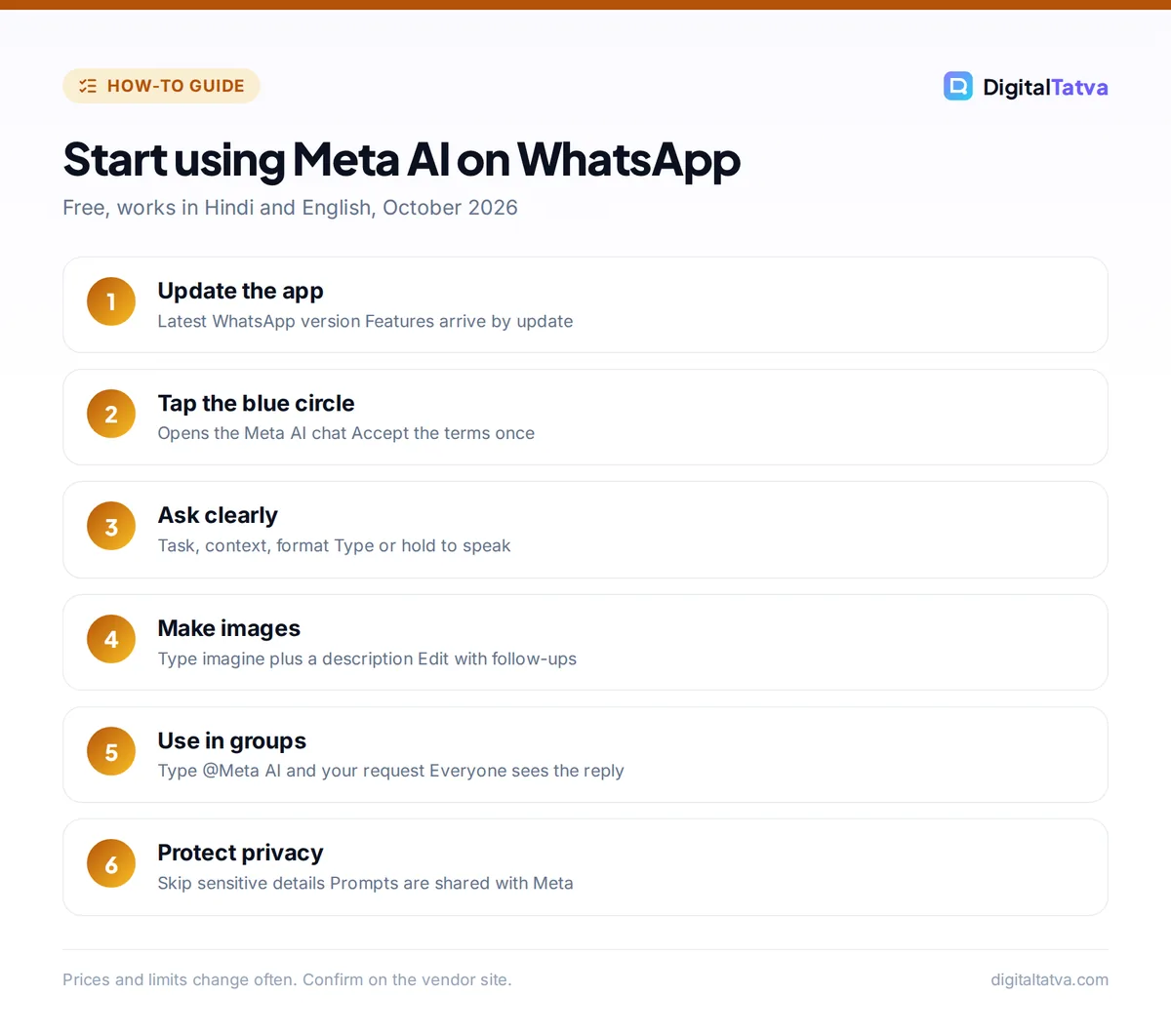
- Update WhatsApp. Install the latest version from the Play Store or App Store. Meta AI features arrive through app updates, and older versions may not show the icon.
- Open the Meta AI chat. On the Chats tab, tap the blue and purple circle near the new chat button. The first time, accept the terms that appear.
- Ask your first question. Type something specific, such as “Plan a 2 day Udaipur trip for a family of four on a mid-range budget.” Meta AI replies in the chat like a normal contact.
- Use voice if you prefer. Hold the microphone button and speak. You can ask in Hindi or English.
- Create an image. Type “imagine” followed by a description, for example “imagine a cozy chai stall at sunset in watercolor style.” You can ask for changes in follow-up messages.
- Use it in a group. In any group chat, type @Meta AI and your request, such as “@Meta AI suggest three restaurants near Connaught Place for 8 people.” Everyone in the group sees the answer.
- Clean up afterwards. To remove a conversation from your phone, open the Meta AI chat history, press and hold the chat and tap Delete.
Tip: Meta AI can only read messages that mention @Meta AI or that you choose to share with it. It does not read the rest of your group conversation unless someone adds it as a group member, in which case WhatsApp shows a system message to everyone and any admin can remove it.
How to use Meta AI on Instagram and Facebook
On Instagram, the search bar doubles as a Meta AI prompt box. Tap search, type a question, and pick the Meta AI suggestion instead of a normal search result. You can also open your messages and start a chat with Meta AI, which works just like the WhatsApp version.
Useful Instagram jobs for Meta AI:
- Captions: “Write five short captions for a Diwali sale post for a handmade candle brand, with emojis and three hashtags each.”
- Reel ideas: “Give me 10 Reel hooks for a home baker in Pune.”
- Translations for Reels: Meta AI can translate your voice in a Reel into another language with optional lip sync. Meta says this is free for public Instagram accounts where Meta AI is available.
For a full creator toolkit, see our list of the best AI tools for Instagram Reels, and our guide to AI tools for Hindi, Gujarati and other Indian languages if you post in regional languages.
Facebook and Messenger
On Facebook, you can ask Meta AI about a post you are scrolling past, for example to explain a news story or a recipe. Use the search bar to ask general questions, and use Marketplace shopping help to narrow listings by price, style or distance where the Muse Spark features have arrived. In Messenger, search for Meta AI and open a chat, or mention it in a group chat.
How to use meta.ai and the Meta AI app
The standalone Meta AI app and the meta.ai website are where the newest features land first. They are the best choice when you want longer conversations or the new Thinking mode.
- Sign in. Go to meta.ai or install the Meta AI app and log in with your Facebook or Instagram account.
- Pick a mode. Use Instant for quick questions and Thinking for planning, comparisons or math.
- Try voice. Start a voice conversation and speak naturally. You can interrupt, switch topics or switch languages. In India, voice replies are reported to be available in English, Hindi and Bengali.
- Point your camera. In the app, the live camera feature lets you show Meta AI an object, a landmark or a product label and ask about it.
- Upload a photo. Ask “What plant is this and how often should I water it?” or “Estimate the calories in this plate.”
Watch out: Meta AI’s health and nutrition answers are general information, not medical advice. Treat calorie estimates from photos as rough guesses and talk to a doctor for anything serious.
Best prompts to try with Meta AI
Meta AI responds best to short, specific prompts. These templates work well across WhatsApp, Instagram and meta.ai. For a deeper method, our prompt engineering guide explains why adding role, context and format improves almost any answer.
| Goal | Prompt to copy |
|---|---|
| Trip planning | “Plan a 3 day Goa trip in December for two people, budget Rs 25,000 excluding flights. Give a day by day plan.” |
| Small business post | “Write a WhatsApp broadcast message announcing 20% off on sarees this weekend. Keep it under 60 words, friendly tone.” |
| Study help | “Explain photosynthesis to a class 8 student in simple Hindi, with one everyday example.” |
| Image | “imagine a minimalist logo of a tea leaf inside a circle, flat design, green and white” |
| Group decision | “@Meta AI suggest a movie for 5 friends who like comedy, released in the last two years” |
| Translation | “Translate this message into polite Gujarati: Your order will be delivered tomorrow before noon.” |
If you run a shop or service business, our collection of 60 AI prompts for small business owners has many more you can paste straight into Meta AI.
Meta AI privacy: what Meta sees and how to control it
Privacy is the most common worry with Meta AI, especially on WhatsApp. Here is what you should know before you start sharing.
- Personal chats stay encrypted. Your normal WhatsApp messages and calls remain end-to-end encrypted. Meta AI cannot read them.
- Meta AI chats are not private from Meta. Whatever you type to Meta AI, or share with it, is sent to Meta so it can answer. Do not send Aadhaar numbers, bank details, passwords or confidential client data.
- You cannot fully remove Meta AI. WhatsApp has no switch that deletes the Meta AI icon, but third-party guides report you can switch off some AI features, such as message summaries and writing help, in the chat settings, and restrict AI features in specific chats.
- Reset what Meta AI remembers. Third-party guides citing the WhatsApp Help Center say typing /reset-ai in a Meta AI chat erases Meta AI’s copy of that chat, and /reset-all-ais does it for every chat. Deleting a chat from your phone alone does not remove Meta’s copy.
Businesses should set a clear policy on what staff may share with any AI tool. Our business guide to AI data privacy walks through the risks, and our explainer on how AI memory works shows similar controls in ChatGPT and Claude.
Meta AI limits and common problems
Meta AI is free and Meta may apply rate limits during busy periods, but it does not publish exact daily caps. If you hit a limit, wait a while and try again.
Pros
- Free and already inside apps most people use daily
- Works in Hindi and English, with voice
- Fast image creation with the “imagine” prompt
- Handy in group chats for plans and decisions
Cons
- Cannot be fully switched off on WhatsApp
- Weaker than leading assistants for coding and long documents
- New Muse Spark features reach India in stages
- Your prompts are shared with Meta
Meta AI icon not showing?
Update the app first. If the icon still does not appear, it may not have reached your account yet, or your account may be ineligible (for example if you are under the minimum age). Some Muse Spark features, like side chats and Marketplace shopping help, are still rolling out by country.
Answers look wrong or outdated
Like every chatbot, Meta AI can be confidently wrong. Ask it to “show sources” for factual questions, and double-check prices, dates and medical or legal information yourself.
Meta AI vs other free AI assistants
Meta AI wins on convenience because it is already on your phone. It is less strong for serious work. Muse Spark was reported at launch to trail rival models on coding and complex reasoning, so pick a dedicated assistant when the task matters.
- ChatGPT is the better all-rounder for writing, files and data. Start with our guide on how to use ChatGPT.
- Gemini is best if you live in Gmail, Docs and Android. See our complete Gemini beginner guide.
- Grok is strong on real-time X posts and trends.
For images specifically, Meta AI is fine for quick fun visuals, but our list of the best AI image generators covers tools with more control and higher quality. And if you want a wider view of no-cost options, browse the best free AI tools you can use today.
Frequently asked questions
Is Meta AI free to use?
Yes. Meta AI is free on WhatsApp, Instagram, Facebook, Messenger, meta.ai and the Meta AI app. Meta may apply usage limits at busy times but does not publish exact caps. Meta has tested paid Meta One subscriptions with higher limits in a few countries, but that has not been confirmed for India, so Indian users currently use Meta AI at no cost.
Is Meta AI available in India?
Yes. Meta AI launched in India in June 2024 on WhatsApp, Facebook, Messenger and Instagram, and it has supported Hindi since July 2024. Newer features built on the Muse Spark model rolled out first in the US, so some of them may arrive in India later than in other countries.
Can I turn off Meta AI on WhatsApp?
Not completely. WhatsApp has no setting that removes the Meta AI icon. You can simply avoid using it, turn off some AI features in your chat privacy settings, and ask group admins to remove Meta AI from groups. Typing /reset-ai in a Meta AI chat reportedly clears Meta AI’s copy of that chat.
Can Meta AI read my WhatsApp messages?
No. Your personal messages and calls remain end-to-end encrypted. Meta AI only sees messages you send directly to it, messages that mention @Meta AI, or content you choose to share with it. Anything you do send to Meta AI is processed by Meta, so avoid sharing sensitive personal or business information.
How do I make images with Meta AI?
Open a chat with Meta AI, or any chat where it is present, and type “imagine” followed by a clear description, such as “imagine a red vintage scooter on a Mumbai street at night.” You can ask for edits in follow-up messages, like changing colors or style, and then save or share the image.
Next steps: get the most from Meta AI
Start with one everyday job, like planning a trip, writing captions or settling a group debate, and use Meta AI where you already chat. Keep personal and business secrets out of your prompts, and switch to a stronger assistant for long documents or research. Features and availability change often, so confirm the latest details in the app or on Meta’s official pages before relying on them.
Pricing and features are checked at the time of writing and can change. Some links may be affiliate links, which never affect our verdicts.