Free AI Video Generators That Are Actually Usable
The free AI video generators you can keep using in 2026: Google Flow's 50 daily credits, free Gemini Omni in YouTube, Kling, Hailuo, Firefly and Luma, with watermark and rights limits.

On this page
- Key takeaways
- Free AI video generator quick picks
- What “free” really means for AI video
- The best free AI video generators, ranked
- How many free videos can you actually make?
- A free AI video workflow that works
- Cheapest ways to remove the limits
- Watermarks, rights and safety on free plans
- Frequently asked questions
- Verdict: the free AI video generators worth your time
The best free AI video generator in October 2026 is Google Flow, which gives 50 free credits a day without a subscription, enough for about five 8-second Veo 3.1 Lite clips. YouTube Shorts Remix and the YouTube Create app also let adults use Google’s Gemini Omni video model at no cost, while Kling, Hailuo, Adobe Firefly and Luma offer free daily allowances with watermarks or personal-use-only limits.
Most “free AI video generator” lists are padded with one-time trials that run out after a single clip. This guide ranks only the tools that let you keep making videos for free, explains exactly what each free tier limits (credits, watermark, resolution, commercial rights), and shows the cheapest legal ways to remove those limits, including offers for students and users in India.
Key takeaways
- Google Flow is the most generous free option: 50 credits a day, about 5 Veo 3.1 Lite clips or 4 Gemini Omni Flash 720p clips.
- YouTube Shorts Remix and YouTube Create give free Gemini Omni video to users aged 18+, but only for YouTube content.
- Kling, Hailuo and Luma free tiers add watermarks and, for Kling and Luma, do not allow commercial use.
- Runway (125 one-time credits) and Pika (no monthly free credits) are trials, not free plans.
- In India, Google AI Plus is free for eligible students until 31 December 2026, and Jio has bundled Google AI Pro with eligible 5G plans.
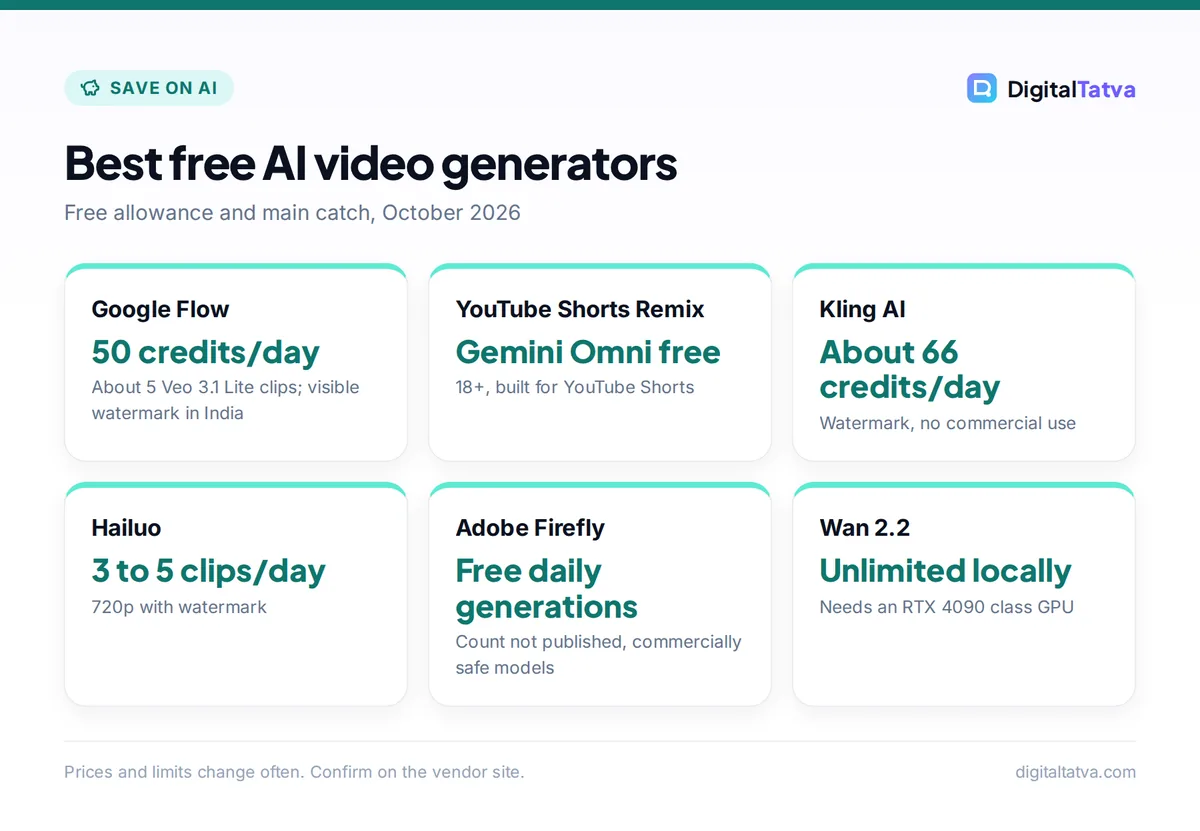
Best free AI video generators
Free allowance and main catch, October 2026
| Item | Detail | Notes |
|---|---|---|
| Google Flow | 50 credits/day | About 5 Veo 3.1 Lite clips; visible watermark in India |
| YouTube Shorts Remix | Gemini Omni free | 18+, built for YouTube Shorts |
| Kling AI | About 66 credits/day | Watermark, no commercial use |
| Hailuo | 3 to 5 clips/day | 720p with watermark |
| Adobe Firefly | Free daily generations | Count not published, commercially safe models |
| Wan 2.2 | Unlimited locally | Needs an RTX 4090 class GPU |
Prices and limits change often. Confirm on the vendor site.
Free AI video generator quick picks
We checked every free tier against official help pages where available, and flagged third-party figures where vendors do not publish their terms. Here is the short version.
| Tool | Free allowance | Watermark | Commercial use on free | Best for |
|---|---|---|---|---|
| Google Flow (Veo 3.1, Omni Flash) | 50 credits per day | Invisible SynthID; visible mark forced in India | Check Google terms | Best overall free AI video |
| YouTube Shorts Remix and YouTube Create | Gemini Omni at no cost (18+) | SynthID | For YouTube content | Free Shorts |
| Kling AI | About 66 credits a day (third-party) | Yes | No | Realistic human motion |
| Hailuo (MiniMax) | Daily credits, about 3 to 5 clips (third-party) | Yes, 720p | Not stated | Quick 6-second clips |
| Adobe Firefly | Free daily generations, count not published | No visible mark stated; Content Credentials | Firefly models marketed as commercially safe | Brand-safe B-roll |
| Luma Dream Machine | About 250 credits a day, drafts only (third-party) | Yes | No | Testing ideas |
| Wan 2.2 (open source) | Unlimited on your own GPU | None added | Apache 2.0 license | Developers with a strong PC |
If you need full commercial rights and no watermark, there is no truly free option among hosted tools; jump to the section on the cheapest upgrades. For still images, our guide to free AI image generators with no watermark covers the image side.
What “free” really means for AI video
Video is the most expensive thing AI tools generate, so free tiers are tighter than for chat or images. Before you invest time in a tool, check these five limits:
- Credits: daily credits that reset are far more useful than a one-time grant.
- Watermark: a visible logo makes clips unusable for client work and many ads.
- Resolution and length: free clips are often 720p or lower and 5 to 8 seconds long.
- Commercial rights: several free tiers are personal use only, which rules out monetized or client videos.
- Queues and peak hours: free jobs wait behind paid ones, and some tools block free video at busy times.
Watch out: Sora is not an option anymore. OpenAI shut down the Sora app in April 2026 and the Sora API in September 2026, and Microsoft retired the Sora video experience in Microsoft 365 Copilot by late June 2026. Ignore older lists that still recommend them.
The best free AI video generators, ranked
1. Google Flow: Best overall free AI video generator
- Free allowance: 50 credits per day
- Models: Veo 3.1 Lite, Fast and Quality, Gemini Omni Flash
- Clip length: 4 to 8 seconds (Omni up to 10)
- Paid upgrade: Google AI Plus $4.99/month (Rs 399)
Google’s Flow credits help page lists 50 credits a day for users without a subscription. Veo 3.1 Lite costs 10 credits per clip, so you can make about five clips a day, or four 8-second Gemini Omni Flash clips at 720p (12 credits each), or eight 360p Omni drafts at 6 credits. Veo 3.1 Fast costs 20 credits, which gives two higher-quality clips a day.
The catches: daily credits do not roll over, free video generation may be unavailable from roughly 2 PM to 5 PM UTC, 1080p upscaling is subscriber-only, and Google’s getting started page lists a Google AI plan as a requirement, so the free experience can vary by account. Flow is 18+ only, and users in India get a visible watermark automatically. Our step-by-step guide on how to use Google Flow and Veo shows how to stretch those credits.
2. YouTube Shorts Remix and YouTube Create: Best free option for Shorts creators
- Free allowance: Gemini Omni at no cost
- Age: 18+
- Where: YouTube app (Shorts Remix) and the YouTube Create app
- Best for: vertical Shorts
At Google I/O 2026, Google said Gemini Omni Flash is “available today in YouTube Shorts Remix and the YouTube Create app to users (18+) at no cost.” This is the simplest way to get Google’s newest video model for free if your goal is YouTube Shorts. The trade-off is control: you work inside YouTube’s remix and editing flows, not a full studio, and the output is built for publishing on YouTube. Every Omni video carries Google’s invisible SynthID watermark.
3. Kling AI: Best free tier for realistic people and motion
- Free allowance: about 66 credits a day that expire in 24 hours (third-party)
- Watermark: Yes
- Commercial use: No
- Paid upgrade: Standard from about $7 to $10/month
Kling, from China’s Kuaishou, is known for lifelike human movement, and its free daily credits reset every day. Third-party trackers report that a basic 5-second clip in standard mode costs around 10 credits, while Kling 3.0 clips with native audio cost far more, so expect a few short clips a day at most. Free output is watermarked and not licensed for commercial use. Kling did not publish its plan terms on a page we could load, so treat these numbers as approximate. Our full Kling AI review covers quality, pricing and the new Kling 4.0.
4. Hailuo (MiniMax): Best for quick daily experiments
- Free allowance: daily credits, roughly 3 to 5 generations (third-party)
- Resolution: 720p with watermark
- Clip length: about 6 seconds
- Paid upgrade: from about $7.99/month
Hailuo is MiniMax’s consumer video app. According to a July 2026 third-party tracker, free users get daily credits for a handful of 6-second 720p clips with a watermark, and watermark-free 1080p exports are paid-only. It is a good second tool to run the same prompt through when Flow’s credits are used up. Commercial terms for free output were not stated in the sources we found, so do not use free clips for client work.
5. Adobe Firefly: Best for commercially safer clips
- Free allowance: free daily generations (image, video, audio), number not published
- Provenance: Content Credentials attached
- Paid upgrade: Firefly Standard $9.99/month for 2,000 credits
- Best for: brands and agencies
Adobe lets anyone use Firefly with “limited free daily generations across both standard and premium features,” including video, with no plan required. Adobe says outputs from its own Firefly models are “safe for commercial use” because they are trained on licensed and public domain content; partner models available inside Firefly may have different terms. Adobe does not publish the free daily count, so it is hard to plan around, but it is the free tool we would trust most for a brand video. See the Firefly plans page and our Canva vs Adobe Firefly comparison.
6. Luma Dream Machine: Best for testing ideas in draft mode
- Free allowance: about 250 credits a day, draft generations only (third-party)
- Watermark: Yes
- Commercial use: No, personal use only
- Paid upgrade: Lite about $9.99/month (still non-commercial); Plus about $29.99 for commercial use
Luma’s Ray models are good at camera movement and stylized scenes. A June 2026 third-party guide reports that the free plan gives roughly 250 credits a day for draft-quality generations, with a visible watermark that stays on exported files and personal use only. Use it to rough out ideas, then render final shots elsewhere.
7. Wan 2.2: Best free option if you have a powerful GPU
- Free allowance: unlimited, runs on your hardware
- License: Apache 2.0
- Hardware: TI2V-5B model on a single RTX 4090 class GPU
- Output: 5-second 720p clips
Alibaba released Wan 2.2 under the Apache 2.0 license. Its smaller TI2V-5B model can generate a 5-second 720p clip in under 9 minutes on a single consumer GPU like the RTX 4090, while the larger A14B models need about 80 GB of VRAM. There are no credits, watermarks or queues, but setup takes technical skill and a gaming-class PC. If local AI appeals to you, start with our guides to open source AI models and running AI locally.
Free trials that run out quickly
These tools are worth knowing, but they are not free plans you can keep using:
- Runway: the Free plan gives 125 one-time credits. Gen-4.5 uses 12 credits per second, so that is roughly 10 seconds of video in total. See our Runway pricing guide for the paid tiers.
- Pika: the Free plan has 0 monthly credits and relies on credit packs, according to Pika’s pricing page.
- Grok Imagine: third-party reports say free Grok accounts get images only; video needs a SuperGrok plan from about $10 a month.
- Meta Vibes: Meta’s AI video feed has been free in the Meta AI app and on meta.ai, but its standalone app was only being tested in Mexico and Brazil in early 2026, and Meta plans a freemium model. Availability in India is unclear.
- CapCut: popular for AI video effects elsewhere, but the app has remained blocked in India since 2020.
How many free videos can you actually make?
Credits are confusing, so here is a realistic daily estimate using published credit costs. Third-party figures are marked as approximate.
| Tool | Free daily credits | Cost per clip | Clips per day |
|---|---|---|---|
| Google Flow, Veo 3.1 Lite (8 s) | 50 | 10 | 5 |
| Google Flow, Omni Flash 720p (8 s) | 50 | 12 | 4 |
| Google Flow, Omni Flash 360p draft (8 s) | 50 | 6 | 8 |
| Google Flow, Veo 3.1 Fast (8 s) | 50 | 20 | 2 |
| Kling, standard 5 s clip | About 66 | About 10 | About 6 (approximate) |
| Runway, Gen-4.5 | 125 once | 12 per second | About 10 seconds total, once |
Stack two or three free tools and you can produce a handful of usable clips every day, which is enough for a daily Reel or Short. Our workflow for AI tools for Instagram Reels shows how to combine them with editing and captions.
A free AI video workflow that works
- Write a shot list. Break your video into 5 to 8 second shots, one camera setup each. Free credits go much further when each prompt is one clear shot.
- Draft cheaply. Use Flow’s Omni Flash 360p or Veo 3.1 Lite to find prompts that work.
- Render the best shots. Spend Veo 3.1 Fast credits only on the two shots that matter most, and use Kling or Hailuo’s free credits for extra angles.
- Add voice and music. Free tiers of voice tools work well here; see our list of the best AI voice generators.
- Edit and caption. Assemble clips in a free editor, add captions and export vertical and horizontal versions. Our full guide on how to make an AI video from text walks through each step.
Tip: Run free video jobs outside 2 PM to 5 PM UTC (7:30 PM to 10:30 PM in India). Flow warns that free users may not be able to generate video in that window, and other tools slow down at the same peak.
Cheapest ways to remove the limits
When free credits stop being enough, the cheapest legal upgrades are surprisingly affordable, especially in India.
| Option | Price | What you get for video |
|---|---|---|
| Google AI Plus | $4.99/month (Rs 399) | Video generation, 200 extra Flow credits/month, 1080p upscaling in Flow |
| Google AI Plus for Indian students | Free for 1 year (redeem by 31 Dec 2026) | Same as AI Plus, then Rs 399/month unless cancelled |
| Jio Google Gemini offer | Free with eligible Jio 5G plans (Rs 349+) | Google AI Pro for 18 months, including 1,000 Flow credits a month |
| Kling Standard | About $7 to $10/month (third-party) | 660 credits, no watermark, commercial use |
| Adobe Firefly Standard | $9.99/month | 2,000 credits, commercially safe Firefly models |
| Runway Standard | $15/month ($12 yearly) | 625 credits, about 52 seconds of Gen-4.5, no watermark |
Save money: Before paying for any video tool, check whether you qualify for a free Google AI plan. Our guides to free AI Pro plans in India and AI student discounts list the current offers and their conditions, and our tips to save money on AI subscriptions help you avoid paying twice for overlapping tools.
Watermarks, rights and safety on free plans
Free AI video comes with strings attached, and some matter more than the watermark.
- Do not remove watermarks. Cropping or masking a visible watermark can break the tool’s terms. Google, Adobe and others also embed invisible provenance data (SynthID, Content Credentials) that survives many edits.
- Respect personal-use limits. Kling and Luma free output is not licensed for commercial use, which includes monetized channels and client work.
- Label realistic AI video. Platforms including YouTube expect disclosure of realistic synthetic content, and some free tools are 18+ only.
- Never fake real people. Do not generate videos of real people saying or doing things they did not do. Read our guide on copyright and AI-generated content before you publish.
Frequently asked questions
Is there a completely free AI video generator with no watermark?
Among hosted tools, not with full rights. Google Flow adds only an invisible SynthID watermark in most countries, but forces a visible watermark for users in India, South Korea and Vietnam. Adobe Firefly does not mention a visible watermark on free generations. The only fully watermark-free and unlimited option is running an open model such as Wan 2.2 on your own powerful GPU.
What is the best free AI video generator in India?
Google Flow, because its 50 free daily credits work in India and cover about five Veo 3.1 Lite clips a day, although Flow adds a visible watermark for Indian users. Students can also claim Google AI Plus free for a year until 31 December 2026, and Jio’s Gemini offer has bundled Google AI Pro with eligible 5G plans. CapCut remains blocked in India.
Can I use free AI videos on YouTube or for clients?
Check each tool’s terms. Kling and Luma free tiers are personal use only, so they are not suitable for monetized channels or client projects. YouTube’s own Gemini Omni tools are built for YouTube content. Adobe markets its Firefly model outputs as commercially safe. For client work, a paid plan with explicit commercial rights is the safer route.
Is Sora still free?
No. OpenAI discontinued the Sora web and app experiences on 26 April 2026 and ended the Sora API on 24 September 2026, and Microsoft retired its Sora-based video experience in Microsoft 365 Copilot in June 2026. For free AI video today, use Google Flow, YouTube’s Gemini Omni tools, Kling, Hailuo or Adobe Firefly instead.
How long can free AI videos be?
Short. Free clips are usually 5 to 10 seconds: Veo 3.1 clips in Flow run 4 to 8 seconds, Gemini Omni Flash up to 10 seconds, Hailuo free clips about 6 seconds and Wan 2.2 about 5 seconds. To make a longer video, generate several shots and join them in an editor, or use Flow’s Extend and Scenebuilder features.
Verdict: the free AI video generators worth your time
Start with Google Flow’s daily credits, use YouTube’s free Gemini Omni tools if you make Shorts, and keep Kling, Hailuo and Adobe Firefly as backup free tiers for extra shots. When you need clean, commercial clips every week, the cheapest real upgrade is Google AI Plus at $4.99 (Rs 399) a month, or free if you qualify as a student in India. For paid options ranked head to head, see our list of the best AI video generators and our roundup of the best free AI tools. Free tiers, credit costs and prices change often, so confirm the current terms on each vendor’s site before you rely on them.
Pricing and features are checked at the time of writing and can change. Some links may be affiliate links, which never affect our verdicts.