Kling AI Review: Pricing, Features and Is It Worth It?
Our Kling AI review for 2026: Kling 3.0 and the new Kling 4.0, plan prices and credit costs, free tier limits, pros and cons, and when Runway or Google Veo is the better choice.

On this page
- Our verdict
- Key takeaways
- Kling AI at a glance
- What Kling AI is and why creators use it
- Key features of Kling 3.0 and Kling 4.0
- Kling AI pricing in 2026
- How Kling compares on quality
- Pros and cons of Kling AI
- Privacy, moderation and commercial use
- Ways to use Kling without a Kling subscription
- Who should use Kling AI, and who should skip it
- Kling AI alternatives
- Frequently asked questions
- Final verdict: is Kling AI worth it?
Kling AI is one of the best AI video generators in 2026 for realistic human motion, physics and native audio, and it is worth paying for if you make short social clips, ads or music videos and want good results per dollar. Its weaknesses are unclear official pricing, slow queues at busy times, Chinese content moderation and a free tier that is watermarked and not licensed for commercial use.
This Kling AI review covers what Kling 3.0 and the new Kling 4.0 can do, what the plans cost (with the caveat that Kling’s own membership page would not load for us), who should buy it, and when Runway or Google Veo is the better pick. Facts are current as of 12 October 2026.
Our verdict
8.0/10
Our rating: 8/10. Kling delivers some of the most lifelike people and movement of any AI video tool, with native audio, multi-shot prompts and cheap entry plans. It loses points for opaque, frequently changing prices, slow free queues and limited cross-clip consistency. Best for solo creators and social teams; studios that need editing and team controls should also look at Runway.
Key takeaways
- Kling is made by Kuaishou’s Kling unit; Kling 3.0 (February 2026) added multi-shot generation and native audio with lip sync.
- Kling 4.0 launched on 28 September 2026 to a limited group, with 30-second clips, up to 4K 10-bit HDR and stereo audio; wider release is slated for October.
- Plans reportedly run from about $7 to $10 a month (Standard, 660 credits) to about $128 to $180 (Ultra, 26,000 credits); figures vary by region and promotion.
- The free tier gives daily credits (about 66 a day per third-party guides) but adds a watermark and bans commercial use.
- You can also use Kling models inside Runway and Adobe Premiere, which may be cheaper if you already pay for those.
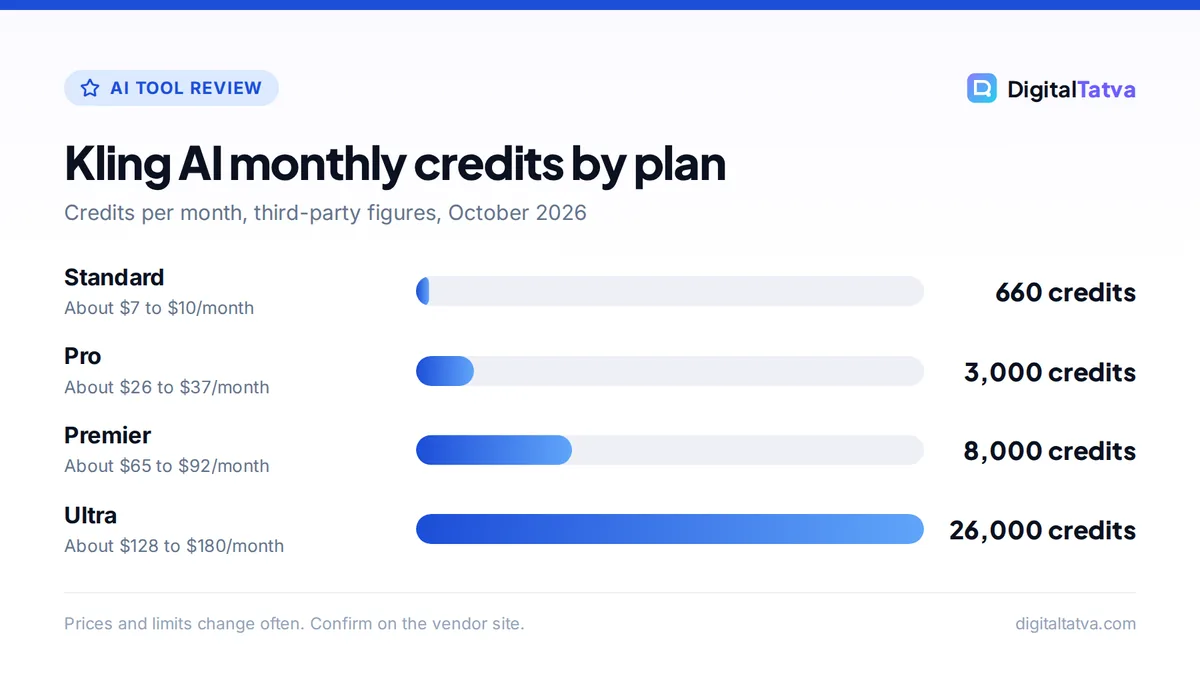
Kling AI monthly credits by plan
Credits per month, third-party figures, October 2026
Prices and limits change often. Confirm on the vendor site.
Kling AI at a glance
| Item | Details |
|---|---|
| Developer | Kling, spun off from Kuaishou (China), planning a Hong Kong listing |
| Current models | Kling 3.0 and 3.0 Omni (video), Image 3.0; Kling 4.0 in limited release |
| Clip length | 3 to 15 seconds on Kling 3.0; up to 30 seconds on Kling 4.0 |
| Audio | Native dialogue, sound effects and ambience; lip sync in Chinese, English, Japanese, Korean and Spanish |
| Resolution | 720p and 1080p, with 4K on higher tiers; 4K 10-bit HDR on Kling 4.0 |
| Free plan | Daily credits (about 66), watermark, no commercial use (third-party) |
| Paid plans | Standard, Pro, Premier, Ultra; about $7 to $180 a month (third-party) |
| Also available in | Runway, Adobe Premiere’s Generative Media Tool, Kling API |
What Kling AI is and why creators use it
Kling is a text-to-video and image-to-video generator from China’s Kuaishou, the company behind the Kwai short-video app. In 2026 Kuaishou moved Kling into a standalone company; third-party reports put its annualized recurring revenue at about $500 million by March 2026 and its valuation at around $18 billion after a July 2026 funding round. That scale matters for buyers: Kling is not a side project that might vanish like some smaller tools.
Creators pick Kling for one main reason: people look and move like people. Dancing, sports, hand movements, walking crowds and product handling tend to look more natural than in many rivals, and Kling 3.0 generates sound in the same pass. If you want a broader ranking of video tools first, see our list of the best AI video generators.
Key features of Kling 3.0 and Kling 4.0
Kling 3.0: multi-shot video with native audio
Kling 3.0 launched on 5 February 2026 in four variants: Video 3.0, Video 3.0 Omni, Image 3.0 and Image 3.0 Omni. The headline features, according to third-party reviews of the release:
- Multi-shot generation: write a short script and Kling produces a sequence of shots with automatic camera angle changes in one output.
- Native audio: dialogue, ambient sound and sound effects are generated together with the video, with automatic, language-specific lip sync.
- Clips of 3 to 15 seconds: longer than the 8-second limit of many rivals.
- References: images and elements guide characters and objects, though consistency holds within a clip rather than across clips.
- Image 3.0 Omni: image generation up to 2K and 4K, useful for creating start frames.
Kling 4.0: longer, sharper, but not for everyone yet
Kling 4.0 shipped on 28 September 2026, first to a limited group (AI Weekly reported Ultra yearly subscribers), with a wider release slated for October. Reported specs include clips up to 30 seconds, more than a dozen reference inputs (text, images and video), up to 10 keyframes for control, output up to 4K with 10-bit HDR and stereo audio. One model tracker still describes it as “a preview rather than a generally available video or API model,” so do not buy a plan expecting 4.0 today unless Kling confirms access for your tier.
Note: We did not run our own benchmark tests for this review. Quality judgments reflect editorial assessment of Kling’s published capabilities, release notes and widely shared creator results.
Kling AI pricing in 2026
Kling’s official membership page did not load during our research, and third-party trackers disagree because Kling runs frequent first-month discounts and regional prices. The credit allowances are consistent across sources; the dollar prices are not.
| Plan | Monthly credits | First-month or promo price | Regular monthly price | Notes |
|---|---|---|---|---|
| Free | About 66 per day | $0 | $0 | Watermark, no commercial use |
| Standard | 660 | About $6.99 | About $10 | No watermark, commercial use |
| Pro | 3,000 | About $25.99 | About $37 | Best value for regular creators |
| Premier | 8,000 | About $64.99 | About $92 | Heavy users and small teams |
| Ultra | 26,000 | About $127.99 | About $180 | Monthly only; first access to Kling 4.0 |
Sources: CloudZero (September 2026), StackSheriff (May 2026) and Atlas Cloud (July 2026), all third-party. Annual billing is reported at about 34% off for Standard, Pro and Premier, while Ultra is monthly only. Subscription credits expire at the end of each billing cycle; purchased top-up packs last longer.
What a clip actually costs
Third-party guides list credit costs for a 5-second Kling 3.0 clip of about 30 credits at 720p without audio, 40 at 1080p, 60 at 1080p with native audio and 150 in 4K. On Pro at about $37 for 3,000 credits, one credit costs roughly $0.012. A 5-second 1080p clip with audio (60 credits) therefore costs about $0.74, or roughly $0.15 per second. At the first-month price of about $25.99 the same clip costs about $0.52.
For comparison, Runway’s Gen-4.5 costs about $0.19 per second on Runway Pro monthly, per our Runway pricing breakdown, and Google’s Veo 3.1 Fast works out to about $0.05 per second on Google AI Pro credits (see our guide on how to use Google Flow and Veo).
Watch out: First-month discounts renew at the regular price, prices differ between the website and app stores, and Ultra has risen in price before. Read the renewal price on the checkout screen, and see our guide to annual vs monthly AI plans before you commit for a year.
How Kling compares on quality
In everyday creator use, Kling’s strengths are clear: natural body movement, convincing cloth and hair physics, believable faces in close-ups and audio that matches lip movement. It is particularly good for dance clips, sports moments, fashion and product-in-hand shots.
Its weaker spots are equally consistent:
- Cross-clip consistency: characters stay stable inside one clip but can drift between separate generations.
- Iteration: reviewers report needing several attempts per finished clip, which burns credits.
- Speed: generations can take 5 to 10 minutes when queues are busy, slower than Runway.
- Text in video: on-screen text and logos remain hit and miss, as with most video models.
For a head-to-head on quality, pricing and workflow, read our detailed Runway vs Kling comparison.
Pros and cons of Kling AI
Pros
- Lifelike human motion and physics
- Native audio with lip sync in five languages
- Multi-shot clips up to 15 seconds on 3.0, 30 seconds on 4.0
- Cheap entry plan and daily free credits for testing
- Available inside Runway and Adobe Premiere
Cons
- No stable, easy-to-read official price list
- Free tier is watermarked and non-commercial
- Slow queues at peak times
- Chinese content moderation can block political or sensitive prompts
- Limited consistency across separate clips
Privacy, moderation and commercial use
Kling is operated by a Chinese company, and Chinese regulatory content moderation applies, so prompts touching politics or some news topics may be refused. For marketing teams, the bigger question is data: avoid uploading confidential product images, unreleased designs or client footage until your legal team has read Kling’s terms. Our guide on AI data privacy for business has a checklist you can apply.
Commercial use is a paid feature. Third-party guides agree that paid plans remove the watermark and allow commercial use, while the free plan does not. Even with commercial rights, avoid prompts that copy real people, brands or characters, and read our explainer on copyright for AI-generated content.
Ways to use Kling without a Kling subscription
- Inside Runway: Runway lists Kling 3.0 as a third-party model, and in September 2026 it added Kling models to its MCP connector. If you already pay for Runway, test Kling there first. See the Runway pricing page for credit costs.
- Inside Adobe Premiere: Adobe’s September 2026 update added a Generative Media Tool to the Premiere timeline with partner models including Kling, Veo, Runway and Luma, according to Adobe’s announcement.
- Through the API: Kling sells API access separately as prepaid packages; web subscriptions do not include API credits.
Save money: Do not stack a Kling plan on top of Runway or Adobe credits until you know you need Kling’s own app features. Our list of ways to save money on AI subscriptions covers how to audit overlapping tools.
Who should use Kling AI, and who should skip it
Kling is a great fit if you
- Make Reels, Shorts or TikToks with people, dancing, sports or fashion.
- Want native audio and lip sync without a separate voice tool.
- Prefer a low monthly entry price and can live with changing prices.
- Create music videos or social ads from a handful of reference images.
Skip Kling if you
- Need talking-head presenters for training or corporate video; avatar tools fit better (see our Synthesia vs HeyGen comparison).
- Need clear invoices, team seats and admin controls for an agency; Runway is more mature here.
- Work with sensitive client material or politically sensitive topics.
- Only want free video; Google Flow’s daily credits are more generous, as our list of free AI video generators shows.
Kling AI alternatives
| Tool | Best for | Starting price | Why choose it over Kling |
|---|---|---|---|
| Runway | Complete AI video studio | $15/month ($12 yearly) | Editing tools, team plans, several models including Kling |
| Google Veo (Flow) | Best value bundle | $4.99/month (Google AI Plus) | Clear per-clip credit costs, 50 free daily credits |
| Adobe Firefly | Commercially safe clips | $9.99/month | Licensed training data, Adobe app integration |
| Pika | Playful effects | $10/month ($8 yearly) | Fun effects; commercial license from Creator plan |
| Hailuo (MiniMax) | Cheap quick clips | About $7.99/month (third-party) | Daily free credits for testing |
To turn Kling clips into finished videos, pair it with one of the best AI video editors and follow our workflow for making an AI video from text.
Frequently asked questions
Is Kling AI free?
Kling has a free tier with daily credits, reported by third-party guides at about 66 credits a day that expire after 24 hours. That covers a few short standard clips. Free videos carry a watermark and cannot be used commercially. To remove the watermark and get commercial rights, you need a paid plan, starting with Standard at roughly $7 to $10 a month.
How much does Kling AI cost per month?
Third-party trackers list Standard at about $10 a month (often $6.99 for the first month) for 660 credits, Pro at about $37 for 3,000 credits, Premier at about $92 for 8,000 credits and Ultra at about $128 to $180 for 26,000 credits. Annual billing is reported at about 34% off. Kling’s own page did not load for us, so confirm prices at checkout.
Is Kling AI safe to use?
Kling is a legitimate product from a large company, Kuaishou’s Kling unit, but it is based in China and applies Chinese content moderation. It is fine for general creative work. Avoid uploading confidential business material or footage of people who have not consented, and check your company’s AI policy before using it for client projects.
What is Kling 4.0?
Kling 4.0 is Kling’s newest video model, launched on 28 September 2026 to a limited group of subscribers, reportedly Ultra yearly plans first, with a wider release planned for October 2026. Reported features include clips up to 30 seconds, more than a dozen references, up to 10 keyframes, 4K 10-bit HDR output and stereo audio. Treat it as limited access until Kling confirms your plan.
Is Kling better than Runway?
For realistic human motion and native audio at a low entry price, many creators prefer Kling. Runway is better as a complete studio, with editing tools, team plans, clear published pricing and several models, including Kling 3.0 itself. If you already pay for Runway, try Kling inside it before buying a separate Kling subscription.
Final verdict: is Kling AI worth it?
Yes, for the right creator. If your content is short, people-heavy and social, Kling’s motion quality and native audio make the Standard or Pro plan good value, and Kling 4.0 should widen the gap once it reaches more subscribers. Start on the free tier to test your prompts, buy one month of Standard or Pro rather than a year, and compare results against Google Veo and Runway before committing. Kling’s prices and plans change often, so confirm the current terms and renewal price on Kling’s official site before you subscribe.
Related reading: AI tools for YouTubers and our Midjourney review for creating start frames.
Pricing and features are checked at the time of writing and can change. Some links may be affiliate links, which never affect our verdicts.