
50 ChatGPT Prompts for Students to Study Smarter
50 copy-and-paste ChatGPT prompts for students covering concepts, notes, quizzes, exam prep, essay feedback, math and research, written to help you learn without cheating.

On this page
- Key takeaways
- Quick guide: which ChatGPT prompts for students to use when
- How to get better answers from these prompts
- ChatGPT prompts to understand difficult concepts (1 to 9)
- Prompts for notes, readings and lectures (10 to 17)
- Active recall and self-quiz prompts (18 to 25)
- Exam preparation prompts (26 to 31)
- Essay and assignment prompts that keep the work yours (32 to 39)
- Math and science prompts (40 to 44)
- Research prompts (45 to 47)
- Planning, career and wellbeing prompts (48 to 50)
- Free and cheap ways for students to use ChatGPT
- Frequently asked questions
- Next steps: build your own study prompt library
The best ChatGPT prompts for students ask ChatGPT to explain, quiz and give feedback rather than to do the work for you. The 50 prompts below cover understanding tough concepts, making notes, active recall, exam prep, essay feedback, math, research and planning, and every one works on the free plan. Copy a prompt, fill in the [brackets], and turn on study mode when you want ChatGPT to guide you with questions instead of handing over answers.
These ChatGPT prompts for students are written to keep you on the right side of your school’s AI rules. They help you learn faster, not skip learning, and they work just as well in Gemini or Claude.
Key takeaways
- Study mode is available on all ChatGPT plans: type @study or choose Study from the + menu to get guided questions instead of answers.
- The most effective student prompts set your level, your goal and the format, for example “explain like I am in Class 9, then quiz me with 3 questions”.
- Use ChatGPT for explanations, practice questions and feedback on your own drafts; do not submit AI-written work where your course does not allow it.
- ChatGPT can be wrong, especially on facts, citations and long calculations, so check against your textbook or notes.
- US college students can claim four free months of ChatGPT Plus until 31 October 2026; Indian university students can get Google AI Plus free for a year.
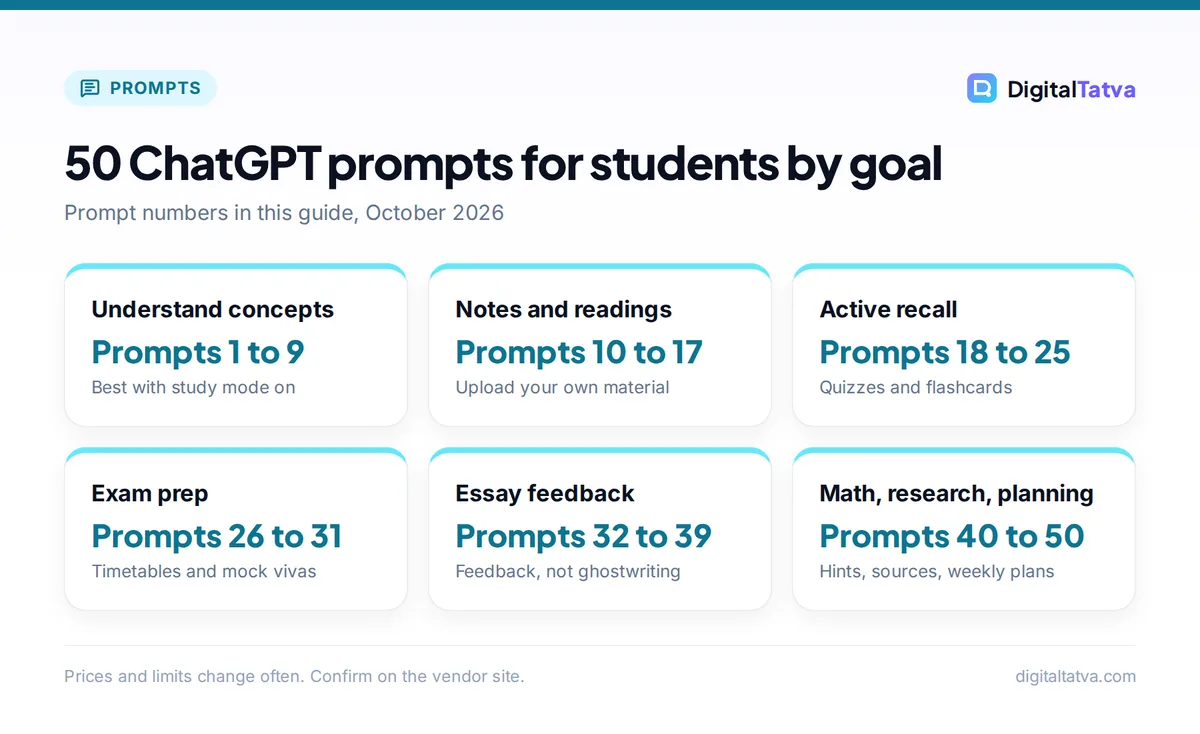
50 ChatGPT prompts for students by goal
Prompt numbers in this guide, October 2026
| Item | Detail | Notes |
|---|---|---|
| Understand concepts | Prompts 1 to 9 | Best with study mode on |
| Notes and readings | Prompts 10 to 17 | Upload your own material |
| Active recall | Prompts 18 to 25 | Quizzes and flashcards |
| Exam prep | Prompts 26 to 31 | Timetables and mock vivas |
| Essay feedback | Prompts 32 to 39 | Feedback, not ghostwriting |
| Math, research, planning | Prompts 40 to 50 | Hints, sources, weekly plans |
Prices and limits change often. Confirm on the vendor site.
Quick guide: which ChatGPT prompts for students to use when
| You want to | Prompts | Best mode |
|---|---|---|
| Understand a concept you are stuck on | 1 to 9 | Study mode |
| Turn readings and lectures into notes | 10 to 17 | Normal chat with file upload |
| Test yourself with active recall | 18 to 25 | Study mode or flashcards |
| Plan revision and prepare for exams | 26 to 31 | Normal chat |
| Improve your own essays and assignments | 32 to 39 | Normal chat, paste your draft |
| Work through math and science | 40 to 44 | Study mode |
| Research and check sources | 45 to 47 | Search on |
| Manage time, careers and stress | 48 to 50 | Normal chat |
Watch out: Rules on AI differ by school, course and even assignment. Before you use any prompt on graded work, check your syllabus or ask your teacher. If AI help is allowed but must be disclosed, say which prompts you used. Submitting AI-written text as your own where it is banned can lead to misconduct cases, and detectors are not the only way teachers notice.
How to get better answers from these prompts
A good student prompt has four parts: your level, the topic, what you want to do with it, and the output format. “Explain photosynthesis” gets a generic answer. “Explain photosynthesis for a Class 10 CBSE biology exam, in 5 steps, then ask me 3 questions” gets a lesson.
- Use study mode for learning. According to OpenAI’s study mode guide, it guides with questions, explains in layers and quizzes you one question at a time. It is not available in Temporary Chats, GPTs or Projects.
- Upload your own material. Notes, slides and PDFs keep answers tied to what your teacher actually covered. ChatGPT can make interactive flashcards on all plans.
- Ask follow-ups. “Simpler”, “give an example from cricket” or “what would an examiner look for?” usually beat starting over.
- Save your best prompts. Keep a note of the prompts that work for each subject.
New to ChatGPT? Start with our beginner guide to using ChatGPT, and see our prompt engineering guide for why structure matters.
ChatGPT prompts to understand difficult concepts (1 to 9)
- Explain at my level: “Explain [topic] as if I am a [Class 8 student / first-year engineering student]. Use one everyday analogy, then give the textbook definition.”
- Build up in layers: “Teach me [topic] in three layers: a one-line summary, a one-paragraph explanation, then the detailed version with key terms.”
- Find my gap: “I understand [part A] but not [part B] of [topic]. Ask me questions to find exactly where my understanding breaks, then explain only that part.”
- Teach with examples: “Give me three worked examples of [concept], from easy to hard. After each, ask me to explain one step back to you.”
- Compare and contrast: “Make a table comparing [concept A] and [concept B] on definition, how they work, examples and common confusions.”
- Fix a misconception: “Here is how I understand [topic]: [your explanation]. What did I get right, what is wrong, and why?”
- Connect topics: “How does [topic] connect to [earlier topic] in [subject]? Show me a simple concept map in text.”
- Real-world use: “Where is [concept] used in real life in India? Give three examples a student would recognize.”
- Socratic tutor: “Act as a Socratic tutor for [topic]. Do not give me the answer. Ask one question at a time and wait for my reply.”
Tip: Prompt 9 works even better with study mode switched on. If you prefer Gemini, its Guided Learning mode does something similar, and Claude has an Explanatory style built for learning new concepts.
Prompts for notes, readings and lectures (10 to 17)
- Chapter to notes: “Turn this chapter into study notes with headings, bullet points, key terms in bold and a 5-line summary at the end. [paste or upload]”
- Cornell notes: “Convert my lecture notes into Cornell format: cues and questions on the left, notes on the right, summary at the bottom. [paste notes]”
- One-page cheat sheet for revision: “Make a one-page revision sheet for [topic] with formulas, definitions and the three most common exam questions.”
- Clean messy notes: “Organize these rough notes by topic, fix spelling, and mark anything that looks incomplete with [CHECK]. Do not add new facts. [paste]”
- Reading preview: “Before I read this article, give me the 5 key questions it answers so I know what to look for. [paste or link]”
- Glossary builder: “List every technical term in this text with a one-line definition and an example sentence. [paste]”
- Timeline: “Create a timeline of [historical period or process] with dates, events and why each one matters for the exam.”
- Diagram in words: “Describe how to draw a labeled diagram of [process or structure] step by step, so I can draw it myself.”
For studying across many readings at once, NotebookLM is often better than a single chat because it answers from your sources with citations. Our guide to using NotebookLM for study and our list of the best AI summarizers explain when to use which.
Active recall and self-quiz prompts (18 to 25)
Testing yourself beats rereading. These prompts turn ChatGPT into a quiz partner.
- Quick quiz: “Quiz me on [topic] with 10 multiple-choice questions, one at a time. Tell me if I am right and explain the answer before the next question.”
- Flashcards: “Make 20 flashcards from these notes, question on the front and short answer on the back. [paste]”
- Blank page test: “I will write everything I remember about [topic]. Compare it with these notes and tell me what I missed. [paste notes, then your recall]”
- Explain it back: “I will explain [topic] in my own words. Grade my explanation out of 10 for accuracy and clarity, and tell me what to fix.”
- Harder questions: “I got these right: [questions]. Now give me 5 harder questions on the same topic that test application, not memory.”
- Mixed practice: “Give me a mixed set of 8 questions from [topic 1], [topic 2] and [topic 3] without telling me which topic each comes from.”
- Spot the error: “Write a short explanation of [topic] with two deliberate mistakes. I will try to find them.”
- Spaced repetition plan: “I have [number] days before my exam. Create a spaced repetition schedule for these topics: [list].”
Exam preparation prompts (26 to 31)
- Revision timetable: “Build a study timetable for [number] days until my [exam]. Subjects: [list with weak ones marked]. I can study [hours] a day. Include breaks and revision days.”
- Past paper pattern: “Here are questions from past [board or university] papers. Group them by topic and tell me which topics come up most. [paste]”
- Model answer structure: “For a [marks]-mark question on [topic], show me how a high-scoring answer is structured, with headings and points, but not the full answer.”
- Mock viva: “Act as my external examiner for a viva on [project or subject]. Ask me 8 questions one at a time and give feedback on each answer.”
- Last-day review: “Summarize the 15 most important facts and formulas for [topic] that students usually forget in exams.”
- Exam technique: “Give me a time plan for a [duration] paper with [sections and marks], and tips for [MCQ / long answer] questions.”
Essay and assignment prompts that keep the work yours (32 to 39)
These prompts give you feedback and structure while you do the writing. Paste your own draft, not a blank page.
- Brainstorm angles: “I am writing about [topic]. Suggest 5 possible arguments or angles and the evidence each would need. Do not write the essay.”
- Thesis check: “Here is my thesis: [thesis]. Is it specific and arguable? Suggest two ways to sharpen it.”
- Outline review: “Review my outline for logic and gaps. Point out any section that does not support the thesis. [paste outline]”
- Feedback like a teacher: “Give feedback on my draft using this rubric: [paste rubric]. List strengths, then the three most important improvements. Do not rewrite it.”
- Clarity pass: “Highlight sentences in my draft that are unclear or too long and explain why. I will rewrite them myself. [paste]”
- Counterargument: “What is the strongest counterargument to my essay’s main point, and how could I respond to it?”
- Citation format: “Format these sources in [APA 7 / MLA / Harvard] style: [paste details]. Flag anything missing.”
- Grammar check for non-native writers: “Correct only the grammar and spelling in this paragraph and list each change so I can learn from it. [paste]”
Note: AI detectors are unreliable and can flag genuine student writing, especially from non-native English writers. Keep your drafts and version history so you can show your process. Our review of the best AI detectors explains their limits, and our Claude prompts for writing include more feedback-style prompts.
Math and science prompts (40 to 44)
- Hint, not answer: “Here is a problem I am stuck on: [problem]. Here is my working: [working]. Give me a hint for the next step only.”
- Find my mistake: “Check my solution line by line and tell me the first line where I made an error and why. [paste or upload photo]”
- Similar problems: “Give me 3 problems like this one with different numbers, increasing in difficulty. Check my answers when I reply.”
- Formula meaning: “Explain what each symbol in [formula] means, its units, and when I can and cannot use it.”
- Lab report help: “Here are my experiment results: [data]. Help me understand what they show and possible sources of error. I will write the report myself.”
Chatbots can still slip on arithmetic, so check final answers with a calculator or Wolfram|Alpha. Our guide to the best AI math solvers compares tools that show steps.
Research prompts (45 to 47)
- Research questions: “I am researching [topic] for a [level] assignment. Suggest 5 focused research questions and the kinds of sources I would need for each.”
- Keyword list: “Give me search keywords and synonyms for finding academic papers on [topic] in Google Scholar.”
- Source check: “Here is a claim from my notes: [claim]. Search the web and tell me if reliable sources support it, with links I can check.”
Watch out: Never cite a source ChatGPT names without opening it yourself. AI can invent paper titles, authors and page numbers. For serious research, use the tools in our best AI research tools guide.
Planning, career and wellbeing prompts (48 to 50)
- Weekly plan: “Here are my classes, deadlines and commitments this week: [list]. Make a realistic plan with study blocks, breaks and sleep.”
- Internship or interview prep: “I am applying for a [role] internship. Ask me 5 likely interview questions one at a time and give feedback on my answers.” (More in our AI interview prep prompts.)
- Study stress reset: “I feel overwhelmed with [situation]. Help me break my tasks into small steps for today, and suggest when to take a break.” If stress feels serious, talk to someone you trust or a counselor at your school.
Free and cheap ways for students to use ChatGPT
All 50 prompts work on ChatGPT Free, which now runs on GPT-6 Luna for everyday chats after the October 2026 rollout. You will hit lower limits on uploads, images and deep research. Our guide to ChatGPT limits by plan explains the caps.
| Option | Price | Good for |
|---|---|---|
| ChatGPT Free | $0 | All prompts here, with limits on uploads |
| ChatGPT Go | $8/month (Rs 399 at India launch) | More uploads, longer memory, projects |
| ChatGPT Plus | $20/month | Heavy use, deep research, GPT-6 Sol |
| US Back to School offer | 4 months of Plus free, then $20/month | US college students, claim by 31 Oct 2026 |
| Google AI Plus for Indian students | Free for 1 year, then Rs 399/month | Gemini alternative, redeem by 31 Dec 2026 |
See our roundups of AI student discounts and the best AI tools for students for more free options.
Save money: Most students do not need Plus. Use Free for daily study, add NotebookLM for readings, and only upgrade during exam season if you keep hitting upload limits. Remember to cancel trials before they renew.
Frequently asked questions
What are the best ChatGPT prompts for students?
The most useful prompts ask ChatGPT to explain at your level, quiz you, find gaps in your understanding and give feedback on your own drafts. Examples include “Act as a Socratic tutor for [topic]”, “Quiz me with 10 questions one at a time” and “Give feedback on my draft using this rubric without rewriting it.”
Is it cheating to use ChatGPT for homework?
Using ChatGPT to understand concepts, practice and get feedback is usually fine, but submitting AI-written answers as your own where your school bans it is cheating. Rules vary by course and assignment, so check your syllabus or ask your teacher, and disclose AI help when required.
What is ChatGPT study mode?
Study mode is a ChatGPT setting that guides you with questions, explains topics step by step and checks your understanding instead of giving final answers right away. It is available on all ChatGPT plans on web, iOS and Android. Type @study or choose Study from the + menu to turn it on.
Can ChatGPT make flashcards and quizzes?
Yes. Paste or upload your notes and ask for flashcards or a quiz, and ChatGPT can create interactive flashcards on all plans. For the best results, ask for questions one at a time with explanations, and mix topics so you practice recalling, not just recognizing, answers.
Do these prompts work in Gemini or Claude?
Yes. The prompts are plain instructions, so they work in Gemini, Claude and most other assistants. Gemini’s Guided Learning mode and Claude’s Explanatory style are good equivalents of ChatGPT’s study mode. Indian university students can get Google AI Plus free for a year until 31 December 2026.
Next steps: build your own study prompt library
Pick five prompts from this list that match your next exam, save them in a note, and use them every study session for a week. Start with prompt 9 (Socratic tutor), prompt 18 (quick quiz) and prompt 35 (teacher-style feedback), then adjust the wording to your subjects. For more everyday prompts, browse our 100 best ChatGPT prompts. Plans and student offers change often, so confirm prices and eligibility on the vendor’s site before you sign up.
Pricing and features are checked at the time of writing and can change. Some links may be affiliate links, which never affect our verdicts.



