How to Use Google AI Mode: Features, Tips and Gemini 4 Argon
How to use Google AI Mode on desktop and mobile: google.com/ai, voice, photos and PDFs, Hindi support, Gemini 4 Argon for AI Pro users, prompts that work and privacy tips.

On this page
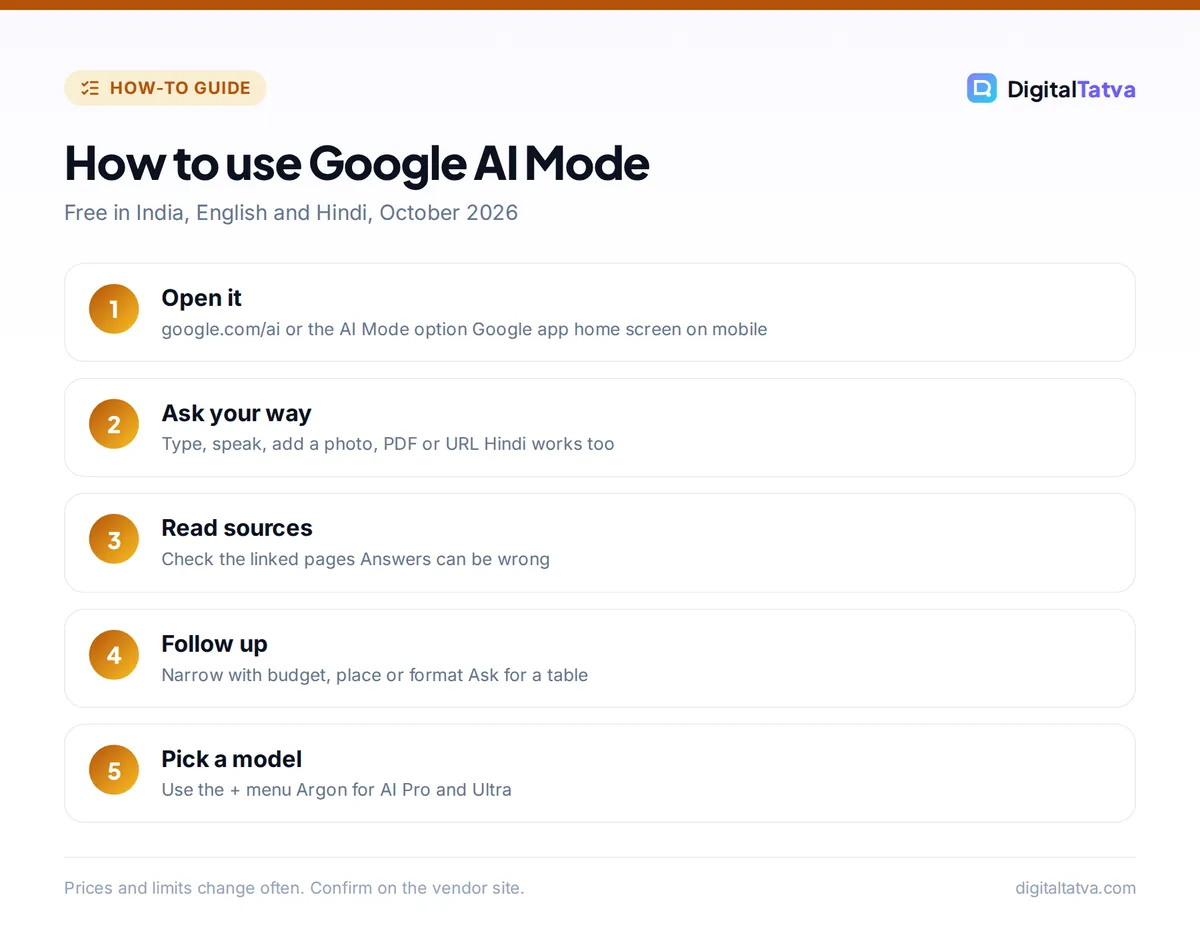
To use Google AI Mode, go to google.com/ai, or type a question in Google Search and tap AI Mode, or open the Google app and tap AI Mode on the home screen. You can type, speak, upload a photo or PDF, or paste a link, and AI Mode answers with a written response, sources and follow-up questions. It is free, it works in India in English and Hindi, and since October 13, 2026 Google AI Pro and Ultra subscribers can switch it to the new Gemini 4 Argon model.
Google AI Mode is Google’s chat-style search. Instead of ten blue links, it breaks your question into smaller searches (Google calls this “query fan-out”), reads the results and writes one answer with links. This guide explains how to open it on every device, the features worth using, prompts that work, how to pick a model, privacy settings and when classic Search or ChatGPT is still better.
Key takeaways
- Open Google AI Mode at google.com/ai, from the AI Mode option after a search, or from the Google app home screen. Chrome can also send open tabs to AI Mode.
- You can ask by text, voice, images, PDFs, Drive files or a pasted URL, then keep asking follow-ups in the same thread.
- It is free. Google AI Plus, Pro and Ultra subscribers can pick stronger models, and Pro and Ultra get Gemini 4 Argon from October 13, 2026.
- AI Mode launched fully in India in July 2025, added Hindi in September 2025 and now works in around 100 languages and 200+ countries.
- Answers can be wrong. Google itself advises checking important information in more than one place.
What is Google AI Mode?
AI Mode is a separate search experience inside Google Search, powered by Gemini models. It is built for longer, multi-part questions, such as “compare three budget phones under Rs 20,000 for gaming and battery life” or “plan a two-day Udaipur trip for a family with kids”. Google’s own help page says AI Mode falls back to plain web links when it is not confident in an AI answer.
It is different from AI Overviews, the short AI summary that sometimes appears at the top of normal results. AI Overviews reach over 2.5 billion monthly users and AI Mode passed 1 billion monthly users in 2026, according to Google’s I/O 2026 keynote. Google has said AI Mode is not the default search experience, so normal Search is still there.
| Feature | AI Mode | AI Overviews | Classic Search |
|---|---|---|---|
| How you get it | Choose AI Mode or go to google.com/ai | Appears automatically on some queries | Default results page |
| Follow-up questions | Yes, in a thread | Limited, via “Dive deeper” | No |
| Inputs | Text, voice, images, PDFs, files, URLs | Your search query | Text, voice, Lens |
| Best for | Complex, multi-part questions | Quick facts | Finding a specific site or local result |
| Cost | Free, model upgrades with Google AI plans | Free | Free |
How to open Google AI Mode on every device
On a computer
- Go to google.com/ai. This opens AI Mode directly with the “Ask anything” bar.
- Or search first. Type a question on google.com and choose AI Mode above the results.
- In Chrome, you can also start from the address bar and add open tabs to an AI Mode question, so it can answer about those pages.
- Sign in. AI Mode works without signing in, but you need to be signed in to save history and come back to earlier searches.
On Android and iPhone
- Update the Google app from the Play Store or App Store.
- Tap AI Mode on the home screen, below the search bar.
- Type, tap the microphone, or add an image from the menu in the “Ask anything” bar.
- Use Search Live for a spoken conversation with your camera, which Google rolled out to every AI Mode country in March 2026.
Tip: To ask in Hindi, just type or speak in Hindi. AI Mode usually replies in the language you use, in supported languages. For more Indian-language tools, see our guide to AI tools for Hindi, Gujarati and other Indian languages.
Best Google AI Mode features to try
Multi-part questions and follow-ups
The core skill of AI Mode is handling a question with several conditions at once. Ask it, read the answer and sources, then narrow with follow-ups like “only show options available in Ahmedabad” or “make it a table”.
Photos, PDFs and links
Upload one or more images, drag in a PDF, add a Drive file or paste a URL, then ask about it. This is handy for checking a product label, summarizing a brochure or comparing two web pages. For heavy document work, our list of AI tools to chat with PDFs covers dedicated options.
Interactive visuals
Signed-in English users can ask for simulations, diagrams or calculators with sliders, such as an EMI calculator or a physics demo. Ask for one explicitly in your question.
Personal context
Adults can turn on personal results that use Search history, and optionally connect Gmail, Google Calendar and Google Photos. This is useful for questions like “when is my next flight?”, but it is optional, and you can disconnect apps any time.
Travel and shopping help
AI Mode can track flight prices in more than 180 countries and send email alerts, and it has information monitoring that, since September 28, 2026, is open to all users. Hotel booking inside AI Mode is US only for now. Our guide to planning a trip with AI shows a full workflow.
How to choose a model, including Gemini 4 Argon
The menu in the “Ask anything” bar lets you pick a model. The free default is a fast Gemini Flash model, which Google switched to Gemini 3.5 Flash at I/O 2026. Google’s help page lists two options: Fast for everyday questions, and Pro, which uses Gemini 3 Pro, needs a Google AI Plus, Pro or Ultra subscription, works in English and has daily limits.
On October 13, 2026, Google began rolling out Gemini 4 Argon in AI Mode globally for Google AI Pro and Ultra subscribers. Tap the “+” icon in the “Ask anything” bar and choose Argon from the model menu. Google says Argon handles nuanced, multi-step tasks and follows instructions better in long conversations. The rollout is gradual, so it may not appear on your account yet. Our explainer on Gemini 4 Argon covers the model in depth.
| Plan | Price in India | AI Mode models |
|---|---|---|
| No plan | Free | Fast default model |
| Google AI Plus | Rs 399/month | Adds Pro (Gemini 3 Pro) with daily limits |
| Google AI Pro | Rs 1,950/month | Pro plus Gemini 4 Argon (rolling out) |
| Google AI Ultra | Highest tier | Highest limits, Gemini 4 Argon |
Save money: Eligible university students in India can get Google AI Plus free until December 31, 2026. See our roundup of free AI Pro plans in India and the full Gemini pricing guide.
Google AI Mode prompts that work
| Goal | Try this |
|---|---|
| Compare products | “Compare the best washing machines under Rs 35,000 for a family of four. Show a table with capacity, energy rating and service network in India.” |
| Local research | “Which co-working spaces in Ahmedabad have day passes under Rs 500 and good reviews for quiet work?” |
| Learn a topic | “Explain how SIPs work for a beginner, then give a simple example with numbers.” |
| Check a document | Upload a PDF and ask “List the key dates, fees and penalties in this agreement.” |
| Interactive visual | “Make an EMI calculator for a Rs 10 lakh car loan with a slider for interest rate.” |
| Trip plan | “Plan two days in Jaipur for a couple who like food and history, with travel times between stops.” |
Good AI Mode prompts state the goal, the constraints (budget, location, audience) and the format you want. Our prompt engineering guide covers the same principles for every AI tool.
Privacy, history and limits
- History: on a computer, saved AI Mode searches appear in a history panel on the left. Delete one or all from the More menu, or from your Search history page. Google says deleted items are removed from My Activity in under 24 hours.
- Personalization: personal results and app connections are for users 18 and over, and they are optional.
- Accuracy: Google warns AI responses can contain mistakes and recommends checking important information in several places, especially for health, money and legal questions.
- Limits: the Pro model has daily usage limits that can change with demand and plan.
Full details are on Google’s AI Mode help page.
Google AI Mode vs ChatGPT vs Perplexity
AI Mode’s advantage is Google’s index, maps, shopping and local data, which makes it strong for “near me”, product and travel questions. ChatGPT is better for writing, long analysis and working with your own files, while Perplexity is built around citations and research. Our comparisons of ChatGPT vs Google Search and Perplexity vs ChatGPT explain when to use each, and our list of the best AI research tools covers deeper research.
If you run a website, AI Mode also changes how people find you. Our guide to ranking in AI search explains what Google says about appearing in AI Mode and AI Overviews.
Frequently asked questions
Is Google AI Mode free?
Yes. AI Mode is free for everyone in supported countries, including India. A Google AI Plus, Pro or Ultra subscription adds stronger models such as Gemini 3 Pro, and Pro and Ultra subscribers get Gemini 4 Argon, which began rolling out on October 13, 2026.
How do I turn on AI Mode in Google?
You do not need to turn it on. Go to google.com/ai, or search on google.com and choose AI Mode, or tap AI Mode on the Google app home screen. Update the Google app if you do not see the option, and sign in to save your history.
Is Google AI Mode available in India and in Hindi?
Yes. AI Mode launched fully in India on July 8, 2025, its first full launch outside the US, and Hindi support arrived in September 2025. It now works in around 100 languages, so you can type or speak your question in Hindi.
Can I turn off Google AI Mode?
AI Mode is not the default, so you only see it when you choose it. Google’s help page does not describe a switch to remove it, but you can keep using normal Search, delete your AI Mode history and disconnect Gmail, Calendar or Photos at any time.
What is the difference between AI Mode and AI Overviews?
AI Overviews are short summaries that appear automatically at the top of some normal results. AI Mode is a separate, chat-style search where you ask complex questions, add images or files and keep asking follow-ups, with sources linked throughout the answer.
Final thoughts
Google AI Mode is the easiest way to get AI answers grounded in Google’s search data, and it costs nothing to try. Use it for multi-part questions, product and travel research, and quick questions about photos or PDFs, and switch to classic Search when you just need a specific site. If you pay for Google AI Pro, try Gemini 4 Argon on your hardest questions. Features and plan prices change often, so check Google’s help pages for the latest details.
Related reading: how to use Google Gemini and the best AI browsers.
Pricing and features are checked at the time of writing and can change. Some links may be affiliate links, which never affect our verdicts.