
15 Best AI Apps for Android and iPhone in 2026
The 15 best AI apps for Android and iPhone in 2026, from ChatGPT, Gemini and Claude to photo, Reels, transcription and Indian language apps, with free limits and INR prices.

On this page
- Key takeaways
- Best AI apps at a glance: quick picks table
- AI assistant apps: the 8 best AI chatbots for your phone
- AI apps for photos, Reels and creativity
- AI productivity apps: notes, transcription and translation
- How to choose the best AI app for your phone
- Free vs paid AI apps: what you actually get
- Frequently asked questions
- Our verdict: the best AI apps to install today
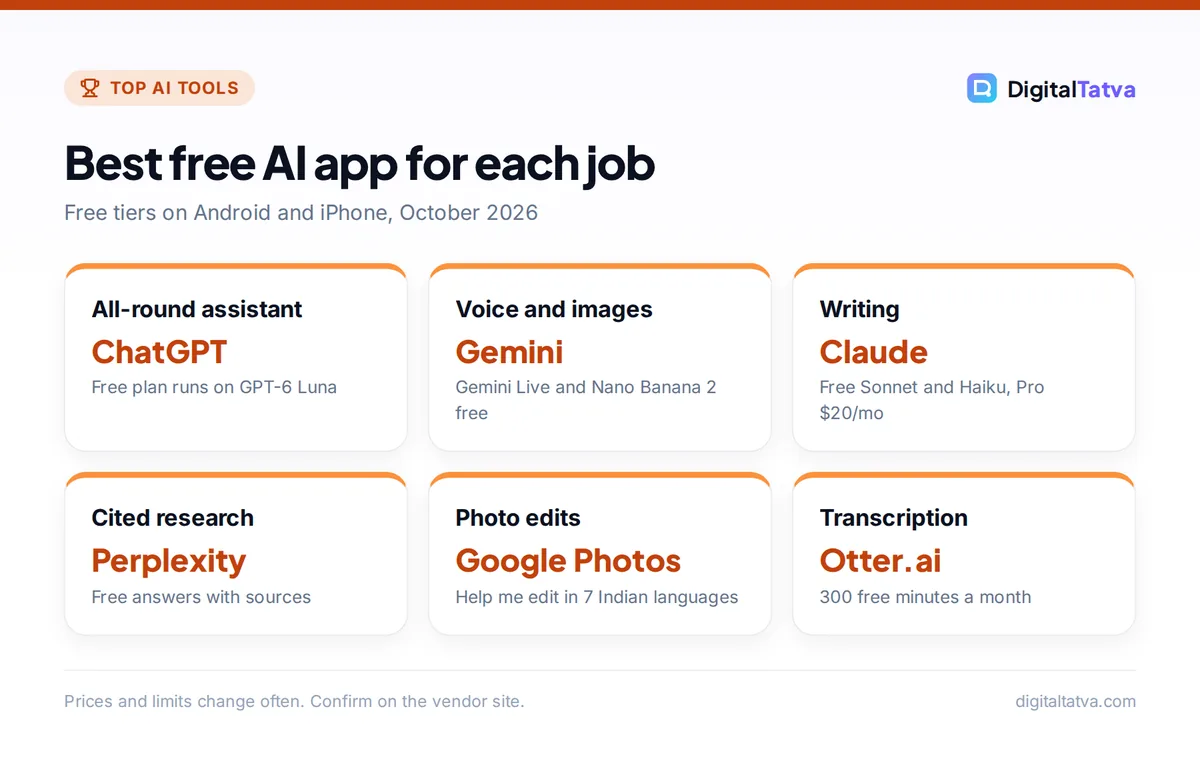
The best AI apps for Android and iPhone in 2026 are ChatGPT for an all-round assistant, Google Gemini for the best free voice and image features, and Claude for writing, with Perplexity, Microsoft Copilot and Meta AI close behind. Every app on this list has a free version, works on both platforms (except where we note it), and covers a real everyday job: chatting, research, photo editing, Reels, transcription, notes, translation or Indian languages.
We picked these best AI apps for what they do on a phone specifically, not on a laptop. That means voice mode, camera input, offline features, and how much you get before a paywall. Prices are in USD with INR where an official or clearly sourced Indian price exists.
Key takeaways
- ChatGPT, Gemini and Claude all have strong free mobile apps. ChatGPT Free now runs on GPT-6 Luna, and Gemini Free includes Gemini Live voice and Nano Banana 2 image editing.
- If you pay for one AI app, Google AI Plus (Rs 399 a month in India) is the cheapest paid tier, while ChatGPT Plus, Claude Pro and Perplexity Pro cost $20 a month each.
- For photos and video, Google Photos “Help me edit”, Photoroom and Instagram Edits do most jobs free.
- App store subscriptions are billed by Apple or Google in local currency, so the same plan can cost more in the app than on the web.
- Indian users get extra options: UPI for ChatGPT Go and Plus, the Jio Gemini offer, free Google AI Plus for students, and Sarvam’s Indus app for Indian languages.
Best AI apps at a glance: quick picks table
Use this table to jump to the app that fits your job. “Free plan” means a usable free tier, not a short trial.
| App | Best for | Free plan | Paid from | Platforms |
|---|---|---|---|---|
| ChatGPT | All-round assistant | Yes (GPT-6 Luna) | Go $8/mo, Plus $20/mo | Android, iPhone |
| Google Gemini | Free voice, images, Google apps | Yes | AI Plus $4.99/mo (Rs 399) | Android, iPhone (iOS 16+) |
| Claude | Writing and long documents | Yes | Pro $20/mo | Android, iPhone |
| Perplexity | Cited answers and research | Yes | Pro $20/mo | Android, iPhone |
| Microsoft Copilot | Free chat tied to Office | Yes | Microsoft 365 Personal $9.99/mo | Android, iPhone |
| Meta AI | AI inside WhatsApp and Instagram | Yes | Free in most markets | Android, iPhone |
| Grok | Real-time X content, images | Yes | SuperGrok Lite about $10/mo | Android, iPhone |
| DeepSeek | Free reasoning chat | Yes | App is free | Android, iPhone |
| Google Photos | Editing photos by asking | Yes | Google One for extras | Android, iPhone |
| Photoroom | Product photos, backgrounds | Yes (25 exports/week) | Pro $7.50/mo yearly | Android, iPhone |
| Instagram Edits | Reels editing | Yes (free app) | Free | Android, iPhone |
| Otter.ai | Live transcription | Yes (300 min/mo) | Pro $8.33/mo yearly | Android, iPhone |
| Goodnotes | Handwritten notes with AI | Yes (3 notebooks) | Essential $11.99/yr | Android, iPhone, iPad |
| Google Translate | Travel and conversations | Yes | Free | Android, iPhone |
| Sarvam Indus | Indian languages | Beta | Not announced | Android, iPhone (India) |
AI assistant apps: the 8 best AI chatbots for your phone
These eight are the strongest general assistants, and our longer comparison of the best AI chatbots in 2026 covers them on desktop too.
1. ChatGPT: Best all-round AI app
- Starting price: Free; Go $8/mo; Plus $20/mo
- Free plan: Yes, unlimited everyday chats on GPT-6 Luna
- Best for: Most people who want one app for everything
ChatGPT is the safest first install. Since 7 October 2026, answers can use Intelligent UI, which builds charts, buttons, forms and small tools inside the chat on updated apps, and Free and Go users now chat on GPT-6 Luna while Plus and higher get GPT-6 Sol. ChatGPT Images 2.5 works on every tier, so you can generate or edit photos straight from your camera roll.
Voice is where plans differ on a phone. Free gets a restricted GPT-Live-1 mini voice allowance, Go gets 3 hours a day on GPT-Live-1 mini, and Plus gets 3 hours a day on the fuller GPT-Live-1 model, counted over a rolling 24 hours. In India, you can pay for Go and Plus with UPI. See our ChatGPT pricing guide before upgrading.
Skip it if: you mostly want cited sources (use Perplexity) or the cheapest paid tier (use Gemini).
2. Google Gemini: Best free AI app for voice and images
- Starting price: Free; AI Plus $4.99/mo (Rs 399); AI Pro $19.99/mo (Rs 1,950)
- Free plan: Yes, Gemini 3.6 Flash, Gemini Live, image generation
- Best for: Android users and anyone living in Gmail, Calendar and Maps
Gemini gives away more on its free plan than any rival: Gemini Live voice chat, image generation and editing with Nano Banana 2, Deep Research and Canvas. On Android, Gemini Live can use your camera and screen, check your Calendar, add to Keep and Tasks, and pull up Maps directions. On iPhone, the app needs iOS 16 or later, and Google’s official Gemini app availability page lists more than 150 supported countries.
Free images download at 1K resolution and paid plans at 2K. AI Plus doubles the free usage limits and adds video generation, while AI Pro gives 4x the free limits and a 1M token context window. Indian college students can claim AI Plus free for a year until 31 December 2026, and Jio users on an unlimited 5G plan of Rs 349 or more can claim 18 months of AI Pro. Details are in our Gemini pricing breakdown.
Skip it if: you need the most careful long-form writing, where Claude is stronger.
3. Claude: Best AI app for writing and long documents
- Starting price: Free; Pro $20/mo ($17/mo yearly)
- Free plan: Yes, Sonnet and Haiku models, web search, file creation
- Best for: Writers, students and professionals reading long PDFs
Claude’s mobile app is calm and focused, and its writing needs fewer edits in everyday use. The free plan includes web search, file creation, memory and connectors. Pro adds Opus models, Projects, more usage (sessions reset every five hours) and Claude Cowork on mobile, which lets Claude work through multi-step tasks for you.
Press reports put Indian Pro pricing at about Rs 2,000 a month including GST. Our Claude pricing guide explains what each plan unlocks.
Skip it if: you want image generation, which Claude does not offer.
4. Perplexity: Best AI app for cited answers
- Starting price: Free; Pro $20/mo
- Free plan: Yes, search with citations and limited daily usage
- Best for: Research, shopping comparisons and fact checks
Perplexity answers with sources you can tap, which makes it the best phone app for checking facts quickly. On Android, you can set it as your default assistant and launch it by holding the power or home button, and it can carry out voice tasks across your other apps. Its Comet browser is free on Android and iPhone too.
Note that the Airtel free Perplexity Pro offer ended on 16 January 2026 for new sign-ups. Read our Perplexity review for where it beats ChatGPT and where it does not.
Skip it if: you mostly write or brainstorm rather than search.
5. Microsoft Copilot: Best free AI app for Office users
- Starting price: Free; Microsoft 365 Personal $9.99/mo
- Free plan: Yes, chat with daily limits
- Best for: People who already use Word, Excel and Outlook
Copilot’s free app handles everyday chat and image creation, with daily limits reported by third-party testers. It shines when you pay for Microsoft 365, because Copilot then works inside Word, Excel, PowerPoint, OneNote and Outlook. Microsoft 365 Personal at $9.99 a month (or $99.99 a year) covers one person on up to five devices, which is good value if you need Office anyway. Microsoft lists the app for desktop, mobile and web on its official Copilot app page.
Our step-by-step guide on how to use Microsoft Copilot for free covers the mobile app.
Skip it if: you do not use Microsoft apps; ChatGPT or Gemini will serve you better.
6. Meta AI: Best AI inside WhatsApp and Instagram
- Starting price: Free
- Free plan: Yes, with usage limits
- Best for: Quick questions and images without installing anything new
Meta AI lives inside apps you already have: WhatsApp, Instagram, Facebook and Messenger, plus a standalone Meta AI app on the App Store and Google Play. It handles chat, voice, image generation and web search, and the standalone app also manages Ray-Ban Meta glasses. Meta’s free Reels translation, now in Hindi, Bengali, Tamil, Telugu, Marathi and Kannada, is a real bonus for Indian creators.
Learn the basics in our guide on how to use Meta AI on WhatsApp, Instagram and Facebook.
Skip it if: you want deep reasoning or long documents.
7. Grok: Best for real-time X content
- Starting price: Free; SuperGrok Lite about $10/mo; SuperGrok about $30/mo
- Free plan: Yes, Grok 4.6 with limits
- Best for: News, trends and conversations happening on X
Grok’s standalone app runs Grok 4.6 on every plan and includes image generation, voice mode and limited web and X search for free. Video generation in Grok Imagine needs a paid SuperGrok plan, according to third-party reports. xAI’s official price page could not be read, so treat paid prices as approximate.
See how to use Grok AI for its free features.
Skip it if: you need dependable citations or business-grade privacy controls.
8. DeepSeek: Best free reasoning chatbot
- Starting price: Free
- Free plan: Yes, limits not published
- Best for: Math, coding questions and step-by-step reasoning on a budget
DeepSeek’s app is free and capable for reasoning-heavy questions, and its open-weight V4 models are popular with developers. It does not publish usage limits, so expect slowdowns at busy times. Read its privacy policy before sharing personal or business data.
Our guide on how to use DeepSeek walks through the app and web versions.
Skip it if: you need image generation or strict data handling commitments.
AI apps for photos, Reels and creativity
9. Google Photos: Best free AI photo editor
- Starting price: Free
- Free plan: Yes
- Best for: Fixing and restyling everyday photos by describing the change
“Help me edit” in Google Photos lets you describe an edit by voice or text, and in India it understands English, Hindi, Tamil, Marathi, Telugu, Bengali and Gujarati. It needs an Android phone with 4GB of RAM and Android 8.0 or later. Magic Eraser and Photo Unblur are free for everyone, and edited images carry C2PA Content Credentials.
Compare it with paid options in our list of the best AI photo editors for phone and desktop.
10. Photoroom: Best for product photos
- Starting price: Free; Pro $7.50/mo billed yearly
- Free plan: Yes, 25 exports per week or 100 per month
- Best for: Sellers, resellers and small brands
Photoroom removes backgrounds and generates clean studio-style backdrops in a tap, which is why online sellers love it. Free exports are capped at 25 a week or 100 a month, and Android free exports go up to 4032 x 4032 pixels. Pro adds 8,000 AI credits a month and 1,000 exports.
11. Instagram Edits: Best free Reels editor
- Starting price: Free
- Free plan: Yes, no subscription
- Best for: Creators posting Reels from their phone
Edits is Instagram’s own video editor for Android and iPhone. Third-party reviews report it is free with no watermark, exports up to 4K HDR and includes AI Animate, an AI green screen and auto-captions. It is a strong replacement for CapCut, which remains blocked in India. For a deeper list, see the best AI tools for Instagram Reels.
AI productivity apps: notes, transcription and translation
12. Otter.ai: Best for live transcription
- Starting price: Free; Pro $8.33/mo yearly or $16.99 monthly
- Free plan: Yes, 300 minutes a month, 30 minutes per conversation
- Best for: Lectures, interviews and in-person meetings
Tap the blue microphone in the Otter app and it transcribes in real time (an internet connection is required). The free Basic plan gives 300 minutes a month with a 30-minute cap per conversation, while Pro raises that to 1,200 minutes and 90 minutes per conversation. Students and teachers with a .edu email get 20% off Pro. More options are in our roundup of the best AI transcription tools.
13. Goodnotes: Best AI app for handwritten notes
- Starting price: Free; Essential $11.99/yr; Pro $35.99/yr
- Free plan: Yes, 3 notebooks
- Best for: Students and tablet users who write by hand
Goodnotes runs on iPhone, iPad, Android and more, and its Goodnotes AI assistant works across handwriting, typed text and audio, with citations back to your notes. Goodnotes AI for Meetings transcribes and summarizes recordings. Full AI needs the AI Pass add-on at $9.99 a month on top of a paid plan. Compare it with Notion and Evernote in our list of the best AI note taking apps.
14. Google Translate: Best for travel and conversations
- Starting price: Free
- Free plan: Yes
- Best for: Travelers and multilingual families
Google Translate now uses Gemini for idioms and slang, launched first in the US and India, and offers live translation through any headphones on Android in India in more than 70 languages. Offline language downloads keep it useful without data. For business use, see the best AI translation tools.
15. Sarvam Indus: Best AI app for Indian languages
- Starting price: Not announced (beta)
- Free plan: Beta access, possible waitlist
- Best for: Chatting in Hindi and other Indian languages by voice
Indus is Sarvam AI’s chat app for Android, iPhone and the web, launched in beta in February 2026 and limited to India. You can type or speak, and it replies in text and audio. Sarvam says its platform covers 22 Indian languages, though the exact list inside Indus is not published. Our guide to AI tools for Hindi, Gujarati and other Indian languages compares it with Gemini and ChatGPT.
How to choose the best AI app for your phone
- Start with one assistant. Install ChatGPT or Gemini first. If you live in Google apps or use Android, Gemini integrates better; if you want the broadest features, choose ChatGPT.
- Add one specialist app. Pick the job you do most on your phone (photos, Reels, transcription or translation) and add the app from that section.
- Test free limits for a week. Most people never hit the free caps on Gemini, Claude or Meta AI. Upgrade only when you hit a wall more than twice a week.
- Check permissions. Grant microphone, camera and photo access only to apps that need them, and turn off training on your chats where the app allows it. Our guide Is ChatGPT safe? shows where the privacy switches are.
- Compare app store and web prices. Subscribe on the web when it is cheaper, then sign in on your phone.
Save money: In-app subscriptions are charged by Apple or Google in local currency, and OpenAI notes on its payment methods help page that existing subscribers keep their billing currency. If the web price is lower, cancel the app store subscription at the end of the period and resubscribe on the vendor’s website. Our list of ways to save money on AI subscriptions has more tricks.
Free vs paid AI apps: what you actually get
The real differences show up in voice minutes, image limits, model quality and file uploads.
| Feature | Free tiers | Paid tiers ($20/mo range) |
|---|---|---|
| Everyday chat | Unlimited on ChatGPT Free and Go, subject to safeguards | Smarter models (GPT-6 Sol, Opus, Gemini Pro) |
| Voice | Gemini Live free; ChatGPT Free restricted | ChatGPT Plus 3 hours a day of GPT-Live-1 |
| Images | Gemini 1K downloads, ChatGPT limited | Gemini 2K downloads, higher limits |
| File uploads | ChatGPT Free 3 uploads a day | Up to 80 files every 3 hours on ChatGPT |
| Research | Limited deep research | Expanded deep research and agents |
If you only want one paid plan, our guide to AI subscriptions actually worth paying for ranks them by value.
Frequently asked questions
What is the best AI app for Android and iPhone?
ChatGPT is the best all-round AI app for most people because it handles chat, voice, images and files well on both platforms, and its free plan now runs on GPT-6 Luna. Gemini is the best free alternative, especially on Android, because Gemini Live voice and Nano Banana image editing are included at no cost.
Which AI app is completely free?
Meta AI, DeepSeek, Google Translate, Instagram Edits and Google Photos editing are free to use. ChatGPT, Gemini, Claude, Perplexity and Copilot have free tiers with limits, and paid plans add better models, longer voice time and higher image and upload caps. For most casual users, the free tiers are enough.
Is the Gemini app better than ChatGPT on Android?
On Android, Gemini integrates more deeply: it can act as your phone assistant, use your camera and screen in Gemini Live, and connect to Calendar, Keep, Maps and Google Home. ChatGPT has the stronger all-round assistant and richer Intelligent UI answers. Many people keep both, using Gemini for phone tasks and ChatGPT for thinking work.
How much do AI apps cost in India?
Google AI Plus costs Rs 399 a month and AI Pro Rs 1,950 a month on Google’s India page. ChatGPT Go was Rs 399 at launch and Plus is widely reported at Rs 1,999 including GST, with UPI accepted for both. Claude Pro is reported at about Rs 2,000. Check the in-app price, because app store pricing can differ.
Are AI apps safe to use on my phone?
Official apps from major vendors are generally safe, but treat chats as data you are sharing with a company. Turn off model training where possible, avoid pasting passwords, ID numbers or client data, and review camera, microphone and photo permissions. Download only from the verified developer in the App Store or Google Play.
Our verdict: the best AI apps to install today
Install ChatGPT or Gemini as your main assistant, add Perplexity if you research often, and pick one creative or productivity app from the list based on what you do every day. If you want a single paid plan on a budget, Google AI Plus is the cheapest serious option, and ChatGPT Plus is the best all-rounder at $20 a month. For desktop tools, see our list of the best free AI tools you can use today. App prices and free limits change often, so confirm the current price on the vendor’s site or app store before you subscribe.
Pricing and features are checked at the time of writing and can change. Some links may be affiliate links, which never affect our verdicts.



