15 Best AI Tools for Freelancers to Earn More in Less Time
The 15 best AI tools for freelancers in 2026 for winning clients, doing the work faster and running the business, with prices, free plans and budget stacks.

On this page
The best AI tools for freelancers in 2026 are ChatGPT or Claude for writing and thinking, Grammarly for polish, Canva for design, Otter or Fireflies for client calls, Gamma for proposals and decks, Perplexity for research and Zapier for automating admin. Together they can cut hours from proposals, client work and invoicing every week, so you can take on more projects or raise your rates without working longer.
Below are 15 AI tools for freelancers grouped by job (winning clients, doing the work, running the business), with prices, free plans, a starter stack for every budget and tips for using AI without hurting client trust.
Key takeaways
- Most freelancers need just one AI assistant (ChatGPT or Claude) plus two or three specialist tools.
- A strong free stack exists: ChatGPT, Claude, Canva, Grammarly, Otter and Zapier all have free plans.
- A paid core stack costs about $20 to $60 a month and usually pays for itself with one extra project.
- Use AI for drafts, research and admin; keep strategy, final quality and client relationships human.
- Check client contracts before pasting their data into AI tools, and disclose AI use where required.
Quick picks: AI tools for freelancers
| Tool | Best for | Free plan | Paid from |
|---|---|---|---|
| ChatGPT | All-round assistant, images, data | Yes | Go $8, Plus $20/month |
| Claude | Writing, long documents, coding | Yes | Pro $20/month ($17 yearly) |
| Grammarly | Polishing client-ready writing | Yes (100 AI prompts/month) | Pro $12/month yearly |
| Canva | Design, social posts, presentations | Yes (20 AI uses) | Pro US$144/year |
| Gamma | Proposals and pitch decks | 400 one-time credits | Plus about $9/month |
| Perplexity | Research with sources | Yes | Pro $20/month |
| Otter | Client call notes | 300 minutes/month | Pro $8.33/month yearly |
| Fireflies | Meeting notes and search | Yes | Pro $10/seat/month yearly |
| Notion | Client portals, notes, projects | Yes (AI trial) | Business $20/month for full AI |
| Zapier | Automating admin | 100 tasks/month | Paid plans |
| ElevenLabs | Voiceovers | Yes | Paid plans |
| Descript | Editing video and podcasts by text | Yes | Paid plans |
| Bolt.new or Lovable | Building client prototypes | Yes | About $25/month |
| Google AI Studio | Free access to Gemini models | Yes | Pay per use |
| Microsoft Copilot | Free help inside Windows and Edge | Yes | Microsoft 365 plans |
AI tools to win more clients
1. ChatGPT: Best all-round freelance assistant
- Starting price: Free; Go $8/month (about Rs 399); Plus $20/month
- Free plan: Yes
- Best for: Proposals, cold emails, research, images and spreadsheets
Use ChatGPT to tailor proposals to each job post, draft follow-up emails, analyze client spreadsheets and create images for mockups. Projects keep each client’s brief and files together. Our ChatGPT pricing guide helps you pick a plan.
2. Gamma: Best for proposals and pitch decks
- Starting price: Plus about $9/month
- Free plan: 400 one-time credits
- Best for: Good-looking proposals in minutes
Paste your scope and Gamma builds a polished proposal or deck you can export to PDF or PowerPoint. Paid plans remove Gamma branding, which matters for client work. See our Gamma review.
3. Perplexity: Best for client research
- Starting price: Free; Pro $20/month
- Free plan: Yes
- Best for: Researching a prospect’s market before a pitch
Before a discovery call, ask Perplexity about the client’s industry, competitors and recent news, with sources you can check. It makes you sound prepared in the first five minutes.
AI tools to do the work faster
4. Claude: Best for writing and long documents
- Starting price: Free; Pro $20/month or $17/month yearly
- Free plan: Yes
- Best for: Writers, consultants, developers
Claude writes natural long-form drafts, handles long briefs and contracts, and is excellent at coding. Use Projects to store each client’s style guide. Read how to use Claude.
5. Grammarly: Best for client-ready polish
- Starting price: Pro $12/month billed yearly
- Free plan: Yes, 100 AI prompts a month
- Best for: Non-native English writers and anyone sending lots of copy
Grammarly catches errors, adjusts tone and, on Pro, checks plagiarism and AI text, which helps when clients worry about originality. See our Grammarly review.
6. Canva: Best for design work
- Starting price: Pro US$144/year
- Free plan: Yes, up to 20 AI uses
- Best for: Social media, presentations, simple branding
Canva’s Magic Studio generates designs, removes backgrounds, resizes posts for every platform and keeps brand kits per client. Pro gives 10 times more AI than the free plan.
7. ElevenLabs: Best for voiceovers
- Starting price: Paid plans for commercial use
- Free plan: Yes
- Best for: Video creators and course builders
Realistic AI voices for explainer videos, ads and courses, in many languages. Check that your plan allows commercial use for client projects. See ElevenLabs pricing.
8. Descript: Best for video and podcast editing
- Starting price: Paid plans
- Free plan: Yes
- Best for: Editing recordings by editing the transcript
Delete words in the transcript and Descript cuts the video. It also removes filler words and cleans audio, which speeds up client video work.
9. Bolt.new or Lovable: Best for client prototypes
- Starting price: About $25/month
- Free plan: Yes, limited
- Best for: Designers, consultants and no-code developers
Describe an app or landing page and get a working prototype to show clients the same day. Learn the approach in what vibe coding is.
10. Google AI Studio: Best free model access
- Starting price: Free tier, then pay per use
- Free plan: Yes
- Best for: Tech freelancers testing Gemini and building small tools
Free access to Gemini Flash models, long documents and a Build mode for quick apps. See how to use Google AI Studio.
AI tools to run your freelance business
11. Otter: Best for client call notes
- Starting price: Pro $8.33/month yearly ($16.99 monthly)
- Free plan: 300 minutes a month
- Best for: Discovery calls and briefings
Otter records and summarizes calls so you can focus on the client, then send a recap with action items. Always tell clients you are recording.
12. Fireflies: Best for searchable meeting history
- Starting price: Pro $10/seat/month yearly
- Free plan: Yes
- Best for: Freelancers with many recurring client meetings
Fireflies joins calls, transcribes them and lets you search across all past meetings. Compare in Otter vs Fireflies.
13. Notion: Best for client portals and projects
- Starting price: Business $20/month for full Notion AI
- Free plan: Yes, AI trial only
- Best for: Organizing clients, briefs and deliverables
Build a shared page per client with briefs, timelines and files. Full Notion AI requires the Business plan. See Notion AI pricing.
14. Zapier: Best for automating admin
- Starting price: Paid plans
- Free plan: 100 tasks a month
- Best for: Lead capture, invoicing reminders, file handling
Automate repetitive steps: new form lead to CRM, signed proposal to project board, paid invoice to thank-you email. Start with our Zapier automation guide.
15. Microsoft Copilot: Best free help on Windows
- Starting price: Free
- Free plan: Yes
- Best for: Quick answers and images without another subscription
Free Copilot in Windows and Edge handles quick rewrites, summaries of web pages and simple images, and if you pay for Microsoft 365 Personal you also get Copilot in Word and Excel.
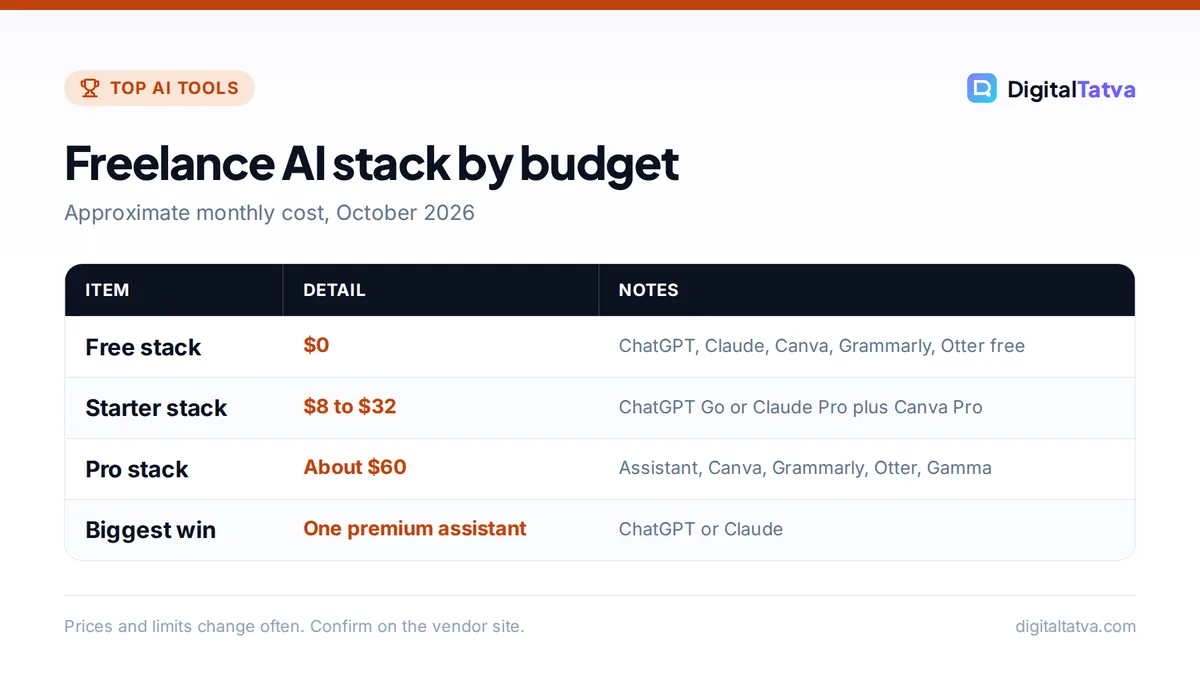
Freelance AI stacks for every budget
| Budget | Stack | Monthly cost |
|---|---|---|
| Free | ChatGPT Free, Claude Free, Canva Free, Grammarly Free, Otter Basic, Zapier Free | $0 |
| Starter | ChatGPT Go or Claude Pro, Canva Pro, plus free tools | About $8 to $32 |
| Pro | Claude Pro or ChatGPT Plus, Canva Pro, Grammarly Pro, Otter Pro, Gamma Plus | About $60 |
Save money: pay for one premium assistant, not three. Pick ChatGPT if you need images and data analysis, Claude if you write or code a lot. Use annual billing only for tools you have used for at least two months. More tips in how to save money on AI subscriptions.
Using AI as a freelancer without losing client trust
- Read your contract. Some clients forbid AI or require disclosure; follow it.
- Protect client data. Do not paste confidential documents into free tools that may train on data.
- Add real value. Clients pay for judgment, strategy and quality, not raw AI output.
- Check facts and originality. Verify claims and run plagiarism checks on important copy.
- Price on value. If AI makes you faster, consider project pricing instead of hourly rates.
For ideas on new income streams, read how to make money with AI and AI skills to learn in 2026.
Frequently asked questions
What is the best AI tool for freelancers?
ChatGPT is the best all-round AI tool for most freelancers because it handles writing, research, images and spreadsheets in one place. Writers and developers often prefer Claude. Add Canva for design, Grammarly for polish and Otter for client calls.
Are there free AI tools for freelancers?
Yes. ChatGPT, Claude, Gemini, Canva, Grammarly, Otter, Fireflies, Notion, Zapier and Microsoft Copilot all offer free plans. A free stack covers most needs for new freelancers, and you can upgrade one tool at a time as work grows.
Should freelancers tell clients they use AI?
Follow your contract first. Where there is no rule, being open about using AI for drafts and research while you handle strategy, editing and quality builds trust. Some clients and platforms require disclosure, so ask if you are unsure.
Can AI help freelancers earn more?
Yes, mainly by saving time on proposals, research, first drafts and admin, which lets you take more projects or offer new services such as AI content, automation or prototypes. Pricing by project rather than by hour lets you keep the benefit of working faster.
How much do AI tools cost for freelancers in India?
Many tools are free to start. ChatGPT Go costs about Rs 399 a month, and most premium assistants such as ChatGPT Plus and Claude Pro cost about $20 a month. A full paid stack typically costs Rs 2,500 to Rs 5,000 a month.
Our recommendation
Start free: ChatGPT or Claude, Canva, Grammarly and Otter. When AI saves you real hours each week, upgrade your main assistant first, then add Gamma or Zapier where they remove your biggest time sinks. Prices change often, so confirm current plans on Grammarly’s plans page, Canva’s pricing page and each tool’s site.
Pricing and features are checked at the time of writing and can change. Some links may be affiliate links, which never affect our verdicts.