40 ChatGPT Prompts for Resumes, Cover Letters and Job Search
40 copy-and-paste ChatGPT prompts for resumes, cover letters, LinkedIn and interviews, with a step-by-step workflow, ATS tips and the mistakes to avoid.

On this page
- Key takeaways
- How to use ChatGPT to write your resume: the workflow
- Prompts to analyze the job description
- Prompts for your resume summary
- Prompts for experience bullet points
- Prompts for skills, education and formatting
- Prompts for cover letters
- Prompts for LinkedIn
- Prompts for interviews and follow-ups
- Best AI tools for resumes besides ChatGPT
- Common mistakes when using AI for resumes
- Frequently asked questions
- Start with one prompt today
The best ChatGPT prompts for a resume give the AI three things: the job description you are targeting, your real experience, and clear rules such as “use numbers, keep it to one page and do not invent anything”. Paste a job post and your current resume, then use prompts like “Rewrite my experience bullets to match this job, starting each with an action verb and adding measurable results I provide” to get a tailored, ATS-friendly resume in minutes.
Below are 40 copy-and-paste ChatGPT prompts for resumes, cover letters, LinkedIn and the wider job search, grouped by task, plus a step-by-step workflow, tips for applicant tracking systems (ATS), and mistakes to avoid. They work in ChatGPT, Claude and Gemini too. New to ChatGPT? Start with our beginner guide.
Key takeaways
- Always paste the job description: tailored resumes beat generic ones.
- Give ChatGPT your real numbers and achievements; tell it never to invent experience.
- Use AI for structure, wording and keywords, then edit so it sounds like you.
- Remove personal details such as your address, phone number and ID numbers before pasting into any AI tool.
- Keep formatting simple for ATS: standard headings, no tables or images in the resume itself.
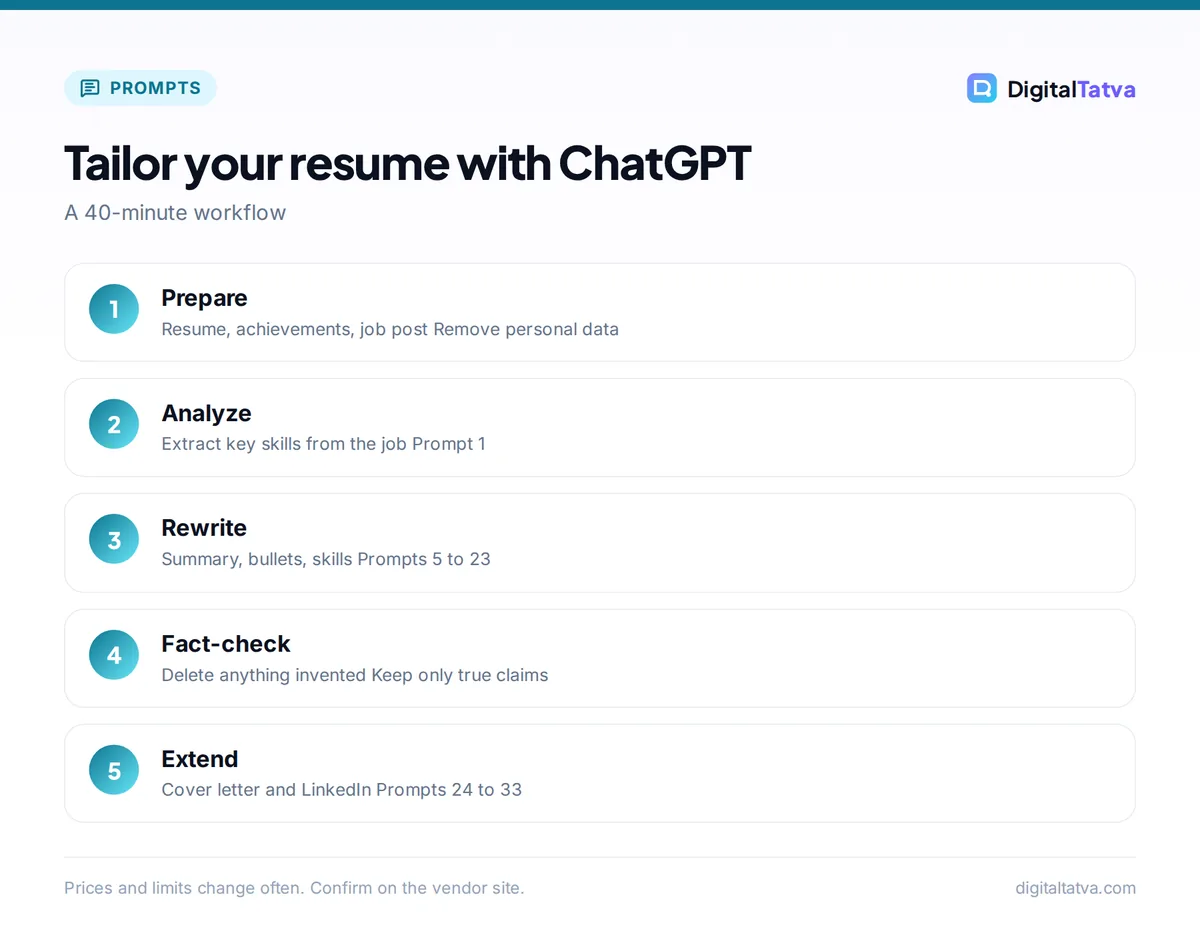
How to use ChatGPT to write your resume: the workflow
- Collect your raw material. Your current resume, a list of achievements with numbers, and the job description.
- Strip personal data. Replace your name, phone, email and address with placeholders before pasting.
- Analyze the job first. Ask ChatGPT to extract the key skills and keywords from the job post.
- Rewrite section by section. Summary, experience, skills, education. Do not ask for everything at once.
- Fact-check every line. Delete anything that is not true or that you cannot explain in an interview. The techniques in our prompt engineering guide help you get accurate output the first time.
- Write the cover letter and LinkedIn updates from the finished resume.
Watch out: ChatGPT may “improve” your resume by adding skills, titles or numbers you never gave it. Recruiters check, and invented claims can cost you the offer. Add this line to every prompt: “Do not invent anything. Use only the information I provide.”
Prompts to analyze the job description
- “Here is a job description: [paste]. List the 10 most important skills and keywords, ranked by importance, and say which are hard skills and which are soft skills.”
- “Based on this job description, what problems is this company trying to solve by hiring this role? Answer in five bullets.”
- “Compare this job description with my resume [paste]. Show a table of requirements I clearly meet, partly meet and do not meet.”
- “What questions should I expect in an interview for this role, based on the job description?”
Prompts for your resume summary
- “Write three versions of a 3-line professional summary for a [job title] with [X] years of experience in [industry], tailored to this job description: [paste]. Use only facts from my resume: [paste].”
- “Make this summary more specific and less generic. Remove clichés like ‘hardworking’ and ‘team player’: [paste].”
- “Write a resume summary for a fresher with a [degree] from [college], internships in [areas] and skills in [skills], applying for [role].”
- “Write a summary for someone switching careers from [old field] to [new field], highlighting transferable skills: [list].”
Prompts for experience bullet points
- “Rewrite these experience bullets using strong action verbs and the format ‘did X, which resulted in Y’. Keep my numbers and do not add new ones: [paste bullets].”
- “Turn these job duties into achievement-focused bullets. Ask me for missing numbers instead of guessing: [paste].”
- “Tailor these bullets to match the keywords in this job description, without changing the facts: [paste both].”
- “Shorten each bullet to one line, under 20 words, keeping the most impressive result.”
- “I managed [task]. Ask me five questions that would help quantify the impact so I can write a stronger bullet.”
- “Write three bullet points for an internship where I did [tasks] at [company], focused on skills relevant to [target role].”
- “Rewrite these bullets for a senior leadership role, emphasizing strategy, team size, budget and business outcomes: [paste].”
Tip: numbers make bullets credible: “Reduced customer response time from 24 hours to 4 hours” beats “Improved customer service”. If you do not know exact figures, use honest ranges you can defend.
Prompts for skills, education and formatting
- “From my resume and this job description, create a skills section grouped into Technical, Tools and Soft skills. Only include skills I actually have.”
- “Check my resume for ATS problems: unusual headings, tables, graphics, missing keywords and inconsistent dates.”
- “Reorder my resume sections for a [fresher or experienced] candidate applying for [role].”
- “Cut my resume to one page by removing the least relevant content for this job. Explain what you removed.”
- “Proofread my resume for grammar, consistency of tense and formatting. List every change.”
- “Suggest a clean, ATS-friendly resume layout in plain text with standard section headings.”
- “Rewrite my education section to highlight relevant projects, coursework and achievements for [role].”
- “Explain a [6 month or 1 year] career gap positively in one line for my resume, based on this reason: [reason].”
Prompts for cover letters
- “Write a 250-word cover letter for [role] at [company] using my resume and this job description. Open with why I am interested in this company specifically.”
- “Make this cover letter sound more natural and less formal, like a confident professional talking: [paste].”
- “Write a short cover email (under 120 words) to attach my resume for [role].”
- “Write a cover letter for a career switch from [field] to [field], addressing the switch honestly and confidently.”
- “Create a cover letter template with placeholders I can quickly customize for similar roles.”
For more email templates, see our ChatGPT prompts for professional emails.
Prompts for LinkedIn
- “Write a LinkedIn headline (under 220 characters) for a [role] with skills in [skills], aimed at recruiters in [industry].”
- “Write a LinkedIn About section in first person, 150 to 200 words, based on my resume, ending with what I am looking for.”
- “Turn my resume experience into LinkedIn experience descriptions that are slightly more conversational.”
- “Write a short LinkedIn post announcing I am open to [role] opportunities, without sounding desperate.”
- “Draft a polite LinkedIn message to a recruiter at [company] about the [role] opening, under 80 words.”
Our full collection of ChatGPT prompts for LinkedIn has 40 more, and the best AI headshot generators can help with a profile photo.
Prompts for interviews and follow-ups
- “Act as an interviewer for [role] at [company]. Ask me one question at a time and give feedback on each answer.”
- “Help me write a STAR-format answer (situation, task, action, result) for this example from my experience: [story].”
- “What are good questions to ask the interviewer at the end of an interview for [role]?”
- “Write a thank-you email after my interview with [name] for [role], mentioning [topic we discussed].”
- “Help me answer ‘What are your salary expectations?’ for [role] in [city], politely and without giving a number first.”
- “Write a professional email accepting [or declining] a job offer.”
- “Create a weekly job search plan with daily tasks for applying, networking and learning.”
- “Review my job search approach and suggest three changes to get more interviews: [describe what you are doing].”
For full mock interviews, use our 40 AI interview prep prompts.
Best AI tools for resumes besides ChatGPT
| Tool | Best for |
|---|---|
| ChatGPT | Tailoring, rewriting and interview practice |
| Claude | Natural-sounding cover letters and long edits |
| Gemini | Working directly in Google Docs resumes |
| Dedicated resume builders | Templates, ATS checks and formatting |
| Grammarly | Final polish and tone |
Compare dedicated tools in our list of the best AI resume builders, and read our Grammarly review for proofreading.
Common mistakes when using AI for resumes
- Generic output: not pasting the job description leads to bland, keyword-poor resumes.
- Invented claims: always fact-check; never keep a line you cannot defend.
- Robotic tone: rewrite phrases like “spearheaded synergies” in plain English.
- Over-design: fancy layouts with tables, columns and icons can confuse ATS software.
- Same resume for every job: tailor at least the summary and top bullets each time.
- Ignoring in-demand skills: check which skills employers want now in AI skills to learn and which jobs AI is changing, then highlight the ones you genuinely have.
- Sharing private data: keep phone numbers, addresses and ID numbers out of AI chats; read Is ChatGPT safe?
Frequently asked questions
Can ChatGPT write my resume?
Yes. ChatGPT can draft and tailor every section of a resume if you give it your real experience, achievements with numbers and the job description. Treat its output as a draft: check every fact, remove anything invented and edit the wording so it sounds like you.
What is the best ChatGPT prompt for a resume?
A strong prompt includes the job description, your current resume and clear rules: “Rewrite my experience bullets to match this job description, start each with an action verb, keep my numbers, keep it to one page and do not invent anything.” Tailoring to the job is the key.
Will recruiters know I used ChatGPT?
Recruiters often spot generic AI phrasing such as buzzword-heavy summaries. If you tailor the content, use specific achievements and edit the language into your own voice, AI-assisted resumes read like any well-written resume. What matters most is that every claim is true.
Is a ChatGPT resume ATS-friendly?
It can be. Ask ChatGPT to use standard headings, include keywords from the job description and avoid tables, columns and graphics. Then paste the final text into a simple template in Word or Google Docs, and run an ATS check if your resume builder offers one.
Is it safe to paste my resume into ChatGPT?
Remove your phone number, email, address and any ID numbers first, and replace your name with a placeholder. Professional history is generally fine to share, but check your data settings and avoid pasting confidential details from current or past employers.
Start with one prompt today
Open ChatGPT, paste a job description you want and your current resume, and run prompts 1, 9 and 16. In 20 minutes you will have a tailored draft; spend another 20 minutes making it truly yours. ChatGPT features and plans change over time, so check OpenAI’s ChatGPT pricing page if you need higher limits for heavy job search weeks.
Pricing and features are checked at the time of writing and can change. Some links may be affiliate links, which never affect our verdicts.