How to Use Qwen AI: Free Chat, App and API Guide
How to use Qwen AI: free Qwen Chat step by step, which Qwen model to pick, Alibaba Cloud API access and pricing, running Qwen locally with Ollama, and privacy tips.

On this page
- Key takeaways
- What is Qwen AI?
- How to use Qwen Chat for free
- What you can do with Qwen: practical uses and prompts
- Which Qwen model should you use?
- How to use the Qwen API
- Qwen API pricing
- How to run Qwen locally
- Qwen vs ChatGPT, DeepSeek and Gemini
- Is Qwen safe? Privacy considerations
- Frequently asked questions
- Get started with Qwen
To use Qwen AI for free, open chat.qwen.ai in your browser, sign in with an email or Google account, choose a Qwen model from the menu at the top and start chatting, uploading files or creating images; there is no subscription. Developers can use Qwen through the API on Alibaba Cloud Model Studio, where Qwen-Flash starts at about $0.05 per million input tokens, or run open-weight Qwen models on their own computer with tools like Ollama.
This guide explains what Qwen is, how to use Qwen Chat step by step, which Qwen model to pick, how to get API access and what it costs, how to run Qwen locally, and the privacy points to consider before you share data.
Key takeaways
- Qwen is Alibaba’s family of AI models; Qwen Chat at chat.qwen.ai is free with no subscription.
- The current hosted flagship is Qwen3.8-Max, released in August 2026, with a 1M-token context.
- The API runs on Alibaba Cloud Model Studio; the old free API tier ended April 15, 2026, but new accounts get trial tokens.
- Many Qwen models are open-weight (several under Apache 2.0), so you can run them locally for full privacy.
- Qwen is a strong, low-cost option for coding, multilingual text and long documents.
What is Qwen AI?
Qwen (pronounced “chwen”, from Tongyi Qianwen) is the large language model family built by Alibaba Cloud. It includes hosted flagship models such as Qwen3.8-Max, faster and cheaper models such as Qwen-Flash and Qwen-Plus, specialist coding and image models, and a large range of open-weight models that anyone can download. Qwen models are popular with developers because they combine strong benchmarks with low prices and permissive licenses on many open versions.
In 2026, Alibaba released a steady stream of models: Qwen3.5 in February, Qwen3.6 in April, Qwen3.7-Max in May, Qwen3.8-Max and a 2.4-trillion-parameter open-weight Qwen3.8 model in August, and the Qwen-Image-2.1 image model in September. Alibaba says Qwen 4 is currently in training. To understand how models like Qwen work, read what a large language model is.
How to use Qwen Chat for free
- Open Qwen Chat. Go to chat.qwen.ai in any browser.
- Sign up or sign in. Create an account with your email or a Google account.
- Pick a model. Use the model menu at the top of the chat. The latest Max model is best for complex tasks; Flash or Plus models answer faster.
- Type your prompt. Ask questions, request writing or code, or paste text to summarize.
- Use extra tools. Turn on thinking for harder reasoning, web search for current information, or upload documents and images for analysis. Image generation is available with Qwen’s image models.
- Save or share. Your chats are saved in the sidebar; copy answers or download generated images.
Tip: Qwen is strong at multilingual work. Try asking it to translate or write in Hindi or another Indian language, then compare the result with ChatGPT and Gemini; our guide to AI tools for Indian languages lists other options.
Alibaba does not publish fixed daily limits for the free Qwen Chat, so expect fair-use limits during busy periods.
What you can do with Qwen: practical uses and prompts
Qwen handles the same everyday jobs as other leading assistants. Here are tasks where it does especially well, with prompts you can paste into Qwen Chat.
| Task | Prompt to try |
|---|---|
| Coding help | “Explain this Python error and fix the function. Show the corrected code and what changed: [paste].” |
| Long document summary | “Summarize this 80-page report into a one-page brief with key numbers, risks and recommendations.” |
| Translation | “Translate this product description into simple Hindi for WhatsApp customers. Keep brand names in English.” |
| Study help | “Teach me compound interest with three worked examples in rupees, then quiz me with five questions.” |
| Business writing | “Write a polite payment reminder email to a client whose invoice is 15 days overdue.” |
| Image understanding | “Read this photo of a handwritten bill and turn it into a table of items, quantities and prices.” |
Because Qwen’s flagship handles up to 1 million tokens of context, it is useful for very long documents and large code files. For coding work, compare it with dedicated tools in our list of AI coding assistants. As with any AI, check facts, numbers and code before you rely on them, and use the thinking option for problems that need careful step-by-step reasoning.
Which Qwen model should you use?
| Model | Best for | Notes |
|---|---|---|
| Qwen3.8-Max | Hardest reasoning, coding and long documents | Hosted flagship, 1M-token context, text, image and video input |
| Qwen3.7-Plus | Balanced quality and cost, multimodal | Accepts text, images and video |
| Qwen-Plus | Everyday API workloads | Mid-tier workhorse |
| Qwen-Flash | Fast, cheap, high-volume tasks | Replaces Qwen-Turbo |
| Qwen3.8-27B and Qwen3.6 open models | Running locally or self-hosting | Apache 2.0 license |
| Qwen3-Coder models | Coding assistants and agents | Open-weight versions available |
How to use the Qwen API
- Create an Alibaba Cloud account. Sign up for Alibaba Cloud and open Model Studio (formerly called DashScope).
- Choose a region. International users usually use the Singapore endpoint, where new-account trial tokens apply.
- Create an API key. Generate a key in Model Studio and store it in an environment variable.
- Call the API. Model Studio offers an OpenAI-compatible endpoint, so many existing tools and SDKs work by changing the base URL, API key and model name.
- Watch your usage. Set budget alerts; long prompts can move you into higher price tiers on some models.
New to APIs? Our guides to tokens and estimating API costs explain the basics.
Qwen API pricing
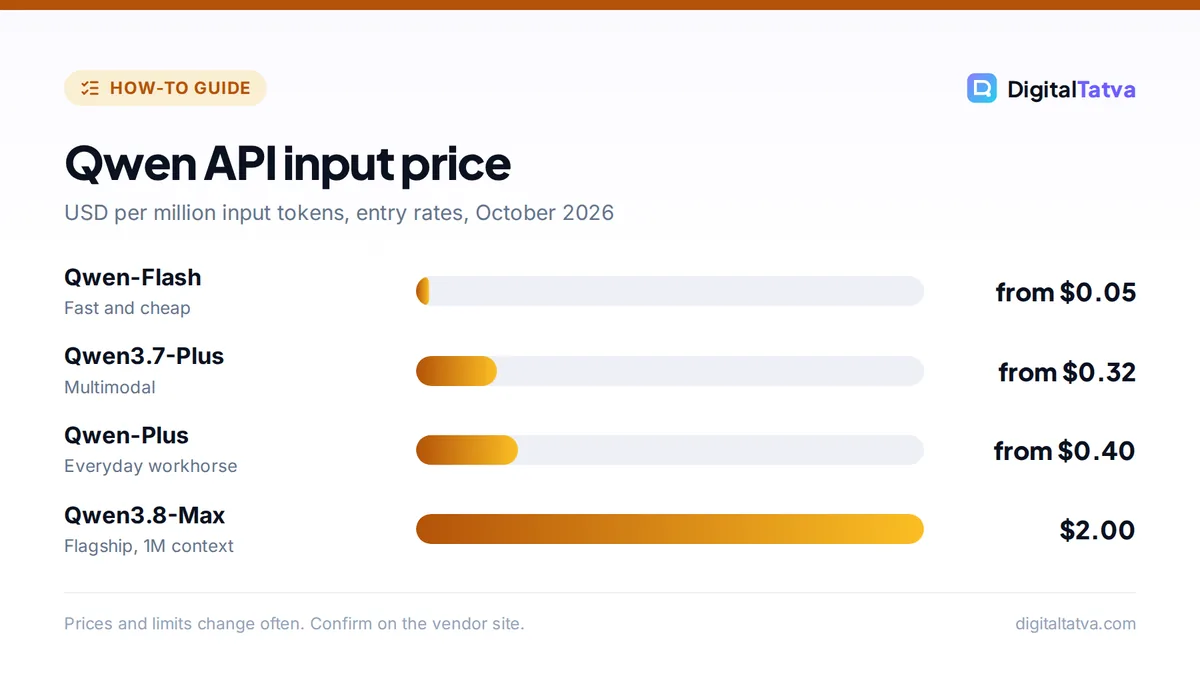
| Model | Input per 1M tokens | Output per 1M tokens |
|---|---|---|
| Qwen-Flash | From $0.05 | From $0.40 |
| Qwen3.7-Plus | From $0.32 | From $1.28 |
| Qwen-Plus | From $0.40 | From $1.20 |
| Qwen3.8-Max | $2.00 | $6.00 |
“From” prices are entry rates; several models charge more for very long prompts (for example Qwen-Flash rises to $0.25 input and $2.00 output above 256K tokens). Batch jobs cost about half. New accounts get a one-time trial of 1 million tokens per model for 90 days, but the standing free API tier ended on April 15, 2026. These figures come from a third-party price tracker updated in October 2026, so confirm on Alibaba’s pricing page. Compare with other providers in our LLM API pricing comparison.
Save money: route simple tasks to Qwen-Flash and only send hard ones to Max, an approach explained in model routing. Use batch processing for jobs that do not need instant answers.
How to run Qwen locally
Open-weight Qwen models let you run AI entirely on your own machine, so your data never leaves it. The easiest way is Ollama:
- Install Ollama on Windows, macOS or Linux.
- Pick a size your computer can handle. In Ollama’s library, qwen3 8B is about 5.2GB and qwen3 14B about 9.3GB; smaller versions run on modest laptops, while 30B and larger need much more memory.
- Run it. Type a command such as
ollama run qwen3in your terminal and start chatting. - Try coding models. qwen3-coder and Qwen3.6 models are designed for agentic coding.
Our full guide on running an LLM locally with Ollama covers hardware, interfaces and tips, and open-source AI models compares Qwen with Llama, Gemma and DeepSeek.
Watch out: not every Qwen model uses the same license. Several are Apache 2.0, the huge Qwen3.8 2.4T model uses a custom license that requires large providers to get a commercial license, and Qwen-Image-2.1 is research-only. Check the model card before commercial use.
Qwen vs ChatGPT, DeepSeek and Gemini
| Feature | Qwen | ChatGPT | DeepSeek | Gemini |
|---|---|---|---|---|
| Free chat | Yes | Yes, with limits | Yes | Yes, with limits |
| Open weights | Yes, many models | Some (gpt-oss) | Yes | Gemma models |
| Cheapest API input | From $0.05 (Flash) | Varies by model | From $0.15 off-peak | From $0.25 (Flash-Lite) |
| Best known for | Value, coding, multilingual | All-round quality, tools | Low cost, reasoning | Google integration |
For deeper comparisons, see DeepSeek vs ChatGPT and our best ChatGPT alternatives.
Is Qwen safe? Privacy considerations
Qwen Chat and the API are hosted by Alibaba Cloud, so read the privacy terms and choose the region carefully for business data. Avoid pasting confidential client data, personal information or proprietary code into the free chat. If privacy is critical, run an open-weight Qwen model locally or through a trusted provider in your region. Our guide to AI data privacy for business has a checklist.
Frequently asked questions
Is Qwen AI free?
Yes. Qwen Chat at chat.qwen.ai is free to use with an account and has no subscription. The API is paid, though new Alibaba Cloud accounts get a one-time trial of free tokens, and open-weight Qwen models are free to download and run on your own hardware.
Who makes Qwen?
Qwen is developed by Alibaba Cloud, part of Alibaba Group. The name comes from Tongyi Qianwen. Alibaba releases both hosted models, such as Qwen3.8-Max, and open-weight models that developers can download from Hugging Face and ModelScope.
What is the latest Qwen model?
As of October 2026, the Qwen3.8 family is the latest generation, with Qwen3.8-Max as the hosted flagship released in August 2026 and a 2.4-trillion-parameter open-weight Qwen3.8 model. Alibaba has said Qwen 4 is currently in training.
Is Qwen better than ChatGPT?
Qwen is competitive on many benchmarks and much cheaper through the API, with excellent open-weight options. ChatGPT offers a more polished app with more tools, such as image generation, agents and plugins. For everyday use most people find ChatGPT easier; for low-cost API and self-hosting, Qwen is very attractive.
Can I run Qwen on my laptop?
Yes. Install Ollama and run a smaller Qwen model such as qwen3 8B, which is about 5.2GB to download. Larger models need much more memory or a strong GPU. Running locally keeps your data on your own device.
Get started with Qwen
Try Qwen Chat free at chat.qwen.ai for a week alongside your usual assistant, then test the API trial or a local model if you build apps or need privacy. Models and prices change quickly, so confirm current rates on Alibaba Cloud Model Studio’s pricing page and model licenses on each model card before you commit.
Pricing and features are checked at the time of writing and can change. Some links may be affiliate links, which never affect our verdicts.