10 Best Cursor Alternatives for AI Coding in 2026
The 10 best Cursor alternatives in 2026, including GitHub Copilot, Claude Code, Codex, Devin Desktop (ex-Windsurf), Google Antigravity and Cline, with prices and picks.


On this page
The best Cursor alternatives in 2026 are GitHub Copilot for the best value inside VS Code and JetBrains, Claude Code for the strongest agentic coding, OpenAI Codex if you already pay for ChatGPT, Devin Desktop (the editor formerly called Windsurf) for a Cursor-like AI IDE, and Google Antigravity for developers on Google AI plans. Free and open-source options such as Cline and Zed are worth a look if you want to bring your own API key and control costs.
Below we compare 10 Cursor alternatives on price, models, editor support and best use, explain why people leave Cursor, and help you pick the right AI coding tool for your workflow and budget.
Key takeaways
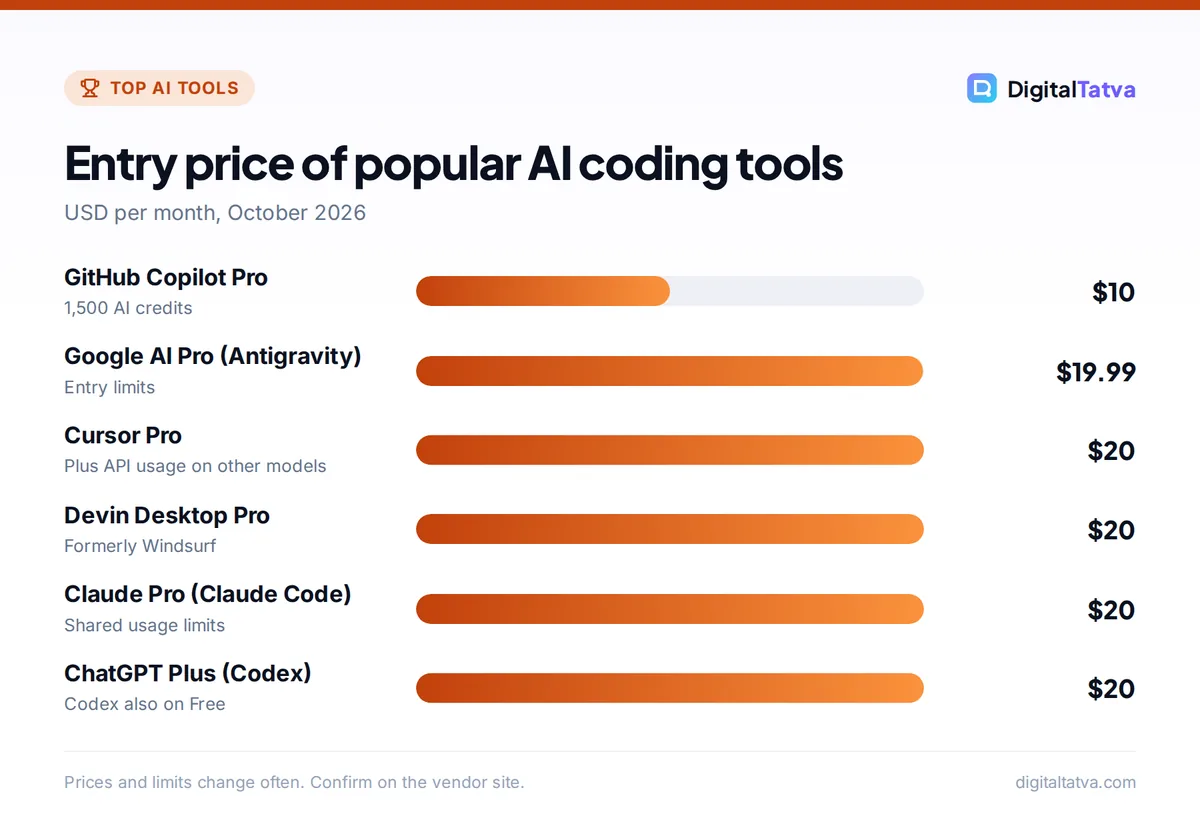
- GitHub Copilot Pro is the cheapest strong option at $10 a month and works in VS Code, Visual Studio, JetBrains and more.
- Claude Code is the top pick for large, multi-file agentic tasks and comes with Claude Pro and Max plans.
- Codex is included in every ChatGPT plan, from Free to Enterprise.
- Windsurf is now Devin Desktop, with Pro at $20 a month, the closest like-for-like Cursor replacement.
- Usage-based billing is now standard: compare included usage, not just the monthly price.
Why look for a Cursor alternative?
Cursor is excellent, but several changes push developers to compare options. Cursor now splits usage into two pools: its own models get generous included usage, while Claude, GPT and Gemini models are charged at API prices after your included amount. Cursor’s own guidance says daily agent users typically spend $60 to $100 a month in total usage, and power users $200 or more, which surprises people who expected a flat $20. Others simply prefer to stay in their existing editor, such as JetBrains or Neovim, or want a terminal-first agent.
For a full breakdown of Cursor’s plans, see our Cursor pricing guide and our Cursor review.
Cursor alternatives compared
| Tool | Type | Free plan | Paid from | Best for |
|---|---|---|---|---|
| GitHub Copilot | Extension for many IDEs | Yes | Pro $10/month | Best value, team standard |
| Claude Code | Terminal, desktop, IDE extensions | No (paid Claude plans) | Claude Pro $20/month | Large agentic tasks |
| OpenAI Codex | Cloud agent, CLI, IDE extension | Included in ChatGPT Free | ChatGPT Plus $20/month | ChatGPT users |
| Devin Desktop (ex-Windsurf) | AI-first editor | Yes | Pro $20/month | Closest to Cursor |
| Google Antigravity | Agent-first IDE | Entry limits | Google AI Pro $19.99/month | Gemini users |
| Cline | Open-source VS Code extension | Yes (bring your own key) | API costs only | Cost control and model choice |
| Zed | Fast native editor with AI | Yes | Paid AI plans | Speed and collaboration |
| JetBrains AI and Junie | Built into JetBrains IDEs | Limited | JetBrains AI plans | IntelliJ, PyCharm users |
| Kiro | Spec-driven AI IDE from AWS | Limited | Paid tiers | Structured, spec-first projects |
| Replit | Browser IDE with agent and hosting | Starter | Core $20/month | Building and hosting in one place |
The 10 best Cursor alternatives
1. GitHub Copilot: Best value Cursor alternative
- Starting price: Pro $10/month; Pro+ $39; Max $100
- Free plan: Yes, 2,000 completions a month plus limited chat and agent
- Best for: Developers who want to stay in VS Code or JetBrains
Copilot moved to usage-based AI Credits in June 2026. Pro includes 1,500 credits a month (shown as $15 of credits), Pro+ 7,000 and Max 20,000; extra credits cost $0.01 each. It works in VS Code, Visual Studio, JetBrains, Eclipse, Xcode and Neovim, with agent mode, code review and custom instructions in the main IDEs. Verified students get a free Copilot Student plan. Compare in Cursor vs GitHub Copilot and see GitHub Copilot pricing.
2. Claude Code: Best for agentic coding
- Starting price: Claude Pro $20/month; Max from $100
- Free plan: No
- Best for: Multi-file changes, refactors and full features
Claude Code is Anthropic’s coding agent. It reads your repository, plans changes, edits many files, runs tests and fixes errors. It runs in the terminal, in the Claude desktop app’s Code tab, on the web and in VS Code and JetBrains, and Opus 5.5 and Sonnet 5.5 support up to 1 million tokens of context. Usage limits are shared with your Claude plan. Read how to use Claude Code and Claude Code vs Cursor.
3. OpenAI Codex: Best if you pay for ChatGPT
- Starting price: Included with ChatGPT plans
- Free plan: Yes, limited
- Best for: Cloud tasks, PR reviews, ChatGPT subscribers
Codex is included in every ChatGPT plan, from Free and Go to Enterprise, and GPT-6 Sol and Luna are available in Codex. It offers cloud tasks you can start from any device on Plus and above, a CLI, IDE extensions and code review for GitHub pull requests. If you already pay for ChatGPT Plus, Codex may make a separate Cursor subscription unnecessary. See Claude Code vs Codex.
4. Devin Desktop (formerly Windsurf): Closest like-for-like replacement
- Starting price: Pro $20/month; Max $200
- Free plan: Yes, light agent quota
- Best for: Developers who want a Cursor-style AI editor
Windsurf was rebranded as Devin Desktop by Cognition, and windsurf.com pricing now redirects to devin.ai. It is a VS Code-based editor with an agent, completions and frontier models. Teams pay $80 a month plus $40 per full developer seat.
5. Google Antigravity: Best for Gemini users
- Starting price: Entry limits with Google AI Pro ($19.99/month)
- Free plan: Limited
- Best for: Agent-first development with Gemini models
Google’s agent-first IDE lets agents plan and carry out tasks across the editor, terminal and browser. Google AI Pro includes entry-level Antigravity limits and the Jules coding agent, and higher Google AI plans raise those limits, so it is good value if you already pay for Google AI.
6. Cline: Best open-source option
- Starting price: Free extension; you pay API costs
- Free plan: Yes
- Best for: Control over models and spending
Cline is an open-source agent for VS Code that works with your own API keys from Anthropic, OpenAI, Google, DeepSeek or local models. You see every step and approve file changes and commands. Costs depend entirely on the model; pairing it with a cheap model can be very economical. See LLM API pricing.
7. Zed: Best for speed
- Starting price: Paid AI plans
- Free plan: Yes
- Best for: Developers who want a very fast native editor
Zed is a high-performance editor written in Rust with built-in AI assistance, agent features and real-time collaboration. It suits developers who find VS Code-based editors heavy.
8. JetBrains AI and Junie: Best for JetBrains users
- Starting price: JetBrains AI plans
- Free plan: Limited
- Best for: IntelliJ IDEA, PyCharm, WebStorm users
JetBrains AI Assistant and its coding agent Junie work directly in JetBrains IDEs and use the IDE’s deep understanding of your code. If your team lives in JetBrains, this avoids switching editors.
9. Kiro: Best for spec-driven projects
- Starting price: Paid tiers
- Free plan: Limited
- Best for: Teams that want requirements and design docs before code
Kiro, from AWS, turns a prompt into requirements, a design and a task list, then implements them. This spec-first approach helps on larger projects where pure “vibe” prompting creates messy code.
10. Replit: Best for building and hosting in the browser
- Starting price: Core $20/month ($18 yearly)
- Free plan: Starter
- Best for: Beginners and quick full-stack apps
Replit’s agent builds apps in the browser, with databases and one-click hosting. It is less suited to large existing codebases but ideal for new projects. See AI app builders and what vibe coding is.
How to choose the right Cursor alternative
- Cheapest good option: GitHub Copilot Pro at $10.
- Already pay for ChatGPT: use Codex before buying anything else.
- Already pay for Claude: Claude Code.
- Already pay for Google AI: Antigravity and Jules.
- Want the Cursor experience: Devin Desktop.
- Want full cost control: Cline with your own keys.
Save money: many developers combine a cheap completion tool (Copilot Pro) with the agent included in an assistant plan they already pay for (Claude Code or Codex), instead of paying for two premium editors. Our guide to reducing Claude Code and Cursor costs has more tips.
Frequently asked questions
What is the best alternative to Cursor?
GitHub Copilot is the best value alternative at $10 a month and works in most editors. Claude Code is the strongest for large agentic tasks, Codex is the best choice for ChatGPT subscribers, and Devin Desktop, formerly Windsurf, is the closest Cursor-like editor.
Is there a free Cursor alternative?
Yes. GitHub Copilot Free includes 2,000 completions a month plus limited chat and agent use, Codex is included in ChatGPT Free with limits, Devin Desktop has a free tier, and Cline is a free open-source extension where you pay only for API usage.
What happened to Windsurf?
Windsurf’s editor was rebranded as Devin Desktop by Cognition, and windsurf.com pricing now redirects to devin.ai. It still offers a free plan, Pro at $20 a month and Max at $200 a month, plus team plans.
Is Claude Code better than Cursor?
Claude Code is often better for large, multi-file agentic tasks run from the terminal or desktop app, while Cursor offers a polished AI editor with fast completions. Many developers use both. Claude Code comes with Claude Pro and Max plans rather than a separate subscription.
Which Cursor alternative works with JetBrains?
GitHub Copilot, Claude Code and JetBrains’ own AI Assistant and Junie all work in JetBrains IDEs. Copilot and JetBrains AI have the deepest integration, while Claude Code offers a JetBrains extension alongside its terminal and desktop app.
Our pick
For most developers, GitHub Copilot Pro plus the agent included in your existing AI plan (Claude Code or Codex) beats paying for Cursor alone. If you love Cursor’s editor experience, try Devin Desktop. Prices and usage rules change often, so check GitHub Copilot’s plans page and Devin’s pricing page before you switch.
Pricing and features are checked at the time of writing and can change. Some links may be affiliate links, which never affect our verdicts.