What Is Vibe Coding? How to Build Apps by Describing Them
Vibe coding explained: how to build apps by describing them to AI, the best vibe coding tools and prices, what you can build, the risks, and how to make your first app today.

On this page
- Key takeaways
- What is vibe coding?
- How vibe coding works, step by step
- Best vibe coding tools in 2026
- What can you build with vibe coding?
- Vibe coding prompts that actually work
- Vibe coding vs traditional coding vs no-code
- Vibe coding costs: credits and tokens explained
- Risks and limits of vibe coding
- How to vibe code your first app today
- Frequently asked questions
- The bottom line
Vibe coding is building software by describing what you want in plain language to an AI and letting it write the code, then steering it with feedback (“make the button bigger”, “add a login page”) instead of writing the code yourself. The term was popularized by AI researcher Andrej Karpathy in early 2025, and in 2026 tools such as Lovable, Bolt.new, Replit, v0 and Google AI Studio’s Build mode let non-programmers ship working apps in an afternoon.
This guide explains what vibe coding means, how it works step by step, the best vibe coding tools and their prices, what you can realistically build, the risks, and how to vibe code your first app today.
Key takeaways
- Vibe coding means you describe the app and the AI writes, runs and fixes the code.
- It is great for prototypes, internal tools, landing pages and personal apps; production software still needs review.
- Top tools: Lovable, Bolt.new, Replit, v0 and Google AI Studio Build mode for no-code builders; Cursor and Claude Code for people who can read code.
- Most tools have free plans; paid plans start around $20 to $30 a month and use credits or tokens.
- The main risks are security holes, exposed API keys, hidden bugs and running out of credits mid-project.
What is vibe coding?
In traditional programming, you write every line of code. In AI-assisted coding, an AI suggests code and you review it. Vibe coding goes one step further: you mostly stop looking at the code. You describe the result, try the app, and tell the AI what to change, trusting it to handle the details. The “vibe” is that you work on the feel and behavior of the product rather than its syntax.
Vibe coding works because modern AI models can write whole applications, run them, read the error messages and fix their own mistakes. It is part of the wider shift to agentic AI, where AI takes multi-step actions toward a goal.
How vibe coding works, step by step
- Describe the app. Explain what it does, who uses it and the main screens: “A habit tracker where I add habits, tick them off daily and see a 30-day streak chart.”
- Let the AI generate it. The tool plans the app, writes the frontend and backend, and shows a live preview.
- Try it like a user. Click around. Note what is wrong or missing.
- Give feedback in plain words. “Streaks reset when I refresh the page” or “use a dark theme”. The AI edits the code.
- Add real features. Ask for login, a database, payments or email, usually through built-in integrations such as Supabase or Firebase.
- Publish. Most tools deploy with one click to a shareable link, or let you export the code to GitHub.
Tip: start small. A one-screen app that works beats a ten-screen app full of bugs. Add one feature at a time and test after each change.
Best vibe coding tools in 2026
| Tool | Best for | Free plan | Paid from |
|---|---|---|---|
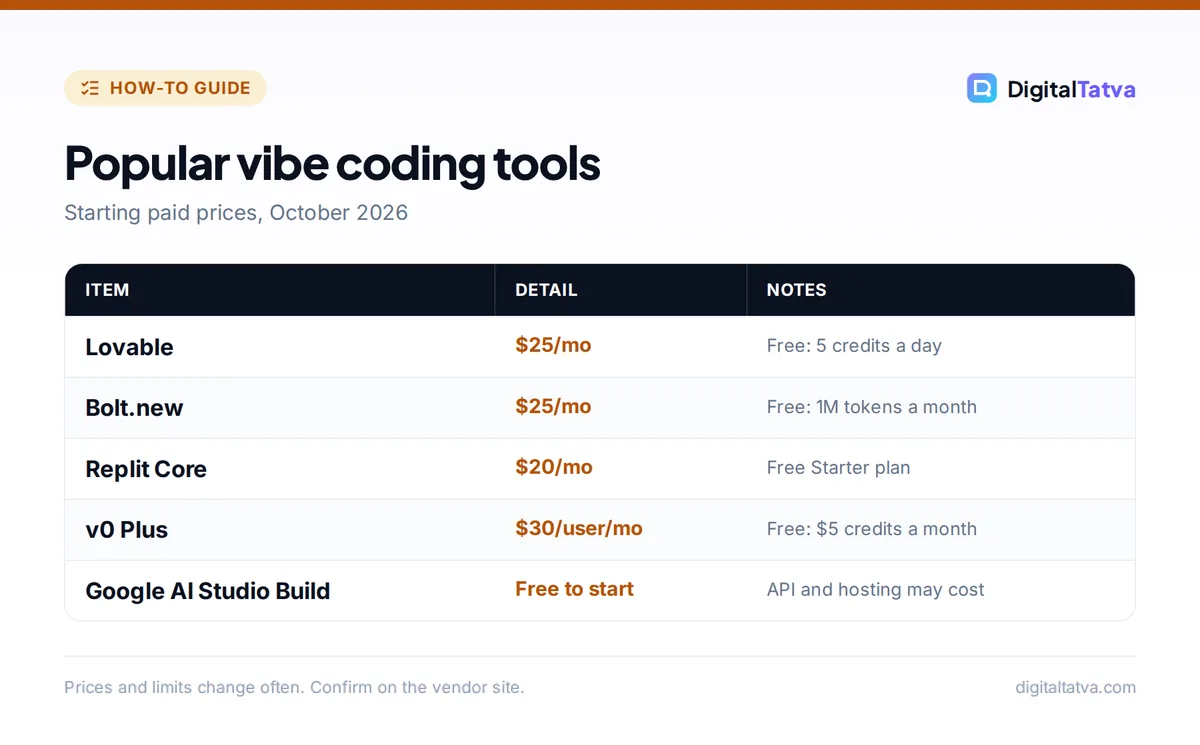
| Lovable | Polished web apps with database and login | 5 credits a day, up to 30 a month | $25/month (100 credits), $21 billed yearly |
| Bolt.new | Fast full-stack prototypes in the browser | 300K tokens a day, 1M a month | $25/month Pro |
| Replit | Apps with hosting, databases and an agent | Starter plan, 1 published app | $20/month Core ($18 yearly) |
| v0 by Vercel | Beautiful React interfaces and Next.js sites | $5 of monthly credits | $30/user/month Plus |
| Google AI Studio Build mode | Free experiments with Gemini; web and Android apps | Free, API and hosting costs may apply | Pay as you go |
| Cursor | Editing real codebases with an AI agent | Free tier | Paid plans; see our Cursor pricing guide |
| Claude Code | Agentic coding in a terminal or desktop app | Included with Claude paid plans | Claude Pro $20/month |
For a deeper comparison of the no-code builders, see Lovable vs Bolt, our Lovable review and the full list of AI app builders. If you can read code, how to use Cursor and how to use Claude Code show the developer side of vibe coding.
What can you build with vibe coding?
| Works well | Needs caution | Avoid without an engineer |
|---|---|---|
| Landing pages and portfolios | Small SaaS products with paying users | Banking, medical or legal systems |
| Internal dashboards and trackers | Apps storing customer personal data | Apps handling payments at scale |
| Calculators, quizzes and games | Integrations with company systems | Anything safety-critical |
| Prototypes to show investors or clients | Mobile apps for the app stores | High-traffic production platforms |
Freelancers use vibe coding to deliver client prototypes faster, founders use it to test ideas before hiring developers, and marketers build calculators and lead magnets. If you want a website rather than an app, compare AI website builders, which are often simpler.
Vibe coding prompts that actually work
The quality of a vibe-coded app depends heavily on how you describe it. Good prompts are specific about users, screens, data and behavior. Here are templates you can copy.
- The starter spec: “Build a web app for [who] to [main job]. Screens: [list]. Data to save: [fields]. Style: [clean, dark, playful]. Keep it to one page for now.”
- The bug report: “When I [action], I expect [result] but I see [what happens]. Fix only this and do not change anything else.”
- The design pass: “Improve the layout on mobile. Make buttons at least 44 pixels tall, use more spacing and keep the current colors.”
- The feature add: “Add user accounts with email login. Each user should only see their own records. Explain what you changed.”
- The safety check: “Review this app for security problems: exposed keys, missing access rules, unvalidated inputs. List issues before fixing them.”
- The handover: “Write a short README explaining how this app works, where data is stored and how to deploy it.”
Two habits make a big difference. First, ask for one change per message so you can see what broke if something goes wrong. Second, ask the AI to explain its plan before large changes, which catches misunderstandings early. Our prompt engineering guide covers more techniques that transfer directly to app building.
Vibe coding vs traditional coding vs no-code
| Approach | Speed to first version | Control | Skill needed |
|---|---|---|---|
| Traditional coding | Slow | Full | High |
| Classic no-code (drag and drop) | Medium | Limited to the platform’s blocks | Low |
| Vibe coding | Very fast | High, because real code is generated | Low to medium |
The big advantage of vibe coding over classic no-code is that you end up with real, exportable code that a developer can take over later. The trade-off is that you are responsible for understanding enough to keep it safe. Developers weighing tools should also check Cursor pricing and our roundup of Cursor alternatives.
Vibe coding costs: credits and tokens explained
Vibe coding tools charge by usage, and complex apps can burn credits quickly. Lovable counts credits per message, Bolt counts tokens, Replit uses effort-based pricing per checkpoint, and v0 uses dollar credits. Each fix, redesign or failed attempt uses some of your allowance.
Save money: plan the app in a free chatbot first (screens, data, features), then paste a clear spec into the builder. Fewer vague prompts means fewer wasted credits. Lovable rolls unused monthly credits over while your subscription is active, which helps with uneven workloads.
If you use coding agents like Claude Code or Cursor, our guide to reducing Claude Code and Cursor costs covers model choice, context and caching.
Risks and limits of vibe coding
- Security holes: AI-generated apps can ship with missing access rules, so one user can see another user’s data. Check database permissions before going live.
- Exposed secrets: API keys pasted into front-end code can be stolen. Keep keys in the tool’s secrets or environment settings.
- Hidden bugs: code you never read can fail in edge cases. Test with realistic data.
- Getting stuck: sometimes the AI loops on a bug. Roll back to the last working version and describe the problem differently.
- Lock-in: some platforms make hosting easy but moving harder. Export to GitHub if you may switch.
- Maintenance: apps need updates. If people depend on it, plan who will maintain it.
Watch out: if your app stores personal data of customers in India, data protection rules under the DPDP Act still apply even if AI wrote the code. Get a developer to review security before launch.
How to vibe code your first app today
- Pick a tiny idea. A tip calculator, a reading list or a client intake form.
- Write a one-paragraph spec. Users, screens, data to save, look and feel.
- Choose a free tool. Try Bolt.new or Lovable on their free plans, or Google AI Studio Build mode; see our AI Studio guide.
- Build one screen, test, then add features. Keep a short list of changes and give them one at a time.
- Publish and share with one friend. Watch them use it and fix what confuses them.
Frequently asked questions
What does vibe coding mean?
Vibe coding means creating software by describing what you want to an AI in everyday language and guiding it with feedback, rather than writing code yourself. The AI writes, runs and fixes the code while you focus on how the app should look and behave.
Who coined the term vibe coding?
The term was popularized by AI researcher Andrej Karpathy in early 2025, who described a style of programming where you fully give in to the AI, accept its changes and mostly stop reading the code. The phrase quickly spread to describe AI app building generally.
Can I vibe code without any coding knowledge?
Yes, for simple apps. Tools like Lovable, Bolt.new, Replit and Google AI Studio Build mode are designed for non-programmers. Basic knowledge helps when something breaks or when you need security checks, so learning a little about how apps work pays off quickly.
What is the best vibe coding tool?
For non-coders, Lovable and Bolt.new are the most popular for full web apps, v0 is strong for interfaces, and Replit adds hosting and databases. Developers who can read code often prefer Cursor or Claude Code for more control over real projects.
Is vibe coding safe for business apps?
It is safe for prototypes and internal tools, but production apps with customer data or payments need a security review by someone who understands code. Common problems include weak database permissions, exposed API keys and untested edge cases.
The bottom line
Vibe coding lets almost anyone turn an idea into a working app by describing it, which makes it perfect for prototypes, internal tools and side projects. Treat AI-written apps like a talented junior developer’s work: test them, secure them and get a review before real customers rely on them. Plans and credit allowances change often, so check current prices on Bolt’s pricing page and Replit’s pricing page before you commit.
Pricing and features are checked at the time of writing and can change. Some links may be affiliate links, which never affect our verdicts.