How to Use Deep Research in ChatGPT, Gemini and Perplexity
How to use deep research in ChatGPT, Gemini and Perplexity: step by step setup, free and paid limits, prompts that get better reports, and how to check citations.

On this page
- Key takeaways
- What is deep research?
- Deep research in ChatGPT, Gemini and Perplexity compared
- How to use deep research in ChatGPT
- How to use deep research in Gemini
- How to use deep research in Perplexity
- Deep research prompts that get better reports
- Best uses for deep research (and when to skip it)
- How to check a deep research report
- Deep research for your own documents
- Frequently asked questions
- Start your first deep research report
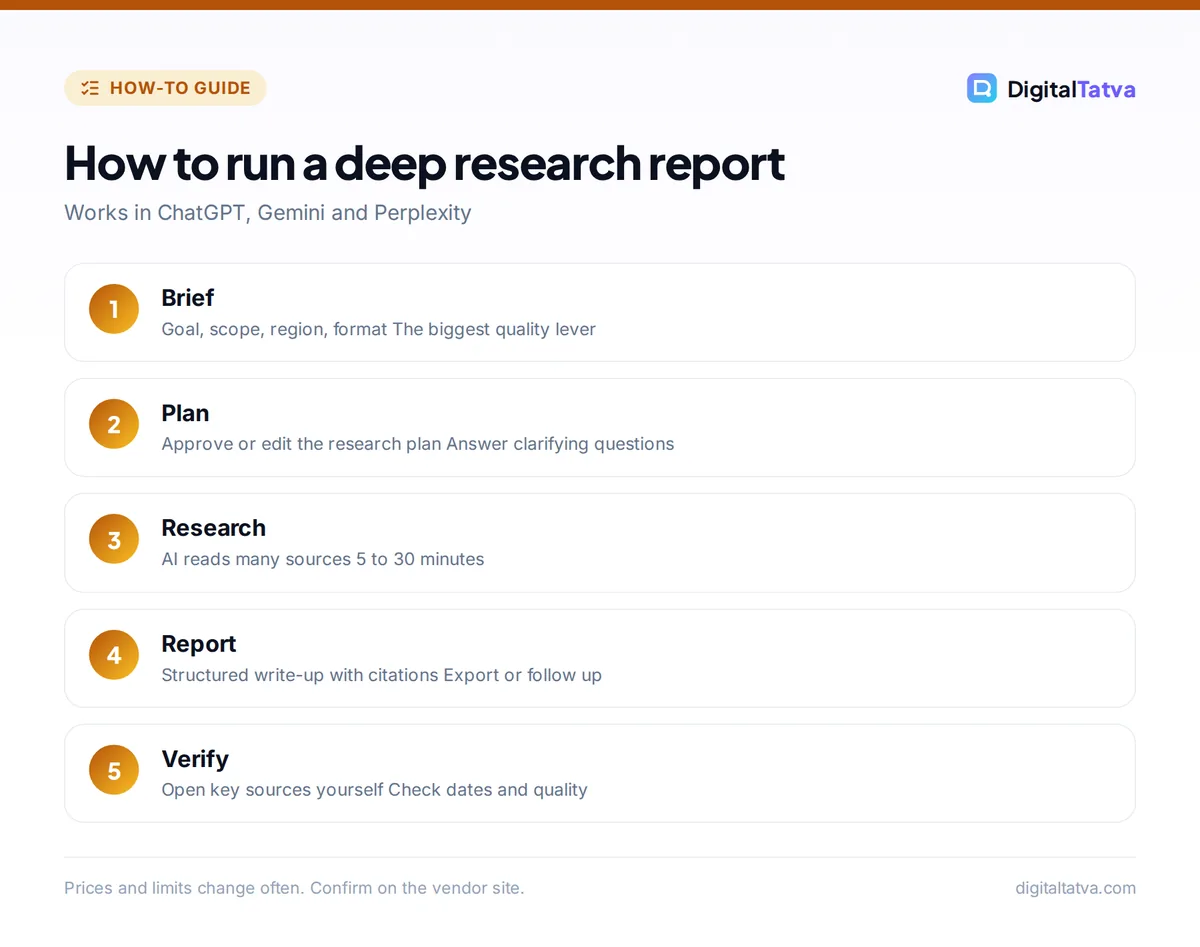
Deep research is an AI mode that searches dozens or hundreds of web pages on its own, reads them, and writes a long, cited report, usually in 5 to 30 minutes. To use it, open ChatGPT, Gemini or Perplexity, choose the Deep Research option in the tools menu or mode switcher, describe your question in detail, approve or edit the research plan, then review the finished report and its sources.
This guide shows how to use deep research in ChatGPT, Gemini and Perplexity step by step, what each one is best at, plan limits, prompts that get better reports, and how to check the results before you rely on them.
Key takeaways
- Deep research is for questions that need many sources: market scans, competitor research, buying decisions and literature reviews.
- ChatGPT, Gemini and Perplexity all offer it; free plans include limited deep research, paid plans give much more.
- Write a detailed brief: goal, scope, region, time period, sources to prefer and the output format you want.
- Reports can still contain errors and weak sources, so open and check the key citations.
- For research across your own documents, NotebookLM and project files are often better than web deep research.
What is deep research?
A normal AI chat answers from the model’s knowledge plus a quick web search. Deep research is an agent: it makes a research plan, runs many searches, opens and reads pages, follows leads, compares sources and then writes a structured report with citations. It trades speed for depth. A regular answer takes seconds; a deep research report takes minutes but covers far more ground.
Because it acts on its own across many steps, deep research is a good everyday example of agentic AI. It is best for questions where the answer is spread across many places, not for quick facts.
Deep research in ChatGPT, Gemini and Perplexity compared
| Feature | ChatGPT | Gemini | Perplexity |
|---|---|---|---|
| Where to find it | Tools menu or “+” in the prompt box | Deep Research option in the prompt box or tools | Research mode in the search box |
| Free plan | Limited deep research | Limited deep research | Limited research queries |
| Paid plans | Plus: expanded; Pro: maximum | Higher limits on Google AI plans | Pro ($20/month) includes deep research |
| Strength | Long, well-structured analytical reports | Very broad source coverage, export to Google Docs | Fast, citation-first research |
| Best for | Strategy, comparisons, detailed write-ups | Market and topic overviews | Quick but sourced deep dives |
OpenAI does not publish exact deep research counts per plan, and Google and Perplexity change limits often, so check the current numbers in each app. Microsoft removed Deep Research from the consumer Copilot app in August 2026, so for Copilot users the options above are the main choices. If you are choosing a research tool overall, see our best AI research tools and Perplexity vs ChatGPT.
How to use deep research in ChatGPT
- Open a new chat. Go to chatgpt.com or the app and sign in.
- Turn on deep research. Click the “+” or tools button in the prompt box and choose deep research.
- Write a detailed brief. Include your goal, audience, region, time frame and output format (see the prompt templates below).
- Answer clarifying questions. ChatGPT often asks a few questions first. Answer them carefully; they shape the whole report.
- Let it run. You can leave the tab; you will see progress and the sources it is reading.
- Review the report. Check the citations for the most important claims, then ask follow-up questions or request a shorter summary.
On paid plans you can connect plugins and company knowledge so deep research can include sources beyond the open web. Our ChatGPT beginner guide covers the rest of the interface.
How to use deep research in Gemini
- Open Gemini. Go to gemini.google.com or the Gemini app.
- Choose Deep Research. Select it from the tools in the prompt box.
- Enter your question. Gemini proposes a research plan with the steps it will take.
- Edit the plan. Remove steps you do not need or add angles you care about, then start the research.
- Read and export. When it finishes, open the report and export it to Google Docs if you want to edit or share it.
Note that Gemini’s new Skills feature does not yet work with Deep Research, so keep your research instructions in the prompt itself; see Gemini Skills explained. For more Gemini tips, read how to use Gemini.
How to use deep research in Perplexity
- Open Perplexity. Go to perplexity.ai or the app.
- Switch to Research mode. Choose the research option in the search box mode selector.
- Ask a focused question. Perplexity works best with a clear question and a defined scope.
- Review sources. Every claim links to sources; check the ones that matter most.
- Export or continue. Save the answer to a Space, export it, or ask follow-ups in the same thread.
Perplexity Pro, at $20 a month, includes deep research along with premium data sources such as PitchBook and Statista. Our Perplexity guide and Perplexity pricing breakdown cover the details.
Deep research prompts that get better reports
The single biggest factor in report quality is your brief. Compare a weak prompt with a strong one.
| Weak prompt | Strong prompt |
|---|---|
| “Research the Indian EV market.” | “Research the Indian electric two-wheeler market for 2024 to 2026. Cover market size estimates, top five brands by sales, government incentives such as PM E-DRIVE, charging infrastructure and key risks. Prefer government data, industry bodies and major business publications. Output: executive summary, then sections with a comparison table and a sources list.” |
Templates you can copy:
- Competitor scan: “Compare [competitor A, B, C] on pricing, features, target customers, recent launches and reviews. Use official sites and reputable reviews from the last 12 months. Output a comparison table and a one-page summary of gaps we could exploit.”
- Buying decision: “I need [product type] for [use case] under [budget]. Find the top 5 options available in India, with current prices, pros and cons, and long-term reliability. Recommend one.”
- Topic primer: “Explain [topic] for a smart beginner. Cover history, how it works, current state in 2026, key players, open debates and five sources to read next.”
- Content research: “Find the most common questions people ask about [topic], the best existing answers, and gaps no one covers well. Output a content outline.”
Tip: tell the AI which sources to avoid as well as which to prefer. “Avoid forums and affiliate review sites” often improves accuracy for buying research.
Best uses for deep research (and when to skip it)
| Use deep research for | Use a normal chat for |
|---|---|
| Market and competitor analysis | Quick facts and definitions |
| Comparing products, vendors or tools | Rewriting or editing your own text |
| Literature reviews and topic primers | Brainstorming ideas |
| Policy, regulation and compliance overviews | Simple how-to questions |
| Content research for long articles | Anything time-sensitive in the next minute |
Deep research uses a lot of compute, which is why plans limit it. Save your runs for questions where breadth really matters, and use normal chat or web search for everything else. Students can use it to map a topic before reading primary sources, freelancers to prepare client proposals, and small business owners to compare suppliers or software before buying. Marketers often pair it with SEO work; our guide to ChatGPT for SEO shows how to turn research into briefs.
How to check a deep research report
Deep research reports look authoritative, which makes errors easy to miss. Before you use one for a decision or publish anything from it:
- Open the citations behind the three to five claims your decision depends on.
- Check dates. Prices, rules and statistics change; make sure sources are recent.
- Watch for weak sources such as anonymous blogs, press releases presented as facts or outdated pages.
- Look for missing perspectives. Ask “What evidence contradicts this?” as a follow-up.
- Do not copy reports directly into published content; rewrite in your own words and verify facts.
Deep research for your own documents
Web deep research is not ideal when the knowledge lives in your own files. For research across PDFs, notes and transcripts, Google NotebookLM is a strong free option: its free tier includes 10 Deep Research runs a month and up to 50 sources per notebook. ChatGPT and Claude projects also let you upload files and ask questions across them. See how to use NotebookLM and AI tools to chat with PDFs.
Frequently asked questions
What is deep research in ChatGPT?
Deep research in ChatGPT is a mode where the AI plans a research task, searches and reads many web sources on its own, and writes a long report with citations. It takes several minutes rather than seconds and is designed for complex questions that need many sources.
Is deep research free?
Yes, with limits. ChatGPT Free, Gemini’s free plan and Perplexity’s free tier all offer some deep research. Paid plans such as ChatGPT Plus and Pro, Google AI Pro and Perplexity Pro give more runs and stronger models. Exact limits change, so check each app.
Which deep research tool is best?
ChatGPT tends to write the most structured analytical reports, Gemini covers a very wide range of sources and exports to Google Docs, and Perplexity is fast and citation-first. For research across your own files, NotebookLM is often better than any web tool.
How long does deep research take?
Most deep research reports take roughly 5 to 30 minutes, depending on the tool, the complexity of the question and how many sources it reads. You can usually leave the page and come back when the report is ready.
Can I trust deep research reports?
Treat them as a well-researched first draft. They cite sources, but they can misread pages, rely on weak sources or miss recent changes. Check the key citations yourself before making decisions or publishing anything based on the report.
Start your first deep research report
Pick one question you would normally spend an afternoon researching, write a detailed brief using the templates above, and run it in the tool you already use. Then check the key sources and compare the result with a second tool if the decision matters. Plan limits and features change often, so confirm details on OpenAI’s ChatGPT pricing page and Perplexity’s pricing page.
Pricing and features are checked at the time of writing and can change. Some links may be affiliate links, which never affect our verdicts.