Gemini Skills Explained: How to Create Skills That Replace Gems
Gemini Skills are replacing Gems. Learn what Skills are, how to create and stack them, the Gems migration dates, and 12 ready skill ideas for work and study.

On this page
- Key takeaways
- What are Gemini Skills?
- Gemini Skills vs Gems: what changed
- How to create a Gemini Skill step by step
- 12 Gemini Skills worth creating
- Gems migration timeline: key dates
- Where Gemini Skills work today
- Do you need a paid plan for Gemini Skills?
- Skills in Gemini vs ChatGPT and Claude
- Frequently asked questions
- Next steps
Gemini Skills are saved, reusable instructions that you call up in Gemini by typing a forward slash, and they are replacing Gemini Gems. Google began rolling out Skills to Google Workspace on October 5, 2026 and to the Gemini app on October 13, 2026, on both free and paid accounts, and existing Gems will be converted into Skills over the coming months.
This guide explains what Gemini Skills are, how they differ from Gems, how to create and use your first skill, the migration dates you need to know, and twelve practical skill ideas you can copy.
Key takeaways
- A Gemini Skill is a reusable set of instructions, optionally with reference files, that you trigger with “/” in the prompt box.
- Unlike Gems, Skills can be stacked: combine a brand voice skill with a formatting skill in one prompt.
- Skills are available on free and paid Google accounts, in the Gemini app and most Workspace apps.
- Gems move into Settings on November 17, 2026; Business and Enterprise lose Gems no sooner than March 1, 2027, when they become draft Skills.
- Skills use the open SKILL.md format, so skills written for other AI tools can be copied in.
What are Gemini Skills?
A skill is a named bundle of instructions that tells Gemini how to do one kind of job well. A “Brand voice” skill might hold your tone rules, banned words and sample paragraphs. A “Weekly report” skill might hold the exact structure your manager wants. Instead of pasting the same long prompt every time, you type “/” in the chat box, pick the skill, and add the specific request.
Skills can include reference files such as PDFs, text documents and images, so a skill can carry your style guide or a product sheet with it. Google says Drive files, link sharing and notebook integration are arriving over the next few weeks of the rollout. Gemini may also notice when you keep repeating a similar prompt and offer to turn it into a skill for you.
Skills are built on the open, Markdown-based SKILL.md standard. That matters because the same idea already exists in other assistants, and skills written for one platform can be copied into Gemini with little editing.
Gemini Skills vs Gems: what changed
| Feature | Gems (old) | Skills (new) |
|---|---|---|
| What it is | A custom version of Gemini with fixed instructions | Reusable instructions you add to any chat |
| How you use it | Open the Gem, then chat inside it | Type “/” in any chat and choose the skill |
| Combine several | No, one Gem per conversation | Yes, skills can be stacked |
| Reference files | Yes | Yes (PDF, text, images; Drive coming) |
| Format | Google only | Open SKILL.md standard |
| Future | Being retired | Replacement for Gems |
The big practical win is stacking. With Gems you had to build one Gem per combination, such as “LinkedIn post in brand voice”. With Skills you can build “Brand voice” once and “LinkedIn post” once, then use both together, or use “Brand voice” with “Email reply” instead.
How to create a Gemini Skill step by step
Menu names may shift slightly during the rollout, but the process looks like this in the Gemini app.
- Open Gemini. Go to gemini.google.com or the Gemini mobile app and sign in. Skills are rolling out to everyone through mid-November 2026, so you may need to wait a few days if you do not see them.
- Start a new skill. Open the Skills area (or type “/” in the prompt box and choose the option to create one).
- Name it clearly. Use a short, obvious name such as “Brand voice” or “Lesson plan”, because you will pick it from a list.
- Write the instructions. Describe the goal, the audience, the format, the length and the rules. Include one short example of good output.
- Add reference files. Upload a style guide, template or sample document if the skill needs it.
- Test and refine. Run the skill on two or three real tasks. Tighten any instruction Gemini ignores, and remove anything vague.
- Use it with “/”. In any new chat, type “/”, select the skill, then add your request. Add a second skill to stack them.
Tip: write skills like you would brief a new colleague: what good looks like, what to avoid, and an example. Our prompt engineering guide covers the techniques that make instructions reliable.
12 Gemini Skills worth creating
| Skill | What to put in it | Good for |
|---|---|---|
| Brand voice | Tone, banned words, spelling, two sample paragraphs | Marketers, founders |
| Email reply | Length, sign-off, how to decline politely | Everyone |
| Meeting notes | Sections: decisions, owners, deadlines, risks | Managers |
| LinkedIn post | Hook style, length, hashtags, call to action | Creators, sales |
| Blog outline | H2 structure, FAQ, internal link reminders | Content teams |
| Lesson plan | Grade, objectives, activities, assessment | Teachers |
| Study coach | Ask questions back, quiz me, explain simply | Students |
| Code reviewer | Language, style rules, security checks | Developers |
| Customer reply | Policy file, refund rules, tone | Support teams |
| Decision helper | Give three to five perspectives and risks | Founders |
| Hindi or regional translator | Formal or casual register, glossary | Indian businesses |
| Slide outliner | Slide count, one idea per slide, speaker notes | Anyone presenting |
For more ready-made instructions to turn into skills, browse our 100 best ChatGPT prompts, which work in Gemini too, our professional email prompts and our LinkedIn post prompts.
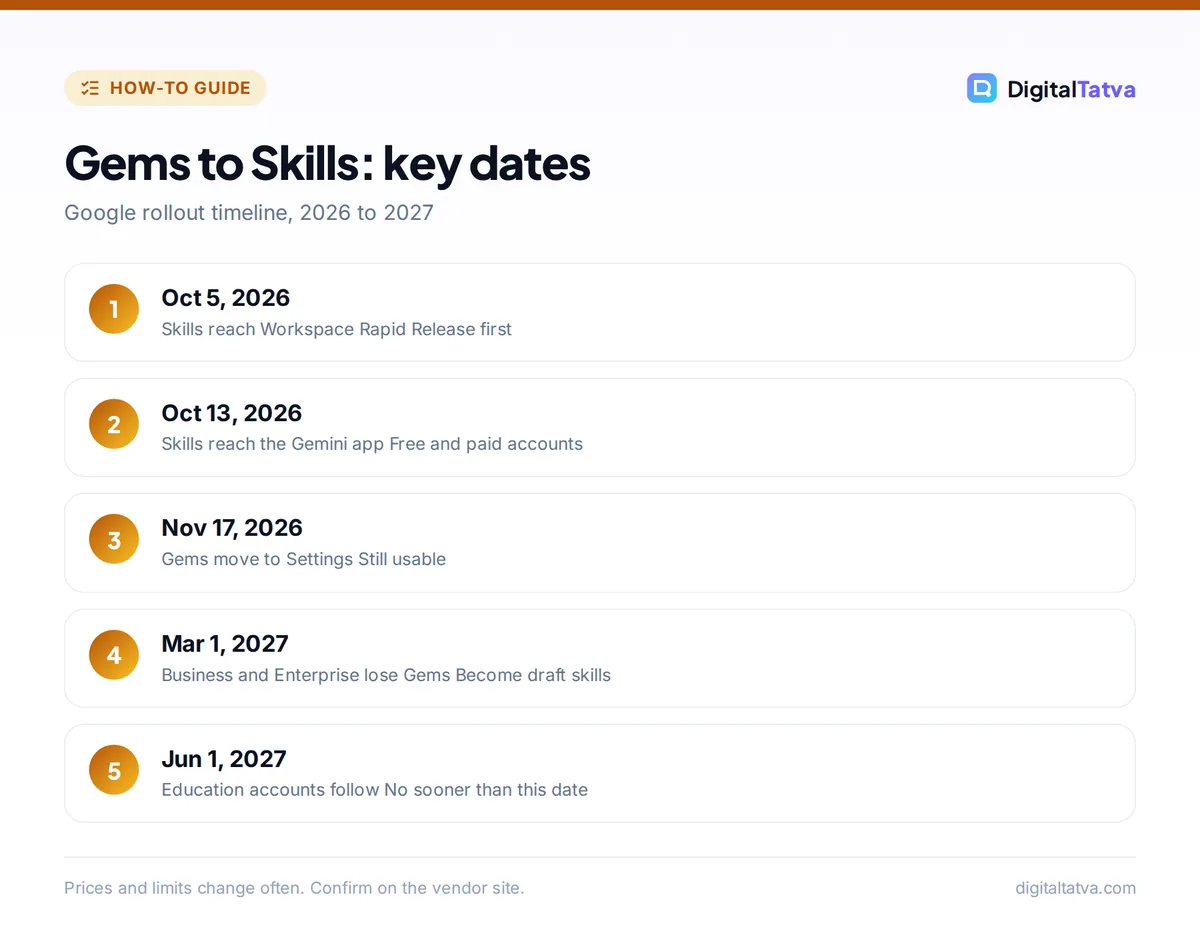
Gems migration timeline: key dates
| Date | What happens |
|---|---|
| October 5, 2026 | Skills start rolling out to Google Workspace (Rapid Release) |
| October 13, 2026 | Skills start rolling out in the Gemini app |
| October 19, 2026 | Workspace Scheduled Release domains start getting Skills |
| Mid-November 2026 | Rollout expected to complete |
| November 17, 2026 | Gems move to the Settings panel of the Gemini app; you can still use and edit them |
| No sooner than March 1, 2027 | Business and Enterprise accounts can no longer use Gems; remaining Gems become draft Skills |
| No sooner than June 1, 2027 | Same change for Education accounts |
Personal Gems are being converted automatically, and supported knowledge files move with them. Workspace admins should get migration details at least 30 days before their transition. Converted Gems arrive as draft skills, so someone has to review and activate them.
Watch out: skills do not currently sync between the Gemini app and Workspace apps such as Docs and Gmail. If your team uses both, you may need to create the same skill twice and keep both copies up to date.
Where Gemini Skills work today
Skills work in the Gemini app and in most Google Workspace apps where Gemini appears. Some tools do not support skills yet: Google lists Canvas and Deep Research among the features that do not work with skills at launch, and GitHub files are not supported as reference files. If you rely on Deep Research, keep your research prompts separate for now.
Inside Workspace, a skill shines when you repeat the same writing task in Gmail or Docs. Our guide to using Gemini in Gmail, Docs and Sheets shows where the Gemini panel lives in each app.
Do you need a paid plan for Gemini Skills?
No. Google says Skills are available on free and paid accounts, after first testing them in the paid Gemini Spark tier. What changes with a paid plan is the model doing the work and your usage limits. Paid plans are Google AI Plus at $4.99 a month, Google AI Pro at $19.99 a month and Google AI Ultra from $99.99 a month; in India, AI Plus is Rs 399 and AI Pro is Rs 1,950 a month.
Reports in October 2026 also said free personal accounts are being limited to a lighter Flash-Lite model, so a skill may produce simpler output on the free tier than on Pro. See our full Gemini pricing guide and beginner guide to Gemini for plan details.
Skills in Gemini vs ChatGPT and Claude
Reusable instructions are now standard across assistants. ChatGPT has custom GPTs and project instructions, explained in how to create a custom GPT. Claude has Projects and Skills, covered in how to use Claude Projects. Gemini’s version stands out for stacking and for living inside Gmail and Docs, which suits teams that already work in Google Workspace.
Frequently asked questions
What are Gemini Skills?
Gemini Skills are reusable instructions, optionally with reference files, that you trigger by typing a forward slash in the Gemini prompt box. They replace Gems, can be stacked together in one prompt, and work in the Gemini app and most Google Workspace apps on free and paid accounts.
Are Gemini Gems going away?
Yes. Gems move into the Settings panel on November 17, 2026 and personal Gems are being converted into Skills. Business and Enterprise accounts lose Gems no sooner than March 1, 2027, and Education accounts no sooner than June 1, 2027, when remaining Gems become draft Skills.
Are Gemini Skills free?
Yes. Google made Skills available on free and paid Google accounts. A paid Google AI plan gives access to stronger models and higher usage limits, which can improve the quality of skill output, but creating and using skills does not require a subscription.
Can I use more than one skill at a time?
Yes. Stacking is the main advantage over Gems. You can combine a brand voice skill with a LinkedIn post skill, or a lesson plan skill with a reading-level skill, in the same prompt or at different points in a conversation.
Do Gemini Skills sync between the Gemini app and Gmail or Docs?
Not yet. At launch, skills created in the Gemini app do not sync with Workspace apps, so teams using both may need to create and maintain the same skill in two places. Google may change this during the rollout.
Next steps
Pick the one prompt you paste most often and turn it into your first Gemini Skill this week, then add a second skill you can stack with it. If you still use Gems, note the November 17, 2026 and March 1, 2027 dates and review your converted draft skills early. For the latest rollout status, check Google’s official Gemini help center, because features, dates and plan limits can change.
Pricing and features are checked at the time of writing and can change. Some links may be affiliate links, which never affect our verdicts.