Microsoft Copilot Cowork: What It Is and How to Use It
Copilot Cowork explained: what Microsoft's delegated task mode does, who can use it, how Copilot Credits billing works, and how to run your first Cowork task step by step.

On this page
- Key takeaways
- What is Microsoft Copilot Cowork?
- The new Copilot explained: Home, Code and Autopilot
- Who can use Copilot Cowork?
- Copilot Cowork pricing and Copilot Credits
- How to use Copilot Cowork step by step
- Good tasks for Copilot Cowork (and bad ones)
- Copilot Cowork vs Claude Cowork vs ChatGPT Work
- Security, privacy and governance
- Frequently asked questions
- Should your team use Copilot Cowork?
Microsoft Copilot Cowork is the part of Microsoft 365 Copilot where you hand over a whole multi-step task, such as “build a quarterly sales deck from these three spreadsheets”, and come back later to a finished draft instead of chatting step by step. Since Microsoft’s September 25, 2026 redesign, Copilot Cowork lives inside a new space called Home, sits next to Code and Autopilot, and is billed by usage in Copilot Credits on top of your Copilot license.
This guide explains what Copilot Cowork is, who can use it today, how the credit billing works, how to run your first task step by step, and how it compares with Copilot Chat, Claude Cowork and ChatGPT Work.
Key takeaways
- Copilot Cowork is for delegating whole tasks; Copilot Chat is for quick questions and answers.
- Microsoft’s September 2026 update moved Chat and Cowork into one space called Home, with Code and Autopilot alongside.
- Cowork is a business feature: it needs a Microsoft 365 Copilot license and is billed in Copilot Credits for agentic work.
- Type /cost inside a Cowork task to see its approximate credit cost before it runs away with your budget.
- Admins can set monthly, group and per-user credit caps, and Microsoft recommends a per-user limit.
What is Microsoft Copilot Cowork?
Copilot Cowork is an agent mode. Instead of answering one prompt at a time, it plans a job, opens the files it needs, works through the steps and returns a result you can review. Word, Excel and PowerPoint files open inside Copilot and stay editable and synced with the normal Office apps, so the deck or report Cowork produces is a real file, not a chat transcript.
Think of the difference this way. In Copilot Chat you ask “summarize this spreadsheet”. In Copilot Cowork you say “compare Q2 and Q3 sales in these files, flag regions that dropped more than 10 percent, write a one-page memo and build five slides for Monday’s review”, then leave it to work. That style of AI is called agentic AI, which we explain in our guide to what AI agents are.
Copilot Cowork first became generally available for Microsoft 365 Copilot business users on June 16, 2026, according to third-party reports, and it was folded into the new Home space in the September redesign.
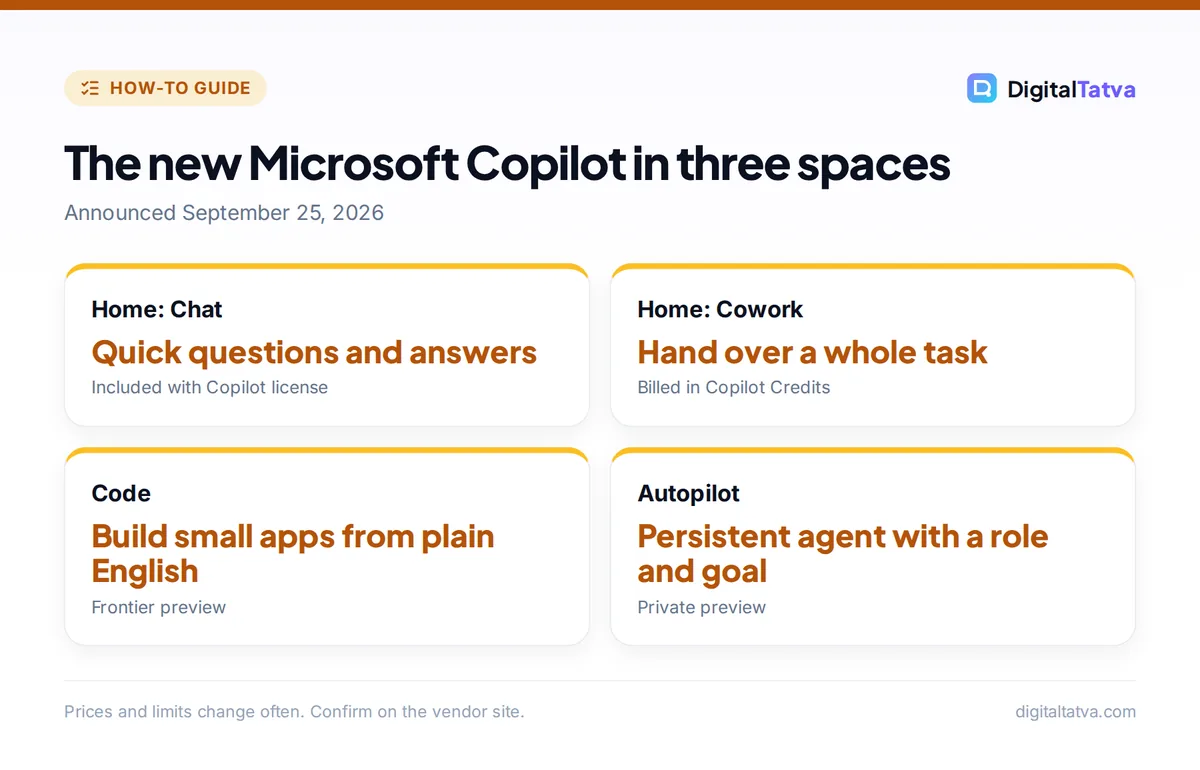
The new Copilot explained: Home, Code and Autopilot
On September 25, 2026 Microsoft reorganized Copilot around three spaces. It did not announce a new model; it changed the interface and how agentic work is sold.
| Space | What it does | Status in October 2026 |
|---|---|---|
| Home | Combines Chat (questions and answers) and Cowork (delegated tasks). Office files open inside Copilot. | Rolling out through the Microsoft Frontier program |
| Code | Describe a small app, tracker, dashboard or workflow in plain English and Copilot builds it in a sandbox that can be hosted in your tenant | Frontier rollout; consumer preview for Microsoft 365 Premium later in 2026 |
| Autopilot | A persistent agent (formerly called Scout) with a name, role and goal that watches channels and runs recurring tasks | Private preview |
Autopilot is the most ambitious piece: it gets its own identity, memory and workspace in your Microsoft 365 tenant and can be @mentioned in Teams and Outlook. For most teams, though, Cowork is the part they can actually use now. If you want the wider picture of Microsoft’s assistant, our guide on how to use Microsoft Copilot covers the free consumer app and Windows features.
Who can use Copilot Cowork?
Copilot Cowork is aimed at organizations, not personal accounts. You need:
- A Microsoft 365 business or enterprise subscription with a Microsoft 365 Copilot license assigned to you.
- Copilot Credits enabled by your admin, because agentic work is billed by usage.
- For the newest Home experience, your organization must be in the Microsoft Frontier program, which delivers preview features that can change or be withdrawn.
Home users on Microsoft 365 Personal or Premium get Copilot in Word, Excel and PowerPoint, but Cowork itself is a business feature at the time of writing. Microsoft has said a consumer preview of Code is coming later in 2026 for Premium subscribers. Students should check with their school IT team, since Frontier features must be switched on by the institution.
Copilot Cowork pricing and Copilot Credits
Microsoft now splits Copilot costs into two parts.
| Cost | What it covers | Price |
|---|---|---|
| Microsoft 365 Copilot (enterprise) | Chat plus Copilot in Word, Excel, PowerPoint, Outlook and Teams | $30 per user per month, paid yearly |
| Microsoft 365 Copilot Business (SMB) | Same for organizations under 300 seats | $21 per user per month list, shown at $18 promotional pricing |
| Copilot Credits | Agentic work: Cowork, apps built with Cowork, the Work IQ API, with Code and Autopilot expected to follow | Usage-based, set by Microsoft per service |
Microsoft describes Copilot Credits as “a common currency for eligible Microsoft services with usage-based billing”. The practical point is that a long Cowork task that reads many files and builds several documents costs more credits than a short one. Inside a Cowork task you can type /cost to see the approximate credit cost of the open task.
Save money: admins can set spending policies by group, an overall monthly cap, a per-user cap, alerts and approval for extra credit requests. Microsoft recommends a per-user limit. Set it before you roll Cowork out widely; reports suggest admins should review these settings before December 1, 2026.
For a broader look at business AI seats and when they pay off, see AI team plans explained and our full Microsoft Copilot pricing breakdown.
How to use Copilot Cowork step by step
The exact buttons depend on whether your tenant has the new Home experience yet, but the flow is the same.
- Open Copilot. Open the Microsoft 365 Copilot app on the web, desktop or mobile, or the Copilot pane in Teams. Sign in with your work account.
- Switch to Cowork. In Home, choose the option to hand off a task (labeled Cowork) instead of a normal chat. If you do not see it, your admin has not enabled it or credits are off.
- Describe the outcome, not the steps. Say what you want delivered, for whom and by when: “Create a 6-slide client update for Acme from the files in the Acme Q3 folder, with a summary slide and next steps.”
- Attach or point to files. Add the Excel sheets, Word documents or SharePoint folders Cowork should use. It can only work with files you already have permission to open.
- Check the plan and cost. Cowork shows the steps it intends to take. Type /cost to see the approximate credits before letting a big job run.
- Let it work and come back. You can leave the task running. When it finishes, open the Word, Excel or PowerPoint output inside Copilot.
- Review and edit. Check numbers against the source files, fix tone and remove anything confidential before sharing. Ask Cowork for revisions in the same task.
Tip: the best Cowork prompts include the audience, the format, the length and a definition of done. “Five slides, one chart per slide, plain English, ready for the CFO” beats “make a deck”.
Good tasks for Copilot Cowork (and bad ones)
Cowork shines on multi-file office work that would take a person an hour or more of copying, summarizing and formatting.
| Good fit | Poor fit |
|---|---|
| Turning several spreadsheets into a summary deck | One-line questions (use Chat, it is cheaper) |
| Drafting a project status report from Teams threads and documents | Final legal, medical or financial decisions |
| Building a comparison table of vendor proposals | Tasks needing files you cannot access |
| Creating a training document from scattered notes | Anything where numbers cannot be checked |
| Preparing meeting packs and follow-up emails | Creative work that needs a strong personal voice |
If your work is mostly spreadsheets, our guide to AI tools for Excel compares Copilot in Excel with alternatives, and AI presentation makers covers dedicated slide tools.
Copilot Cowork vs Claude Cowork vs ChatGPT Work
Three big assistants now have a “do the whole task” mode, and the names are confusingly similar.
| Feature | Copilot Cowork | Claude Cowork | ChatGPT Work |
|---|---|---|---|
| Made by | Microsoft | Anthropic | OpenAI |
| Best at | Microsoft 365 files, Teams, SharePoint | Long documents, files on your computer, browser tasks | Web research and multi-step tasks in ChatGPT |
| Who can use it | Microsoft 365 Copilot business users | Claude Pro, Max, Team and Enterprise | Paid plans, and Free users in the desktop app |
| Billing | License plus Copilot Credits | Included in plan usage limits | Metered within plan usage limits |
If your company already lives in Microsoft 365, Copilot Cowork has the big advantage of working directly on your SharePoint and OneDrive files with your existing permissions. Teams on Google Workspace or mixed tools may get more from Claude or ChatGPT; see how to use ChatGPT Work and our Copilot vs ChatGPT comparison.
Security, privacy and governance
Copilot Cowork works inside your Microsoft 365 tenant and respects existing permissions, which is its main selling point for IT teams. Still, an agent that can read many files at once can surface documents people forgot were overshared. Before rollout:
- Review SharePoint and OneDrive sharing so Cowork cannot pull from files that should be private.
- Set credit caps and alerts so a few heavy users cannot drain the budget.
- Write clear rules on which data can be used, in an AI usage policy.
- Remember that people stay accountable for what an agent sends or publishes in their name.
Our guide to AI data privacy for business covers the wider checklist.
Pros
- Works directly on Word, Excel and PowerPoint files
- Respects Microsoft 365 permissions
- Saves hours on multi-file reporting
- Admin cost controls and /cost command
Cons
- Business only, needs a Copilot license
- Extra usage-based credit costs
- Newest features still in preview
- Output still needs careful checking
Frequently asked questions
What is Copilot Cowork?
Copilot Cowork is the agent mode in Microsoft 365 Copilot that takes a whole multi-step task, such as building a report or deck from several files, works through it and returns finished Word, Excel or PowerPoint output. Since September 2026 it sits inside the Home space alongside Copilot Chat.
Is Copilot Cowork free?
No. It requires a Microsoft 365 Copilot business license, and agentic work in Cowork is billed by usage in Copilot Credits. The free Copilot app and Copilot Chat do not include Cowork. Admins can cap credit spending per user, per group and per month.
How do I check how much a Cowork task costs?
Type /cost inside an open Cowork task to see its approximate credit cost. Admins can also see credit consumption in the Microsoft 365 admin center and set alerts, monthly caps and per-user limits to stop unexpected spending.
Can I use Copilot Cowork with Microsoft 365 Personal or Premium?
At the time of writing Cowork is a business feature. Personal and Premium subscribers get Copilot in Word, Excel and PowerPoint, and Microsoft has said a preview of Code is coming later in 2026 for Premium. Check Microsoft’s plan pages for updates.
What is the difference between Copilot Cowork and Autopilot?
Cowork runs a task you hand it and then stops. Autopilot is a persistent agent with its own name, role and goal that keeps working in the background, watching channels and running recurring jobs. Autopilot is in private preview in late 2026.
Should your team use Copilot Cowork?
If your organization already pays for Microsoft 365 Copilot and spends hours turning spreadsheets and documents into reports and decks, Copilot Cowork is worth piloting now. Start with a small group, set per-user credit caps, use /cost on big jobs and measure hours saved against credit spend, using a framework like our guide to measuring AI ROI. Smaller teams without Copilot licenses can get similar results from ChatGPT or Claude business plans. Copilot plans, credit rates and features change often, so confirm current details on Microsoft’s official Copilot pricing page before you buy.
Pricing and features are checked at the time of writing and can change. Some links may be affiliate links, which never affect our verdicts.