Microsoft Copilot vs ChatGPT: Which AI Assistant Is Better in 2026?
Copilot vs ChatGPT in 2026: models, free plans, pricing, Office integration, agents and privacy compared, with a clear verdict on which assistant to pick for your work.

On this page
- Key takeaways
- Copilot vs ChatGPT: quick verdict
- What each assistant is
- Answer quality and models
- Free plans compared
- Pricing: Copilot vs ChatGPT
- Office and work integration
- Agents: Copilot Cowork vs ChatGPT Work
- Privacy and data
- Copilot vs ChatGPT for common tasks
- Images, voice and mobile apps
- Which should you choose?
- Frequently asked questions
- The bottom line
For most people, ChatGPT is the better all-round AI assistant in 2026, while Microsoft Copilot is the better choice if you live inside Windows, Word, Excel, Outlook and Teams. ChatGPT now runs GPT-6 on every plan and leads on writing, reasoning, tools and its huge plugin ecosystem; Copilot wins when the work happens in Microsoft 365 files and your company already pays for it.
Below we compare Microsoft Copilot vs ChatGPT on models, free plans, pricing, Office integration, agents, image tools, privacy and India pricing, then tell you exactly which one to pick for your situation.
Key takeaways
- Pick ChatGPT for general writing, research, coding help, images and custom GPTs.
- Pick Copilot if your work is in Word, Excel, PowerPoint, Outlook and Teams, especially with a company license.
- Both have strong free versions; ChatGPT Free uses GPT-6 Luna, and free Copilot works on the web, Windows and mobile.
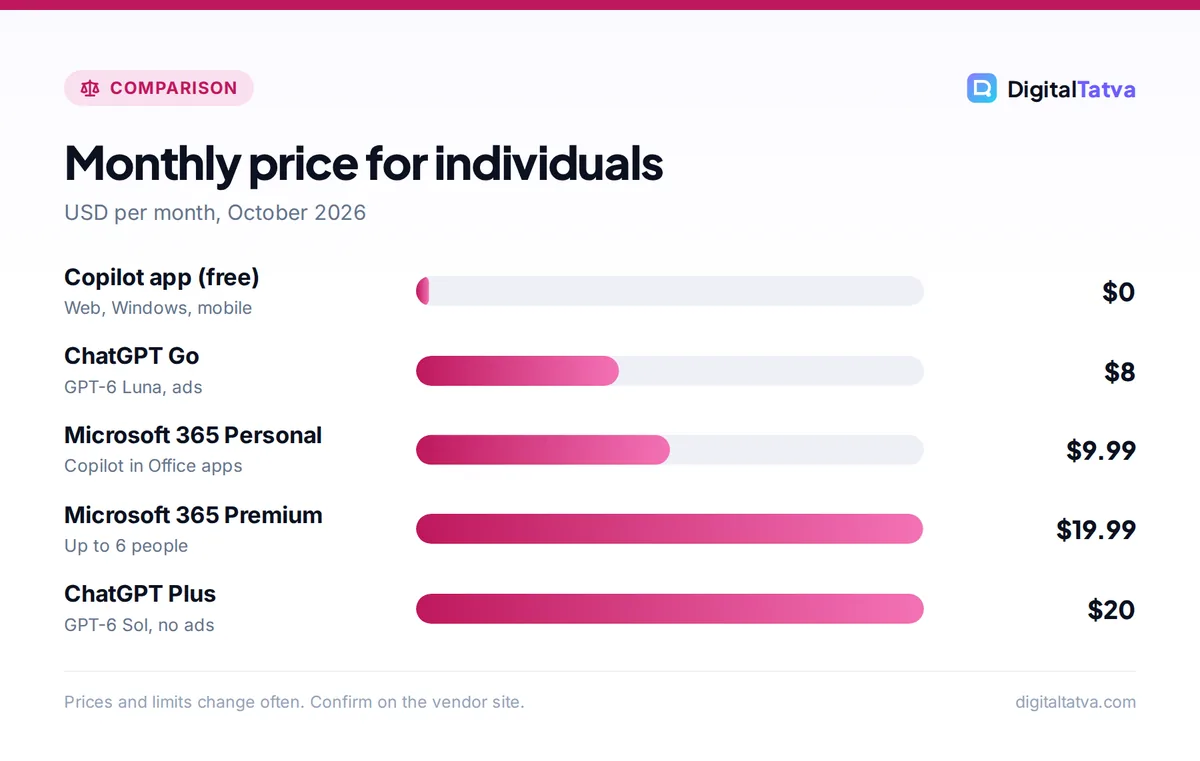
- Paid: ChatGPT Plus is $20 a month; Copilot for home users comes with Microsoft 365 Personal ($9.99) or Premium ($19.99).
- For businesses, Microsoft 365 Copilot costs $30 per user per month (or $21 on the Business plan) and adds agentic Cowork billed in credits.
Copilot vs ChatGPT: quick verdict
| Category | Microsoft Copilot | ChatGPT | Winner |
|---|---|---|---|
| Everyday writing and answers | Very good | Excellent | ChatGPT |
| Word, Excel, PowerPoint, Outlook | Built in | Via file upload and plugins | Copilot |
| Free plan | Generous, works on Windows and mobile | GPT-6 Luna with limits, ads in some markets | Tie |
| Paid plan for individuals | From $9.99 with Microsoft 365 Personal | Go $8, Plus $20, Pro $200 | Copilot on value |
| Agents and long tasks | Cowork, Autopilot (business) | ChatGPT Work, Codex | ChatGPT for individuals |
| Custom assistants | Copilot agents in Microsoft 365 | Custom GPTs, projects, plugins | ChatGPT |
| Company data and permissions | Respects Microsoft 365 permissions | Business and Enterprise plans, connectors | Copilot for Microsoft shops |
What each assistant is
ChatGPT is OpenAI’s assistant, available on the web, desktop and mobile. Since October 7, 2026 it runs GPT-6: Free and Go users get GPT-6 Luna and paid plans get the stronger GPT-6 Sol, with the new Intelligent UI that adds charts, buttons and small calculators to answers. It also includes image generation, voice mode, Deep Research, projects, custom GPTs and ChatGPT Work for longer tasks. Our guide to what ChatGPT is covers the basics.
Microsoft Copilot comes in two flavors that people often confuse. The consumer Copilot app is free on the web, Windows and mobile, and Copilot features inside Word, Excel and PowerPoint come with Microsoft 365 Personal and Premium. Microsoft 365 Copilot is the business version that works across your organization’s files, email and Teams chats. Read how to use Microsoft Copilot for a tour.
Answer quality and models
In everyday use, ChatGPT gives more polished long-form writing, follows complex instructions more reliably and handles multi-step reasoning better, especially on paid plans with GPT-6 Sol. Copilot’s answers are solid for summaries, quick facts and email drafts, and it cites web sources clearly, but it tends to give shorter, safer responses.
For coding and data analysis, ChatGPT is ahead for individuals because of its data analysis tools and Codex. Inside a company, Copilot’s ability to read your actual Excel files and Teams threads can matter more than raw model quality. If writing quality is your top priority, also compare ChatGPT vs Claude.
Free plans compared
| Free feature | Copilot (free) | ChatGPT Free |
|---|---|---|
| Model | Microsoft’s Copilot models, with daily limits | GPT-6 Luna |
| Image generation | Yes, daily limits | Yes, limits |
| Voice conversations | Yes | Yes |
| Works inside desktop Office apps | No | No |
| Ads | Shown in some Microsoft surfaces | Ads below answers for Free users in rollout markets |
Both free plans are good enough for casual use. ChatGPT Free has started showing ads below answers in some markets; see how ChatGPT ads work. If you want to stay free, our list of free ChatGPT Plus alternatives includes Copilot.
Pricing: Copilot vs ChatGPT
| Plan | Price | Best for |
|---|---|---|
| ChatGPT Go | $8/month (about Rs 399 in India) | Budget users who want more than Free |
| ChatGPT Plus | $20/month | Most individual power users |
| ChatGPT Pro | $200/month | Heavy professional use |
| Microsoft 365 Personal (with Copilot) | $9.99/month or $99.99/year | One person who uses Office apps |
| Microsoft 365 Premium | $19.99/month or $199.99/year, up to 6 people | Families and heavy home Copilot use |
| Microsoft 365 Copilot Business | $21/user/month list ($18 promo) | Small businesses on Microsoft 365 |
| Microsoft 365 Copilot (enterprise) | $30/user/month, yearly | Large organizations |
Save money: if you already pay for Microsoft 365 Personal or Family for Office and storage, you already have Copilot in Word, Excel and PowerPoint, so a separate ChatGPT subscription may be optional. Copilot Pro was discontinued for new buyers and replaced by Microsoft 365 Premium.
Full details are in our ChatGPT pricing guide and Microsoft Copilot pricing guide.
Office and work integration
This is Copilot’s home ground. Copilot in Word drafts and rewrites documents, Copilot in Excel explains formulas and analyzes tables, Copilot in PowerPoint builds slides from a document, and Copilot in Outlook summarizes long threads and drafts replies. Microsoft 365 Copilot in a business can also search your SharePoint, OneDrive, email and Teams chats while respecting existing permissions.
ChatGPT can work with the same files if you upload them, and its connectors and plugins reach tools like Google Drive and SharePoint on business plans, but it is not built into the Office ribbon. If spreadsheets are your main use, compare ChatGPT for Excel with Copilot in our AI tools for Excel roundup.
Agents: Copilot Cowork vs ChatGPT Work
Both now offer a “do the whole task” mode. ChatGPT Work handles longer projects across apps, files and the web and produces sheets, slides and documents; Free users can try it in the desktop app and paid plans get more usage. Microsoft’s September 2026 redesign put Chat and Cowork into a new Home space, with Code for building small apps and Autopilot for persistent agents, but these are business features billed in Copilot Credits. Read our guide to Copilot Cowork and ChatGPT Work for setup steps.
Privacy and data
For companies, Microsoft 365 Copilot’s biggest advantage is that it stays inside your Microsoft 365 tenant with your existing security and compliance setup. ChatGPT Business and Enterprise also exclude your data from model training by default and add admin controls. On personal accounts, both companies can use conversations to improve their services unless you change settings, so review the data controls. See Is ChatGPT safe? for ChatGPT’s settings.
Copilot vs ChatGPT for common tasks
The right tool often depends on the job in front of you rather than on overall quality. Here is how the two compare on the tasks people use them for most.
| Task | Better choice | Why |
|---|---|---|
| Writing a blog post or report from scratch | ChatGPT | Longer, more natural drafts and better structure |
| Summarizing a long email thread | Copilot | Built into Outlook, no copying needed |
| Explaining an Excel formula in your own file | Copilot | Reads the open workbook directly |
| Brainstorming campaign ideas | ChatGPT | More varied, creative output |
| Meeting recap in Teams | Copilot | Uses the meeting transcript inside Teams |
| Learning a new topic step by step | ChatGPT | Step-by-step tutoring and Intelligent UI visuals |
| Creating images for social posts | ChatGPT | ChatGPT Images 2.5 handles text and edits well |
| Turning a Word document into slides | Copilot | PowerPoint integration builds the deck in place |
A useful rule of thumb: if the input already lives in a Microsoft 365 file, start with Copilot; if you are starting from a blank page or an idea, start with ChatGPT.
Images, voice and mobile apps
Both assistants create images, but ChatGPT’s image tools are more capable for marketing work: ChatGPT Images 2.5 is better at following reference photos, editing only the part you ask for and rendering text inside images. Copilot’s image creation is fine for quick illustrations and is free with daily limits. For a wider look at image tools, see our list of the best AI image generators.
Voice conversations are available in both mobile apps and work well for hands-free questions. ChatGPT’s voice mode feels more conversational, while Copilot’s voice is handy on Windows PCs where the Copilot app is often pinned to the taskbar. Both apps are free to download on Android and iPhone, and both sync your history across devices when you sign in.
Which should you choose?
Choose ChatGPT if
- You want the strongest general assistant for writing, research, brainstorming and learning.
- You use custom GPTs, image generation or coding help often.
- Your work happens across many tools, not mainly in Microsoft 365.
Choose Copilot if
- You spend your day in Word, Excel, PowerPoint, Outlook and Teams.
- You already pay for Microsoft 365 Personal, Family or a business plan.
- Your company needs AI that respects Microsoft 365 permissions and compliance.
Many professionals end up using both: free Copilot inside Office and ChatGPT Plus for everything else. If you are still choosing, our best AI chatbots comparison and Gemini vs Copilot guide cover the other options.
Frequently asked questions
Is Copilot better than ChatGPT?
Not overall. ChatGPT is the stronger general assistant for writing, reasoning, images and custom GPTs. Copilot is better when your work happens inside Word, Excel, PowerPoint, Outlook and Teams, especially with a Microsoft 365 Copilot business license that can read your company files.
Does Microsoft Copilot use ChatGPT?
Copilot is a separate Microsoft product. Microsoft has a long partnership with OpenAI and has used OpenAI models in Copilot alongside its own models, but the apps, features, limits and pricing are different from ChatGPT, and Microsoft chooses which models power each Copilot feature.
Is Copilot free?
Yes, the consumer Copilot app is free on the web, Windows and mobile with daily limits. Copilot inside desktop Word, Excel and PowerPoint needs Microsoft 365 Personal, Family or Premium, and the business version, Microsoft 365 Copilot, costs $21 to $30 per user per month.
Which is cheaper in India, Copilot or ChatGPT?
ChatGPT Go costs about Rs 399 a month and Plus about Rs 1,999. Copilot comes bundled with Microsoft 365 Personal or Family subscriptions, so it is cheapest if you already pay for Office. Free Copilot and free ChatGPT are both available in India.
Can I use ChatGPT inside Word and Excel?
Not natively like Copilot. You can upload Word and Excel files to ChatGPT for analysis and rewriting, or use add-ins and connectors on business plans. For in-app editing within Office, Copilot is the built-in option.
The bottom line
ChatGPT is the best single AI assistant for most individuals in 2026, and Copilot is the best AI for people and companies who work inside Microsoft 365. Try both free versions on a week of real tasks before you pay. Plans and prices change often, so confirm current details on OpenAI’s ChatGPT pricing page and Microsoft’s Copilot pricing page.
Pricing and features are checked at the time of writing and can change. Some links may be affiliate links, which never affect our verdicts.