Gemini vs Copilot: Which AI Assistant Should You Use in 2026?
Gemini vs Copilot compared on models, chat quality, Google Workspace and Microsoft 365 integration, images and video, pricing for individuals and businesses, and privacy.

On this page
- Key takeaways
- Gemini vs Copilot at a glance
- AI models and answer quality
- Integration with work apps
- Images, video and creative tools
- Research and study tools
- Pricing compared
- Privacy and enterprise security
- Mobile and everyday use
- Which is better for students and small businesses?
- Pros and cons
- Choose Gemini if, choose Copilot if
- Frequently asked questions
- The bottom line
Quick verdict: Choose Gemini if you live in Google’s world: Gmail, Docs, Sheets, Drive, Android and Google Search. Choose Microsoft Copilot if your day runs on Outlook, Word, Excel, PowerPoint, Teams and Windows. As standalone chat assistants, Gemini is generally stronger for research, multimodal tasks, images and video, while Copilot’s biggest advantage is how deeply Microsoft 365 Copilot works inside Office documents and company data.
This comparison covers Gemini and Copilot across AI models, everyday chat quality, work app integration, images and video, pricing for individuals and businesses, privacy, and which one suits students, professionals and companies in 2026.
Key takeaways
- Both have free versions: the Gemini app and Microsoft Copilot are free to use with limits.
- For individuals, Google AI Pro costs $19.99 a month; Microsoft 365 Personal at $9.99 a month includes Copilot in Office apps, and Microsoft 365 Premium costs $19.99 a month for heavier AI use.
- For businesses, Gemini is bundled into Google Workspace plans, while Microsoft 365 Copilot Business is an add-on listed at $21 per user per month (shown at an $18 promotional price) and Enterprise at $30.
- Gemini leads on multimodal features such as image editing, video generation with Veo, NotebookLM and Deep Research.
- Copilot leads for Excel, Outlook and Teams-heavy organizations, especially with Microsoft Graph data and agents like Researcher and Analyst.
Gemini vs Copilot at a glance
| Feature | Google Gemini | Microsoft Copilot |
|---|---|---|
| Made by | Microsoft | |
| Models | Google’s Gemini models (3.x family, Gemini 4 Argon rolling out) | OpenAI models and Microsoft’s own models, with Anthropic models in some Microsoft 365 features |
| Free version | Gemini app | Copilot app and web |
| Individual paid | Google AI Plus $4.99, AI Pro $19.99, Ultra from $99.99 | Microsoft 365 Personal $9.99, Premium $19.99 |
| Business | Included in Google Workspace | Microsoft 365 Copilot add-on |
| Best work apps | Gmail, Docs, Sheets, Slides, Meet, Drive | Outlook, Word, Excel, PowerPoint, Teams |
| Images and video | Strong image editing, Veo video | Image creation; less video focus |
| Research tools | Deep Research, NotebookLM | Researcher agent in Microsoft 365 Copilot |
AI models and answer quality
Gemini runs on Google’s own Gemini models. Google’s newest flagship, Gemini 4 Argon, began rolling out in 2026; our Gemini 4 Argon guide explains what is new. Google’s models are especially strong at handling images, video, audio and long documents together, and they benefit from Google Search for current information.
Copilot uses a mix of models. Microsoft has a close partnership with OpenAI, builds its own models, and has added Anthropic’s Claude models as options in some Microsoft 365 Copilot features. In everyday chat, Copilot gives solid, well-sourced answers using Bing search. The quality gap between the free versions is small for simple questions. For long research and multimodal tasks, Gemini usually pulls ahead; for questions grounded in your Microsoft work data, Microsoft 365 Copilot has the edge.
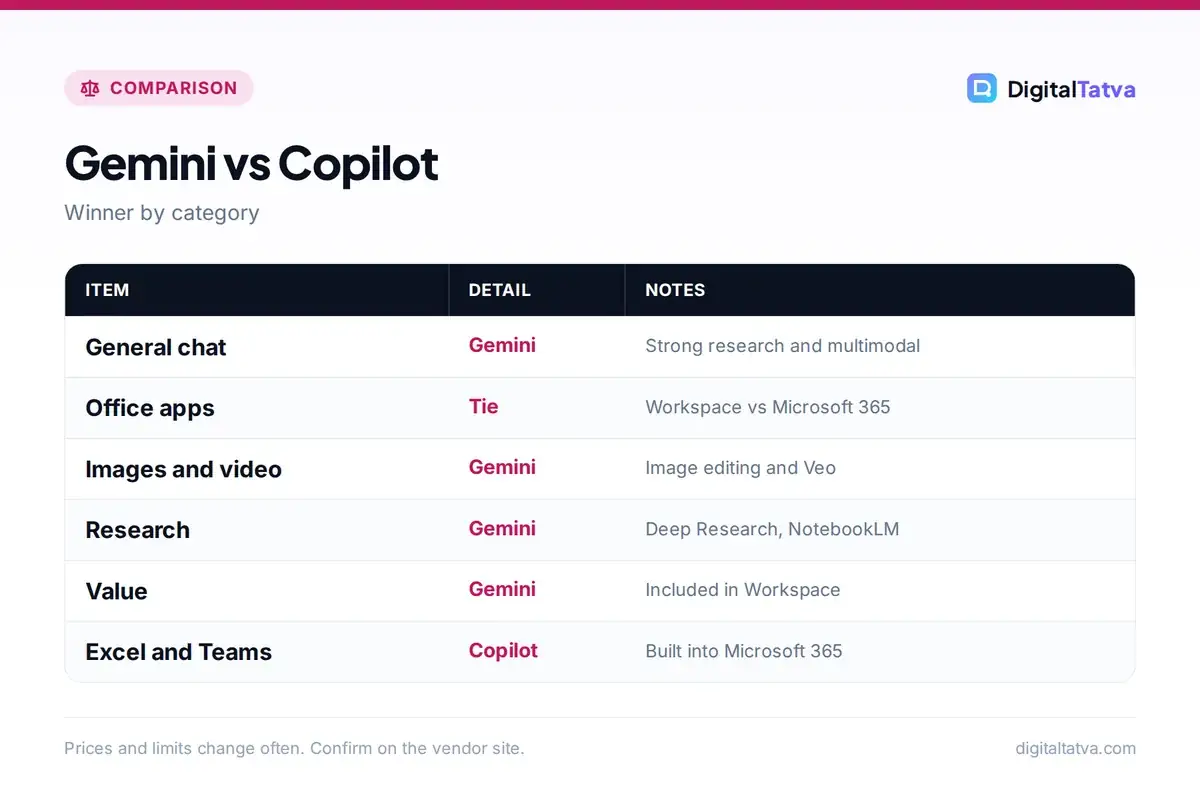
Winner: Gemini for general chat and research; Copilot for Microsoft work data.
Integration with work apps
Gemini in Google Workspace
Gemini appears in Gmail, Docs, Sheets, Slides, Drive, Meet and Chat. It can draft and summarize emails, write documents, build formulas, create slides, take meeting notes in Meet and answer questions across your Drive files. For businesses, Gemini has been bundled into Workspace plans rather than sold as a separate add-on. Our guide to using Gemini in Google Workspace walks through each app.
Copilot in Microsoft 365
Microsoft 365 Copilot sits inside Word, Excel, PowerPoint, Outlook and Teams and can use Microsoft Graph, meaning your emails, chats, meetings and files, to answer questions like “What did the client agree in last week’s meeting?” It includes agents such as Researcher for deep research across work and web, and Analyst for data analysis. Copilot in Excel needs files stored in OneDrive or SharePoint. See how to use Microsoft Copilot for setup.
Winner: tie. Pick the one that matches the apps your team already uses.
Images, video and creative tools
Google has invested heavily in creative AI. The Gemini app includes advanced image generation and editing, sometimes called Nano Banana, plus video generation with Veo on paid plans, and Google’s Flow tool for filmmaking. Our guides to Gemini image editing and Google Flow and Veo show what is possible. Copilot can create images and offers design help through Microsoft Designer, but it is less focused on video.
Winner: Gemini.
Research and study tools
Gemini’s Deep Research runs many searches and produces long, cited reports, and NotebookLM lets you upload sources and get answers, summaries and audio overviews grounded in them, which students love; see our NotebookLM guide. Copilot offers deep research through its Researcher agent in Microsoft 365 Copilot and research-style answers in the consumer app. For learners, Google’s student offers have been generous; check our AI student discounts page for current deals.
Winner: Gemini.
Pricing compared
| Plan type | Gemini | Copilot |
|---|---|---|
| Free | Gemini app with limits | Copilot app with limits |
| Budget individual | Google AI Plus $4.99/month (Rs 399 in India) | Microsoft 365 Personal $9.99/month (includes Office apps) |
| Standard individual | Google AI Pro $19.99/month (Rs 1,950 in India) | Microsoft 365 Premium $19.99/month (up to 6 people) |
| Power user | Google AI Ultra from $99.99/month | No direct equivalent |
| Business | Workspace Business Standard about $14/user/month annual, Gemini included | Microsoft 365 Copilot Business add-on $21/user/month annual list ($18 promo) |
| Enterprise | Workspace Enterprise plans | Microsoft 365 Copilot $30/user/month annual |
The value comparison depends on what you already pay for. If your company already has Workspace, Gemini comes included. If you are on Microsoft 365, Copilot is an extra cost per user but plugs straight into existing documents. See Gemini pricing and Microsoft Copilot pricing for details, and the official Microsoft 365 Copilot pricing page and Google AI plans page.
Winner: Gemini on value for most individuals and Workspace businesses.
Privacy and enterprise security
Both companies offer enterprise-grade protections on business plans. Google says Workspace data used with Gemini is not used to train models outside your organization and respects existing permissions. Microsoft 365 Copilot also respects your organization’s permissions, sensitivity labels and compliance settings, which matters for regulated industries already using Microsoft Purview. On consumer plans, review each app’s activity and training settings. Our guide to AI data privacy for business covers what to check.
Winner: tie, with Copilot slightly ahead for organizations deep in Microsoft compliance tools.
Mobile and everyday use
On Android, Gemini is the built-in assistant on many phones, can see your screen and works with Google apps like Maps, YouTube and Calendar. On iPhone, Gemini is available as an app. Copilot is available on Windows through the Copilot app and key, on Edge, and as mobile apps for Android and iPhone. If you spend most of your day on a Windows laptop, Copilot is always one keypress away. If you are mainly on an Android phone, Gemini is more natural. For a wider view of mobile assistants, see our AI voice assistants comparison.
Which is better for students and small businesses?
For students, Gemini is usually the better pick. NotebookLM turns lecture notes and readings into summaries, quizzes and audio overviews, Deep Research helps with projects, and Google has offered free or discounted AI plans to students in several countries, including free Google AI Plus for eligible students in India until the end of 2026. Copilot is still useful if your college provides Microsoft 365, since Copilot in Word and PowerPoint can speed up assignments and presentations.
For small businesses, the deciding factor is the email and document platform you already pay for. A shop or agency on Google Workspace gets Gemini without an extra add-on, which keeps costs low. A firm on Microsoft 365 Business should trial Microsoft 365 Copilot Business with a few staff first, because the per-user add-on adds up quickly. Our guide to AI for small business lists other tools worth combining with either assistant.
Pros and cons
Gemini strengths
- Strong multimodal and creative tools
- Deep Research and NotebookLM
- Included in Workspace business plans
- Cheap Google AI Plus tier
- Deep Android integration
Copilot strengths
- Best inside Word, Excel, PowerPoint and Outlook
- Uses Teams meetings, chats and emails as context
- Researcher and Analyst agents for work
- Fits Microsoft security and compliance
- Built into Windows and Edge
Choose Gemini if, choose Copilot if
Choose Gemini if you use Gmail, Google Docs and Android, want strong image, video and research tools, are a student who benefits from NotebookLM and Google’s offers, or run a business on Google Workspace.
Choose Copilot if your work happens in Outlook, Excel, Word and Teams, your company already uses Microsoft 365 and its security tools, or you want AI built into Windows.
Still undecided between assistants? Compare more options in ChatGPT vs Gemini and our best AI chatbots list.
Frequently asked questions
Is Gemini better than Copilot?
Gemini is generally better for research, images, video and study tools, and it offers more value for Google Workspace users. Copilot is better for people and companies that work mainly in Microsoft 365 apps like Outlook, Excel, Word and Teams.
Are Gemini and Copilot free?
Yes, both have free versions with usage limits: the Gemini app and the Microsoft Copilot app. Paid plans add higher limits, advanced models and AI features inside Google Workspace or Microsoft 365 apps.
How much does Microsoft 365 Copilot cost for business?
Microsoft lists Microsoft 365 Copilot Business at $21 per user per month on annual billing, shown at an $18 promotional price, and Microsoft 365 Copilot for enterprise at $30 per user per month paid yearly. Both require a qualifying Microsoft 365 license.
Does Google Workspace include Gemini?
Yes. Gemini features are bundled into Google Workspace business plans, with deeper features in Standard and Plus tiers, including Gemini in Docs, Sheets, Slides, Drive, Meet and Chat.
Which is better for Excel, Gemini or Copilot?
Copilot is better if you work in Microsoft Excel, since it is built into the app and can analyze, chart and write formulas for files stored in OneDrive or SharePoint. Gemini is the better choice inside Google Sheets.
The bottom line
Gemini and Copilot are both excellent, and the right choice is mostly about your ecosystem. Gemini offers more creative and research power and better value for Google users. Copilot is the natural pick for Microsoft 365 workplaces where Word, Excel, Outlook and Teams run the day. Try both free versions with your real tasks before paying.
Pricing and features are checked at the time of writing and can change. Some links may be affiliate links, which never affect our verdicts.