AI for Event Marketing: How to Promote Events, Meetups and Webinars Faster
A practical guide to using AI for event marketing: event pages, speaker promos, email and WhatsApp reminders, social content, live coverage, recap content and getting your events found in AI search.
On this page
- Key takeaways
- Why AI fits event marketing so well
- Your AI event marketing toolkit
- Before the event: four to six weeks out
- Two weeks to one week out: reminders and urgency
- On the day: live coverage
- After the event: recap and repurpose
- Monthly and recurring events
- Getting your event found in AI search
- Webinars and online events
- Sponsors and partners
- Accessibility and inclusion
- Worked example: a monthly meetup with a small team
- Budget-friendly setup
- Measuring event marketing
- Choosing the right event format
- Templates worth saving
- Conferences and larger events
- Privacy and permissions
- Building an event archive that keeps working
- Useful prompts
- Common mistakes
- Hybrid events
- In summary
- Frequently asked questions
- Sources
Last updated: 4 November 2026
Quick answer: AI helps event organisers at every stage. Before the event, use AI assistants to write event pages, speaker bios and promo copy, plan a social calendar and draft email and WhatsApp sequences; use design tools such as Canva for graphics. During the event, use AI to caption photos, write live updates and transcribe sessions. After the event, turn recordings into recap articles, clips, newsletters and follow-up emails. Publish each event on a clear web page with Event schema, accurate dates and location, so search engines and AI assistants can recommend it when people ask what is happening. Always check names, dates, times and venues by hand.
Key takeaways
- AI is strongest at the repetitive writing and design work that fills event marketing calendars.
- A clear event page with Event schema helps search engines and AI assistants surface your event.
- Reminder sequences by email and WhatsApp reduce no-shows; AI drafts them quickly.
- Recordings and transcripts turn one event into weeks of content.
- Human checks on dates, names and venue details are essential.
Why AI fits event marketing so well
Event marketing is a burst of work with a fixed deadline. For every meetup, workshop, webinar, conference or community gathering, organisers need an event page, speaker announcements, social posts, emails, reminders, signage, live coverage and follow-up. For monthly community events, this cycle repeats every few weeks, often run by volunteers or a small team.
Much of that work follows patterns. Speaker announcements look similar, reminder emails follow the same structure and recap posts share a format. That makes event marketing ideal for AI assistance: AI drafts the repetitive material, and people add the personality, the relationships and the final checks.
Your AI event marketing toolkit
| Task | Tool types | Examples |
|---|---|---|
| Event page, descriptions, bios | AI assistants | ChatGPT, Claude, Gemini |
| Graphics, banners, badges | Design tools with AI | Canva Magic Studio, Adobe Express |
| Promo videos and reels | AI video editors | CapCut, Canva video |
| Email campaigns | Email platforms with AI writing | Your email tool’s AI assistant |
| WhatsApp reminders | WhatsApp Business tools | WhatsApp Business app, WhatsApp Business Platform providers |
| Registration and ticketing | Event platforms | Luma, Eventbrite, Google Forms, your own site |
| Transcription and recap | Transcription and meeting tools | Otter, Fireflies, recording platform transcripts |
| Clips and repurposing | AI clip tools | Opus Clip, CapCut |
Check current plans and pricing on each vendor’s site. Our lists of AI social media tools, AI for email marketing and AI meeting assistants cover alternatives.
Before the event: four to six weeks out
Write the event page first
Every channel should point to one event page. Give an AI assistant the facts and ask for a clear, scannable page.
Prompt: “Write an event page for the following event. Start with a two-sentence summary that says what it is, who it is for, when and where. Then add: what attendees will learn or get, the agenda with times, speaker bios of 50 words each, venue and directions, how to register, price, accessibility information and an FAQ with six questions. Use only these facts and list anything missing at the end. Facts: [paste].”
Check every detail: date, day of the week, start and end time, time zone for online events, venue name and address, speaker names and titles and registration link. Day-of-week errors are surprisingly common in AI drafts.
Add Event schema
Mark the page up with Event structured data: name, start date and time, end time, location (a Place with address, or VirtualLocation for online events), description, organiser, offers (price and registration link), performer or speaker, and event status. This helps search engines display your event in rich results and helps AI assistants understand the details. See Google’s Event structured data documentation and our guide to schema markup for AEO.
Plan the promotion calendar
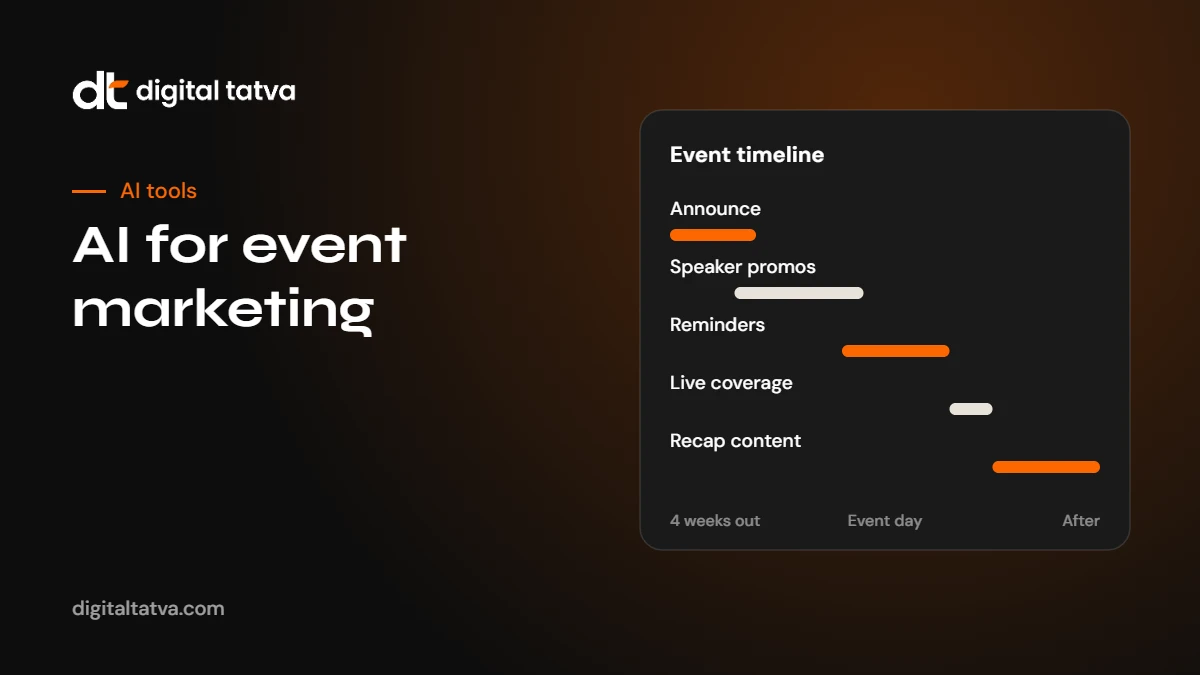
Prompt: “Create a promotion calendar for a [type of event] on [date] for [audience]. Channels: Instagram, LinkedIn, WhatsApp community and email. Include an announcement, speaker spotlights, early bird deadline, behind the scenes, last call, day-before reminder, day-of posts and recap. For each item give the date, channel, format and a one-line idea.”
Create speaker promos
- Ask speakers for a short bio, photo, session title and three takeaways.
- Use AI to turn each into a speaker spotlight post in your brand voice.
- Use Canva templates for consistent speaker cards. See how to use Canva AI.
- Send speakers ready-made posts and graphics to share with their own networks. This is often the most effective promotion you can do.
Two weeks to one week out: reminders and urgency
Email sequence
Ask AI to draft a sequence: announcement, speaker highlight, early bird or seat reminder, “what to expect”, day-before reminder and day-of logistics. Keep each email short with one clear call to action.
WhatsApp reminders
For community events, WhatsApp often drives attendance more than email. Use AI to write short, friendly reminders and logistics messages. Only message people who have opted in, follow WhatsApp’s business policies, and avoid spamming large groups. See WhatsApp AI for business.
Reduce no-shows
- Send a calendar invite or add-to-calendar link with the confirmation.
- Send a reminder two days before and on the morning of the event.
- Include practical details: parking, entry, what to bring, how to join online.
- Ask registrants to confirm attendance a day before for free events with limited seats.
On the day: live coverage
Live coverage builds momentum and gives people who could not attend a reason to come next time.
- Photos and captions: have one person take photos; use AI to draft captions quickly with speaker names and key points.
- Quotes: note memorable lines from speakers and post them as quote cards.
- Short videos: record 15 to 30 second clips and edit them with auto captions.
- Live notes: for talks and panels, use a transcription tool (with speaker permission) to capture key points for later.
- Hashtag and tags: tag speakers and partners so their audiences see the coverage.
Watch out: Ask permission before recording sessions or posting photos of attendees, and respect anyone who does not want to appear online. Put a short notice on the event page and at the venue.
After the event: recap and repurpose
The week after an event is often wasted. With AI, one event can produce several weeks of content.
- Recap article. Upload your notes or the session transcript and ask AI to draft a recap with key takeaways, quotes (checked against the recording) and photos. Publish it on your website and link it from the event page.
- Thank-you email. Thank attendees, share the recap, slides or recording, and announce the next event.
- Clips. Use an AI clip tool to find highlights in session recordings and make short vertical videos. See AI content repurposing tools.
- LinkedIn posts. One post per speaker with their main insight, tagging them.
- Feedback survey. Use AI to draft a short survey, then to summarise the answers into themes. See AI for market research for analysing feedback.
- Update the event page. Mark the event as completed, add the recap, photos and recording, and link to the next event.
Monthly and recurring events
For communities that meet every month, AI makes it easier to keep a consistent rhythm.
- Template everything. Keep prompt templates for the event page, speaker post, reminder and recap. Only the facts change each month.
- Keep a single facts sheet per event: date, venue, speakers, agenda, registration link, sponsor.
- Build an archive page listing all past events with recaps. Over time, this becomes a strong signal of an active community, and AI assistants can find it when people ask about meetups in your city or field.
- Use a consistent event name and series description across platforms.
Getting your event found in AI search
People ask AI assistants questions such as “tech meetups in Ahmedabad this month”, “free AI workshops in Pune” or “marketing conferences in Bengaluru in December”. AI answers draw on event pages, event platforms, social posts and local news. To appear:
- Publish a dedicated page for each event on your website with Event schema.
- List the event on relevant event platforms with the same name, date and venue.
- Use clear, descriptive titles: “AI for Marketers Meetup, Ahmedabad, 15 November 2026” beats “Session 12”.
- Get listed in local community calendars and partner websites.
- Keep your organisation’s Google Business Profile and social profiles current.
- After the event, publish the recap so your community has a visible track record.
Check that AI crawlers can read your event pages with our free AI visibility checker. For the wider strategy, see AEO for local businesses and the five elements of AI visibility.
Webinars and online events
Online events have their own needs:
- State the time zone clearly, and use AI to convert times for your main audiences.
- Send the join link in the confirmation and in reminders, and test it.
- Record the session (with consent) and send the recording to all registrants, including no-shows.
- Use the transcript to create a written summary and an FAQ from audience questions.
- Turn the recording into an on-demand page with chapters.
Sponsors and partners
Sponsors and community partners expect visibility and, increasingly, evidence of results. AI helps you deliver both.
- Sponsor kits: draft a one-page sponsor deck with audience description, past attendance, channels and packages.
- Sponsor mentions: write consistent, approved descriptions for each sponsor to use on the event page, slides and social posts.
- Post-event reports: summarise attendance, registrations, social reach and feedback into a short report for each sponsor.
- Partner promotion: give partners ready-made posts, graphics and email copy to share with their audiences.
Accessibility and inclusion
AI can make events easier for more people to attend and follow.
- Write clear accessibility information on the event page: step-free access, seating, restrooms, parking and contact for requests.
- Add live or post-event captions to sessions using transcription tools.
- Provide written summaries of talks for people who cannot watch recordings.
- Translate key information for attendees who prefer other languages, with a fluent check. See AI tools for Indian languages.
- Use plain language in all event communications.
Worked example: a monthly meetup with a small team
Here is an illustration of how a volunteer team might run a monthly meetup with AI support.
- Four weeks out: the organiser fills a facts sheet for the month: date, venue, speakers, topics, registration link. An AI prompt template turns it into the event page and a promotion calendar in 20 minutes.
- Three weeks out: speaker spotlight posts and Canva cards are created from speaker bios and sent to speakers to share.
- One week out: email and WhatsApp reminders are drafted from templates; the organiser checks dates and links.
- Event day: one volunteer posts photos with AI-drafted captions; sessions are recorded with speaker consent.
- Two days after: AI drafts a recap from session notes and transcripts; the organiser checks quotes and publishes it with photos. Clips are cut from recordings and scheduled over the next two weeks.
- One week after: feedback responses are summarised by AI, and two improvements are agreed for next month.
The team spends its time on people, speakers and the experience, while AI handles most of the drafting.
Budget-friendly setup
Small communities can run excellent event marketing on free or low-cost tools: a free AI assistant tier, Canva’s free plan, a free event registration platform or form, the WhatsApp Business app and a simple website. Upgrade only when volume makes it necessary. See the best free AI tools and AI for small business.
Measuring event marketing
Track a few numbers for every event so you can see what works and improve each time.
| Metric | What it tells you |
|---|---|
| Registrations by source | Which channels bring sign-ups: Instagram, LinkedIn, WhatsApp, email, partners, search |
| Attendance rate | How well reminders and logistics work |
| Repeat attendees | Whether your community is growing loyalty |
| Feedback score and themes | What to change next time |
| Recap and clip reach | How far the event travels after the day |
| Event page traffic from search and AI | Whether people discover your events without promotion |
Use tracking links (UTM parameters) on each channel’s registration link so you can see sources clearly. AI can summarise the numbers into a short post-event report for your team or sponsors.
Choosing the right event format
AI can also help you plan the event itself. Ask it to compare formats for your goals: a talk with Q and A, a panel, a hands-on workshop, a fireside chat or a networking evening. Give it your audience, goal, budget and venue, and ask for pros, cons and a suggested run of show. Then adapt it with your own knowledge of the community. Formats that encourage participation, such as workshops and small-group discussions, often produce better feedback and more shareable content than long lectures.
Templates worth saving
- Event facts sheet
- Event page prompt
- Speaker invitation email
- Speaker spotlight post
- Promotion calendar
- Reminder email and WhatsApp message
- Day-of logistics message
- Live caption prompt
- Recap article prompt
- Thank-you email
- Feedback survey and summary prompt
- Sponsor report
Saved templates turn a full day of event marketing into an hour or two each month.
Conferences and larger events
Larger events with multiple tracks, dozens of speakers and sponsors need more structure, and AI helps keep it manageable.
- Agenda pages: generate session descriptions, track summaries and speaker pages from a single spreadsheet, then publish them with consistent formatting.
- Personalised emails: segment registrants by interest or role and use AI to draft tailored emails highlighting relevant sessions.
- Attendee FAQs: build a detailed FAQ on tickets, refunds, travel, accommodation, accessibility and networking, and use it to power a chatbot on your event page.
- Session summaries: with speaker consent, summarise every session from transcripts within a day and publish them as a content library.
- Press kits: draft media releases, speaker quotes (approved by speakers) and fact sheets for journalists.
Keep one person responsible for the master facts sheet, because errors multiply quickly across hundreds of AI-generated pieces.
Privacy and permissions
- Collect only the attendee data you need, and say how you will use it.
- Do not upload attendee lists with personal details to consumer AI tools.
- Get consent before adding people to marketing lists or WhatsApp broadcasts.
- Ask speakers to approve their bios, quotes and any AI-edited clips.
- Follow your company’s AI policy. See our AI usage policy template and AI data privacy for business.
Building an event archive that keeps working
Most organisations treat each event as a one-off. A better approach is to build an archive that grows in value. Keep a page for every past event with the date, speakers, topics, recap, photos and recordings, all linked from a central events hub. Over months and years, this archive shows search engines, AI assistants and potential speakers and sponsors that your community is active and credible. It also becomes a library of expert content you can reuse in newsletters and social posts. Link each new event page to related past events, and link the archive from your homepage or main navigation so it is easy to find. Our guide to internal linking for AEO explains how to structure hubs like this.
Useful prompts
- “Write three versions of an event announcement for LinkedIn: one formal, one friendly, one short. Facts: [paste].”
- “Turn this speaker bio into a 40-word spotlight post that highlights why attendees should hear them.”
- “Draft a day-before reminder email with logistics, under 120 words, with a clear subject line.”
- “From this session transcript, list the five most useful takeaways and three quotes, with timestamps.”
- “Summarise these 60 feedback responses into themes, with counts and two example quotes each, and suggest three changes for next month.”
- “Suggest 10 event titles for a monthly meetup about [topic] for [audience] that are clear and searchable.”
Common mistakes
- Publishing AI drafts with wrong dates, days or times.
- Misspelling speaker names or titles.
- Promoting only on your own channels and not giving speakers shareable assets.
- No dedicated event page, only social posts.
- Recording or posting attendee photos without consent.
- Letting the post-event week pass without a recap.
Hybrid events
Hybrid events, with an in-person audience and an online stream, need two sets of communications. Use AI to draft separate reminders for each group: venue logistics for in-person attendees, and join links, time zone details and streaming tips for online viewers. During the event, assign someone to watch online questions and pass them to the moderator, and use transcription to caption the stream where your platform allows. Afterwards, send both groups the recording and recap, and ask each for feedback separately, because their experiences differ.
In summary
AI turns event marketing from a scramble into a routine. Start from one facts sheet, generate the event page and promotion calendar from templates, give speakers ready-made assets, send clear reminders by email and WhatsApp, cover the day live and turn recordings into recaps and clips afterwards. Publish every event on its own page with Event schema and keep an archive of past events. Check every date, name and venue by hand. With those habits, even a small volunteer team can promote events consistently every month.
Frequently asked questions
How can AI help with event marketing?
AI can write event pages, speaker promos, emails and WhatsApp reminders, plan social calendars, create graphics with design tools, caption live coverage and turn recordings into recaps and clips.
Which AI tools are best for event promotion?
A general AI assistant for writing, a design tool such as Canva for graphics, an AI video editor for clips, your email and WhatsApp tools for reminders, and a transcription tool for recaps cover most needs.
Does Event schema help events appear in AI search?
Event structured data helps search engines understand dates, location and registration details, which supports rich results and gives AI assistants clear facts to use.
How do I reduce no-shows for free events?
Send add-to-calendar links, reminders two days before and on the morning of the event, clear logistics, and ask registrants to confirm attendance for limited-seat events.
Can I record event sessions and use AI to summarise them?
Yes, with permission from speakers and notice to attendees. Check AI summaries and quotes against the recording before publishing.
What should I publish after an event?
A recap article on your website, a thank-you email, speaker posts, short clips and an update to the event page with photos and recordings.
Sources
- Event structured data, Google Search Central
- Event, schema.org
- WhatsApp Business Policy, Meta
Product details, prices and features are checked at the time of writing and can change. Sources are linked in the text so you can check them yourself.
How does your brand appear in AI answers?
We test the questions your buyers ask across the major AI assistants and search engines, then show you what to fix first.
Get an AI Visibility Audit